00900068-02_SM_ASM_ProcessLens_EN.pdf - 第85页
ASM Proces sLens Single - l ane 03/2020 Edit ion 85 Step 8 1. Click Out to move the tar get to the outp ut section. R em ove the target fr om the m ac hine. 2. The results of the FOV Hei ght calibrati on test c an be f o…
ASM ProcessLens Single-lane 03/2020 Edition
84
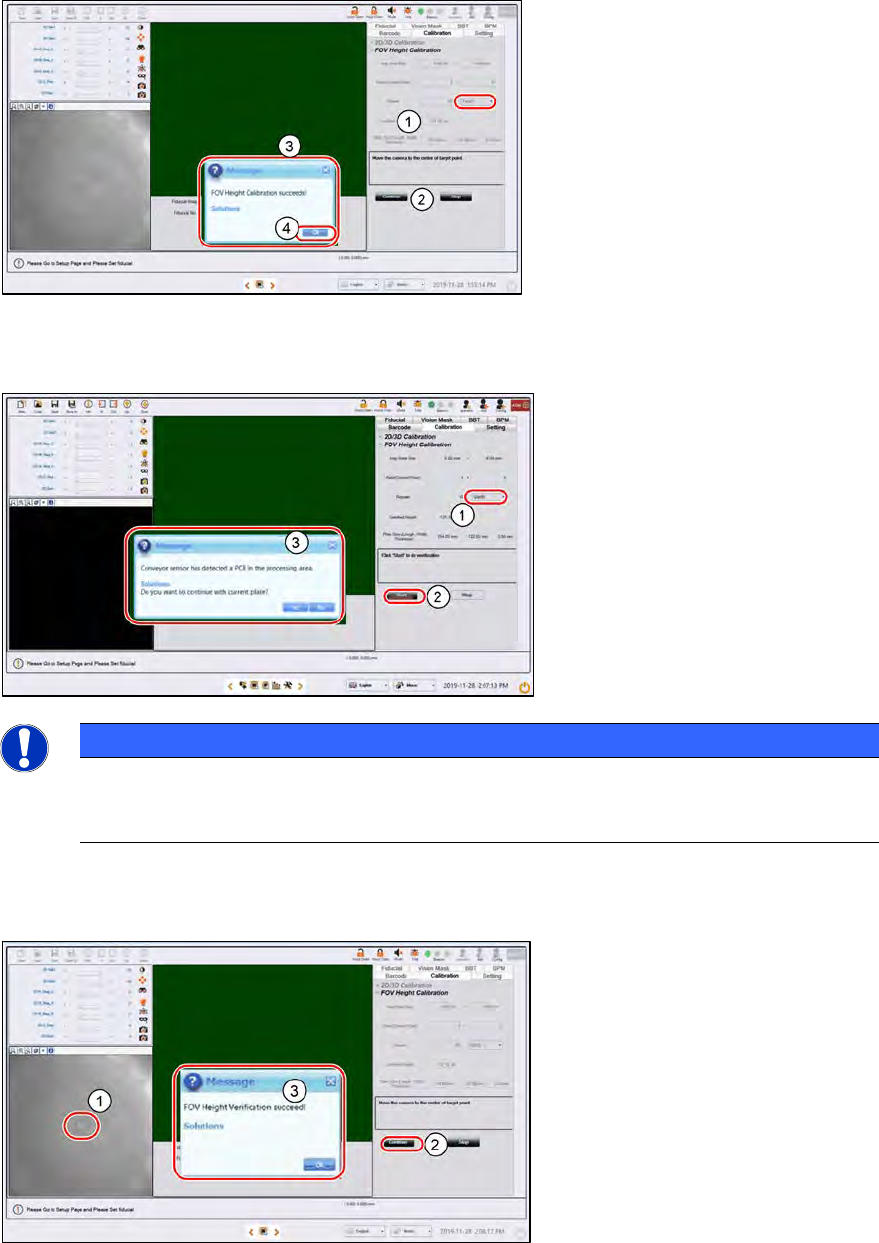
Step 5
1.
Click on the centre of the target.
The FOV centres to the target.
2.
Click Continue. ProcessLens
adjusts the lighting, then starts the
teach process.
3.
After 11.5 minutes, a "FOV
Height Calibration
succeeds!" message pops up.
4.
Click OK.
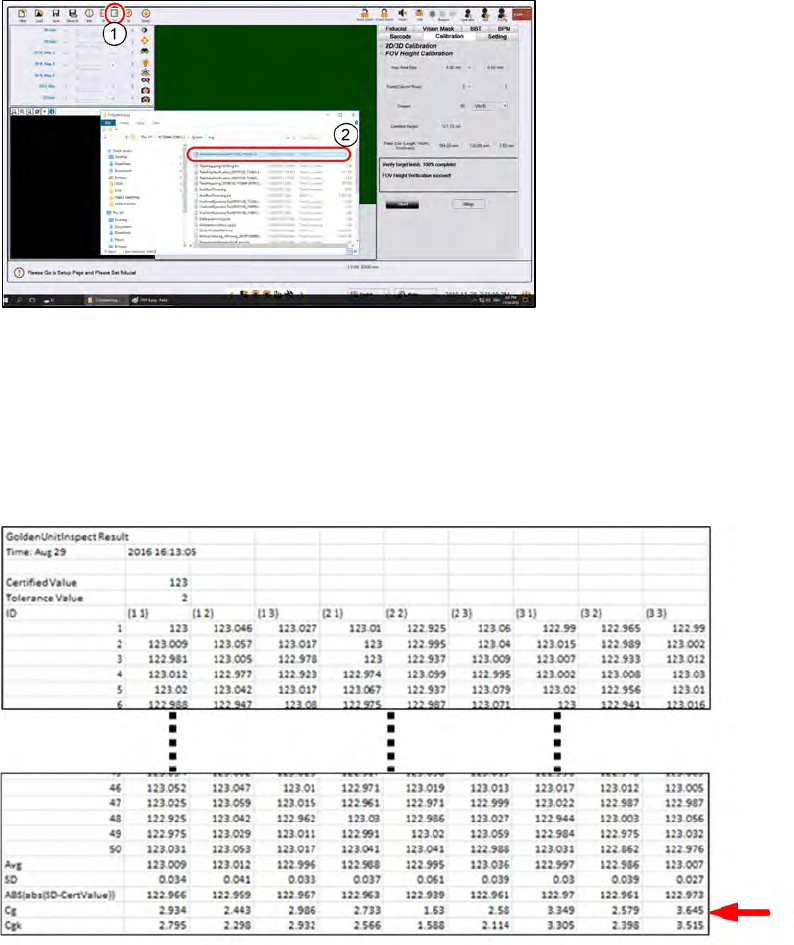
Step 6
1.
Select Verify.
2.
Click Start.
3.
Click Yes to the next message as
the target is still on the conveyor.
NOTICE
If the calibration fails, stop the process. Remove the target and inspect the target under a
microscope for foreign material. Remove any foreign material with a clean, dry, soft hair
brush.
Step 7
1.
Click on the center of the target.
The FOV center’s to the target.
2.
Click Continue. ProcessLens
adjusts the lighting, and then
starts the verification process.
3.
A "
FOV Height Verification
succeeds!" message pops up.
Click OK.
ASM ProcessLens Single-lane 03/2020 Edition
85
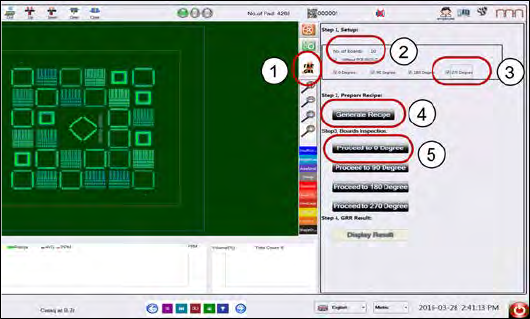
Step 8
1.
Click Out to move the target to
the output section. Remove the
target from the machine.
2.
The results of the FOV Height
calibration test can be found in an
output file in the path
C:\system\
log\GoldenUnitInspect
***timestamp***.csv where
timestamp is the time the
calibration was completed.
Step 9
Keep the results file as proof of the ProcessLens Cg and Cgk performance. Open the file with a
text editor or MS Exel: At the bottom rows, the calculated Cg and Cgk values is listed.
Example of a GoldenUnitInspect***timestamp***.csv output file using a target of
height 123µm.
ASM ProcessLens Single-lane 03/2020 Edition
86
4.6 GR&R Test
After completing the calibrations, perform a GR&R to check that the ProcessLens is ready for
measurements.
What is GR&R?
Performing the GR&R procedure on a pasted or a simulated pasted board such as the CeTaq
glass target allows us to check that the ProcessLens is :
1. measuring precisely with little variation.
2. of many dimensionally diverse targets.
3. when measured repeatedly.
What value does the ProcessLens need to achieve?
The %GR&R of the Volume(%), Area(%), Height(mm), Offset X and Offset Y(mm) reported at the
end of the procedure should be less than 10%, a value which indicate that the variations in the
measurements attributed to the ProcessLens is much smaller that the variations of all the parts
measured.
A %GR&R of greater than 10% is an indication that there is an issue in achieving precision and the
root cause of measurement variation needs to be corrected.
What is needed?
● A pasted board screened with many different size aperture sizes. The board should be dried for
at least 4 hrs. or use a CeTaq glass board (with simulated paste deposits).
● A working recipe of the board without bad marks.
1.
Load the recipe and click on Fast
GRR icon.
2.
Key in 10 in the No. of Boards
input box. This is the number of
replicate measurements to
perform.
3.
Select 0, 90, 180, 270 degree.
4.
Click Generate Recipe.*
5.
Put the PCB at 0° angle in the
input conveyer.
6. Click Proceed to 0 Degree.
* The software will take the loaded recipe and generate recipes for the selected orientations. The
recipes will be labelled “grrrecipeXX.7z” where XX is the orientation of the board.