00900068-02_SM_ASM_ProcessLens_EN.pdf - 第87页
ASM Proces sLens Single - l ane 03/2020 Edit ion 87 1. At the end of 10 rep licate meas urements , the " Batch limit hit " mes sage box will pop up. Click Ok . 2. Remove and r otate th e boar d to 90° and place…
ASM ProcessLens Single-lane 03/2020 Edition
86
4.6 GR&R Test
After completing the calibrations, perform a GR&R to check that the ProcessLens is ready for
measurements.
What is GR&R?
Performing the GR&R procedure on a pasted or a simulated pasted board such as the CeTaq
glass target allows us to check that the ProcessLens is :
1. measuring precisely with little variation.
2. of many dimensionally diverse targets.
3. when measured repeatedly.
What value does the ProcessLens need to achieve?
The %GR&R of the Volume(%), Area(%), Height(mm), Offset X and Offset Y(mm) reported at the
end of the procedure should be less than 10%, a value which indicate that the variations in the
measurements attributed to the ProcessLens is much smaller that the variations of all the parts
measured.
A %GR&R of greater than 10% is an indication that there is an issue in achieving precision and the
root cause of measurement variation needs to be corrected.
What is needed?
● A pasted board screened with many different size aperture sizes. The board should be dried for
at least 4 hrs. or use a CeTaq glass board (with simulated paste deposits).
● A working recipe of the board without bad marks.
1.
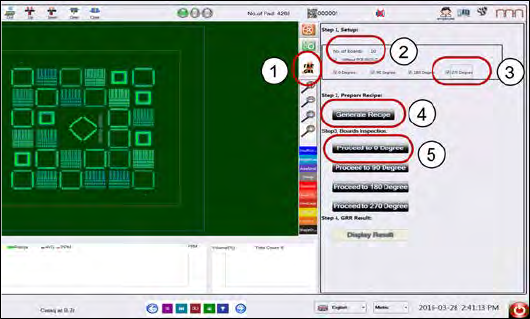
Load the recipe and click on Fast
GRR icon.
2.
Key in 10 in the No. of Boards
input box. This is the number of
replicate measurements to
perform.
3.
Select 0, 90, 180, 270 degree.
4.
Click Generate Recipe.*
5.
Put the PCB at 0° angle in the
input conveyer.
6. Click Proceed to 0 Degree.
* The software will take the loaded recipe and generate recipes for the selected orientations. The
recipes will be labelled “grrrecipeXX.7z” where XX is the orientation of the board.
ASM ProcessLens Single-lane 03/2020 Edition
87
1.
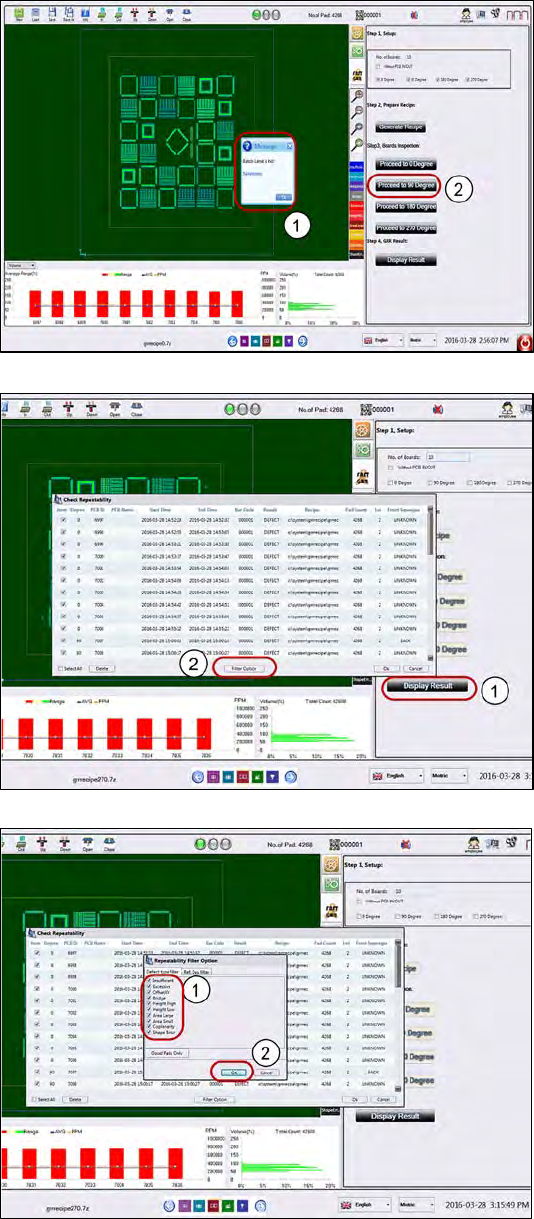
At the end of 10 replicate
measurements, the "Batch
limit hit" message box will
pop up. Click Ok.
2.
Remove and rotate the board to
90° and place it on the input
section Click Proceed to 90
Degree to run the GR&R
inspection at 90° orientation.
1.
Upon completing the last
measurement, click Display
Result.
2.
Click on Filter option to choose
the pads for calculation.
1.
Tick all the defect type check
boxes.
2.
Click Ok to all message boxes to
generate the Repeatability
Report.
ASM ProcessLens Single-lane 03/2020 Edition
88
1.
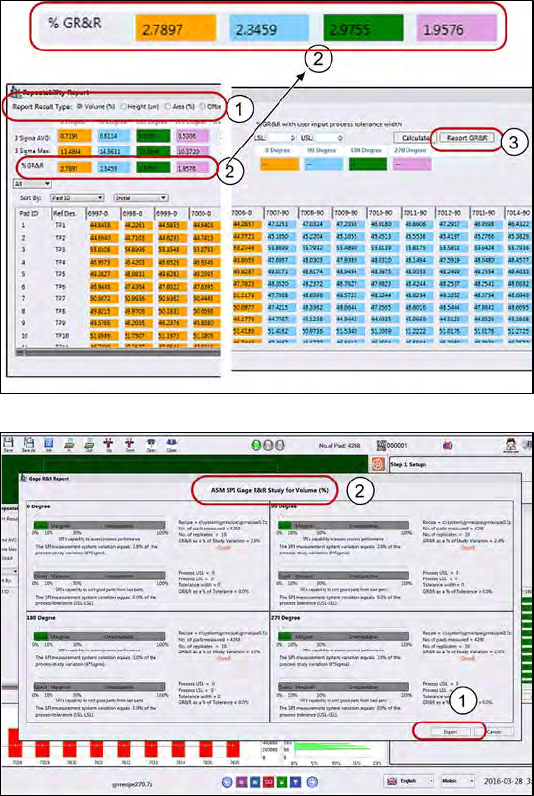
Examine each of the 5
measurement variables.
2.
Check that all the %GR&R are
less than 10%.
e.g. Volume(%) repeatability for
all the different orientations are
less than 10% which is good.
3.
Click Report GR&R to produce a
report.
1.
Click Export to export the GR&R
results for the variable selected.
Repeat for all measured
variables.
Keep the report as proof of GR&R
capability.
What to do if the GR&R fails?
● Measure again: fiber, dust could have fallen on the pad during GR&R test.
● Is the machine cover opened? Is the board properly clamped?
● Is the board bouncing because it´s thin, not properly supported?
● Is the paste on the board slumping?▪Check for hardware issues.
● Was there any disturbance to the CR&R process to the target?