00192790-01.pdf - 第42页
2 PCB Camera Multicolor (Option) User Manual SIPLACE S-25 HM / HS-50 2.3 Focus Heigth: I nstall/Remove the Distance Plate Software Version SC.502.xx 11/00 I ssue 42 .H\ 1. PCB came ra Multi color (dis mantle d) 2. D…
User Manual SIPLACE S-25 HM / HS-50 2 PCB Camera Multicolor (Option)
Software Version SC.502.xx 11/00 Issue 2.3 Focus Heigth: Install/Remove the Distance Plate
41
.H\
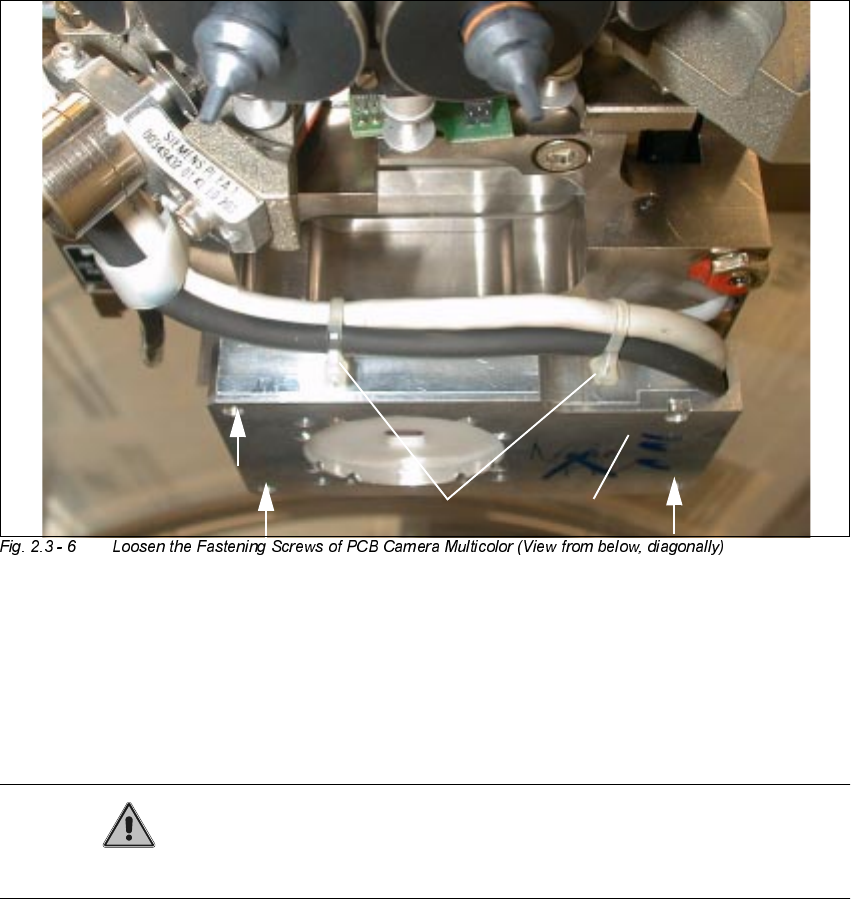
1. PCB camera Multicolor
2. Fasteners: 3 hex head cap screws M3 x 14 (captive)
3. 2 Cable ties (do not remove !)
CAUTION
Do not pull on the cables while work is in process.
Å Touch the PCB camera Multicolor only on its circumference and hold the camera tight AT ALL
TIMES.
Å Working from the bottom, use a screwdriver for hex head cap screws to undo the 3 fastening
screws M3 x 14 (captive) on the PCB camera Multicolor.
Å To prevent damage to the cables or the camera, continue to hold the camera and just move it
far enough down as absolutely imperative to insert/remove the distance plate.
2
2
21
3
2 PCB Camera Multicolor (Option) User Manual SIPLACE S-25 HM / HS-50
2.3 Focus Heigth: Install/Remove the Distance Plate Software Version SC.502.xx 11/00 Issue
42
.H\
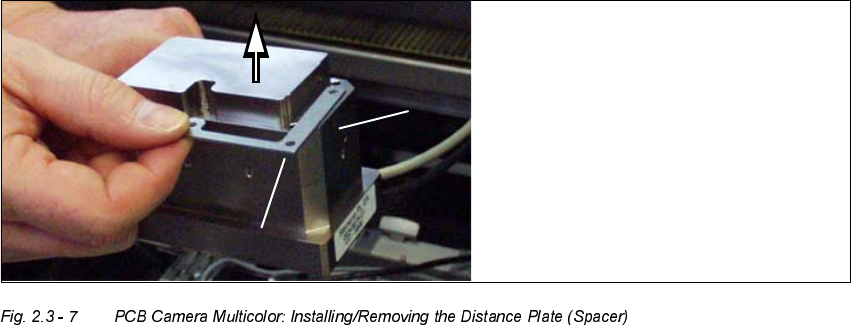
1. PCB camera Multicolor (dismantled)
2. Distance plate (supplied with product or installed while the option is being retrofitted)
Å Remove the distance plate or place it on the camera assembly surface in the correct rotational
position (depends on the holes and the outside contour).
Å Working from below, place the PCB camera Multicolor with or without distance plate, as re-
quired, in the correct position
- on the assembly surface of the camera holder (S-25 HM) or
- on the 3 spacer pieces in the camera holder (HS-50)
Å Screw the camera tight with the 3 captive hex head cap screws M 3 x 14.
Å Fasten the cables leading upward such that the
ORDG
on the plug-type sockets
LVUHOLHYHG
– as shown for HS-50 in Fig. 2.3 - 5.
You will need cable ties or this purpose.
– as show for S-25 HM in Fig. 2.3 - 4.
For this you will require size 6 cable clamps and the M3 and M4 screws removed earlier.
Å Remove all of the tools, etc., from the machine’s working area.

User Manual SIPLACE S-25 HM / HS-50 2 PCB Camera Multicolor (Option)
Software Version SC.502.xx 11/00 Issue 2.3 Focus Heigth: Install/Remove the Distance Plate
43
DANGER
There is additional, higher risk of accident when working with the SITEST program.
The SIPLACE program is only to be started by personnel who are authorized to do so.
For the work with the SITEST program the component changeover table must be moved in and
correctly connected.
Å Start the SITEST program.
Å In the main view, press the button "Total reference run".
Å Afterwards, conduct the calibration:
Whenever the PCB camera Multicolor is reinstalled, all of the placement heads and cameras
must be calibrated - after the overall reference run - as described in the User Manual SITEST
SW V 502.xx.