00192790-01.pdf - 第45页
User Manual SIPLAC E S-25 HM / HS-50 2 PCB Camera Mu lticolor (Option) Software Version S C.502.xx 11/00 Issue 2.4 LCU: Configuration PCB Camer a Multicolor 45 Å The field "PCB camera Multicol or" is deacti vat…
2 PCB Camera Multicolor (Option) User Manual SIPLACE S-25 HM / HS-50
2.4 LCU: Configuration PCB Camera Multicolor Software Version SC.502.xx 11/00 Issue
44
/&8&RQILJXUDWLRQ3&%&DPHUD0XOWLFRORU
The optional PCB camera Multicolor is selected for SIPLACE 80 S-25 HM or HS-50 in the station
configurator of the UNIX line computer (LCU). Insofar as this operation if concerned it can occur
before or after the PCB camera Multicolor is selected at the station in question, in the SITEST pro-
gram 502.xx.
After the configuration and specification or change of the substrate / PCB thickness (= height) in
the line computers cluster editor, check at the line computer under "Error Messages" (see Section
2.4.2) to ascertain whether it is necessary to adapt / optimize the focus of the PCB camera Multi-
color (see Section 2.3.1) because the spacer (distance plate) has been installed or removed.
6HTXHQFH
Å In the menu bar at the top, select "Services".
Å In the pull-down menu that opens, select the option:
"
6WDWLRQFRQILJXUDWLRQ
".
Å The window from which the machine is selected opens:
Select the machine (HS-50 or S-25 HM) on which the optional PCB camera Multicolor was se-
lected.
Å The "Main view of structure editor" is displayed automatically.
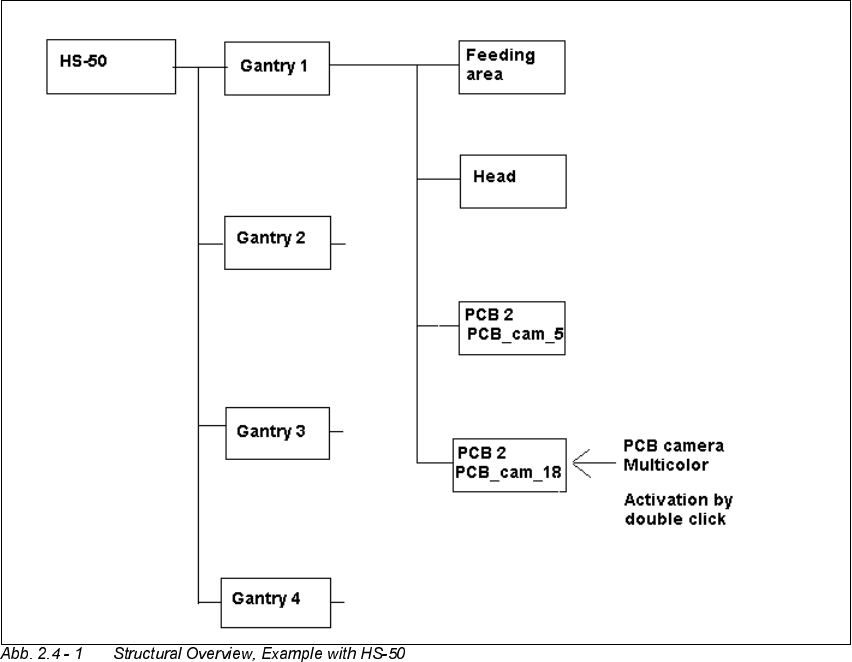
As shown afterwards using the HS-50 for an example, the selected machine (S-25 HM or HS-
50) is displayed graphically, arranged by gantries (1 to 2 or 4), and with the pertinent substruc-
tures (component feeding areas, placement heads, PCB cameras, options, etc.).
User Manual SIPLACE S-25 HM / HS-50 2 PCB Camera Multicolor (Option)
Software Version SC.502.xx 11/00 Issue 2.4 LCU: Configuration PCB Camera Multicolor
45
Å The field "PCB camera Multicolor" is deactivated. Activate the optional PCB camera Multicolor
with a double click on the "LP PC_cam _18", as illustrated above.
Å Do this for all 4 / 2 gantries (HS-50 / S-25 HM).
Å In the menu bar at top, in the Station Editor, select "File" -> "Save" - END".
Å Then select: "File" ->
'DWDPDQDJHU
Å Double click on the ICONs for "Master data".
Å In the window that opens, double click on "Stations".
Å Click once on the "Double click" field that opens and click once on "Translator" to select it and
continue with a double click to select the pertinent station at which the PCB camera Multicolor
is used / was retrofitted.
Å In the "Data manager" window select the field "OK".
All of the windows are closed.
This concludes the work on the line computer for the configuration of the PCB camera Multi-
color. If you have not done so already, carry out the carry out the check "Focus camera / thick-
ness of substrate" as described in Section 2.4.2.
Then carry out the activation / configuration of the PCB camera Multicolor in the SITEST pro-
gram (see Section 2.5).
2 PCB Camera Multicolor (Option) User Manual SIPLACE S-25 HM / HS-50
2.4 LCU: Configuration PCB Camera Multicolor Software Version SC.502.xx 11/00 Issue
46
&DPHUD)RFXVDVD)XQFWLRQRIWKH3&%6XEVWUDWH7KLFNQHVV
The focus level for the current substrate or PCB thickness can be optimized by installing or remov-
ing the distance plate (spacer) between the Multicolor PCB camera and camera holder.
The decision as to whether or not to work with the distance plate can be made during the course
of the retrofitting on the basis of the table (see Section 2.3). After describing the PCB, a specifica-
tion can be accessed at the line computer as described below:
Å After describing the PCB, including entering the PCB/substrate thickness (= height) in the clu-
ster editor, conducting the produceability check and specifying the job for the relevant station
in the job editor you can check under -> Services -> Error messages.
If a change must be made involving the distance plate (spacer), a message such as the follo-
wing one is displayed:
Warning: PCB xxx.la is more than 3.400 mm thick (x.y > 3.400 mm)
For this reason, camera 18 must be mounted without the spacer.
or
Warning: PCB xxx.la is less than 1.500 mm thick (x.y < 1.500 mm).
For this reason, camera 18 must be mounted with the spacer.
xxx.la = name of PCB
x.y = in the cluster editor entered thickness (height) of the PCB / substrate
Camera 18 = PCB camera Multicolor
Å Carry out the activation / configuration of the PCB camera Multicolor in the SITEST program
on the Station (see Section 2.5).