00192790-01.pdf - 第47页
User Manual SIPLAC E S-25 HM / HS-50 2 PCB Camera Mu lticolor (Option) Software Version SC.502.xx 11/00 Issue 2.5 SITEST: PCB Camera Multicolor (Option) 47 6,7 (67 3&%&DPHUD0XOWLFR ORU2SWL RQ The optio…
2 PCB Camera Multicolor (Option) User Manual SIPLACE S-25 HM / HS-50
2.4 LCU: Configuration PCB Camera Multicolor Software Version SC.502.xx 11/00 Issue
46
&DPHUD)RFXVDVD)XQFWLRQRIWKH3&%6XEVWUDWH7KLFNQHVV
The focus level for the current substrate or PCB thickness can be optimized by installing or remov-
ing the distance plate (spacer) between the Multicolor PCB camera and camera holder.
The decision as to whether or not to work with the distance plate can be made during the course
of the retrofitting on the basis of the table (see Section 2.3). After describing the PCB, a specifica-
tion can be accessed at the line computer as described below:
Å After describing the PCB, including entering the PCB/substrate thickness (= height) in the clu-
ster editor, conducting the produceability check and specifying the job for the relevant station
in the job editor you can check under -> Services -> Error messages.
If a change must be made involving the distance plate (spacer), a message such as the follo-
wing one is displayed:
Warning: PCB xxx.la is more than 3.400 mm thick (x.y > 3.400 mm)
For this reason, camera 18 must be mounted without the spacer.
or
Warning: PCB xxx.la is less than 1.500 mm thick (x.y < 1.500 mm).
For this reason, camera 18 must be mounted with the spacer.
xxx.la = name of PCB
x.y = in the cluster editor entered thickness (height) of the PCB / substrate
Camera 18 = PCB camera Multicolor
Å Carry out the activation / configuration of the PCB camera Multicolor in the SITEST program
on the Station (see Section 2.5).
User Manual SIPLACE S-25 HM / HS-50 2 PCB Camera Multicolor (Option)
Software Version SC.502.xx 11/00 Issue 2.5 SITEST: PCB Camera Multicolor (Option)
47
6,7(673&%&DPHUD0XOWLFRORU2SWLRQ
The optional PCB camera Multicolor that is installed in place of the PCB camera with normal illu-
mination (subgantry camera) is activated/configured for HS-50 or S-25 HM at the station in the
SITEST program 502.01 or later. The operation can be performed before or after the configuration
in the station configurator of the UNIX line computer.
&RQILJXUDWLRQ
The Requirement for the configuration is that the 4 PCB cameras Multicolor are retrofitted on the
HS-50 or the both PCB cameras Multicolor are retrofitted on the S-25 HM and the safety hoods
and safety doors are closed.
All component changeover tables must be moved into the machined and docked properly.
Å Boot the machine and change over into the SITEST program.
Å Select "Settings" -> "Machine configuration".
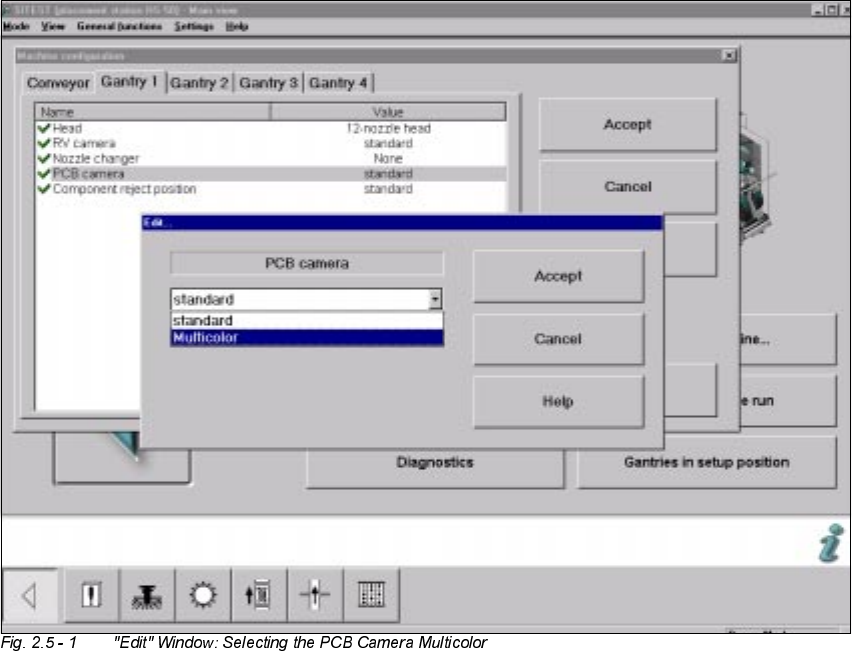
Å On the HS-50 or S-25 HM select: "Gantry 1" -> "PCB camera" -> "Edit" (button).
Å The "Edit" window is displayed (e.g., on the HS-50):

2 PCB Camera Multicolor (Option) User Manual SIPLACE S-25 HM / HS-50
2.5 SITEST: PCB Camera Multicolor (Option) Software Version SC.502.xx 11/00 Issue
48
Å In the configuration menu of gantry 1, mark the option "Multicolor" and select "Accept" (button).
Å On HS-50: One after the other, select the remaining gantries 2, 3 and 4 as described above.
Å On SIPLACE S-25 HM: Select the PCB camera Multicolor for gantry 2 in the same manner as
described above for HS-50 and "Accept" this camera.
Å Conduct the illumination check on the PCB camera Multicolor as described below in Section
2.5.2.
Å Exit the menu "Machine configuration" by pressing "Accept".
Å Power down the machine and execute a new start so that the configuration will be accepted.
Å Next, return to the SITEST program.
Å In the main view, press the button "Total reference run".
Å Afterwards, conduct the calibration:
Whenever the PCB camera Multicolor is retrofitted, reinstalled or exchanged, all of the place-
ment heads and cameras must be calibrated - after the overall reference run - as described in
the User Manual SITEST SW V 502.xx.
LOOXPLQDWLRQ&KHFN
NOTE:
We recommend that the illumination check be performed after the PCB camera Multicolor is a ret-
rofitted, reinstalled or exchanged. By appropriately switching over the vision screen (see User
Manual SC 502.xx) it is possible to precisely check the function of the pertinent light level and, for
example, the change from full to one-half brightness.
Å In the SITEST program 502.xx select the ICON "Gantries" and then the "Gantry 1" .