2OM-1086-002.pdf - 第126页
2. 3 "Recog. Error" T ab This indicates the data related to the recognition errors. • Sheet Layout When the "Recog. Error" tab is pressed in the "MANAGE. DA T A 1" win- dow (submenu), the fo…

*12 Error Stop Time
This indicates the period of time ("*13 Error Alarm Time" + "*14
Recovery Time") during which the machine was reset to its normal
condition after an error alarm was issued.
*13 Error Alarm Time
This indicates the period of time during which the machine issued
an error alarm.
*14 Recovery Time
This indicates the period of time required for the machine to be
reset to its normal condition.
*15 Others
This indicates the period of time required for setup, program change,
and idling operations.
*16 Test Mode Time
This indicates the period of time during which the machine was
operated in the "TEST" mode (operation mode).
*17 SET-UP Time
This indicates the period of time during which the [OPERATION/
SET UP] switch on the front operation panel was set to the "SET
UP" side.
0211-005
Chapter 1 3-10 Tg0583-PM-D2
2.2
"
Time Data
"
Tab
2.3 "Recog. Error" Tab
This indicates the data related to the recognition errors.
• Sheet Layout
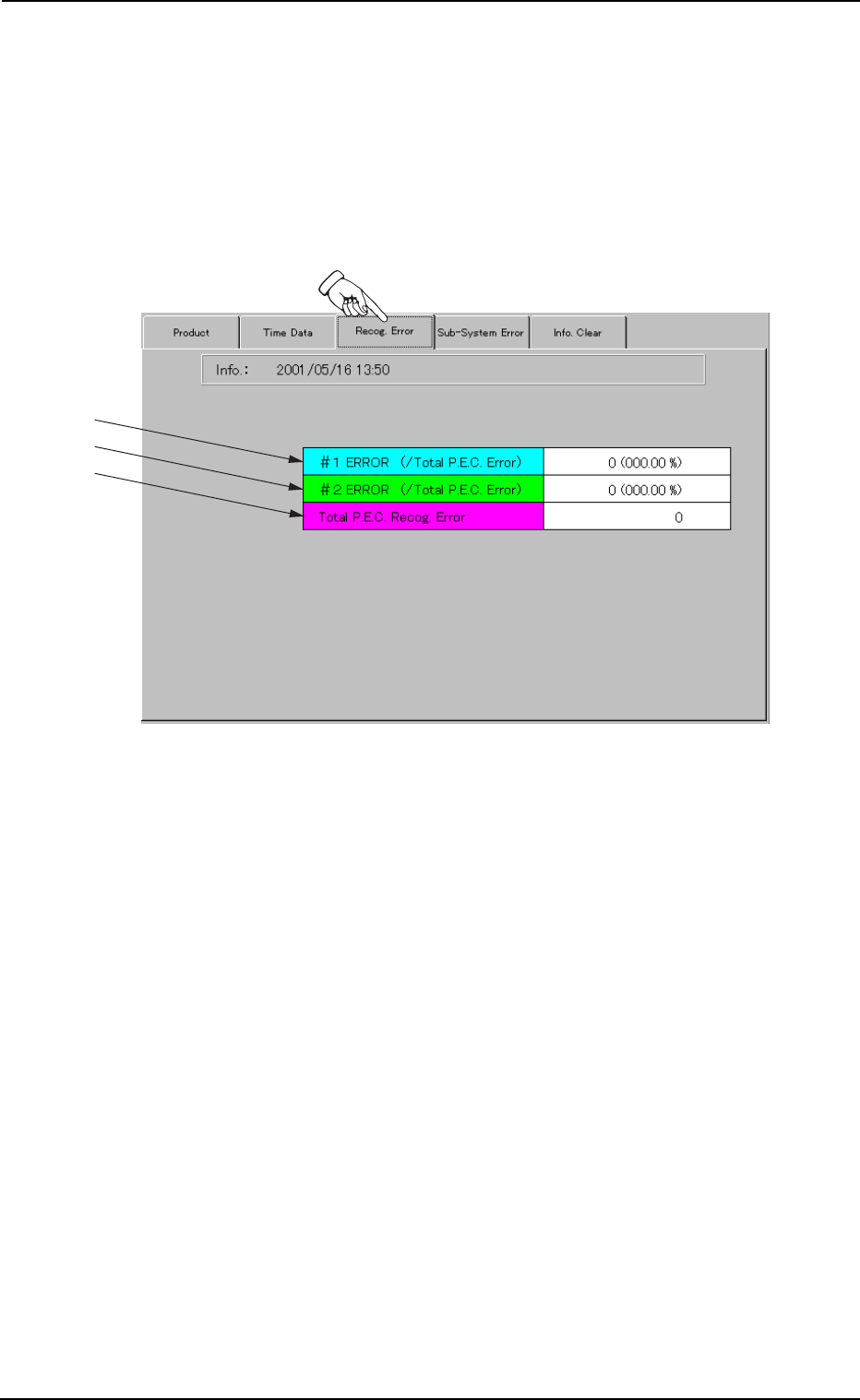
When the "Recog. Error" tab is pressed in the "MANAGE. DATA 1" win-
dow (submenu), the following tab sheet appears.
Fgi. 3C6 "Recog. Error" Tab Sheet
• Sheet Composition
*1 #1 ERROR (/Total P.E.C. Error)
This indicates the total number of errors on the first fiducial mark
and the ratio based on the total number of P.E.C. recognition er-
rors.
*2 #2 ERROR (/Total P.E.C. Error)
This indicates the total number of errors on the second fiducial mark
and the ratio based on the total number of P.E.C. recognition er-
rors.
*3 Total P.E.C. Recog. Error
This indicates the total number of errors that were detected in P.E.C.
recognition processing.
0211-005
Chapter 1 3-11 Tg0583-PM-D2
2.3
"
Recog. Error
"
Tab
*2
*1
*3
2.4 "Sub-System Error" Tab
This indicates the error data on each individual units.
• Sheet Layout
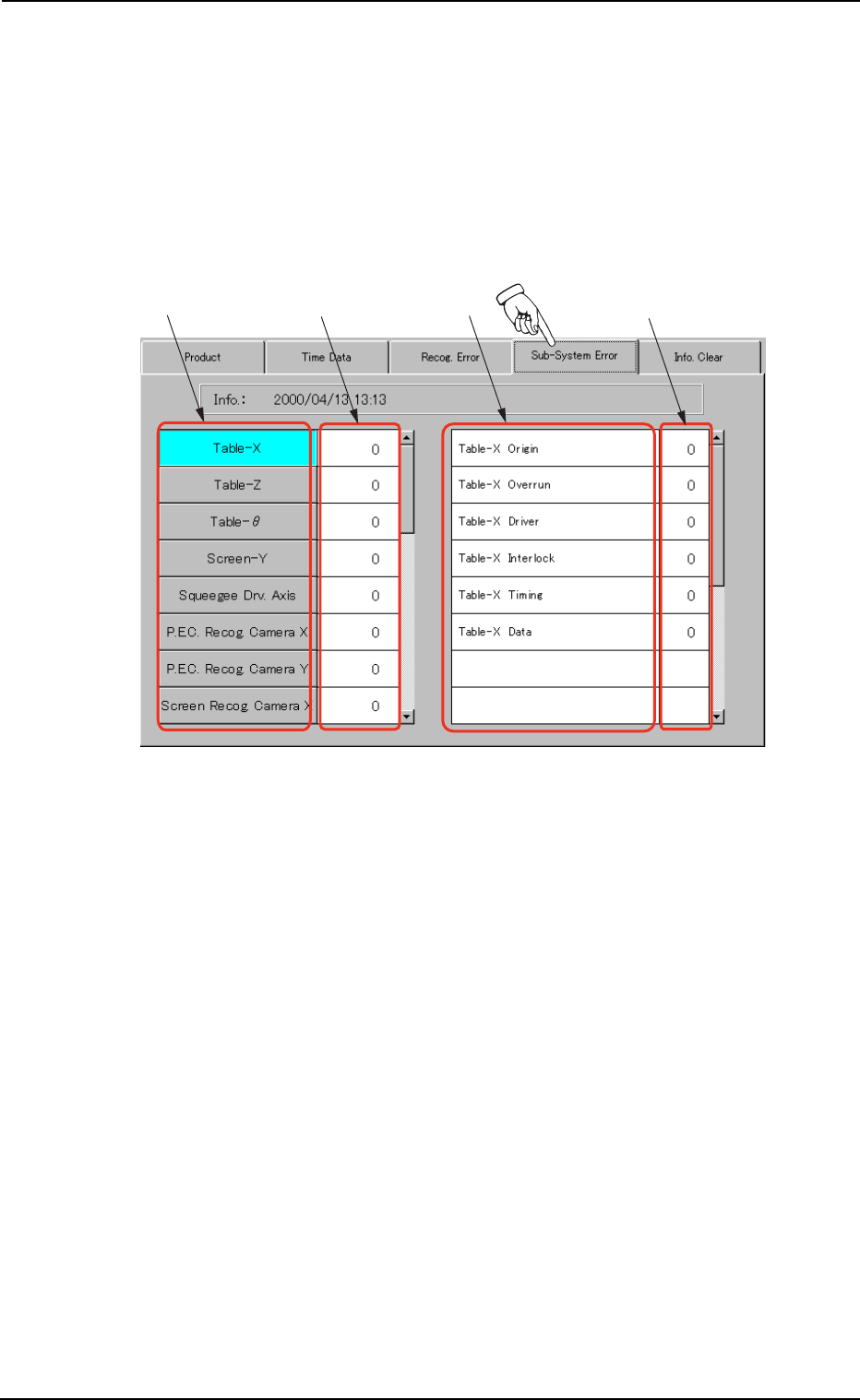
When the "Sub-System Error" tab is pressed in the "MANAGE. DATA 1"
window (submenu), the following tab sheet appears.
Fig. 3C7 "Sub-System Error" Tab Sheet
• Sheet Composition
*1 Unit Selection Buttons
These buttons are used to select the units.
When a button is pressed, the indications in "*3 Contents of Er-
rors" change.
*2 Total Numbers of Errors on Each Individual Units
The indicated values represent the total numbers of errors on each
individual units.
*3 Contents of Errors
Displayed are the contents of errors on each individual units.
*4 Total Numbers of Errors
The indicated values represent the numbers of errors classified
according to the contents of errors on each individual units.
*1
*2 *3
*4
0211-005 Chapter 1 3-12 Tg0583-PM-D2
2.4
"
Sub-System Error
"
Tab