2OM-1086-002.pdf - 第347页
12.3 Cleaning Consumables T able 5A10 Either one of the sizes (width: 280 mm or 350 mm) can be selected for both cleaning paper and roller shaft (cylindrical device to take up the cleaning paper) on the customer side and…
• Whenever an industrial alcohol leakage is found, turn off the power
switch of the machine immediately.
• When it is impossible to track down the cause of a leakage or repair
the leaking area on the customer side, contact the marketing
department or sales agency of Hitachi High-Technologies.
It may be difficult to detect a leakage because industrial alcohol is a
volatile liquid.
Try to carefully examine the area around the joints, etc., for any
trace of leakage.
CAUTION
12.2 Checking of Industrial Alcohol Hose and Joints
12.2 Checking of Industrial Alcohol Hose and Joints
Check for industrial alcohol leakage from the hose (including the joints)
running between the solvent tank and the cleaning nozzle.
Check the following:
• Industrial Alcohol Leakage
• Loosened or Deteriorated Hose Joints and Gaskets
• Cracks or Any Other Deterioration in Hose
Be sure to always perform this checking before starting the operation of
the machine and after completing a setup operation.
0509-001
Chapter 3 1-42-3 Tg0583-PM-D2

12.3 Cleaning Consumables
Table 5A10
Either one of the sizes (width: 280 mm or 350 mm) can be selected for
both cleaning paper and roller shaft (cylindrical device to take up the
cleaning paper) on the customer side and the selected pair is factory-
assembled upon shipment of the machine.
Consult the marketing department or sales agency of Hitachi High-Tech-
nologies for the detailed information on which pair of cleaning paper
and roller shaft is required.
12.3 Cleaning Consumables
0509-006 Chapter 3 1-43 Tg0583-PM-D2
Part No.
630 091 1619
630 091 1633
Type No.
TS507 Width: 280mm, Diameter:φ100mm
TS507 Width: 350mm, Diameter:φ100mm
Industrial Alcohol (Solvent)
Cleaning Paper
Cleaning Paper
Solvent
Q’ty
1
1
-
0211-005 Chapter 3 1-44 Tg0583-PM-D2
13. Cleaning Procedure of Cleaning Unit
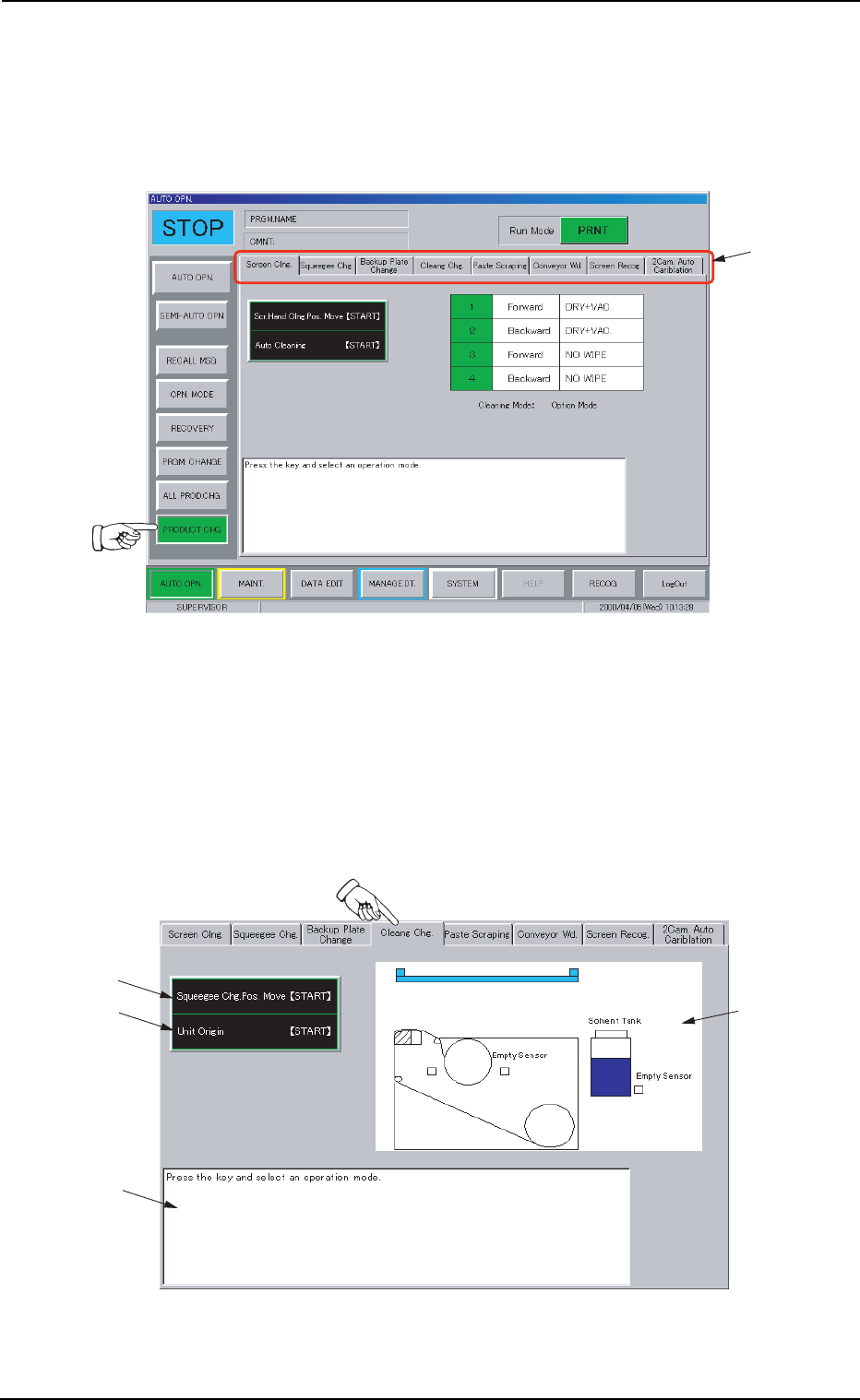
When the [PRODUCT CHG.] button on the “AUTO OPN.” submenu bar
is pressed, the following window opens.
Fig. 5A55
Operation Procedure
(1) Press the “Cleang Chg.” tab.
(2) Press the [Squeegee Chg.Pos. Move [START]] button.
The background color of the button turns blue, indicating that it is
selected.
Fig. 5A56
13. Cleaning Procedure of Cleaning Unit
*1
*1
*2
*3
*4