4OM-1075-002.pdf - 第291页
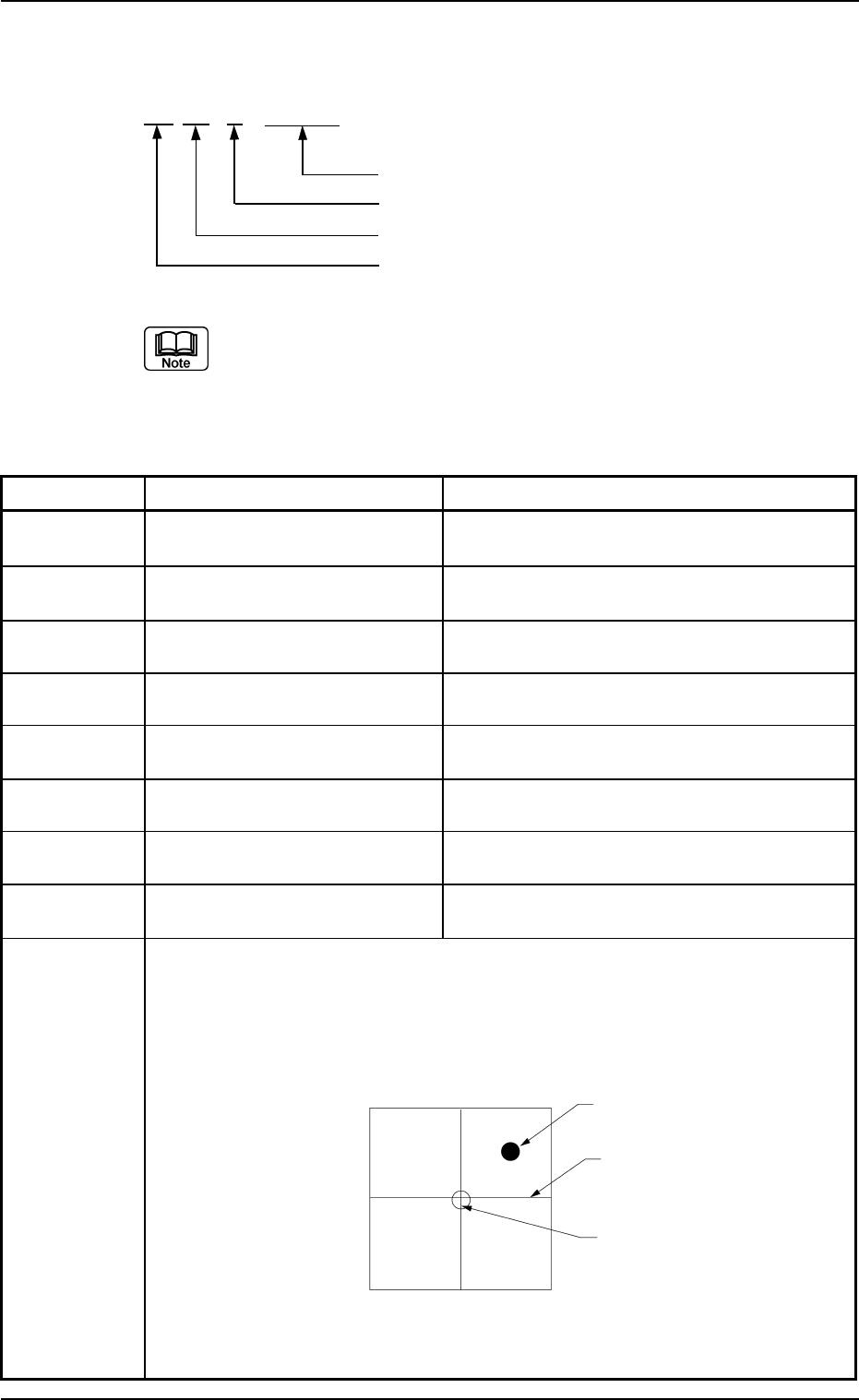
4.3.3 P .E.C. Recognition Errors AA BB C DDDDD Detail Code Secondary Error Classification (1 to 4) Primary Error Classification (0 to 1) Classification of Recognition Functions (03) (a) Error IDs "*" will be fi…

Error ID Item Description
02 91 0 00000 Grid pattern -----
02 92 0 00000 Grid pattern -----
02 93 0 00000 Grid pattern (Split) -----
02 94 0 00000 Grid pattern (Split) -----
(Cause 1) Self-Diagnostics Error Message
(Remedy 1) Contact our service personnel for details.
4.3 Recognition Error IDs and Remedial Procedures
0308-001 2-146-3 AHB01ETRP
4.3.3 P.E.C. Recognition Errors
AA BB C DDDDD
Detail Code
Secondary Error Classification (1 to 4)
Primary Error Classification (0 to 1)
Classification of Recognition Functions (03)
(a) Error IDs "*" will be filled with detail codes.
(b) When an error ID other than the described ones is issued,
contact our service personnel for some advice.
Table 4B12
Error ID Item Description
03 00 0 ***** ---- Others
03 00 1 ***** ---- Specified Mark Not Found in Recognizable
Range.
03 00 2 ***** ---- Unstable Image around Fiducial Mark.
03 00 3 ***** ---- Extensive Error in Similitude of Mark Shape.
03 00 4 ***** ---- Extensive Error in Similitude of Mark Shape or Size.
03 00 6 ***** ---- Contrast between Mark and Background is too Low.
03 01 1 ***** Specified Mark Not Found in Recognizable Range.
03 02 2 ***** Diffusion plate was detected.
(Cause 1) The fiducial mark and the fiducial mark coordinates X and Y or the mark data
are not suitable.
(Remedy 1) Follow the steps below to reset the machine to the normal condition.
(1) When the [RESET] button is pressed, the following recognition window
appears.
Fig. 4B54 Sample Display of Recognition Window
(Continue to the next page. )
4.3 Recognition Error IDs and Remedial Procedures
0308-004 2-147 AHB01ETRP
Actual Fiducial
Mark
Crosshair
Template of
Fiducial Mark
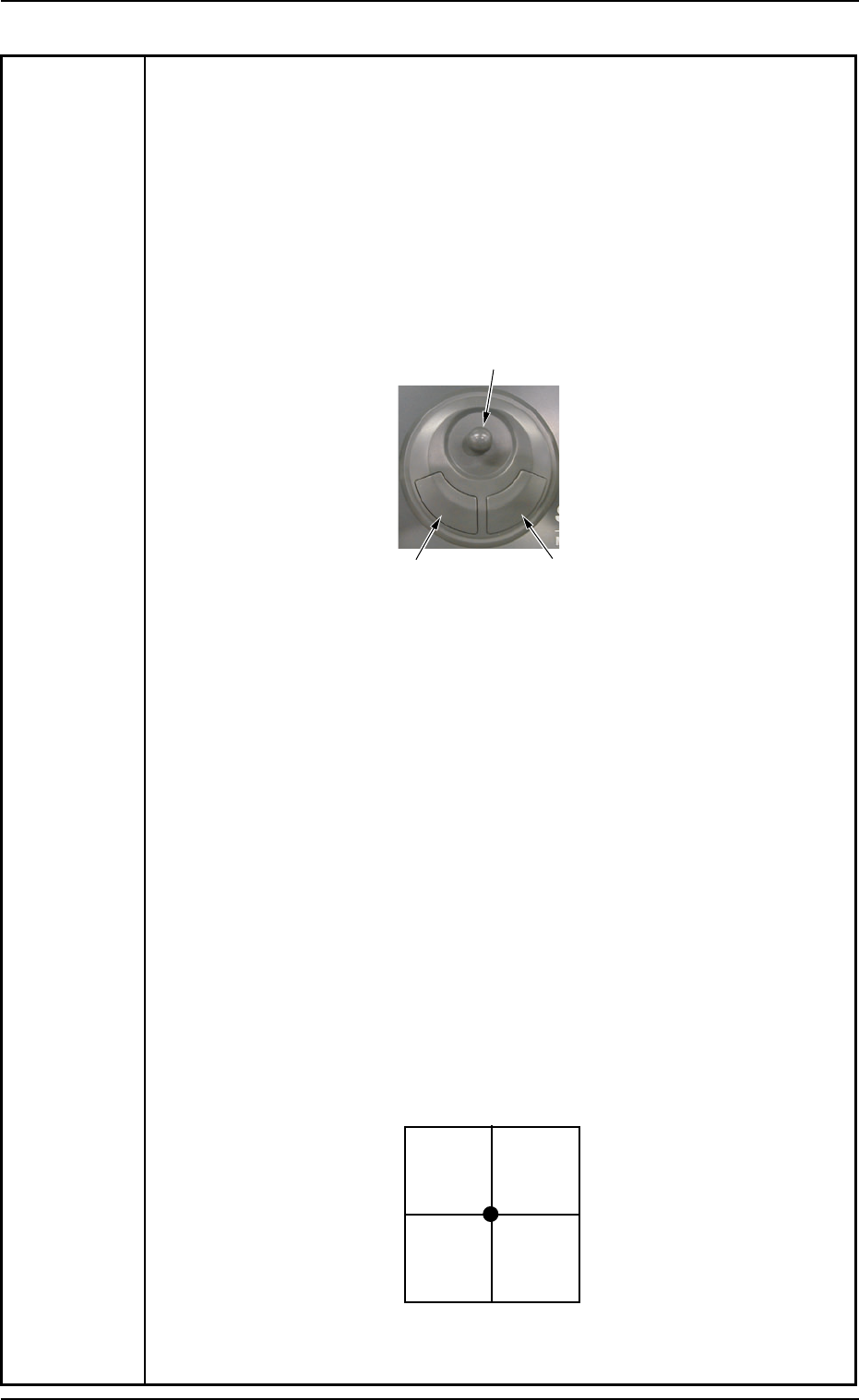
(2) Manipulate the pointing device until the actual fiducial mark and the
template of the fiducial mark (located at the center of the crosshair)
overlap each other.
Note: Enlarge the view for accurate alignment operation. Otherwise,
components may not be placed accurately.
How to manipulate the pointing device
• Move the actual fiducial mark with the joystick.
• Use the right button to enlarge the view.
• Use the left button to reduce the view.
Fig.4B55
(3) After adjusting the actual fiducial mark and the template accurately,
press the right and left buttons of the pointing device at the same time.
The "AUTO OPN." window resumes.
When the [START] button is pressed, the automatic operation starts
again.
Note: Pressing both right and left buttons at the same time is vali-
dated only once.
If the actual fiducial mark and the template are not adjusted
correctly, components may not be placed accurately. In this
case, follow the remedial operation described below.
(3-1) Press the [STOP] button to stop the machine.
(3-2) Press the [Cancel] button to interrupt the automatic operation.
(3-3) Perform the zeroing operation on all axes.
(3-4) Open the "Run Mode" tab sheet. (Operation Sequence: [OPN.
MODE] Button ? "Run Mode" Tab Sheet) Press the [Semi-Auto
(Step)] button to re-start the automatic operation.
Fig. 4B56 Sample Display of Recognition Window at Completion of
Alignment Operation
4.3 Recognition Error IDs and Remedial Procedures
0206-002 2-148 AHB01ETRP
Joystick
Left Button
Right Button