4OM-1075-002.pdf - 第68页
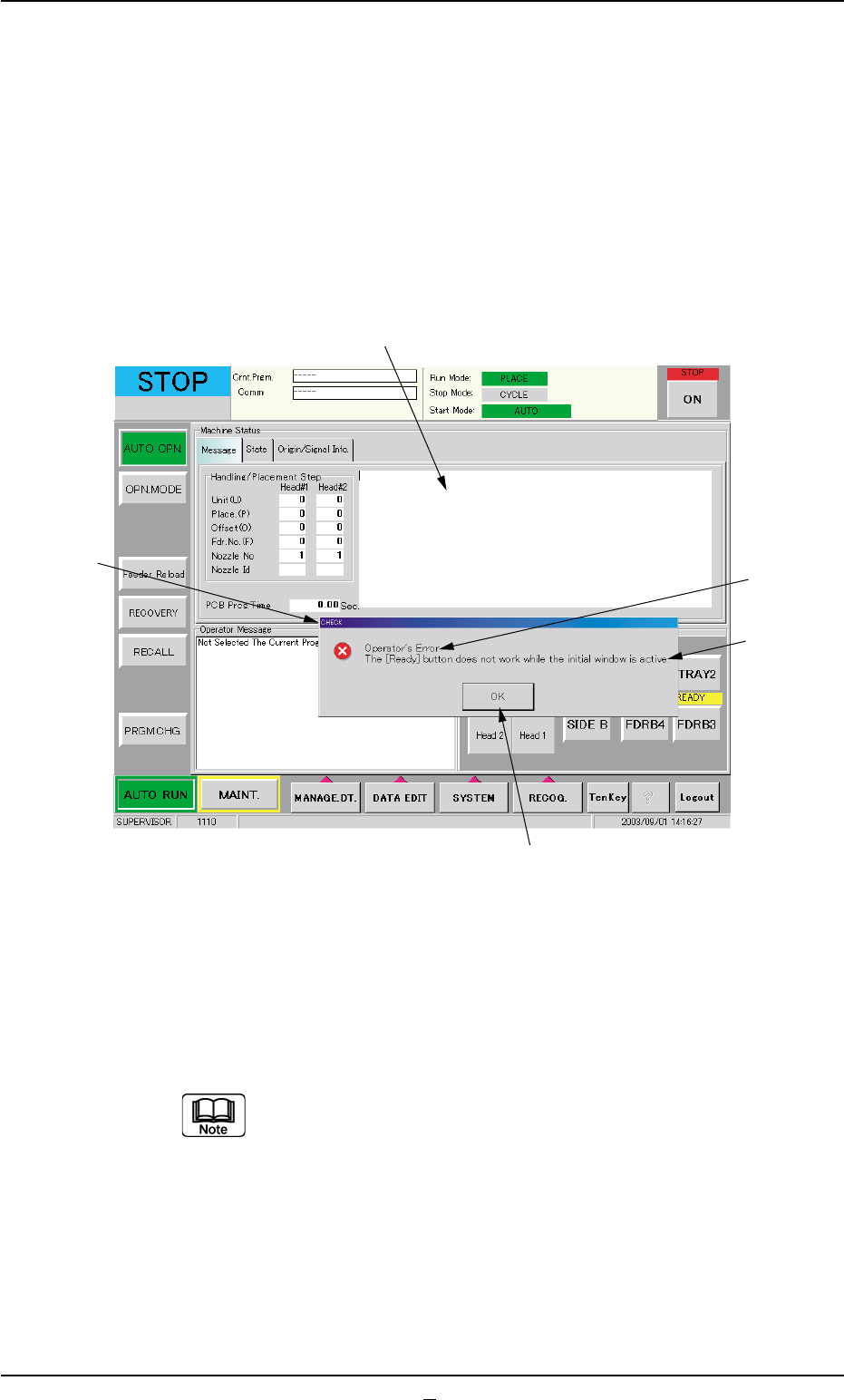
*4 [OK] Button When pressed, this button resumes the previous window (the win- dow before a "CHECK" one). *5 Saving the check message The check message is saved as a production message. • • • • • Reset Procedur…
1.2 "CHECK" Windows
1.2.1 "CHECK" Windows
• Window Layout
When the machine is not reset to its normal condition after an operator
makes an error operation or an error occurs in the operation system, a
window like the following opens.
Fig. 4B2 Example of "CHECK" Window
• Window Composition
*1 Check Message
A check message is issued and displayed.
Refer to "1.3 List of Check Messages" in "Section 1" for
details.
*2 Display Field A
Displayed is the scope of the check message.
*3 Display Field B
Displayed are the details of the check message.
1.2 "CHECK" Windows
0308-003 2-2 AHB01ETRP
*1
*5
*4
*3
*2

*4 [OK] Button
When pressed, this button resumes the previous window (the win-
dow before a "CHECK" one).
*5 Saving the check message
The check message is saved as a production message.
••
••
• Reset Procedure from "CHECK" Window
(1) Take a note of the issued check message.
Note: Be sure to take a note of the check message. If you forget
the contents of the message, the machine cannot be reset
correctly to its normal condition.
(2) Press the [OK] button. The original window resumes.
(3) Follow the contents of the check message to reset the machine
correctly to its normal condition.
1.2 "CHECK" Windows
0308-002 2-2-1 AHB01ETRP
1.2.2 List of Check Messages
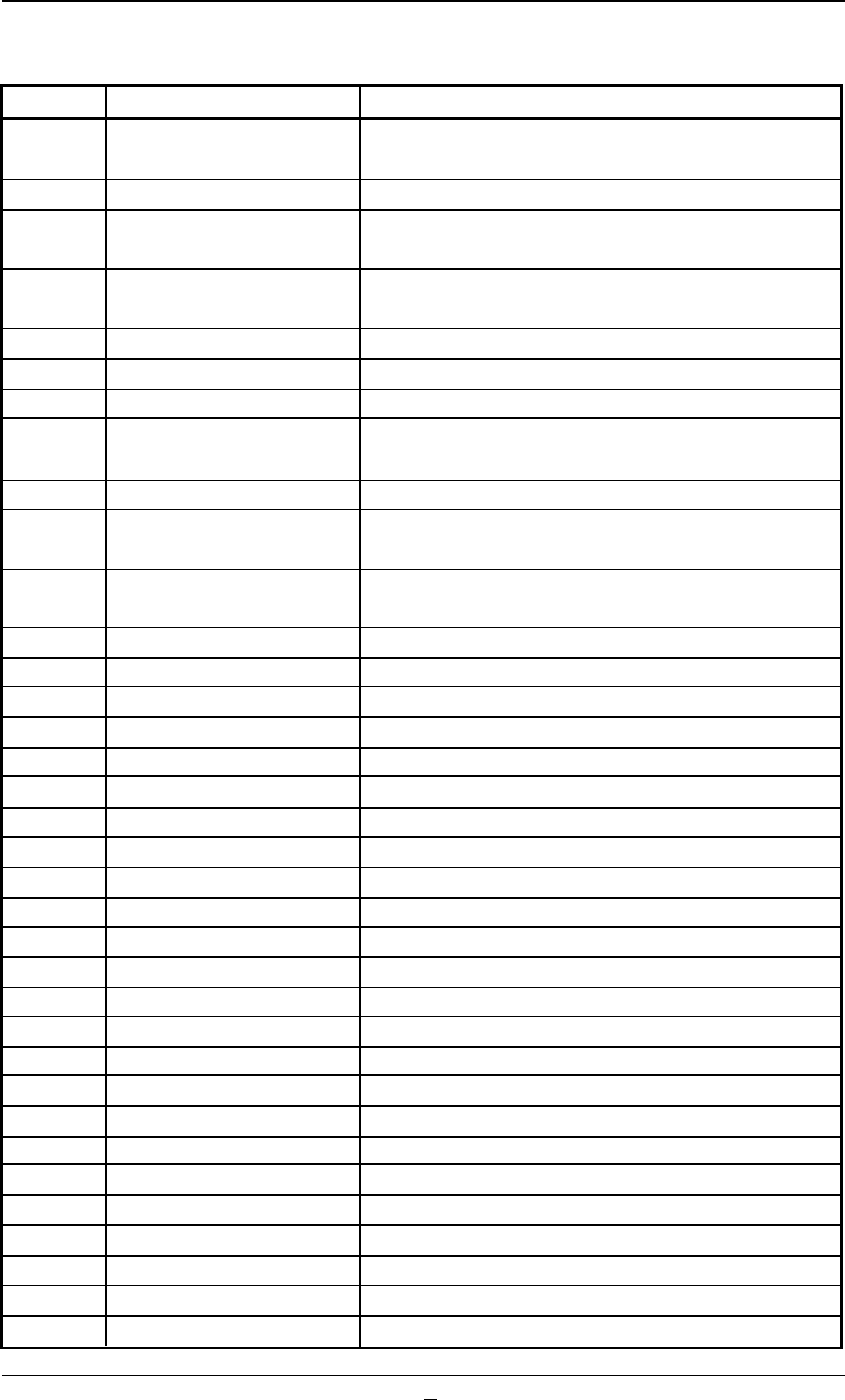
Table 4B1
Check Codes Display Section (A) Display Section (B)
010101 Emergency Stop Turn off the [EMERGENCY STOP] switch and turn on
[POWER ON] swicth.
010201 Air Pressure Air Pressure Drop
010301 Safety Door Close front or back side safety door and press the
[READY] switch.
010401 Safety Door Close front or back side safety door and press the
[READY] switch.
010501 Circuit Protector Circuit Protector is active.
010601 Control Power Source Control Power Source off.
010701 Safety Relay Turn on [POWER ON] switch.
010801 Tray #1 Tray Safety Relay Close tray #1 maintenance cover and press the
[READY] switch.
010802 Tray #1 tray safety relay is active.
010901 Tray #2 Tray Safety Relay Close tray #2 maintenance cover and press the
[READY] switch.
010902 Tray #2 tray safety relay is active.
010a01 Ready Button Ready Button not ON
010b01 Ready Button Ready Button not ON
010c01 Fuse blew Check fuse at feeder base #1 I/O board.
010c02 Check fuse at feeder base #2 I/O board.
010c03 Check fuse at feeder base #3 I/O board.
010c04 Check fuse at feeder base #4 I/O board.
012001 Head 1 Lower than Pass Line (-BPH023)
012002 Pushed excessively (-BPH025)
012003 Loss of Synchronism in NC Axis Detected
012101 Head 2 Lower than Pass Line (-BPH023)
012102 Pushed excessively (-BPH025)
012103 Loss of Synchronism in NC Axis Detected
012301 Front Feeder Base Remove the mispicked components.
012302 Set the safety bar.
012401 Back Feeder Base Remove the mispicked components.
012402 Set the safety bar.
012501 Nozzle Stocker A1 The nozzle is not stored normally.
012502 Unsteady Nozzle Detected!
012601 Nozzle Stocker A2 The nozzle is not stored normally.
012602 Unsteady Nozzle Detected!
012701 Nozzle Stocker B1 The nozzle is not stored normally.
012702 Unsteady Nozzle Detected! (-BPH061)
012801 Nozzle Stocker B2 The nozzle is not stored normally.
012802 Unsteady Nozzle Detected! (-BPH061)
012901 Tray1 Remove the mispicked components on the tray.
0308-003 2-3 AHB01ETRP
1.2 "CHECK" Windows