4OM-1075-002.pdf - 第69页
1.2.2 List of Check Messages T able 4B1 Check Codes Display Section (A) Display Section (B) 010101 Emergency Stop T urn off the [EMERGENCY STOP] switch and turn on [POWER ON] swicth. 010201 Air Pressure Air Pressure Drop…

*4 [OK] Button
When pressed, this button resumes the previous window (the win-
dow before a "CHECK" one).
*5 Saving the check message
The check message is saved as a production message.
••
••
• Reset Procedure from "CHECK" Window
(1) Take a note of the issued check message.
Note: Be sure to take a note of the check message. If you forget
the contents of the message, the machine cannot be reset
correctly to its normal condition.
(2) Press the [OK] button. The original window resumes.
(3) Follow the contents of the check message to reset the machine
correctly to its normal condition.
1.2 "CHECK" Windows
0308-002 2-2-1 AHB01ETRP
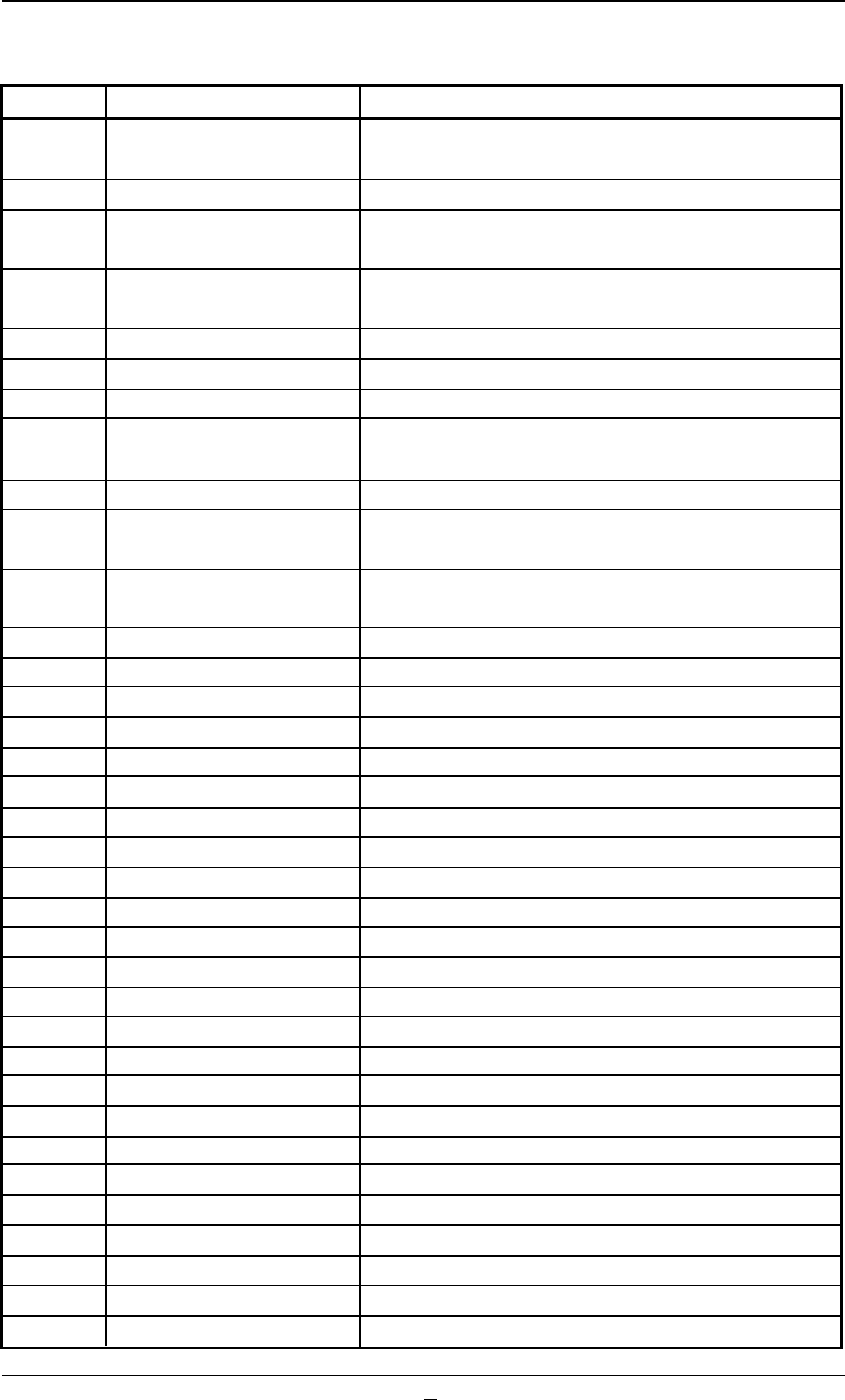
1.2.2 List of Check Messages
Table 4B1
Check Codes Display Section (A) Display Section (B)
010101 Emergency Stop Turn off the [EMERGENCY STOP] switch and turn on
[POWER ON] swicth.
010201 Air Pressure Air Pressure Drop
010301 Safety Door Close front or back side safety door and press the
[READY] switch.
010401 Safety Door Close front or back side safety door and press the
[READY] switch.
010501 Circuit Protector Circuit Protector is active.
010601 Control Power Source Control Power Source off.
010701 Safety Relay Turn on [POWER ON] switch.
010801 Tray #1 Tray Safety Relay Close tray #1 maintenance cover and press the
[READY] switch.
010802 Tray #1 tray safety relay is active.
010901 Tray #2 Tray Safety Relay Close tray #2 maintenance cover and press the
[READY] switch.
010902 Tray #2 tray safety relay is active.
010a01 Ready Button Ready Button not ON
010b01 Ready Button Ready Button not ON
010c01 Fuse blew Check fuse at feeder base #1 I/O board.
010c02 Check fuse at feeder base #2 I/O board.
010c03 Check fuse at feeder base #3 I/O board.
010c04 Check fuse at feeder base #4 I/O board.
012001 Head 1 Lower than Pass Line (-BPH023)
012002 Pushed excessively (-BPH025)
012003 Loss of Synchronism in NC Axis Detected
012101 Head 2 Lower than Pass Line (-BPH023)
012102 Pushed excessively (-BPH025)
012103 Loss of Synchronism in NC Axis Detected
012301 Front Feeder Base Remove the mispicked components.
012302 Set the safety bar.
012401 Back Feeder Base Remove the mispicked components.
012402 Set the safety bar.
012501 Nozzle Stocker A1 The nozzle is not stored normally.
012502 Unsteady Nozzle Detected!
012601 Nozzle Stocker A2 The nozzle is not stored normally.
012602 Unsteady Nozzle Detected!
012701 Nozzle Stocker B1 The nozzle is not stored normally.
012702 Unsteady Nozzle Detected! (-BPH061)
012801 Nozzle Stocker B2 The nozzle is not stored normally.
012802 Unsteady Nozzle Detected! (-BPH061)
012901 Tray1 Remove the mispicked components on the tray.
0308-003 2-3 AHB01ETRP
1.2 "CHECK" Windows
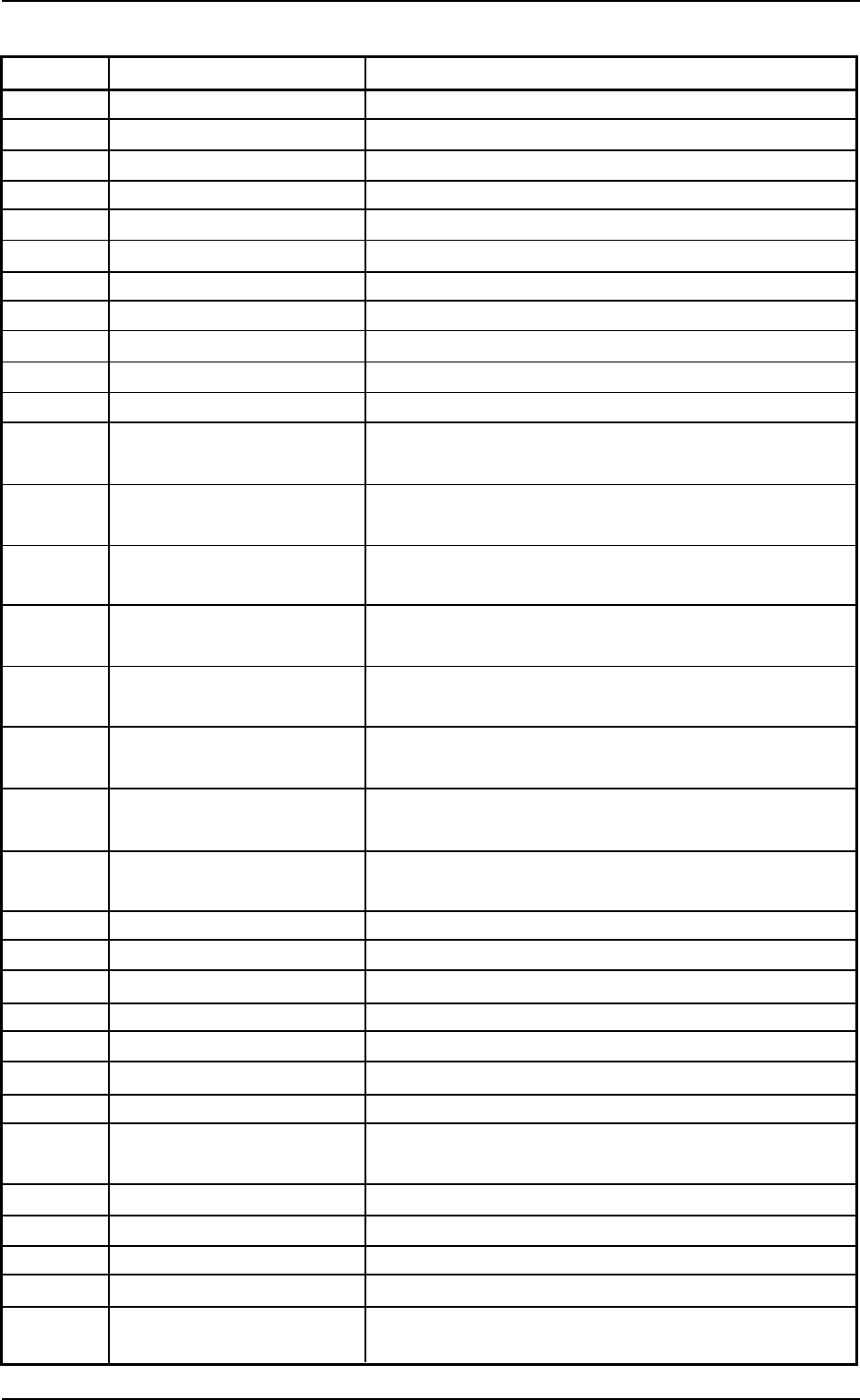
Table 4B1-1
Check Codes Display Section (A) Display Section (B)
012902 Open the rack shutter.
012903 Close the rack shutter.
012904 Open the chuck claws.
012905 Tray1 Close the chuck claws.
012906 Popped Pallet Detected!
012a01 Tray2 Remove the mispicked components on the tray.
012a02 Open the rack shutter. (-BPS501, -BPS503)
012a03 Close the rack shutter. (-BPS502, -BPS504)
012a04 Open the chuck claws. (-BPS511)
012a05 Close the chuck claws. (-BPS511)
012a06 Popped Pallet Detected!
013001 Conveyor Remove the P.C.B. from the input conveyor (over the
L1 sensor). (-BPH141)
013002 Remove the P.C.B. from the input conveyor (over the
L2 sensor). (-BPH142)
013003 Remove the P.C.B. from the positioning conveyor
(over the P1 sensor). (-BPH143)
013004 Remove the P.C.B. from the positioning conveyor
(over the P2 sensor). (-BPH144)
013005 Remove the P.C.B. from the positioning conveyor
(over the P3 sensor). (-BPH144)
013006 Remove the P.C.B. from the positioning conveyor
(over the P4 sensor). (-BPH143)
013007 Remove the P.C.B. from the output conveyor (over
the R1 sensor). (-BPH142)
013008 Remove the P.C.B. from the output conveyor (over
the R2 sensor). (-BPH141)
013009 Remove the P.C.B. from the positioning conveyor.
013101 P.C.B. thickness Specify the P.C.B. thickness.
013201 Unit Adjust A P.C.B. exists in the positioning section.
013202 Put a P.C.B. in the positioning section.
013203 Put a P.C.B. on the inlet of the input conveyor.
013204 A P.C.B. exists in the input conveyor buffer position.
013205 A P.C.B. exists in the output conveyor buffer position.
013206 A P.C.B. existed in the output conveyor. Check the
output conveyor and retry.
013301 Recycle Conveyor A Recycle Conveyor A is full (-BPH652).
013401 Recycle Conveyor B Recycle Conveyor B is full (-BPH652).
013501 Recycle BOX A Component Box A is full.
013601 Recycle BOX B Component Box B is full.
030101 Operator's Error The [Ready] button does not work while the initial
window is active.
0308-002 2-3-1
AHB01ETRP
1.2 "CHECK" Windows