4OM-1075-002.pdf - 第71页
T able 4B1-2 Check Codes Display Section (A) Display Section (B) 030102 The safety door is open. 030103 The operation mode switch is set to the "SET UP" side. 030104 The load power supply is not set ready (OFF)…
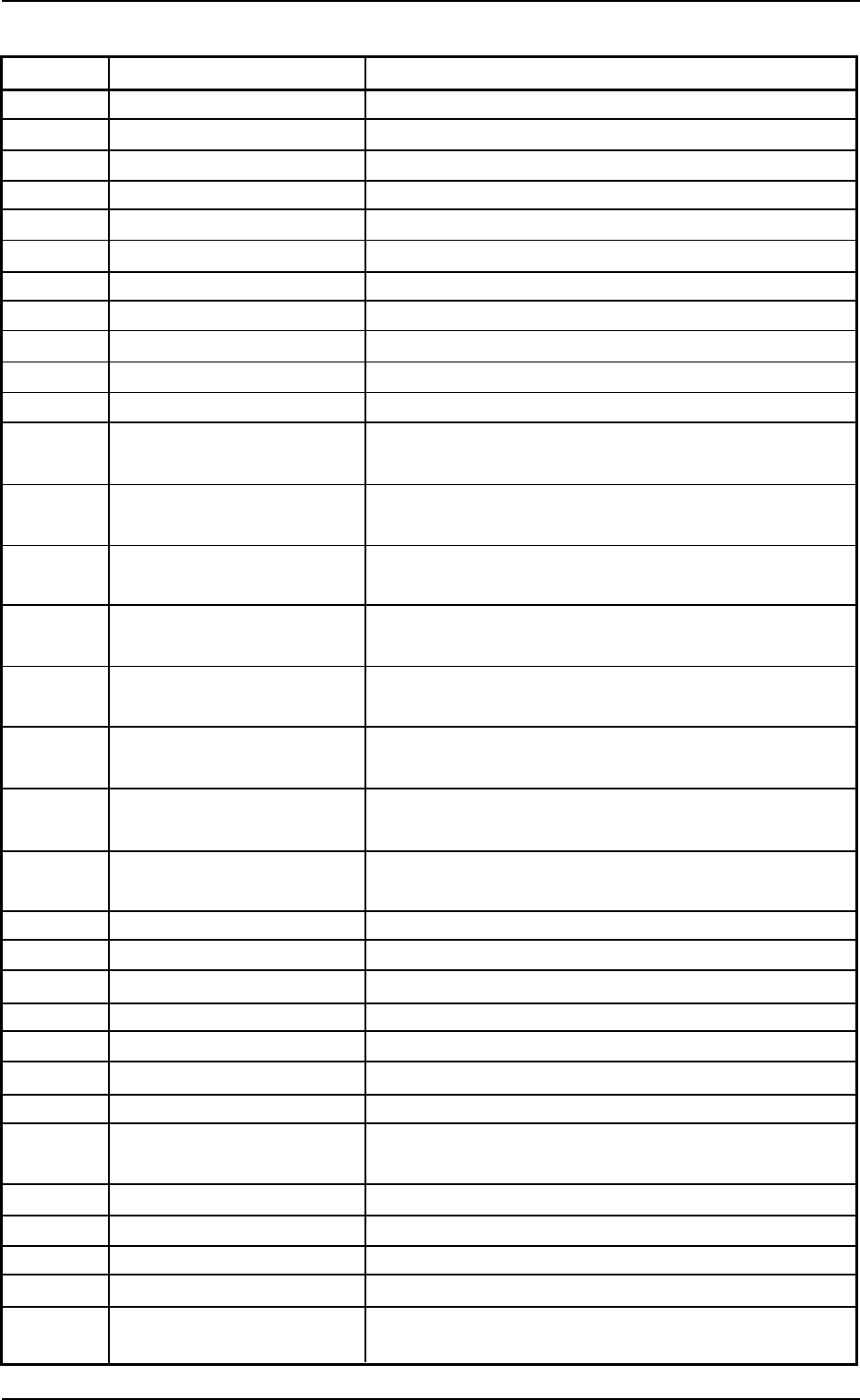
Table 4B1-1
Check Codes Display Section (A) Display Section (B)
012902 Open the rack shutter.
012903 Close the rack shutter.
012904 Open the chuck claws.
012905 Tray1 Close the chuck claws.
012906 Popped Pallet Detected!
012a01 Tray2 Remove the mispicked components on the tray.
012a02 Open the rack shutter. (-BPS501, -BPS503)
012a03 Close the rack shutter. (-BPS502, -BPS504)
012a04 Open the chuck claws. (-BPS511)
012a05 Close the chuck claws. (-BPS511)
012a06 Popped Pallet Detected!
013001 Conveyor Remove the P.C.B. from the input conveyor (over the
L1 sensor). (-BPH141)
013002 Remove the P.C.B. from the input conveyor (over the
L2 sensor). (-BPH142)
013003 Remove the P.C.B. from the positioning conveyor
(over the P1 sensor). (-BPH143)
013004 Remove the P.C.B. from the positioning conveyor
(over the P2 sensor). (-BPH144)
013005 Remove the P.C.B. from the positioning conveyor
(over the P3 sensor). (-BPH144)
013006 Remove the P.C.B. from the positioning conveyor
(over the P4 sensor). (-BPH143)
013007 Remove the P.C.B. from the output conveyor (over
the R1 sensor). (-BPH142)
013008 Remove the P.C.B. from the output conveyor (over
the R2 sensor). (-BPH141)
013009 Remove the P.C.B. from the positioning conveyor.
013101 P.C.B. thickness Specify the P.C.B. thickness.
013201 Unit Adjust A P.C.B. exists in the positioning section.
013202 Put a P.C.B. in the positioning section.
013203 Put a P.C.B. on the inlet of the input conveyor.
013204 A P.C.B. exists in the input conveyor buffer position.
013205 A P.C.B. exists in the output conveyor buffer position.
013206 A P.C.B. existed in the output conveyor. Check the
output conveyor and retry.
013301 Recycle Conveyor A Recycle Conveyor A is full (-BPH652).
013401 Recycle Conveyor B Recycle Conveyor B is full (-BPH652).
013501 Recycle BOX A Component Box A is full.
013601 Recycle BOX B Component Box B is full.
030101 Operator's Error The [Ready] button does not work while the initial
window is active.
0308-002 2-3-1
AHB01ETRP
1.2 "CHECK" Windows
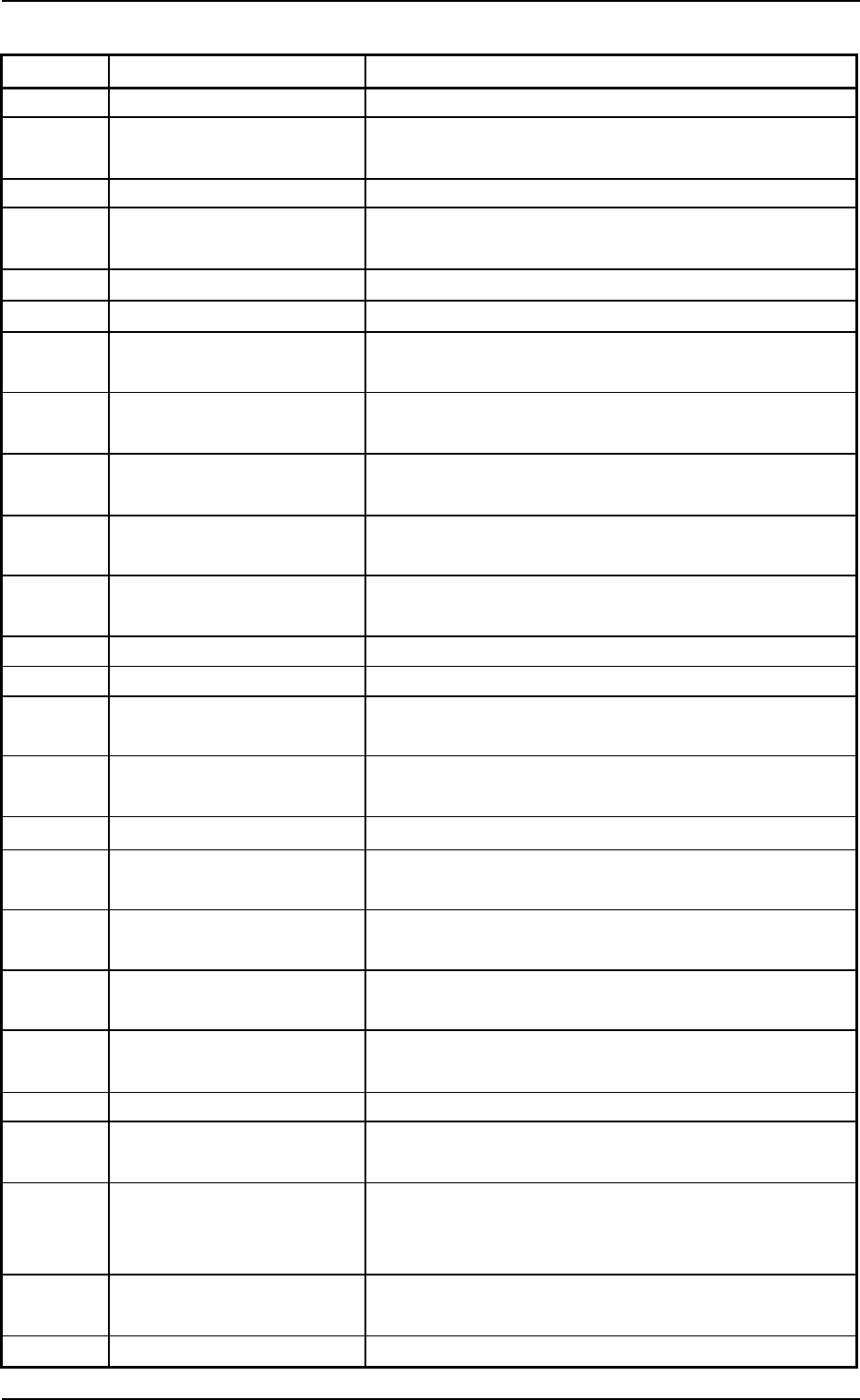
Table 4B1-2
Check Codes Display Section (A) Display Section (B)
030102 The safety door is open.
030103 The operation mode switch is set to the "SET UP"
side.
030104 The load power supply is not set ready (OFF).
030105 The power cannot be supplied with the operation
mode switch in the "SET UP" mode.
030106 The safety door lock is open.
030107 EMER Stop button is on.
030108 The operation mode switch was changed over with
the machine in a mode other than "STOP".
030109 The operation mode switch on the invalid side was
changed over.
03010a The operation mode switch was changed over with
the safety door being open.
03010b Specify the feeder No. for automatic component
picks.
03010c No tray feeder No. can be specified for manual com-
ponent picks.
03010d No component (Test ID) is specified.
03010e The specified nozzle is not attached to the head.
03010f The specified camera cannot be used for the speci-
fied component (Test ID).
030110 Components cannot be picked up from the specified
feeder No., usin the specified head.
030111 Enter the tray setting matrix X and Y correctly.
030112 Another automatic operation cannot be started at the
same time.
030113 The [Component Feed Dsbl.] button is selected in
thetest mode data.
030114 The [Tray Cmpnt Feed Dsbl.] button is selected in the
test mode data.
030115 "TRAY" is not set as a carrier type in the test library
data.
030116 The door of the tray is open.
030117 "VIB. STICK" is not specified in the "CARRIER TYPE"
text box in the test library data.
030118 The feeder No. to be selected is not specified for the
production model or the vibratory stick feeder is not
connected.
030119 The selected feeder No. does not match the carrier
type specified in the test library data.
03011a Feeder No error.
1.2 "CHECK" Windows
0308-002 2-3-2 AHB01ETRP
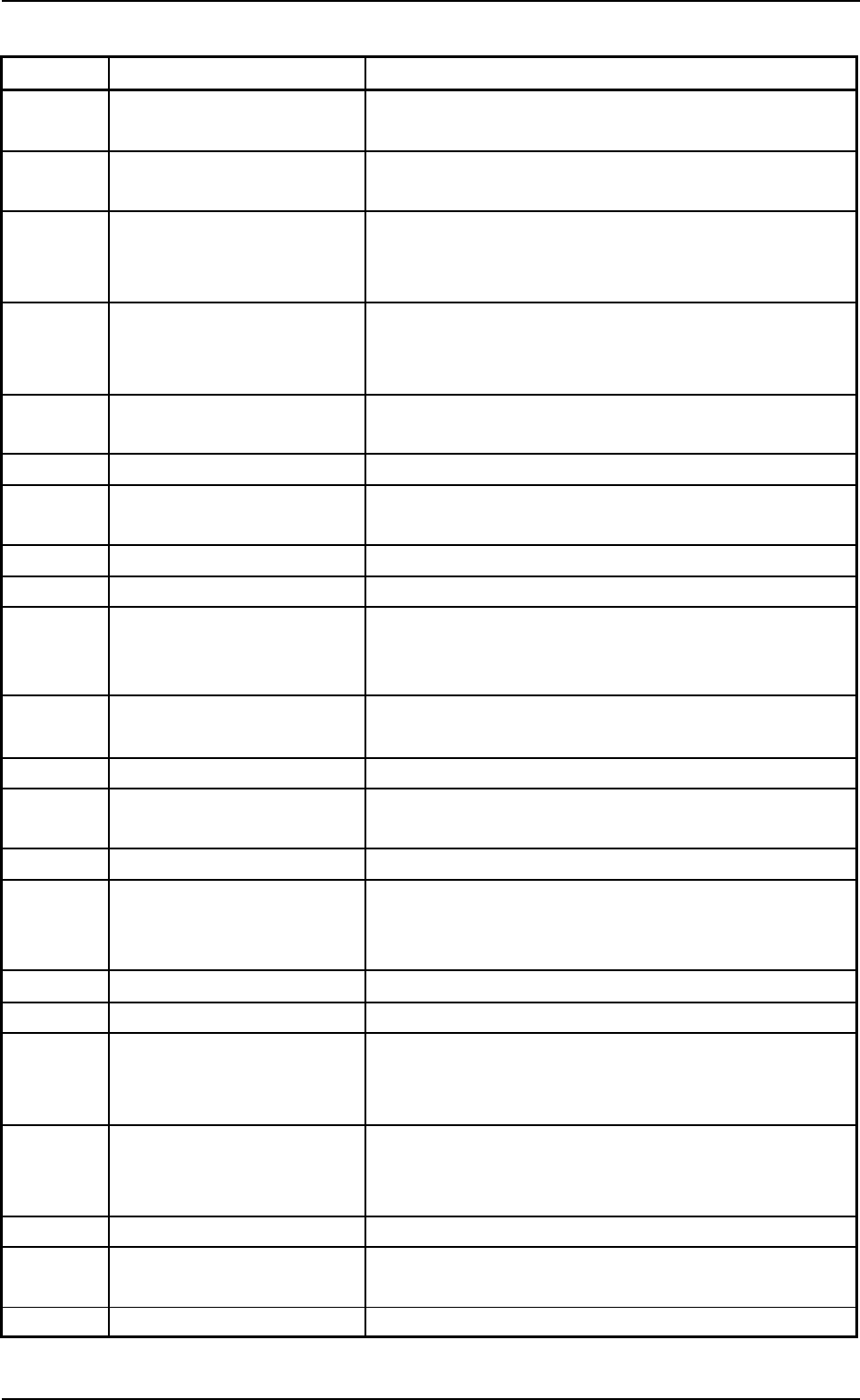
Table 4B1-3
Check Codes Display Section (A) Display Section (B)
03011b The operation mode switch on other side is set to the
"SET UP" mode.
03011c This cannot be executed without a P.C.B. at the
positioning section.
03011d When the machine is set in the "PAUSE" mode, the
NC axis under control of the current value cannot be
zeroed.
03011e A component is being picked up. Start the automatic
operation after the component is collected or the
vacuum is shut off.
03011f The [Ready] button does not work while the machine
is running.
030120 Cannot start by Machine is not in "STOP" mode.
030121 Cannot start by Machine is not in "STOP" or "PAUSE"
mode.
030122 The specified camera is seleced Skip mode.
030123 Move the elevator to its home position.
030125 Illegal parameters are set as "Side length X [mm]",
"Side length Y [mm]", "Pitch X [mm]", and "Pitch Y
[mm]" in the tray data (test library data),
030126 The specified feeder or step No. is bypassed in the
current pattern program data.
030127
030128 The [V.Bend Detection Dsbl.] button is selected in the
library data.
030129
03012a Nozzle storage/attachment actions cannot take place
at the specified stocker position for the selected
head.
03012b Nozzle stocker [B1] is being opened.
03012c Nozzle stocker [B2] is being opened.
03012d Collect picked up component by Vacuum OFF Head
1 button operation on AUTO OPN display. And then
perform zeroing operation.
03012e Collect picked up component by Vacuum OFF Head
2 button operation on AUTO OPN display. And then
perform zeroing operation.
03012f
030130 In the case of "All Selection", keep all nozzles on the
heads stored.
030131 Nozzle number error.
1.2 "CHECK" Windows
0308-002 2-3-3 AHB01ETRP