4OM-1075-002.pdf - 第81页
Error ID Display Section A Display Section B 800401 Start Auto Recovery Mode 800402 Start Auto Recovery Mode 800403 Start Auto Recovery Comp. Missing (Recog) Mode 800404 Start Auto Recovery Comp. Recog Error Mode 800405 …
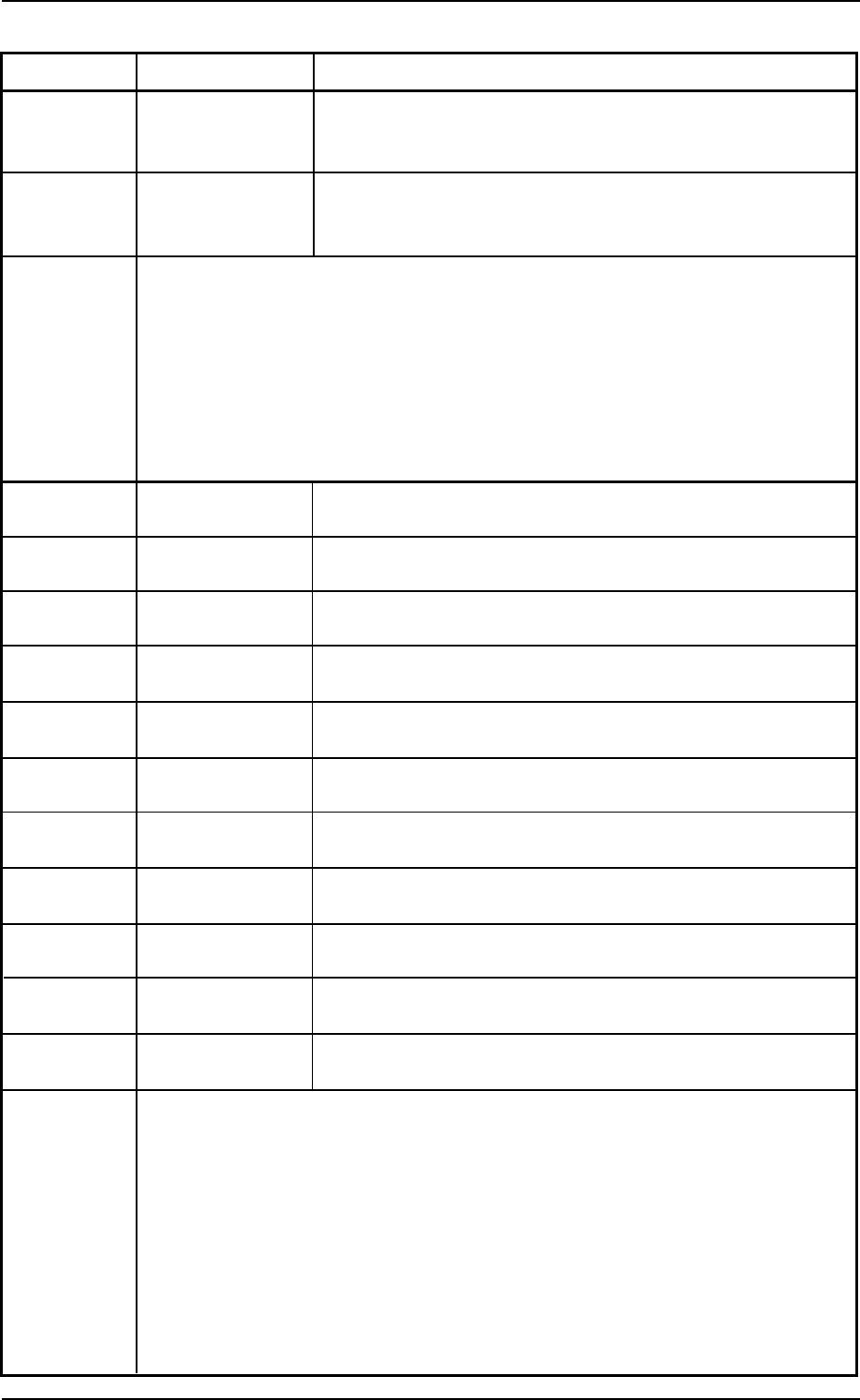
Error ID Display Section A Display Section B
800101 Warning: Decreasing Nozzle Message Rate :
of Comp. Hdlg.
Rate (For Noz.)
800201 Warning: Decreasing Feeder Message Rate :
of Comp. Hdlg.
Rate (For Fdr.)
(Contents) The component pick-up rate has deteriorated.
(Description) Check the related nozzle or feeder and take necessary measures to
improve the pick-up rate.
800301 Alternated Feeder
800302 Alternated Feeder
800303 Alternated Feeder Comp. Missing (Recog)
800304 Alternated Feeder Comp. Recog Error
800305 Alternated Feeder Shortage of Component
800306 Alternated Feeder V.Bend Detection Error
800307 Alternated Feeder Shortage of Component(Alternated Feeder)
80030a Alternated Feeder Auto Recovery Pause
80030c Alternated Feeder Vacuum Sensor Error
80030d Alternated Feeder Comp. Missing (Sensor) After Chuck
80030e Alternated Feeder Comp. Missing (Sensor) Before Mount
(Contents) The feeder alternate function has worked.
(Description) Check the related feeder and take necessary measures such as compo-
nent replenishment.
1.3 Machine lnformation
0308-001 2-3-1 1 AHB01ETRP
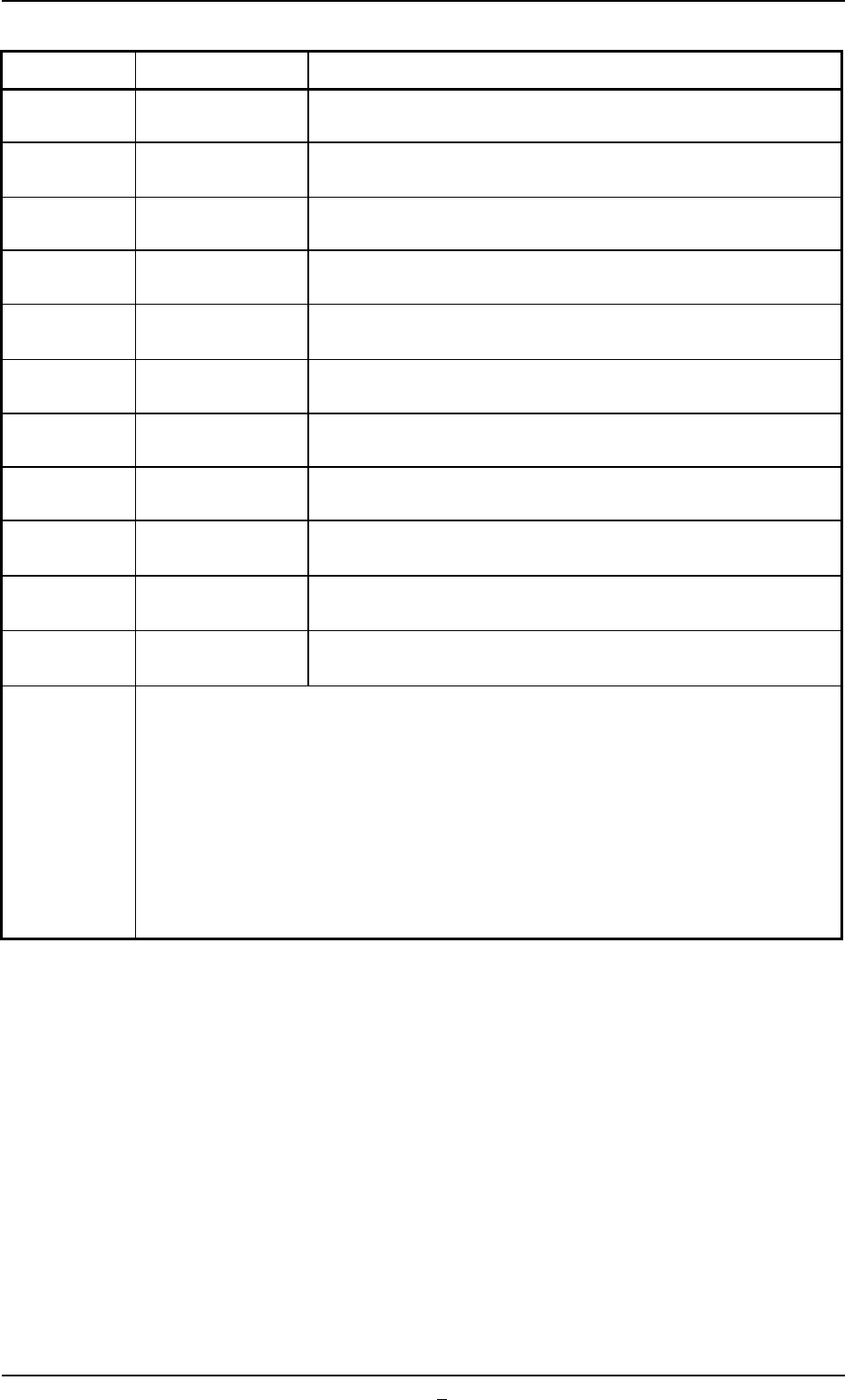
Error ID Display Section A Display Section B
800401 Start Auto Recovery
Mode
800402 Start Auto Recovery
Mode
800403 Start Auto Recovery Comp. Missing (Recog)
Mode
800404 Start Auto Recovery Comp. Recog Error
Mode
800405 Start Auto Recovery Shortage of Component
Mode
800406 Start Auto Recovery V.Bend Detection Error
Mode
800407 Start Auto Recovery Shortage of Component (Alternated Feeder)
Mode
80040a Start Auto Recovery Auto Recovery Pause
Mode
80040c Start Auto Recovery Vacuum Sensor Error
Mode
80040d Start Auto Recovery Comp. Missing (Sensor) After Chuck
Mode
80040e Start Auto Recovery Comp. Missing (Sensor) Before Mount
Mode
(Contents) The automatic (delayed) recovery function has worked.
(Description) Check the related feeder and take necessary measures such as compo-
nent replenishment.
1.3 Machine lnformation
0308-001 2-3-12 AHB01ETRP
1.4 "ERROR" Windows
• Window Layout
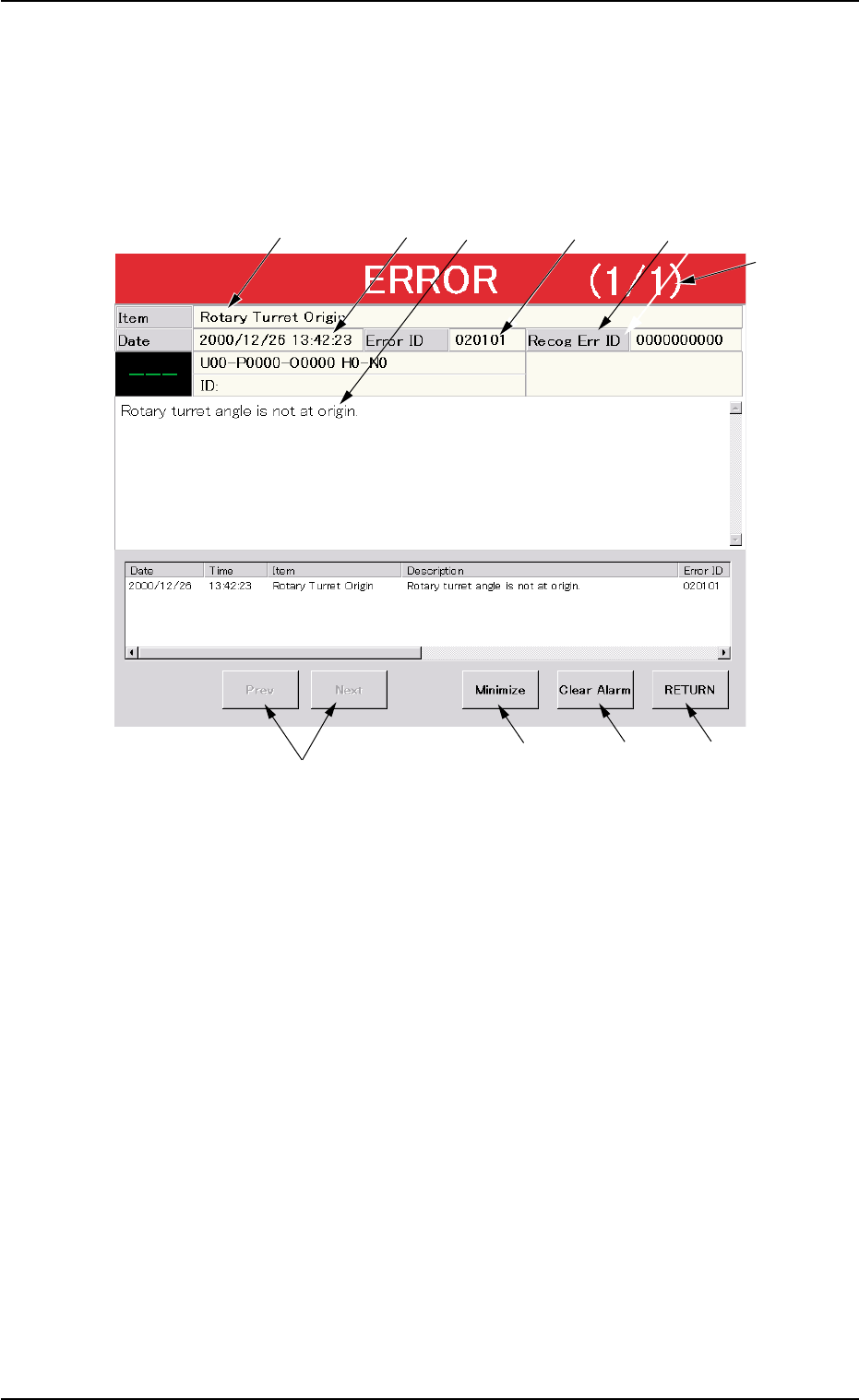
When the machine detects an error, the following "ERROR" window
opens.
Fig. 4B3 Example of "ERROR" Window
• Window Composition
*1 Error ID
Displayed is a string of alphanumeric characters (6 characters) that
identifies an error.
When an error has occurred, use the error ID as an index and refer
to "3. Troubleshooting after "ERROR" Window (Error ID)" for de-
tails.
*2 Recog Err ID
Displayed is a string of alphanumeric characters (10 characters)
that identifies an error.
When an error has occurred, use the error ID as an index and refer
to "4. Troubleshooting after "ERROR" Window (Recognition Error
ID)" for details.
*3 Item
Displayed is a name of the classified element that caused an error.
1.4 "ERROR" Windows
0107-001 2-4 AHB01ETRP
*6
*1
*9
*8
*5
*3
*4
*2
*7
*10