YesAX V3.1.2 - Software User Manual - 第133页
General Inspecti on Methodolo gy 10 - 39 The Show Reference button displays the reference image, the Capture Reference Button capture the reference image from the camera. The S how Difference button displays the Differen…
10-38 General Inspection Methodology
Invert Image checkbox if checked will invert the pixel value of the image before performing the
analysis.
Check Void checkbox if checked will calculate a void percentage for each BGA ball.
Void Threshold sets the binary threshold value which is used to convert gray scale images into
binary images and perform void calculations. Moving the slider bar will change the threshold
value and display a binary image instead of the original gray scale image.
New Void Method checkbox if checked will apply the new void detection algorithm instead of
the old one. Please make sure to select void threshold number less than the ball threshold number.
Moving the slider bar of void threshold will display a binary image. In this binary image only
pixels with gray scale between void threshold and ball threshold will be displayed. To fine tune
the shape of the void, user can select a number different than 0 in Parameter drop down box.
The available choices are 1 and 2. Bigger number will get rid of small unwanted voids but in the
mean time, change the shape of voids slightly. If the parameter number is set to a number
different than 0, the user can click the Apply button and see the actual void been detected on the
screen.
In addition to BGA Group, another algorithm for BGA inspection would be Image Subtraction.
This algorithm does not calculate numerical parameters of the BGA but instead uses a simple
image comparison principle. A reference image taken from a good part is subtracted from the test
image. The difference is the threshold to determine a pass or fail status.
Different Image = | Test Image – Reference Image |
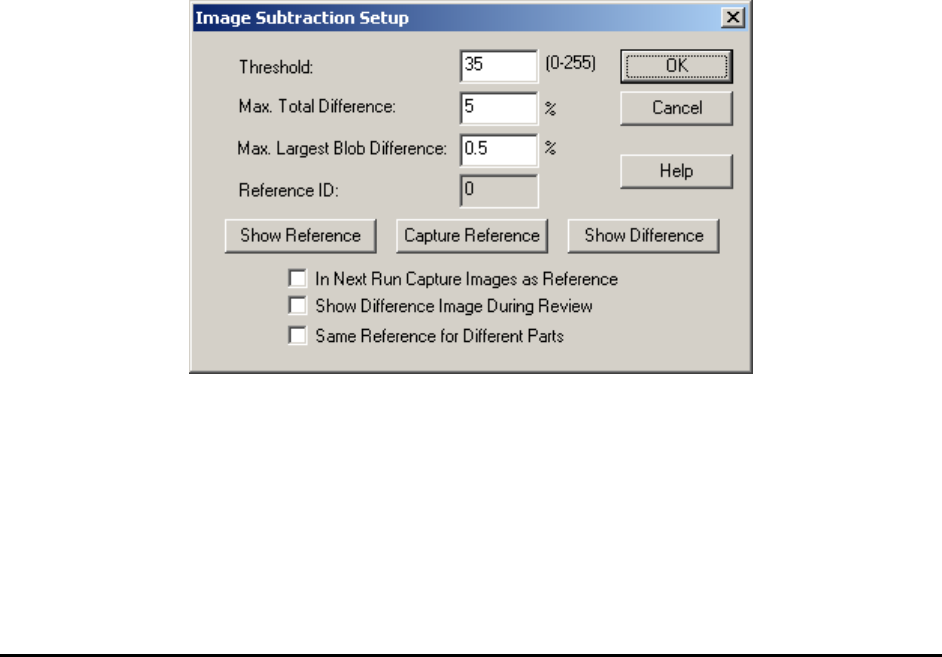
Image Subtraction Params.. launches the Image Subtraction Setup dialog for setting image
subtraction parameters.
The Threshold is the gray level difference between the corresponding pixels of the two images.
Pixels gray level difference below the threshold will be considered the same.
The Max. Total Difference is the maximum number of pixels that is different from the reference
image to be considered PASS, expressed in percentage. The Max. Largest Blob Difference is
the maximum numbers of pixels in the largest blob of the different image to be considered PASS.

General Inspection Methodology 10-39
The Show Reference button displays the reference image, the Capture Reference Button
capture the reference image from the camera. The Show Difference button displays the
Difference Image. The Reference ID shows a number which represent the ID of that reference
image. This number is similar to the template number in template match inspection. A Reference
ID shows 0 means the reference image haven’t been captured yet.
Because of the perspective distortion which is common in the X-ray images, the Reference
Image has to be captured exactly where the part is to be inspected. In other words, if the part is to
be tested near the top left corner of the screen, then the Reference Image should be captured at
that screen location. The In Next Run Capture Images as Reference checkbox switches on the
reference capture mode, in capture mode in the next inspection run the software will capture
reference images for all test boxes using image subtraction algorithm. User should make sure a
good board is put in before the inspection run. The checkbox is turned off at the end of the
inspection run, normal image subtraction will resume.
During review process the software always displays the Reference image; user can optionally
select to have the different image also displayed. To select the option check the Show Difference
Image During Review checkbox.
By default each lead inspection box with Image Subtraction algorithm setup will have one
unique reference image/ID. Sometimes it is convenient to have the same lead box of different
parts with same part number share the same reference image. To do that the user needs to check
the Same Reference for Different Parts checkbox.
10-40 General Inspection Methodology
10.5.3 Solder Inspection
Solder inspection for BGA balls is designed to verify the solder ball quality on each individual
ball of a BGA device. The default inspection uses a BGA Analysis algorithm to detect
insufficient solder, bad shape, gray defects and void defects. Since this algorithm also utilizes
measurements from the BGA Group algorithms, make sure that solder inspections run after lead
bank inspections.
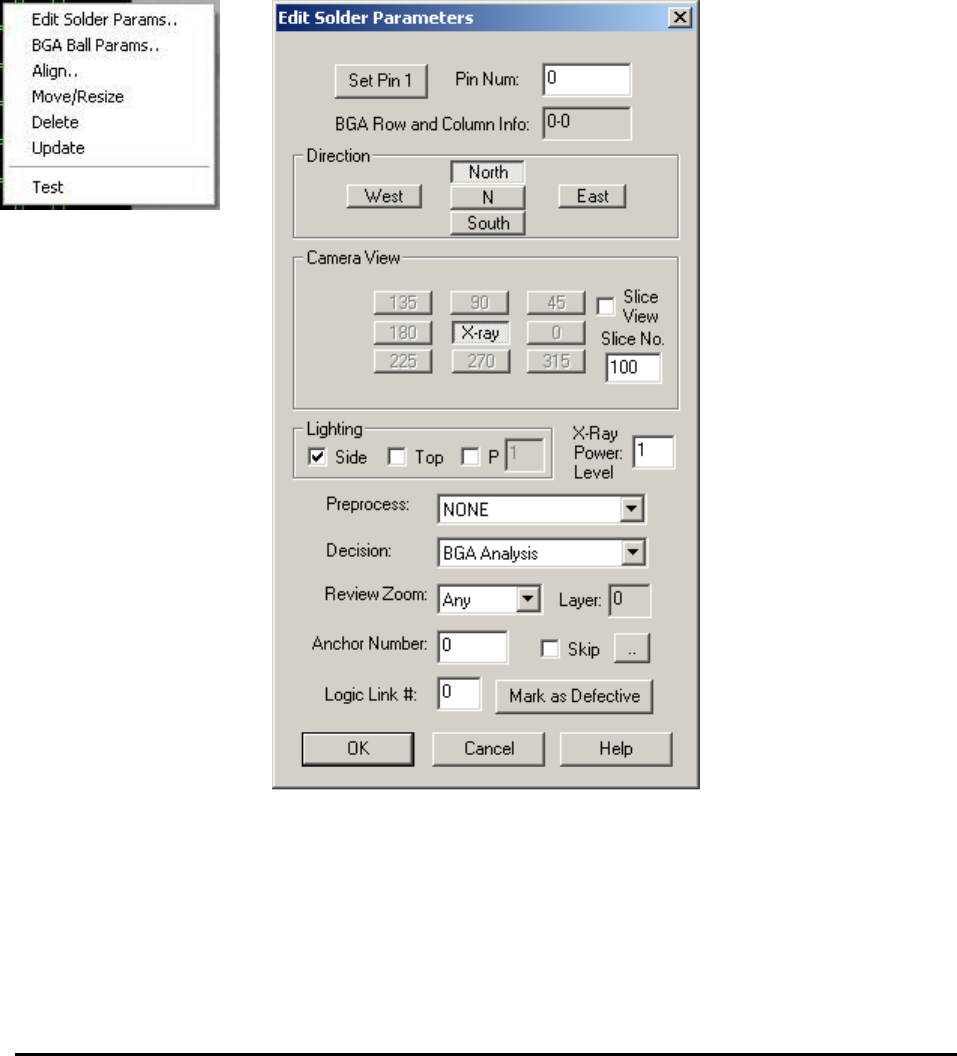
After the solder inspection box is created, display the solder pop-up menu by pressing the right
mouse button while pointing inside the solder inspection box.
Edit Solder Params. launches the Solder Parameters dialog
Enter the current solder pin number in the Pin Num field.
The rest of the buttons on the dialog set the Direction, Camera View, Slice View, Slice No.,
Lighting and X-Ray Power Level for the inspection. For X-Ray inspection the Camera View is
always set as X-ray, the Lighting is always set to Side and the X-Ray Power Level needs to be
specified in the corresponding field.