YesAX V3.1.2 - Software User Manual - 第138页
10 - 44 General Inspecti on Methodolo gy Ball Pitch and Expected Diameter specify the pitch and ball diameter for curre nt ball. Likely all BGA balls belong to either same 2D package or same slice in 3D view will have th…
General Inspection Methodology 10-43
Please be noticed that when user utilizes Pin Cad Import to create solder inspection box, the
BGA Row and Column Info will be set to the specific value and the Direction will be set to N
automatically. This is the differences between Pin Cad Import and normal Cad Import.
There is no specific preprocessing algorithm for BGA Pin Inspection.
BGA Pin Inspection Setup – Launch the BGA Pin Inspection Parameters dialog.
Parameters inside this setup dialog box are similar to those from several other dialog boxes: the
BGA Group Analysis Parameters dialog box, the BGA Ball Analysis Parameters dialog box and
the Lead Blob Analysis Parameters dialog box. If user already familiar with the rest of inspection
algorithms, understanding this dialog box should be fairly easy.

10-44 General Inspection Methodology
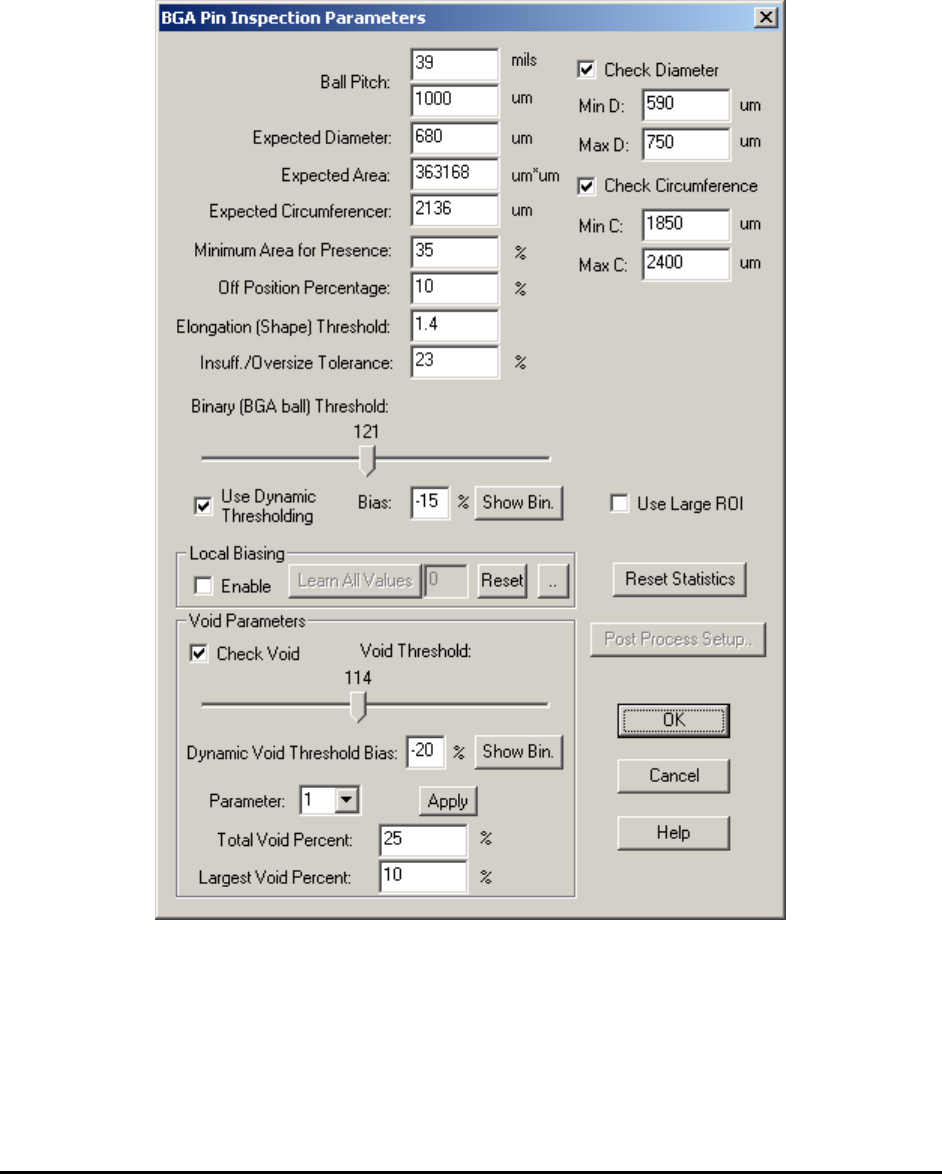
Ball Pitch and Expected Diameter specify the pitch and ball diameter for current ball. Likely all
BGA balls belong to either same 2D package or same slice in 3D view will have the same pitch
number and ball diameter. The number of ball pitch also specifies the size of search window. The
size of search window is exactly the same as the pitch, not the size of the solder inspection box
as shown in screen.
Minimum Area for Presence specifies the minimum area percent parameter for detecting
missing defect. Off Position Percentage specifies the position off percent parameter for
detecting off position defect.
Binary (BGA ball) Threshold sets the binary threshold value which is used to convert gray
scale images into binary images. A good binary threshold value separates the majority of BGA
balls from their background and results in good measurement values.
Use Dynamic Thresholding checkbox if checked will apply dynamic threshold instead of binary
threshold which is specified by user for current inspection. The dynamic threshold method is
similar to the one in lead blob analysis algorithm. Bias (threshold bias) can be used to increase or
decrease the inspection sensitivity. Reducing the Bias e.g. – 10% will increase the sensitivity of
the detection. The Show Bin button displays the binary image.
Insufficient/Oversize Tolerance specifies the abnormal area percent parameter for detecting
insufficient and oversize defect.
Check Diameter checkbox if checked will apply Min D. and Max D. diameter threshold values
to the inspection results. A BGA ball with a diameter less than Min D. or greater than Max D.
will fail for size defect.
Check Circumference checkbox if checked will apply Min C. and Max C. circumference
threshold values to the inspection results. A BGA ball with a circumference less than Min C. or
greater than Max C. will fail for size defect.
Use Large ROI checkbox if checked will apply a larger ROI to current inspect box. This will
particularly help catching the bridge defect.
Check Void checkbox if checked will calculate void related measurements for current BGA ball.
Void Threshold sets the binary threshold value which is used to convert gray scale images into
binary images and perform void calculations. Moving the slider bar will change the threshold
value and display a binary image instead of the original gray scale image. Please make sure to
select void threshold number less than the ball threshold number. Moving the slider bar of void
threshold will display a binary image. In this binary image only pixels with gray scale between
void threshold and ball threshold will be displayed. To fine tune the shape of the void, user can
select a number different than 0 in Parameter drop down box. The available choices are 1 and 2.
Bigger number will get rid of small unwanted voids but in the mean time, change the shape of
voids slightly. If the parameter number is set to a number different than 0, the user can click the
Apply button and see the actual void been detected on the screen.
The Total Void Percent and Largest Void Percent threshold needs to be set by the user to pick
up void defects. These two parameters are similar to those in BGA Ball Analysis algorithms. The
default values for these two parameters are 25 and 10, respectfully.
General Inspection Methodology 10-45
Local Biasing group includes related functions and parameter adjustments for local biasing
adjustment. Local Biasing is a technique that uses the background characteristic learnt from a
good board to compensate the shadowing effect during inspection. In the learning phase a good
board is placed in the machine. Once the process starts, the software will run the board once and
adjust the threshold value for each ball until the area measured is equal (or as close as it can be)
to the expected area. The adjusted value of the threshold (called Local Bias) is stored on a per
ball basis (i.e. not part of the library update).
Steps to setup Local Biasing:
A. Enter the correct expected diameter
Expected diameter is used to determine expected area. So it is very important to set it
right before the learning process.
1. Disable local biasing, Click Reset Statistics
button to clear statistics for each ball.
2. Run the inspection once.
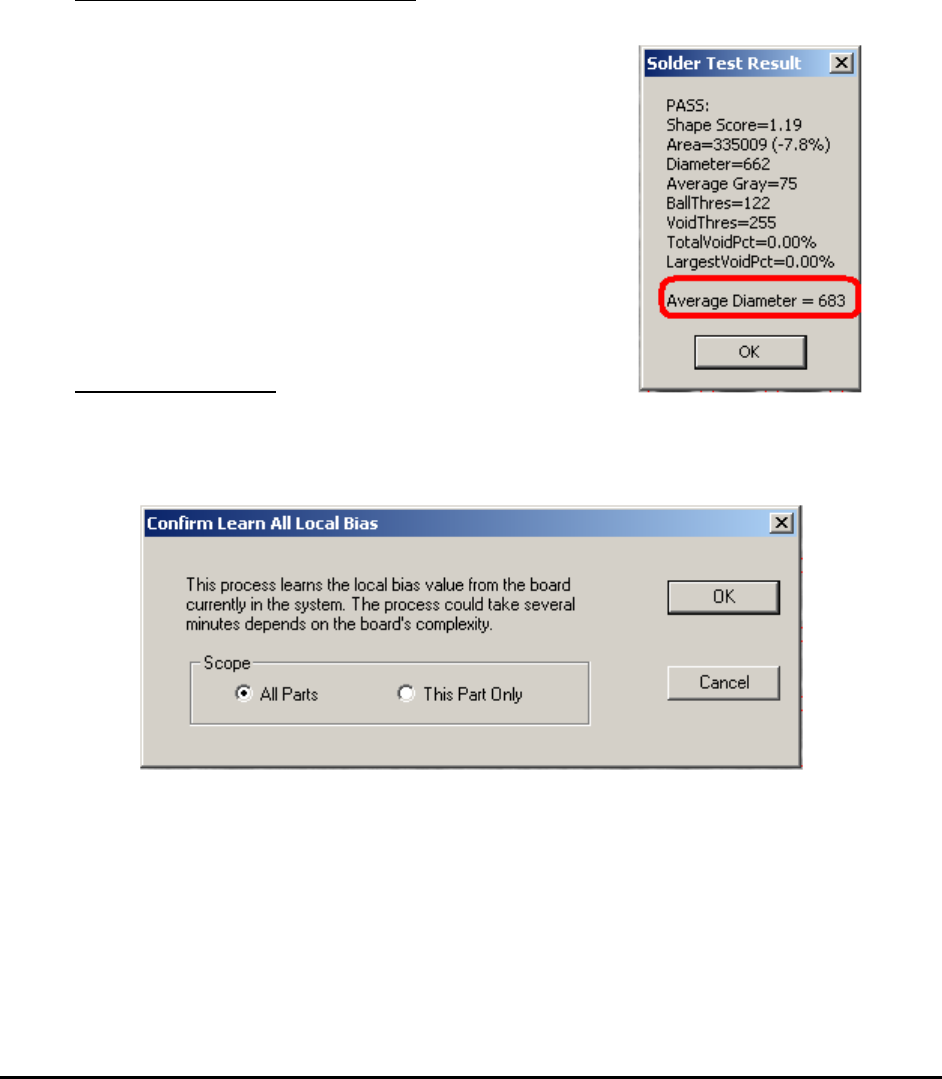
3. Look at the average diameter statistics by doing a
test on one of the inspection box on each part
(package).
4. Set the expected diameter parameter.
5. Do “Update Solder” to set the expected diameter
for all inspection boxes for this package.
B. Learn the Local Bias
6. Enable local biasing, and then press the Learn
All Values button.
7. Select the scope of the learning from the prompt dialog.
8. Press Start button from the Run dialog. The inspection could take many minutes
depends on the board’s complexity. At the end of the process a summary statistic is
displayed.