YesAX V3.1.2 - Software User Manual - 第153页
3D X-Ray Inspection Methodolo gy 11 -9 Power Level indicates the power level setting used by current 3D site. It is possible to change the power level. To do this, please turn on X-ray first and pick a different power le…
11-8 3D X-Ray Inspection Methodology
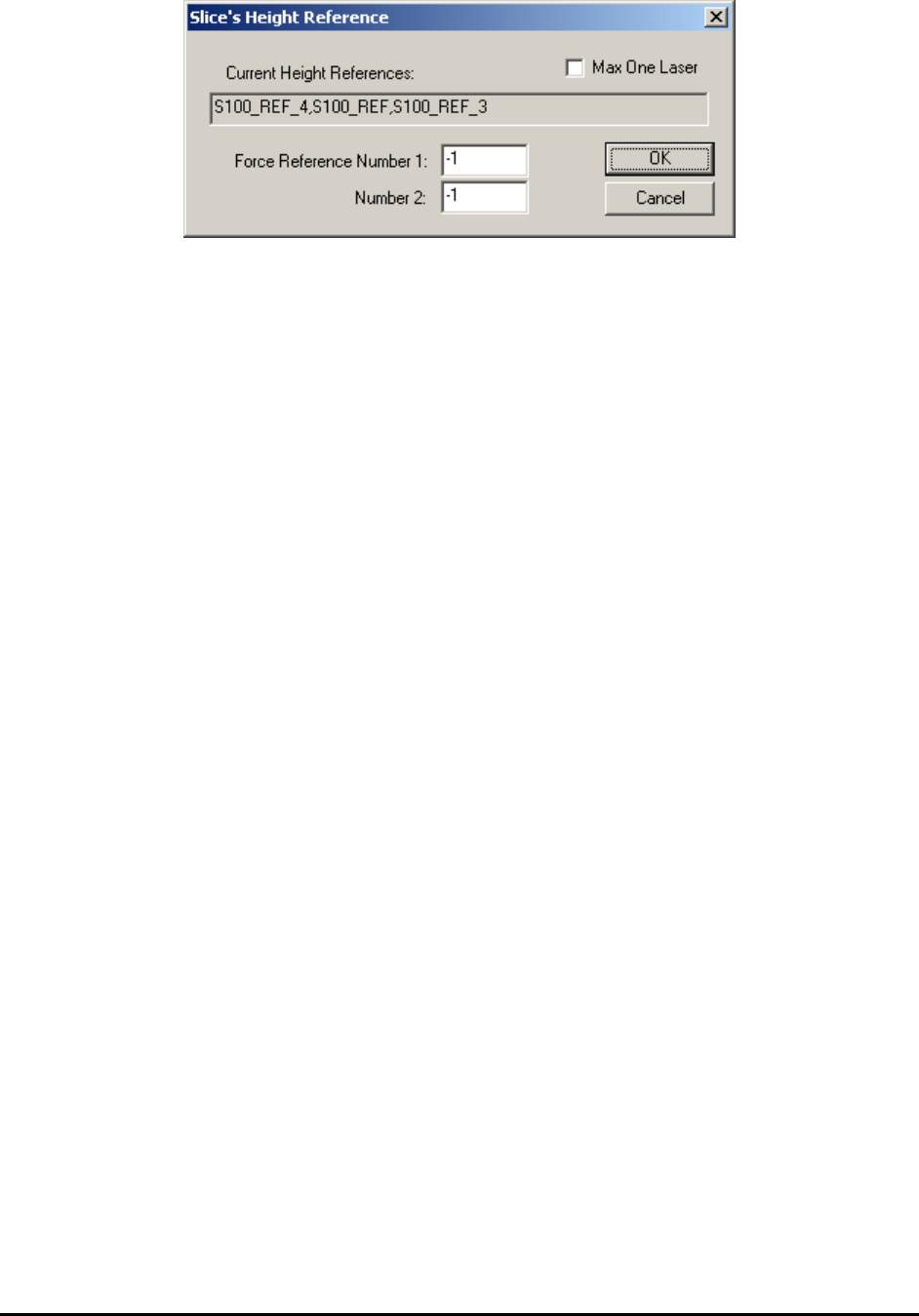
The first time the dialog shows up, both Force Reference Number 1 and 2 are -1, which means
software choose laser references for this site automatically. The laser reference IDs been used by
current 3D site is shown in the Current Height Reference field. In this case, the original list
contains: S100_REF_4, S100_REF_1 and S100_REF_3. If user type in 4 in the Force Reference
Number 1 field and click OK to close the dialog. The user also needs to close the Edit 3D Site
dialog and move around a little bit then go back to current 3D site. Once he opens the Slice’s
Height Reference dialog again, the S100_REF_5 will be added to the list and replace
S100_REF_3, which is at the end of this list. If there are less than 3 laser references in the
original list, the new force reference ID will be appended to the list. The user can type in two
different numbers in Number 1 and Number 2 field so the software will include both laser
references in the list. For multi-panel board, the force reference ID will have the same block ID
as the current 3D site has. For example, the current block ID is 03 and user types in 15 in the
field, in this case the full name of the laser reference being added will be 03_S100_15. When
using this option, the user needs to be careful and avoid choosing laser reference which is too far
away from current 3D site. If Max One Laser checkbox is enabled, only one laser will be used
for current 3D site. This will either be the laser site closest to center of current 3D site or the
laser specified in the Force Reference Number 1 field. If the area around current 3D site is
relatively flat, it is ok for the user to use one laser only to save inspection time.
Surface Height indicates the height of current 3D site’s center point. If there is more than one
laser references allocated for current site, this number will be calculated automatically based on
height information of these laser references. Otherwise, a number 0 will be assigned to height
offset. Ideally the height offset of every 3D site will be about 0. Due to board warp and other
board handling issues (i.e., use of a board fixture or loader) normally the height offset won’t be 0.
Here a positive number means the center of current 3D site is higher than board top surface and a
negative number means the center of this 3D site is lower than board top surface.
Site Offset indicates the height offset of current slice compare to board top surface. If
components are right on top side or bottom side, the surface offset number will be very close to 0.
For components like BGA, the surface offset won’t be 0 and needs to be adjusted manually to get
the best effect.
Side images Num indicates the number of images used for reconstruction. Default number is 8,
which means that 8 angle image shots will be taken starting from 0° to 315° with 45° intervals.
For inline program another choice is 4. In this case only 4 angle images will be taken starting
from 0° to 270° with 90° intervals. For offline/manual inspection mode there are more choices.
The detail wills be covered in the 3D advance options section.

3D X-Ray Inspection Methodology 11-9
Power Level indicates the power level setting used by current 3D site. It is possible to change
the power level. To do this, please turn on X-ray first and pick a different power level, when X-
ray power is stabilized pressing the Update button underneath will allow software to update the
power level of 3D site to current number. Please remember to re-capture the site once power
level’s been modified. Also if inspection boxes have been created inside the current 3D site, it is
possible to check power level settings of those inspection boxes and make sure the numbers
match with 3D site’s power level settings.
Pitch and Roll indicate how much the current surface is tilted in the x and y direction. The
perfect flat surface will have both pitch and roll values set to 0. Bigger number of pitch and/or
roll indicates the board tilts a lot in current location. If there is no laser reference or only one
laser reference within the range of the 3D site, the pitch and roll will also be set to 0.
The Surface Height, Pitch and Roll information are all obtained from the laser surface map. Once
the number of slices has been added to the list, the only parameter the user needs to adjust is the
surface offset. For the same board, if all the inspection boxes are either on the top surface or
bottom surface, the site offset numbers should be very similar between different 3D sites. For
BGA inspection, since the middle ball slice is not on either surface, the surface offset value for
3D sites that contain a BGA package will be different from other 3D sites. The slider bar and site
offset adjustment when moving up and down will show slice in different z level in real time. But
if the Pitch and Roll are not both set to 0, the user still needs to click the Apply button to see the
real slice which reflects the height change.
The inspection area on a slice is affected by the FOV size, the overlap setting in the Extended
Recipe Option page and its slice number. Slices farther away from the reference height (Slice
Number = 0) has a smaller inspection area. The Ext. Ispn Area (Extended Inspection Area)
checkbox if checked extends the inspection area for all slices of the site to that of the reference
height slice (Slice Number = 0).
Once a site has been added the user can start placing parts/inspect boxes on certain slice level of
3D site and finish the rest of 3D programming. This part of programming will be similar to the
normal 2D programming.
11.5 Laser Height Measurement
Laser height measurement is very useful for 3D inspection, especially in the situation that the
surface of the board is not flat or the board warps a lot. Please note that the Laser height
measurement is actually performed by a vision camera.
11-10 3D X-Ray Inspection Methodology
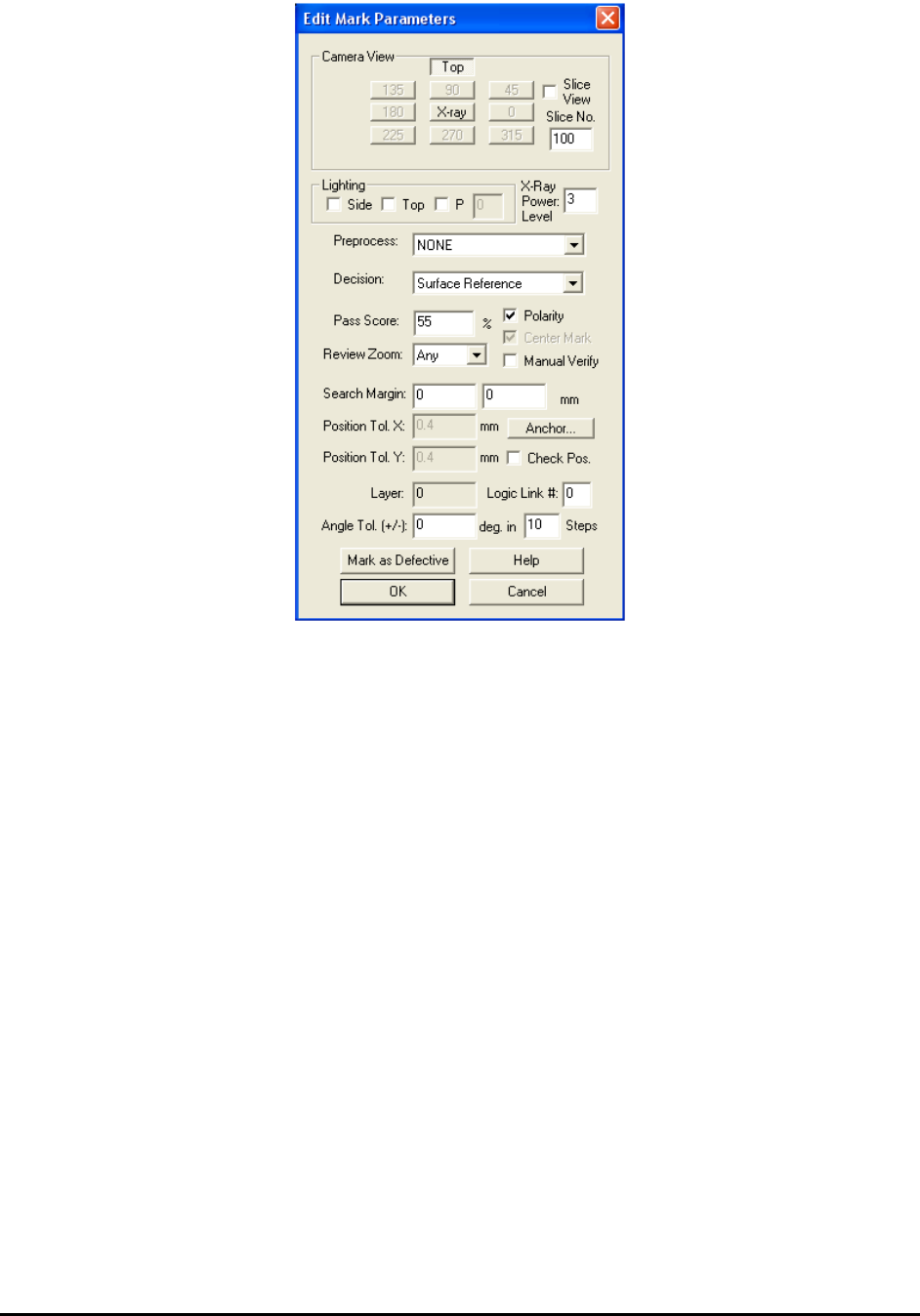
To add a laser height reference to recipe, the vision view must be selected first. When adding a
new part, make sure the Ref ID contains string “S100_REF”. The format of laser references is
like “S100_REF_N” while N is the ID of current laser reference. For example, a laser reference
with name “S100_REF_10” will have the ID of 10. When allocating laser references
automatically by using method mentioned in next sector, system will assign names to each
reference automatically, with the ID in a one-by-one increment order. When placing the
reference, under Vision View, select a clean spot which is not close to any via holes or shining
components. This spot must be close to the 3D site. The laser height measurement is a mark
inspection. When launch the Mark Parameter dialog, please make sure no Lighting is selected
and the decision is set to Surface Reference. The Laser Surface Reference Setup dialog is show
below.