00191025-01.pdf - 第287页
SIPLACE 80S/F/G User’s Manual 7 Vision Systems Edition 07/97 from S oftware Version SR.010.xx 7.6 Test Co mponent Line engi neer 7 - 95 ● With “RETURN” close the dialog box. The m odified measurem ent conditions are writ…
7 Vision Systems SIPLACE 80S/F/G User’s Manual
7.6 Test Component Edition 07/97 from Software Version SR.010.xx
7 - 94 Line engineer
7.6.5.1 Dialog Boxes "Size", "Row", "Corner", "Lead", "Grid" and "Ball"
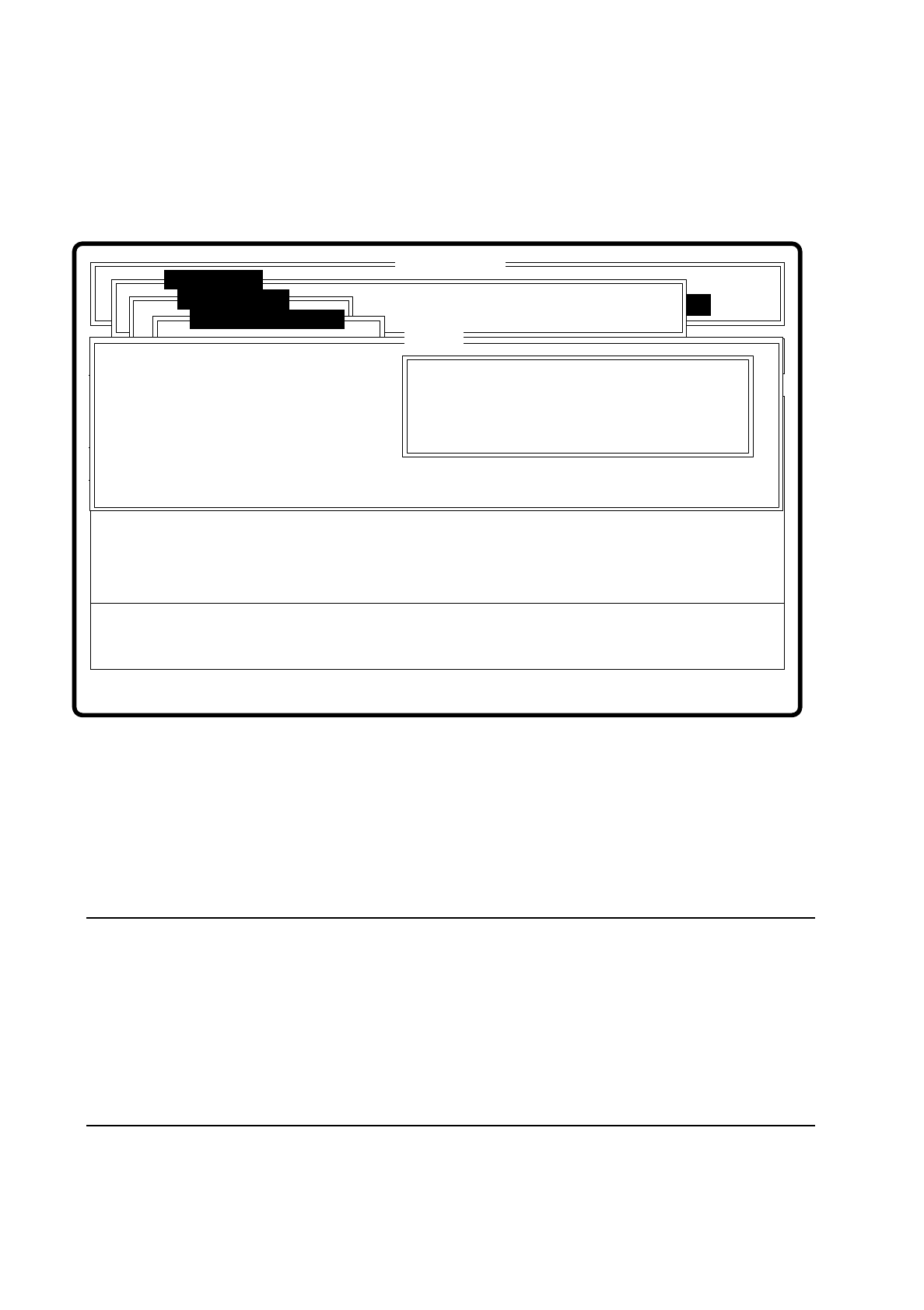
After a menu item has been selected the corresponding dialog window - "Size", "Row", "Corner", "Lead",
"Grid" or "Ball" opens. The "Corner" dialog window is shown as an example.
Fig. 7.6.23
●
With the Tab key you can toggle between option box and input box.
●
Use the arrow keys to position the cursor in the appropriate dialog box.
●
Use the space bar to mark in the option field the measurement method you have chosen. A cross is dis-
played to show that the option has been selected.
●
In the input field you can change the hex values of the measurement method and thus cater for the require-
ments of special components.
NOTE
Entering hex values presupposes considerable knowledge in measurement methodology. Explanatory
material in this connection goes beyond the scope of this operating manual. A detailed description will be
found, however, in the "MVS/EDA1 Application Manual". In this connection may we refer you in particular
to Sections III.7 "Electronic Device Alignment and Inspection: Implementation" and VII.4 "Electronic
Device Alignment and Inspection".
If you do intend to alter the hex values, then please contact the vision system development group and after
you have discussed the matter with them, enter the bit-coded hex values.
Error
State
Action
Change measure mode Corner
Rüstung:
Single functions
:
:
:
Nutzen:
SI80 V 10.x
Vision system
Vision system
Rüstung.
Test component
BE abholen
Size
Row
Lead
Corner
Change measure mode
( ) Corner driven
Esc: abort Blank: select Tab: change wind
CORNER P1 [ Hex ] :
CORNER P2 [ Hex ] :
CORNER P3 [ Hex ] :
CORNER P4 [ Hex ] :
CORNER P5 [ Hex ]:
Ret: input
Corner

SIPLACE 80S/F/G User’s Manual 7 Vision Systems
Edition 07/97 from Software Version SR.010.xx 7.6 Test Component
Line engineer 7 - 95
●
With “RETURN” close the dialog box. The modified measurement conditions are written to the GF file in
the station computer.
●
With “ESC” you can abort the dialog box without accepting data, then returning to the menu “Test compo-
nent”.
7.6.5.2 Information on the Measurement
With conventional components with lead connections, component centering is essentially based on four mea-
suring methods which aim at determining the position (x, y coordinates,
Φ
= angle of rotation) of the compo-
nent and the lead parameters:
–
Size-driven mode
–
Row-driven mode
–
Corner-driven mode
–
Lead-driven mode
For BGAs (Ball Grid Arrays) and flip chips new algorithms have been implemented for determining the position
(x, y coordinates,
Φ
= angle of rotation) of the component and the ball parameters (see also Section 7.6.3.4
Option “Measure component”):
–
Grid-driven mode
–
Ball-driven mode
Depending on your circumstances any method in this sequence can be omitted. But it is not possible to alter
their sequence.
Definition of the methods
●
Size-driven
This method was developed especially for small components. On the strength of the information on dimen-
sion parameters the position and rotation of small components is determined rapidly and reliably.
This procedure is very robust as regards defects such as color markings.
The size-driven method makes use of profile creation. It creates a profile either along the length
or
across
the width of the components. Whichever you selected can be marked in the option box with a cross. As
default the profile is always created for the longer side.
●
Row-driven
This method is based on the information for a pin row.
It is very fast and supplies approximate values for the coordinates and the angle of rotation of the compo-
nent.
●
Corner-driven (component inspection)
The measurement results provide precise information on the coordinates and rotation of the component,
the pin number, the spacing and of the row offset.
This method is not sensitive to variations in pin dimensions.
7 Vision Systems SIPLACE 80S/F/G User’s Manual
7.6 Test Component Edition 07/97 from Software Version SR.010.xx
7 - 96 Line engineer
●
Lead-driven (pin inspection)
With this method the information is obtained from examining each individual pin.
The following combinations of methods are:
–
Size-driven — corner-driven — lead-driven (see table in Section 7.6.3.5) or
–
Row-driven — corner-driven — lead-driven (see table in Section 7.6.3.5)
●
Grid-driven
(Component inspection with the 80F machine)
The measurement results provide information on the approximate coordinates and the approximate rota-
tion of the component. They also give an indication of the quality of measurement.
●
Ball-driven
(Determining the solder ball position with the 80F machine)
The measurement results provide precise information on the coordinates and the rotation of the compo-
nent. They also give information of the maximum ball offset and the quality of measurement.
7.6.5.3 Recommendations concerning the Optimum Sequence of Methods
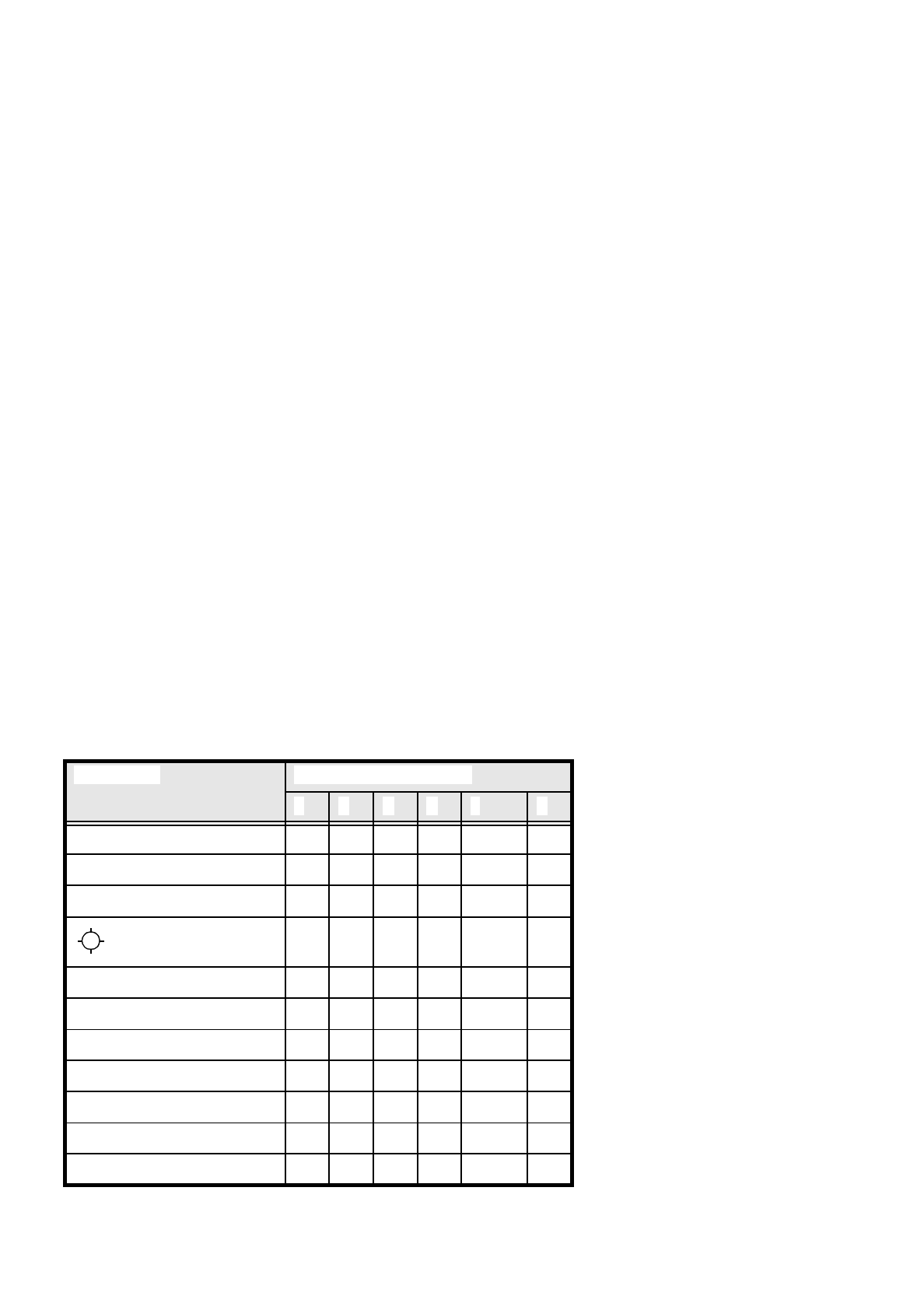
In the following table recommendations are provided for the optimum sequence of methods for components:
These are the abbreviations used:
B = ball driven
C = corner driven
G = grid driven
L = lead driven
R = row driven
S = size driven
* (L) applies to irregularly shaped components with separate windows
Component Measurement Sequence
S R G C L B
MELF S C L
CHIP S C L
SOT S C L
S L
SOJC6 S C
SOJC14 R C
LCC R C (L)
PLCC R C (L)
QFP R C (L)
TAB R C (L) *)
BGA, Flip chip G B