00191025-01.pdf - 第320页
7 Vision Systems SIPLACE 80S /F/G User’s Manual 7.11 Teach fiducial: Supplements to the G Machine Edition 07/97 from Software Version SR.010.xx 7 - 128 Line engine er
SIPLACE 80S/F/G User’s Manual 7 Vision Systems
Edition 07/97 from Software Version SR.010.xx 7.11 Teach fiducial: Supplements to the G Machine
Line engineer 7 - 127
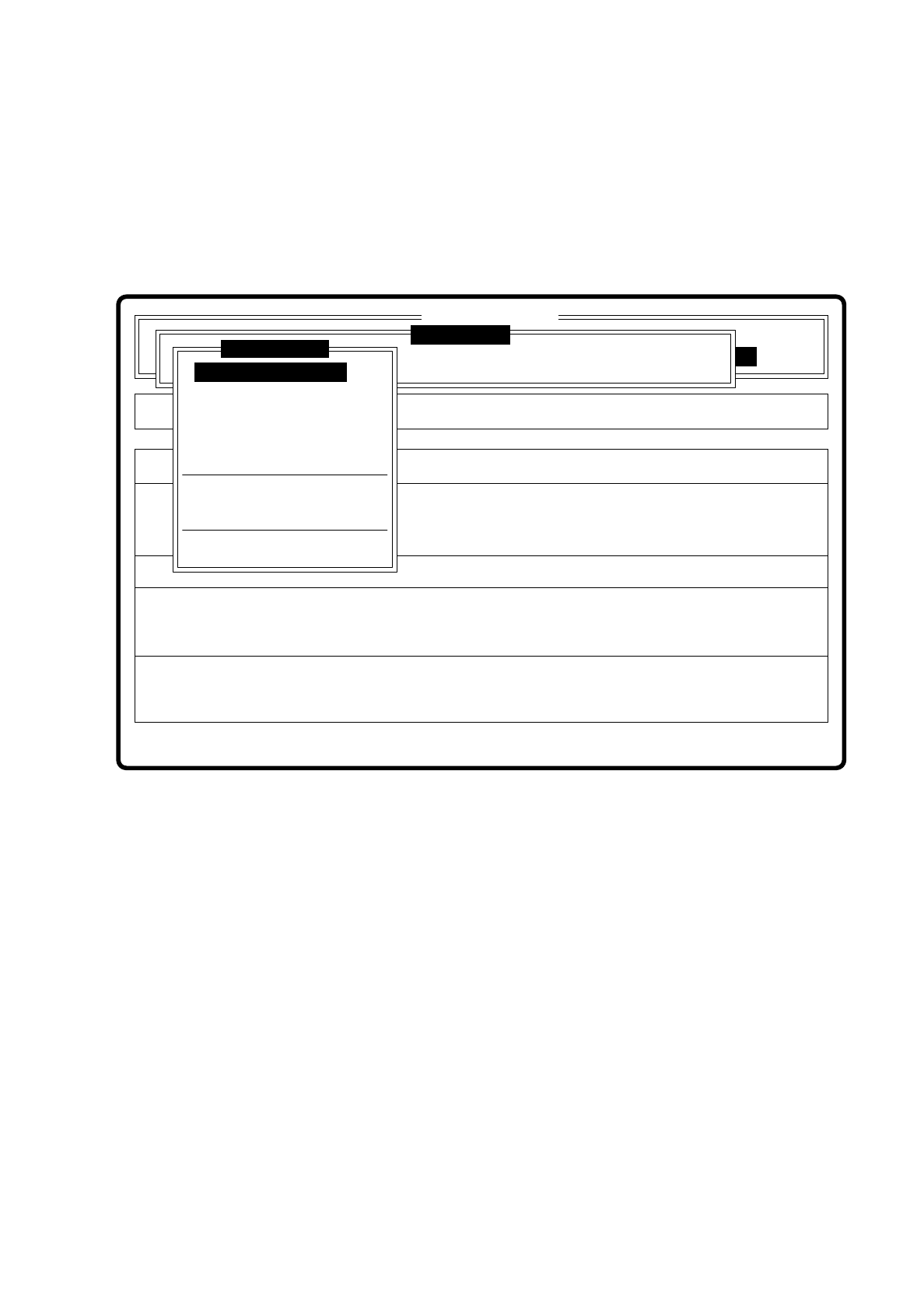
7.11 Teach fiducial: Supplements to the G Machine
All menus are identical with those of the SI80S placement system.
You will find a description of the menus and their options in Section 7.5 Teaching the Fiducial.
Fig. 7.11.1
❒
Error
State
Action
Enter fiducial number to be processed
Single functions
:
:
:
SI80G V 10.x
Vision system
Vision system
Rüstung:
Cluster:
Vision system
Version: 2133
Setup:
Enter fiducial number
New fiducial
Edit fiducial
Center fiducial
Test fiducial
Move x/y axes
PCB to center conveyor
PCB to output conveyor
Display errors
Teach fiducial

7 Vision Systems SIPLACE 80S/F/G User’s Manual
7.11 Teach fiducial: Supplements to the G Machine Edition 07/97 from Software Version SR.010.xx
7 - 128 Line engineer
SIPLACE 80 S/F/G User’s Manual 7 Vision Systems
Edition 07/97 from Software Version SR010.xx 7.5 Teaching the Fiducial
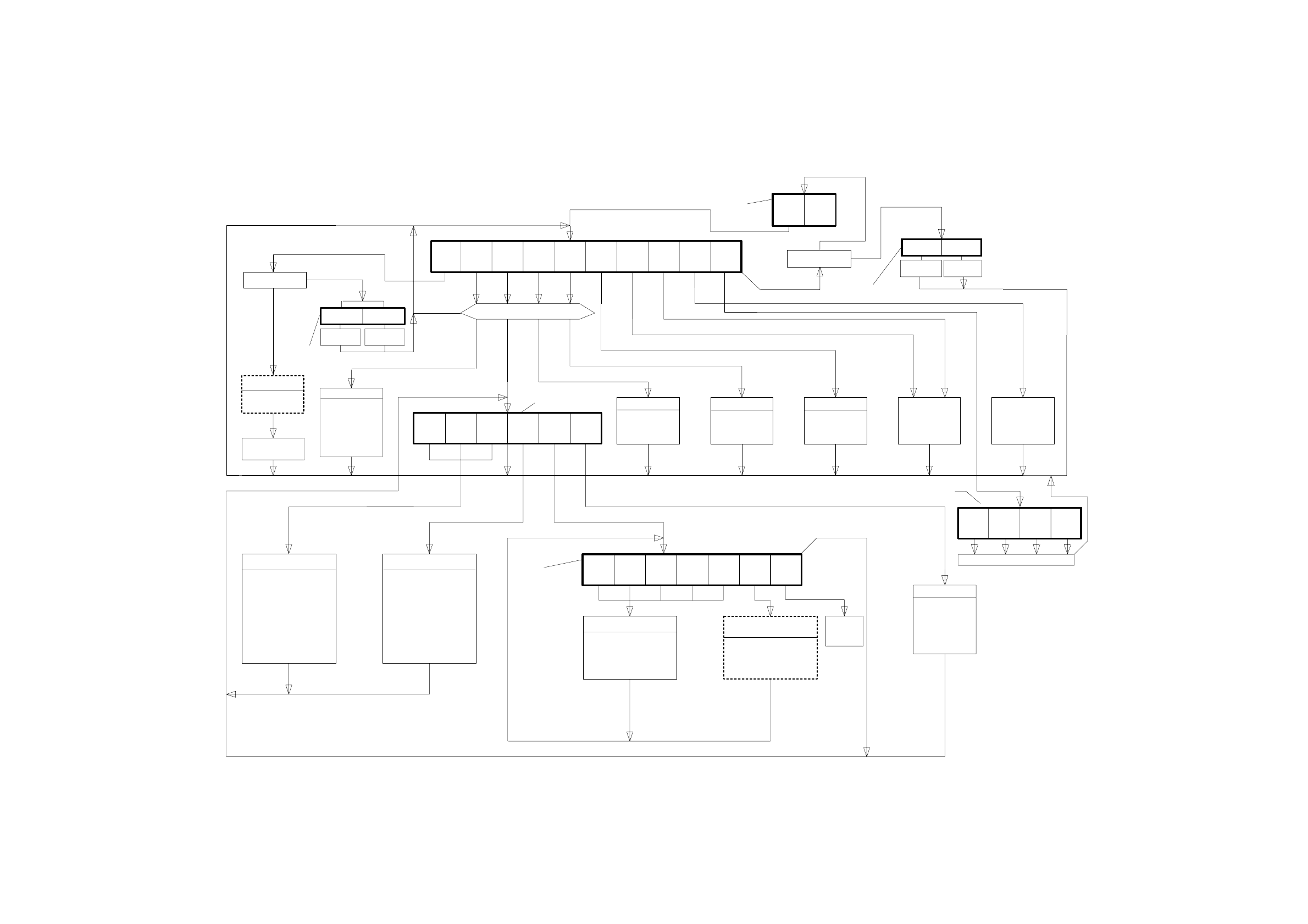
Fig. 7.5.1 Flow diagram "Teach Fiducial"
7 - 33/34
Fiducial number already entered ?
no
Fiducial processed?
Esc
Video image
Esc
Esc
Menu Options »Teach fiducial«
Esc
Fiducial processed?
Esc
Esc
Esc
Video image
Teach
fiducials
ESC
Video image
Video image
Video image
Test
comp.
Enter
fiducial
number
New
fiduc
Edit
fiducial
Center
fiducial
Test
fiducial
Move
x/y axes
PCB to
center
conveyor
PCB to
output
conveyor
Choose
gantry
Display
errors
Dialog box
Enter
fiducial number
Request for fiduc. X
+ download
Esc Ret
Esc
Key assignment
for x/y positioning
Teach message
with default values
Display of
uniqueness
Template
high res.
Template
med. res.
Template
low res.
Search
area
Color
gradua-
tion
Standard
values
Define template
window (hor./vert.)
(via MVS)
Esc Ret (save) Esc Ret (repeat)
Triggering meas.
sequence; output
fiducial quality
Video image
Display of key
assignment for
camera position.
PCB
transport
Option box
for selection of
teach gantry
Menu
"Vision system"
Video image
Key assignment for
x/y positioning.
Teach message
with default values
Display of
uniqueness
Transformation table
to be programmed
by machine setter.
Teach command
with various
grey-scale value
transformation
Esc Ret (save)
Disp. with
transf. 1
Disp. with
transf. 2
Disp. with
transf. 3
Disp. with
transf. 4
Disp. with
transf. 5
Program.
transf. 5
Key assignment for
modification of search area
is additionally displayed.
Upon any modification of
the search area a teach
message is prompted,
uniqueness value
is displayed.
Menu
"Color graduation"
Video image
Enter
default
values
Menu
"Save fiducial data"
Menu "Edit fiducial"
Menu "Teach fiducial"
Fig. 7.5.1 Flowchart "Teach fiducial"
Transf. 5
default
values
Key assignment for
modification of template
window is additionally
displayed.
Upon any modification of
the template window a teach
message is prompted,
uniqueness value
is displayed.
no
yes
Save
fiducial
Restore
fiducial
Menu
"Save fiducial data"
Menu "Display errors"
Save
fiducial
Discard
fiducial
Dialog box
Track
error
Transport
error
Machine
error
General
error
Display error list
Esc
Save
fiducial
Restore
fiducial
Save
fiducial
Discard
fiducial
yes
no
7