00191025-01.pdf - 第348页
SIPLACE 80S/F/G User’s Manual 8 Component Supply Edition 07/97 from S oftware Version SR.010.xx 8.6 Wafflepack Changer 8 - 23 filled w ith is added to the set- up. The waffl epack cha nger is define d as Loca tion 1. In …
8 Component Supply SIPLACE 80S/F/G User’s Manual
8.6 Wafflepack Changer Edition 07/97 from Software Version SR.010.xx
8 - 22
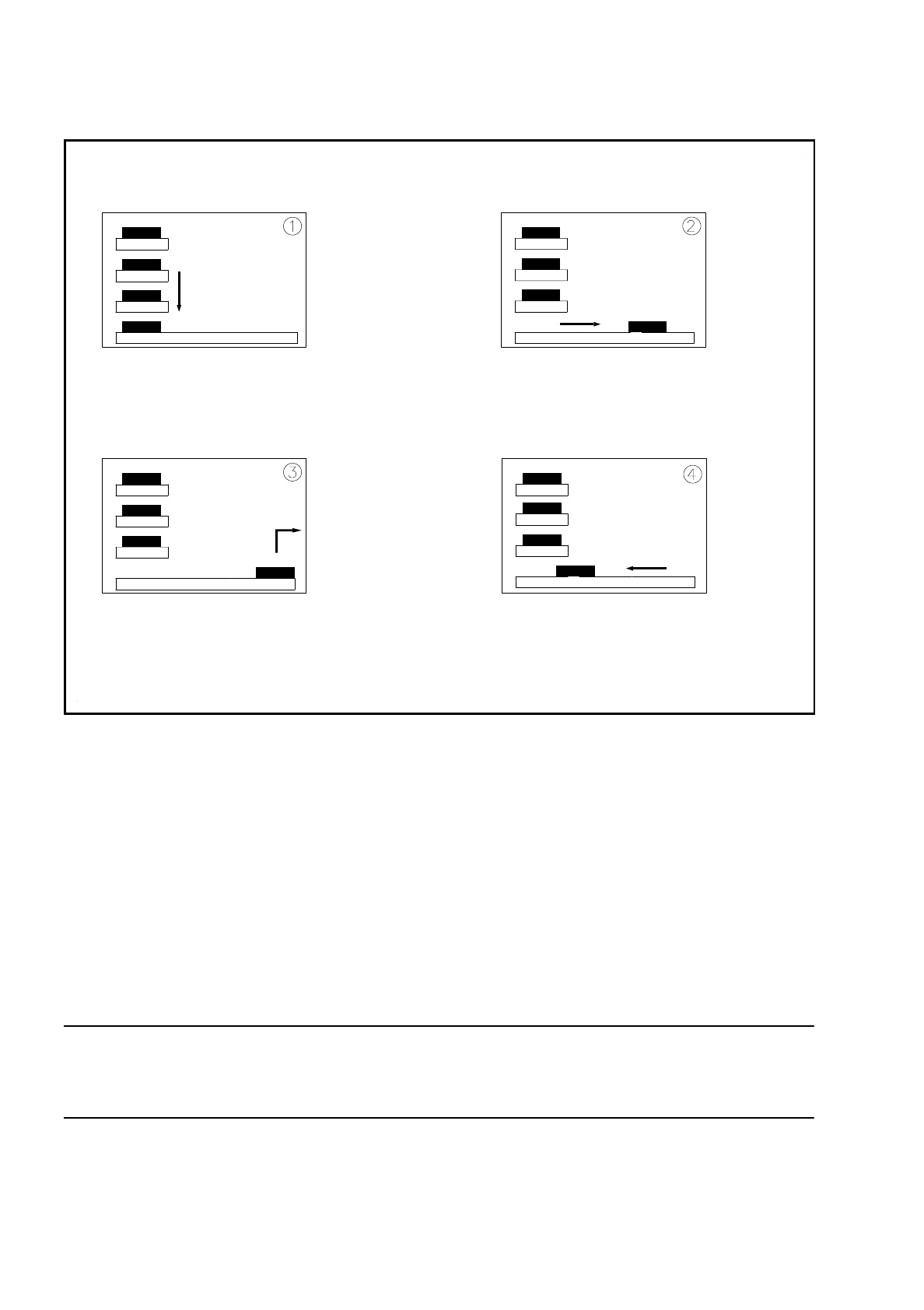
Fig. 8.6.3 Functional sequence
- Key to Fig. 8.6.3
➀
The selected level of the magazine storage unit is positioned on the feeder axis (horizontal).
➁
The tray is transferred to the access area of the placement head.
➂
The components are removed.
➃
The tray is returned again.
-
The lift in the magazine storage unit brings the magazine carrier from the selected level into position on the
horizontal feeder axis.
-
The magazine carrier with the flatpack magazine is brought into the placement head's access area.
-
Once the requisite components have been removed by the placement head, the magazine is returned in
the reverse sequence of operations.
NOTE
If the placement sequence is interrupted with the wafflepack changer being switched off, the set-up and the
current fill level will remain saved in memory.
-
If the placement sequence is restarted using the set-up which was being used when the sequence was
aborted, the placement machine will be able to pick up the next component from the point where it picked
up the previous one.
-
The position of the magazine carriers in the flatpack magazine storage unit and the components they are
SIPLACE 80S/F/G User’s Manual 8 Component Supply
Edition 07/97 from Software Version SR.010.xx 8.6 Wafflepack Changer
8 - 23
filled with is added to the set-up. The wafflepack changer is defined as Location 1. In this connection see
UNIX line computer user manual, under "Station editor".
8.6.4 Inserting the Magazine Carriers
The magazine carriers are monitored to make sure they are in the correct position in the magazine storage
unit.
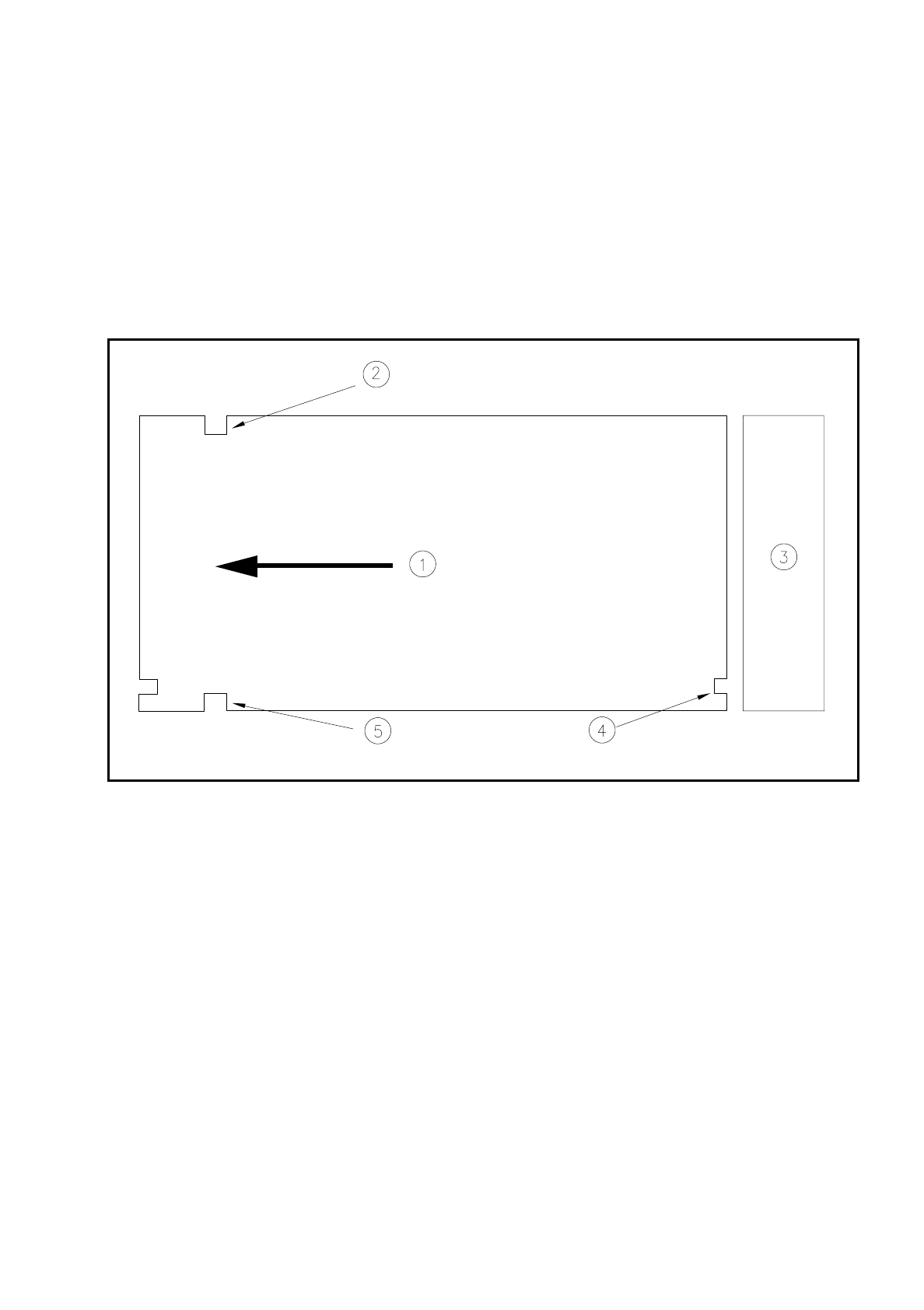
Fig. 8.6.4 Position of the magazine carriers - top view
- Key to Fig. 8.6.4
➀
Transport direction
➁
Driver notch
➂
Magazine storage unit
➃
Check notch
➄
Driver notch
It should be noted here that the driver notches in the magazine carriers are inserted forwards with respect to
the direction of transport (see Fig. 8.6.4).
The check notches of the individual magazine carriers must be positioned one above the other and point in
the direction of the magazine storage unit.

8 Component Supply SIPLACE 80S/F/G User’s Manual
8.6 Wafflepack Changer Edition 07/97 from Software Version SR.010.xx
8 - 24
8.6.5 Control and Display Elements
The wafflepack changer has an EMERGENCY STOP switch and a switch for changing the speed. These two
control elements are located on the machine base at the rear of the wafflepack changer.
●
Key
slow
With flatpack magazines carrying small components which could fall out of their pockets if the flatpack
magazine moves quickly, it is possible to reduce the speed for the flatpack magazine. Press the Slow
key
.
All flatpack magazines will now travel at a slower speed.
●
Switch
- EMERGENCY STOP
Press the EMERGENCY STOP
switch
. The power supply will be switched off and the entire system shut
down.
8.6.6 Safety Features
●
Switch - EMERGENCY STOP
The entire system with, for example, SIPLACE 80F and wafflepack changer is immediately stopped. At this
point placement can be continued or aborted. Make sure that all boards have been completely assembled.
●
Safety Door
Once the safety doors are opened the wafflepack changer is switched into a de-energized state and the
wafflepack changer's operational sequence stopped. Upon the safety door being closed the wafflepack
changer resumes operations.
CAUTION
∆
!
The wafflepack changer safety door should not be opened while a component is being picked up from the
wafflepack changer.