00191025-01.pdf - 第404页
SIPLACE 80S/F/G User’s Manual 9 Maintenance Edition 07/97 from S oftware Version SR.010.xx 9.5 Revolver Head, Segment V ersion 2 (New N ozzle Seat) 9 - 45 ● Now ca rry out C com pensation by select ing "Compe nsate …
9 Maintenance SIPLACE 80S/F/G User’s Manual
9.5 Revolver Head, Segment Version 2 (New Nozzle Seat) Edition 07/97 from Software Version SR.010.xx
9 - 44
●
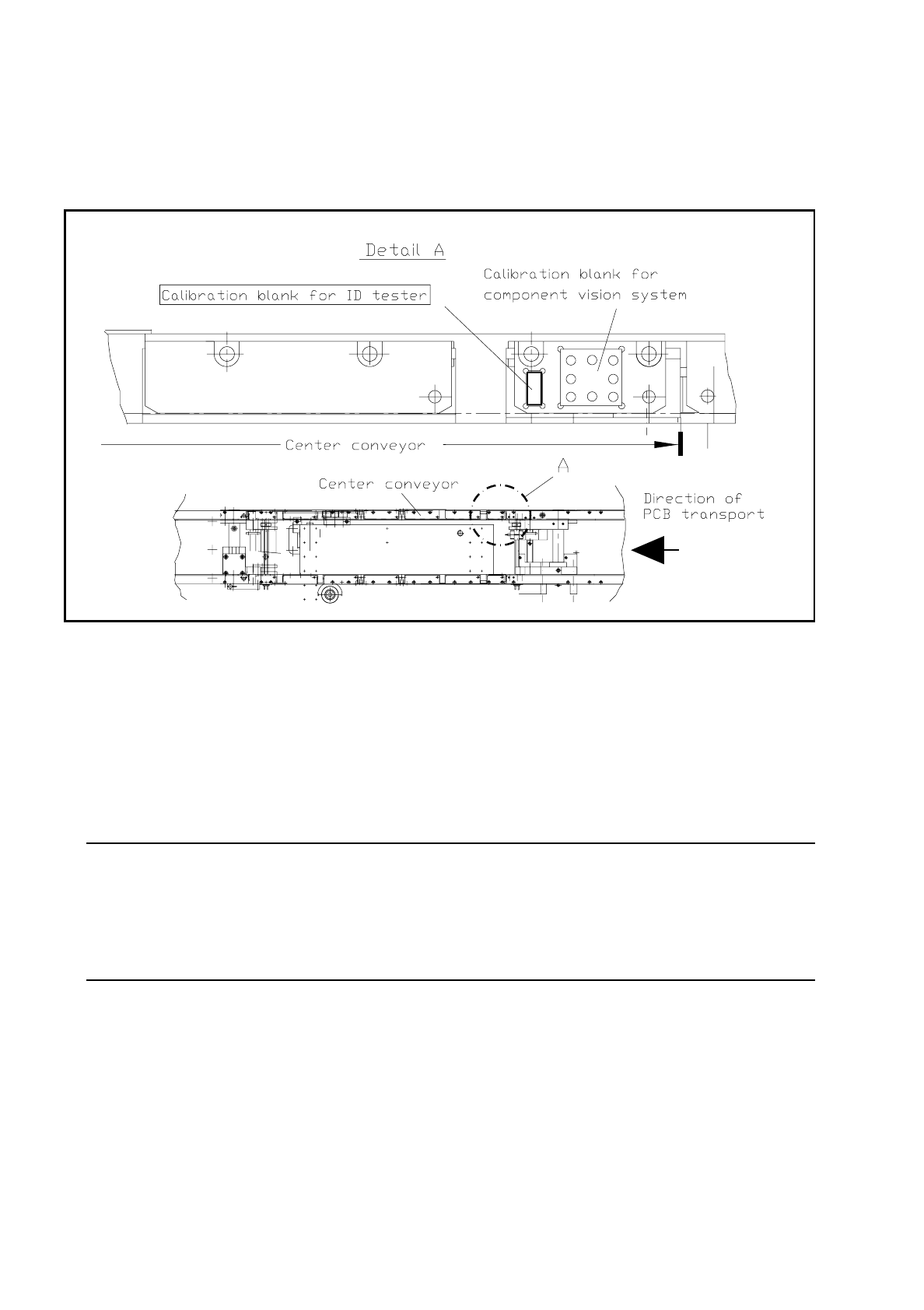
Before carrying on with your work check to see whether the "Calibration unit RLCD is in the pocket on the
right-hand front part of the fixed side of the center PCB conveyor (see Fig. 9.5.1). The calibration unit must
be greasefree to ensure optimum electrical contact.
Fig. 9.5.1 Provision of the calibration unit for identity testing on the fixed side of the PCB conveyor
9.5.2.1 Sequence of Operations
●
From the main menu select with the aid of the cursor + return: Single functions
→
Gantry 1
●
Then select "Star head"
→
"Tester".
●
Open the protective cover and with the aid of tweezers insert the calibration unit (which has been cleaned
with alcohol) into the pocket on the PCB conveyor (see Fig. 9.5.1).
NOTE
The calibration unit for the identity tester will not be required for the following C compensation, in other
words, not inserted!
But in principle C compensation can also be carried out with a calibration unit inserted as the jaws remain
open during C compensation.

SIPLACE 80S/F/G User’s Manual 9 Maintenance
Edition 07/97 from Software Version SR.010.xx 9.5 Revolver Head, Segment Version 2 (New Nozzle Seat)
9 - 45
●
Now carry out C compensation by selecting "Compensate C" and compare the actual value displayed on
the screen with the required value for C compensation in the following table.
–
If the values are different there is a fault in the identity tester or in the test set-up between tester and
testing jaws of the mechanical centering station. Fault correction will be carried out by the SMD ser-
vice department of Siemens AG.
●
Next carry out the R and L compensations ("Compensate R", "Compensate L"):
NOTE
To carry out R and L compensation the calibration unit for the identity tester must be in position so that the
plus and minus testing jaws of the mechanical centering station are electrically connected to each other.
The calibration unit is automatically removed when the tester menu is quit.
●
Select first the function "Pick up calibration unit" and after that "Compensate R". Compare again the
value displayed with the corresponding value in the table.
●
Finally select L compensation. The calibration unit remains in position here as the jaws must again
remain connected to the electric wire.
●
Compare again the actual value obtained with the corresponding required value in the table.
NOTE
The compensation values obtained are required as initial values for CRDL testing in the placement
sequence and are therefore automatically saved.
●
Quit the "CRDL" menu by pressing the
"Esc"
key: the calibration unit is now returned automatically to
the pick-up point.
●
Quit the "Star head" menu by pressing the
"Esc"
key.
●
Now with the SIPLACE 80 S machine carry out - analogously to the above description - maintenance
of the identity tester-CRDL 2:
●
Select "Single functions"
→
"Gantry 2"
→
"Star head"
→
"CRDL" and proceed analogously to the
operations described above for gantry 1.

9 Maintenance SIPLACE 80S/F/G User’s Manual
9.5 Revolver Head, Segment Version 2 (New Nozzle Seat) Edition 07/97 from Software Version SR.010.xx
9 - 46
NOTE
The required compensation values for testers 1 and 2 are identical.
The tolerance of the identity tester in the machine, including the entire set-up together with the testing jaws,
amounts to 5 % in each test range.
●
If, despite properly performed C, R, and L compensation, components are still rejected during placement
with identity errors, then to location the fault first check the components with known values and compare
the SETPOINT with the ACTUAL values. If they differ it may be the cause that there is a fault in the identity
tester. This fault can only be corrected by the SMD service department of Siemens AG.
9.5.3 Removal and Reinstallation of the Housing Complete with Star
9.5.3.1 Removal of the Housing Complete with Star
NOTE
Be aware that after reinstallation of the "Housing complete with star" assembly you will require the SIPLACE
test program for the "concluding work".
In the following maintenance work do not apply any grease or oil to the jaws of the centering station.
Do not hold the centering station by the jaws or jaw levers.
●
Remove all segments, as described in the section 9.5.10 Segments, Version 2.
DANGER
∆
!
∆
!
∆
!
Switch the automatic placement system off at the main switch and disconnect from the power supply.
●
Switch off the machine at the main switch.
●
Switch off the compressed air at the supply system.
●
Open the sliding safety doors.
Work to be carried out
Function to be selected
at the computer
(Cursor + Return)
Required value
displayed
on the screen
Comment
C compensation Compensate C < 5.0 pF
Without calibration unit
for identity tester
R compensation Compensate R < 0.5
Ω
With calibration unit for
identity tester
L compensation Compensate L < 0.1
µ
H
With calibration unit for
identity tester
Tab. 9.5.1 Table for checking the compensation values