00191025-01.pdf - 第441页
9 Maintenance SIPLACE 80S /F/G User’s Manual 9.6 IC Head (SIPLACE 80F) Edition 07/97 from Software Version SR.010.xx 9 - 82 Sequen ce of work in Fig. 9.6. 7 A C lean the o-r ing with alcoho l and gr ease sparingl y with …

SIPLACE 80S/F/G User’s Manual 9 Maintenance
Edition 07/97 from Software Version SR.010.xx 9.6 IC Head (SIPLACE 80F)
9 - 81
Key to
Fig. 9.6.6
1 View in the direction of fitting of the placement head
2 Vacuum nozzle
3 IC head
4 Valve (vacuum)
5Block
6 Compressed air supply line
Sequence of work in
Fig. 9.6.6
A Slide the red ring on the quick-release connection downwards and pull off the compressed-air hose.
B Disconnect the plug connection at the solenoid valve.
C Unscrew and remove the two M3 hexagon socket screws which fasten the valve with block to the vacuum
generator.
D Lift the solenoid valve together with the block upwards and off.
E Pull the vacuum nozzle vertically upwards and out and carry out maintenance on it (see 9.6.5.2).
F Fit the vacuum nozzle back in the reverse sequence.
Fig. 9.6.7 Cleaning the vacuum nozzle and o-rings
Key to
Fig. 9.6.7
1 Maintenance of the vacuum nozzle assembly
2 The vacuum nozzle assembly removed

9 Maintenance SIPLACE 80S/F/G User’s Manual
9.6 IC Head (SIPLACE 80F) Edition 07/97 from Software Version SR.010.xx
9 - 82
Sequence of work in
Fig. 9.6.7
A Clean the o-ring with alcohol and grease sparingly with Unisilkon L250L.
B Clean outside and inside diameter of the plastic hose.
C Clean the annular groove.
D Clean the venturi nozzle.
●
Fit the vacuum generator back in the reverse sequence.
●
Turn on the compressed air at the stop valve of the compressed air unit and switch the machine on.
●
Check the operating pressure (see Figures 9.3.5 and 9.3.6) and fit the cover back on the machine base.
9.6.6 Maintenance of the Nozzles
Carry out maintenance of the nozzles following maintenance of the pick-up star.
9.6.6.1 Preparatory Work
NOTE
The item numbers of the nozzles and diaphragms will be found in Section 9.6.7, Page 9 - 87.
Material and equipment: Nozzle removal tool, Item No. 00311448-01
You will already have returned the current nozzle to the nozzle changer by selecting
Single functions →
Gantry 1 → IC head
→ Return (nozzle)
.
●
Make a note of the nozzle types and corresponding garage numbers. You will need these allocations later
for refitting the nozzles. Specification of the garage numbers is shown in Fig. 9.6.11.
●
Remove all nozzles from the nozzle changer with the aid of the nozzle removal tool. Proceed as shown in
Fig. 9.6.8.
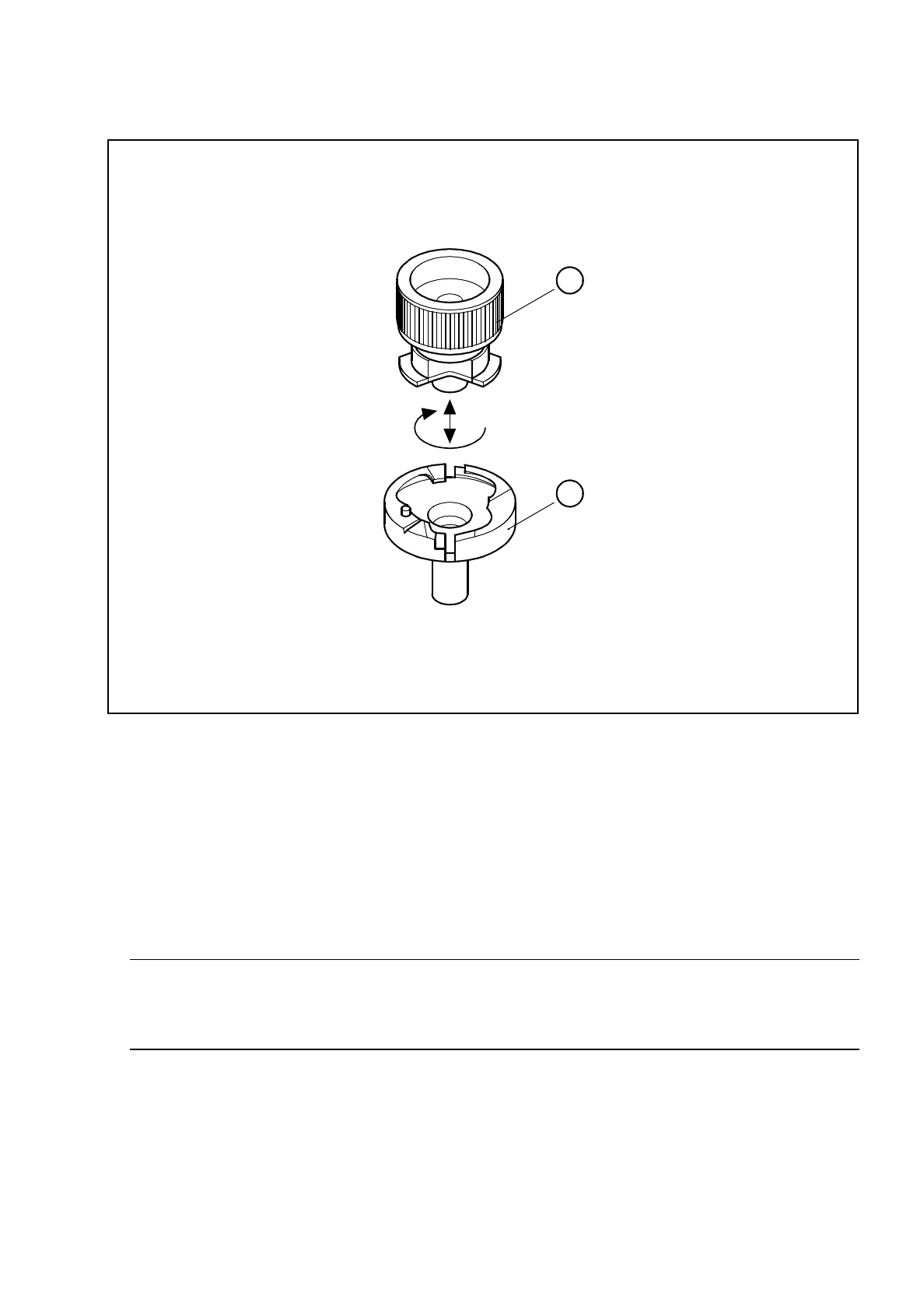
Key to
Fig. 9.6.8
1 Nozzle removal tool
2 Nozzle in the nozzle changer
3 Direction of rotation: lock the nozzle after inserting it in the nozzle changer
Sequence of work in
Fig. 9.6.8
- nozzle removal
A Insert the tool into the nozzle.
B To unlock the nozzle in the nozzle changer, turn the tool anticlockwise.
C Lift the tool off.
D Pull the unlocked nozzle out of the nozzle changer.
SIPLACE 80S/F/G User’s Manual 9 Maintenance
Edition 07/97 from Software Version SR.010.xx 9.6 IC Head (SIPLACE 80F)
9 - 83
Fig. 9.6.8 Removing the nozzle from the nozzle changer
9.6.6.2 Checking and Maintaining the Nozzles
●
Carry out maintenance of the nozzles as shown in Fig. 9.6.9.
●
Check the nozzles and the diaphragms and replace any damaged diaphragm.
Please refer to Fig. 9.6.10 for the procedure for replacing diaphragms. The item numbers for the dia-
phragms are given in Tab. 9.6.1, Page 87. For maintenance of the diaphragms you will require talcum
powder (see Tab. 9.2.9, Page 14).
NOTE
Rubbing over with talcum prevents components sticking to the diaphragm after being set down on the
board. The diaphragm must not come into contact with spirit or alcohol.
●
Check the suction faces of the nozzles without diaphragm: if you detect damage use the corresponding
new nozzles. For the item numbers, see Fig. 9.6.11, Page 9 - 87.
1
2