00194614-08 Trainingsdoku. SG X-Serie_X4i SW70x (AL2)_EN.pdf - 第127页
Communication and Control One Wire Bus One Wire Bus - Structure 127 Student Guide SIPLACE X-Serie and X4I SW70x (AL2) Legend: See also 4.3.10.1 DIP Switch on Main and Subdistributor (for Version -03 ) [ ➙ 107] One Wir …
Communication and Control
One Wire Bus - Structure One Wire Bus
Student Guide SIPLACE X-Serie and X4I SW70x (AL2) 126
A repeat initialization can be performed with the CACCIA tool (see Function Control and Troubleshooting
for Service Work).
One Wire Bus Components
4.5.1.4 One Wire Bus Components
Assemblies:
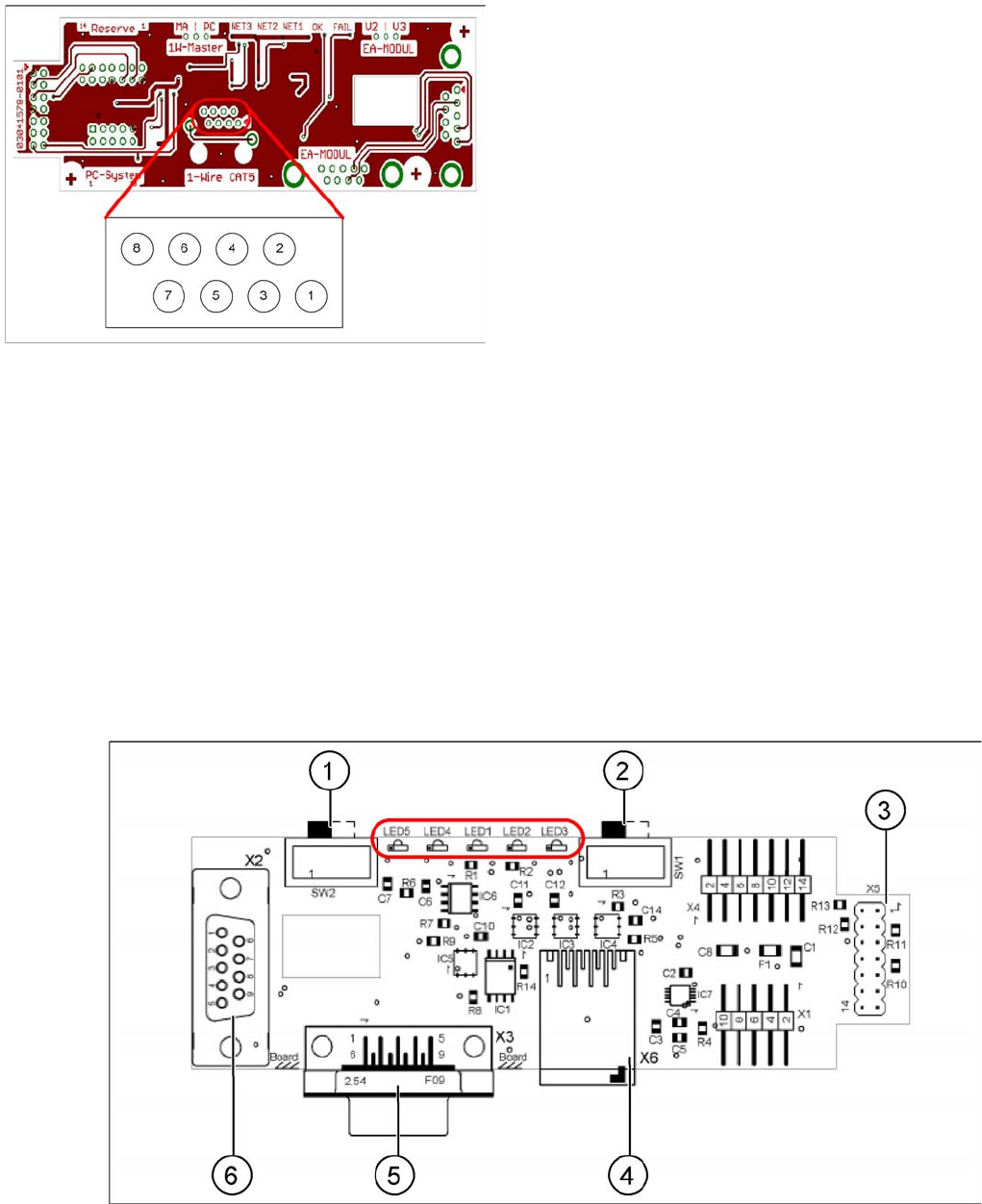
1. Interface 1-Wire CAT5 on the SUB/MAIN module
2. 1 wire CAT 5 Gantry on the trailing interface (board between CAN bus and trailing interface)
3. 1 set of temperature sensors (replacement only as a set, due to serial number)
4. EEPROM for gantry recognition
Interface 1-Wire CAT5
Interface 1-Wire CAT5
Interface 1-Wire CAT5 on the SUB/MAIN module (version 02) [03041578-01]
Interface 1-Wire CAT5
Legend
1. NC row 1 gantry 1/3
2. NC row 2 gantry 1/3
3. Temperature sensors gantry 1
4. Temperature sensors gantry 4
5. NC row 1 gantry 2/4
6. NC row 2 gantry 2/4
7. 24 V
8. GND
For initial analysis, the 5 V level can be measured at the
1-Wire-CAT5 connector of the interface.
The 24 V at pin 8 can be measured at the old 1-Wire and
serves as voltage supply for the nozzle changers. The
24 V are fed into the 1-Wire distributor. However, this is
not used at the interface.
Communication and Control
One Wire Bus One Wire Bus - Structure
127 Student Guide SIPLACE X-Serie and X4I SW70x (AL2)
Legend:
See also
4.3.10.1 DIP Switch on Main and Subdistributor (for Version -03) [ ➙ 107]
One Wir e CAT5 G antry Boar d
One Wire CAT5 Gantry Board
Tempera ture Sen sors and Gantry Rec ognition (EEPROM )
Temperature Sensors and Gantry Recognition (EEPROM)
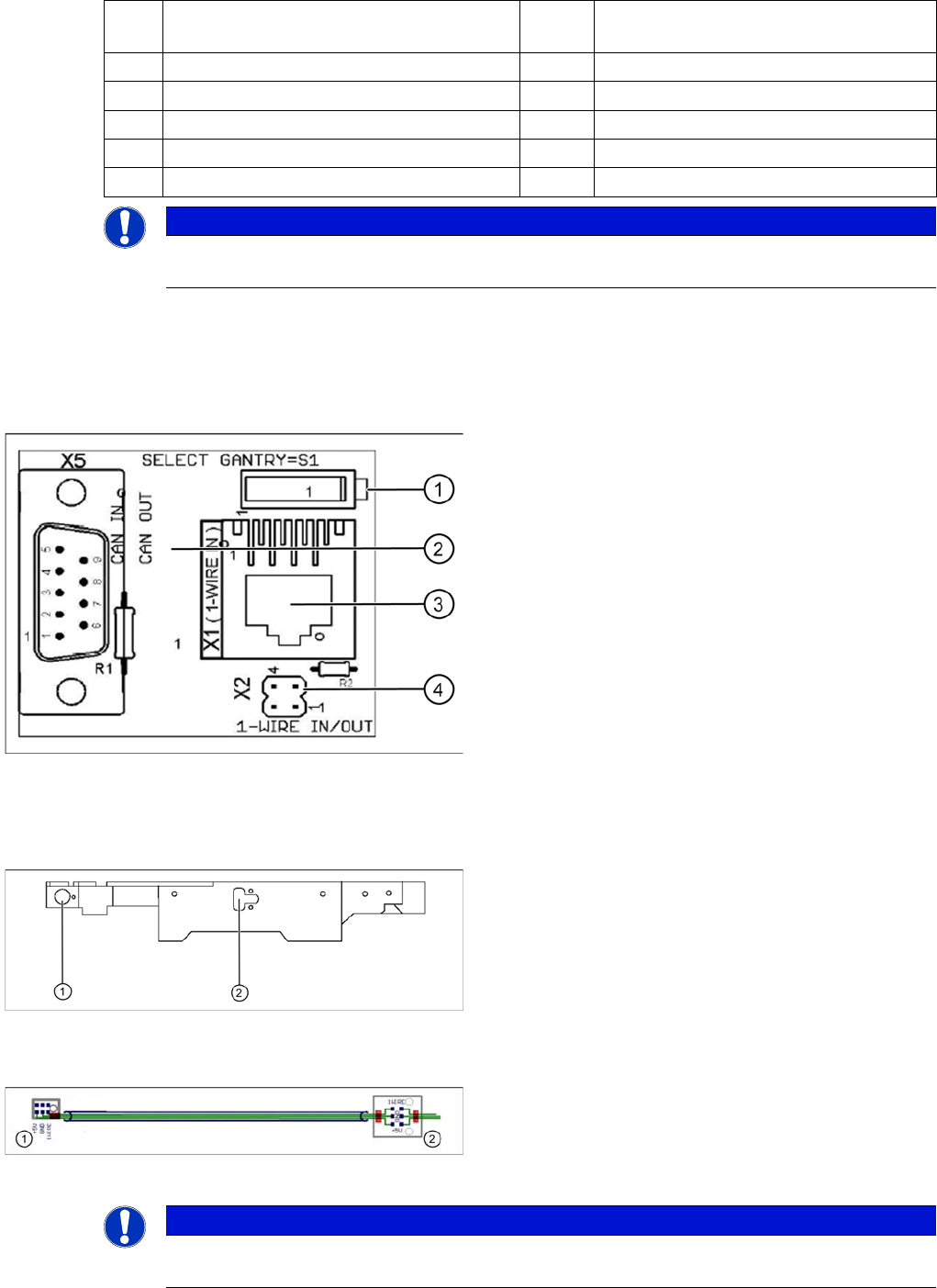
1 MA / PC switch must be set to MA
(machine)
LED 1 NC 1/3
2 Switch must be set to V2 LED 2 Temperature sensors
3 Interface 1-Wire CAT5 LED 3 NC 4/2
4 Connector CAT5 cable LED 4 Green "OK"
5 CAN Bus interface to the machine LED 5 Green "Error"
6 CAN Bus Interface to I/O module
NOTICE
In version 03, this board is integrated into the I/O module and settings are made with the DIL
switch of the I/O module.
One wire gantry board [03042214-01]
1 wire CAT 5 Gantry on the trailing interface (board
between CAN bus and trailing interface)
Legend:
1. Switches:
Position down = gantry 1/2,
position up = gantry 3/4
2. This board is located directly on the CAN bus
connector of the trailing interface.
3. Connector CAT5 cable direct from the 1 wire CAT5
interface
4. Connection to the second Gantry in the placement
area
Position of temperature sensors on the head assembly
plate (assembly side of placement head)
1 set of temperature sensors (replacement only as a set)
Legend
1. Temperature sensor on the PCB camera
2. Temperature sensor/ EEPROM gantry recognition
Temperature sensors / gantry recognition
Legend
1. Temperature sensor on the PCB camera
2. Temperature sensor/ EEPROM gantry recognition
NOTICE
The temperature sensors are directly connected to the connector X20 or X21 on the head
interface C500. Either one of these connectors can be used.
Communication and Control
Function Control and Troubleshooting for Service Work One Wire Bus
Student Guide SIPLACE X-Serie and X4I SW70x (AL2) 128
Function Cont rol and Troubleshooting fo r Service Wor k
4.5.2 Function Control and Troubleshooting for Service Work
This section provides an overview of how to assign the one wire bus subsystems to the relevant
hardware assemblies, enabling a structured approach to service work.
With the help of the Cacciatool, all subsystems on the one wire bus can be checked.
Subsystem Query i n PA1
4.5.2.1 Subsystem Query in PA1
▪ Connect the service laptop to the machine CAN bus at PA1.
Make sure that the cable to channel 1 is connected to PA 1 and that the transceiver is connected to
channel 2 of the Kvaser Card or switch off the query for the transceiver at channel 2 in the Change
Properties .
▪ Start the Caccia software and check the machine configuration and the language set in Caccia.
▪ This can be opened by double-clicking on the Subsystem control center.
NOTICE
All the CAN bus commands listed in this section are also equally applicable for the SIPLACE
X4I, even if the NC and the reject bin are no longer controlled or monitored by the one wire bus.
Change Properties Change Machine
Configuration
Open Subsystem Control
Center
NOTICE
Caccia
CACCIA is only fully supported in English. Functions may be missing in the other languages.