00194614-08 Trainingsdoku. SG X-Serie_X4i SW70x (AL2)_EN.pdf - 第135页
Communication and Control One Wire Bus One Wire Bus SIPLACE X Machine 135 Student Guide SIPLACE X-Serie and X4I SW70x (AL2) ▪S e l e c t Send ▪ Acknowledg e: 6a 00 00 --> reject bin not present 6a 00 01 --> reject …

Communication and Control
Function Control and Troubleshooting for Service Work One Wire Bus
Student Guide SIPLACE X-Serie and X4I SW70x (AL2) 134
► (4) Select Send.
The relevant NC should now open or close, as required.
CAN Bus Commands for the Status Query Open/Close
CAN Bus Commands for the Status Query Open/Close
➢ Preparation: see subsystem queries.
► Open the network window.
► Select the address range Add All . At Current Range you will see 0-7ff.
► Enter the CAN ID for the relevant CAN bus path.
Placement area 1: 07d0
Placement area 2: 07c0
► Enter the command with spaces
6a 30 --> command for status request
04 --> Gantry 4
01 --> NC row 1
► Select Send
The answer in the network window appears with the command entered and the following answer.
▪ 6a 00 01
6a --> repeats the command
00 --> command was understood
01 --> NC is closed/00 --> NC is open
CAN Bus Commands for the Status Request "Nozzle Changer Magazines Present for C&P20 A"
CAN Bus Commands for the Status Request "Nozzle Changer Magazines Present for C&P20A"
▪Command: 6a 33 04 01
6a 33 --> command for status request NC magazines
04 --> Gantry 4
01 --> NC row 1
▪Select Send
▪ Acknowledge:
6a 00 7f --> all magazines present
6a 00 xx --> one or more magazines missing
CAN Bus Commands for the Status Query Reject Bin Components
CAN Bus Commands for the Status Query Reject Bin Components
▪Command: 6a 31 04
6a 31 --> command for status request component reject bin
04 --> Gantry 4
▪Select Send
▪ Acknowledge:
6a 00 00 --> reject bin not present
6a 00 01 --> reject bin present
CAN Bus Commands for the Status Query Reject Bin Nozzles
CAN Bus Commands for the Status Query Reject Bin Nozzles
▪Command: 6a 32 04
6a 32 --> command for status request component reject bin
04 --> Gantry 4
CAUTION
Direct CAN bus commands should only be used by specially trained and qualified service
technicians.

Communication and Control
One Wire Bus One Wire Bus SIPLACE X Machine
135 Student Guide SIPLACE X-Serie and X4I SW70x (AL2)
▪Select Send
▪ Acknowledge:
6a 00 00 --> reject bin not present
6a 00 01 --> reject bin present
CAN Bus Commands For Checking the Temperature Sensors
CAN Bus Commands For Checking the Temperature Sensors
▪Command: 6e 11 01 01 28 10
6e 11 --> command
01 --> not def.
01 --> Gantry 1
28 --> Subsystem temperature
10 --> Temperature sensor at top, on the head plate (16)
▪Select Send
▪ Acknowledge: 6e 00 1c 4b -->
6e 00 --> command
1c --> Temperature value 1c hex --> 28°C
▪Command: 6e 11 01 01 28 11
6e 11 --> command
01 --> not def.
01 --> Gantry 1
28 --> Subsystem temperature
11 --> Temperature sensor at bottom, on the head plate (17)
▪Select Send
▪ Acknowledge: 6e 00 1d 4b -->
6e 00 --> command
1d --> Temperature value 1d hex --> 29°C
CAN Bus Com mands for Ini tializing the One Wire Bus
CAN Bus Commands for Initializing the One Wire Bus
▪Command: 3d 01
3d 01 --> initialization command
▪Select Send
▪ Acknowledge: 3d 00 01 Initialization successful.
One Wire B us SIPLACE X Ma chine
4.5.3 One Wire Bus SIPLACE X Machine
The structure of the SIPLACE X and X4I machines has been changed. This results in a different
hardware structure of the bus system and the subsystems to the hardware components.
During the initialization procedure, the subsystems independently log themselves on to the one wire bus
via the public byte. The public byte is sent via the CAN ID +3hex of the relevant subsystem. If the state
of a subsystem changes, the subsystem reports automatically and without a request from the
application.
See also
4.5.2.1.1 Allocation of Subsystems to the Hardware Components [ ➙ 130]
NOTICE
The reject bins request is sent via the message loop. This means that you must first close the
whole security loop (table, cover,...) before the software can check and display the state of the
message loop (e.g.missing reject bins).
Communication and Control
One Wire Bus SIPLACE X Machine One Wire Bus
Student Guide SIPLACE X-Serie and X4I SW70x (AL2) 136
One Wir e Communication
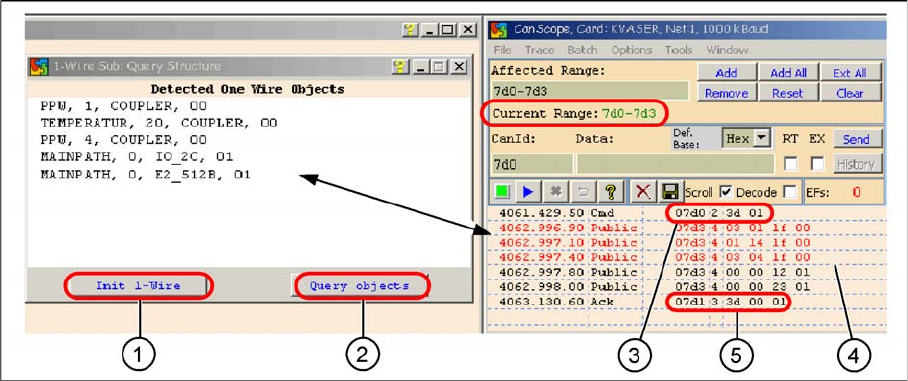
4.5.3.1 One Wire Communication
Communication with the one wire interface RS232 on the I/O module
Legend
1. Init 1 Wire sends the command via the CAN ID 7d0 (PA1)
2. Query objects shows the decoded public bytes.
3. Net window: 07d0 3d 01 Command initialization for the one wire bus.
4. 5 public bytes from subsystem 1-Wire CAT5 interface on the I/O module
1. 03 01 1f 00 --> 03 Subsystem NC / 01 Gantry / 1f Coupler
2. 01 14 1f 00 --> 01 Subsystem temperature gantry 1/4 / 14 1k EEPROM / 1f Coupler
3. 03 04 1f 00 --> 03 Subsystem NC / 04 Gantry / 1f Coupler
4. 00 00 12 01 --> 12 I/O component and EEPROM
5. 00 00 23 01 --> 23 4k EEPROM
5. Acknowledge (Ack) command CAN ID +1hex --> 3d 00 01