00194614-08 Trainingsdoku. SG X-Serie_X4i SW70x (AL2)_EN.pdf - 第248页
C&P20A Board Descriptions for C&P20A Settings Student Guide SIPLACE X-Serie and X4I SW70x (AL2) 248 Settin gs 7.5 Settings Board D escriptio ns for C&P 20A 7.5.1 Board Descriptions for C&P20A Head Adapter…
C&P20A
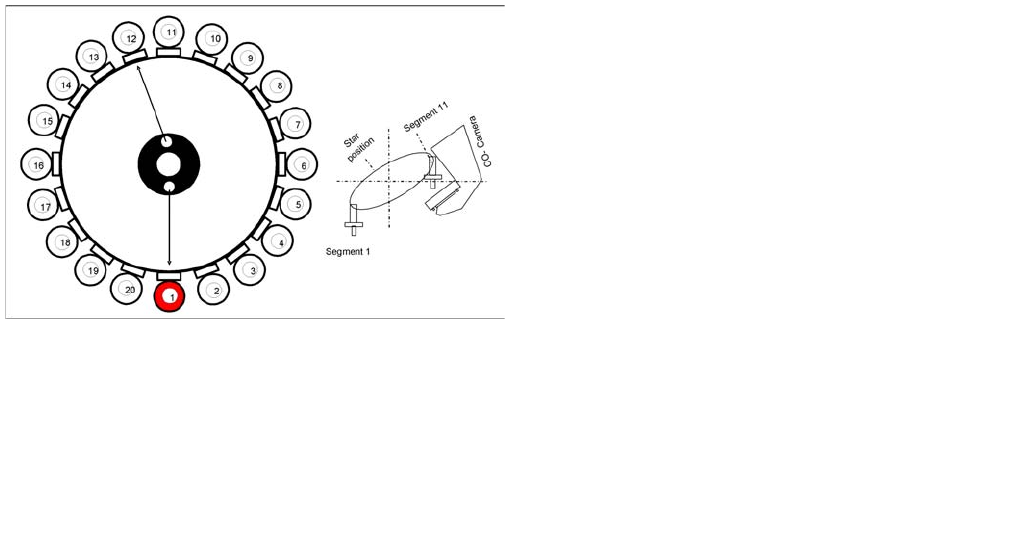
Pickup and Placement Cycle for C&P20A Standard Mode - Placement: Z Axis Up
247 Student Guide SIPLACE X-Serie and X4I SW70x (AL2)
Standard Mode - Placement: Z Axis U p
7.4.26 Standard Mode - Placement: Z Axis Up
Optical Nozzle Query
7.4.27 Optical Nozzle Query
▪ After the reference run, the gantries move into the wait position and performs the first nozzle
scanning. During the production, a nozzle scanning run is performed after 350 head cycles (can be
set by SIPLACE service if required) and after the completion of the board currently processed. This
ensures that the nozzle quality is continually checked during the production process:
– All nozzles listed in the scan parameters of the station database will be measured by the
component camera.
– If there is any deviation from the defined size, shape or brightness, the machine will show the
message: Nozzle worn down or contaminated.
▪ Tiny nozzles may touch the solder paste or the glue because of component shift and the minimum
component height.
▪ The number of components per segment (number of head cycles), after the next nozzle query has
been performed, should be adjusted to the customer's process requirements. This check is always
performed after completing PCB processing.
Air Blast Control During Placement
7.4.28 Air Blast Control During Placement
The air blast is controlled by the digital pressure control valve, which can be programmed via the
component shape data in the SIPLACE PRO computer. In the component shape data, values between
0 and 255 mbar can be set at "Advanced Handling". The standard value which is transmitted with the
component shape to the station is 150 mbar. This value needs to be reached to 80 % during placement.
Detailed component placement procedure: Z Axis Up
LB down switches:
▪...
▪ Pickup/placement position; air blast threshold "place
component" reached? Yes
▪ Start signal for upwards movement
Z axis starts:
▪ Z axis positioning upwards
Head firmware:
▪ Digital pressure control valve: switches air blast OFF
▪ Reset "light barrier down" signal
Axis controller:
▪ Z axis measurement value for nozzle "empty" and
▪ Z axis in safe area =
▪ Enable X, Y gantry axes.
Vacuum query:
▪ Vacuum threshold for holding circuit reached? Yes
▪ Star axis starts.
C&P20A
Board Descriptions for C&P20A Settings
Student Guide SIPLACE X-Serie and X4I SW70x (AL2) 248
Settings
7.5 Settings
Board D escriptio ns for C&P 20A
7.5.1 Board Descriptions for C&P20A
Head Adapter for C&P20A on X Machines wit h A364
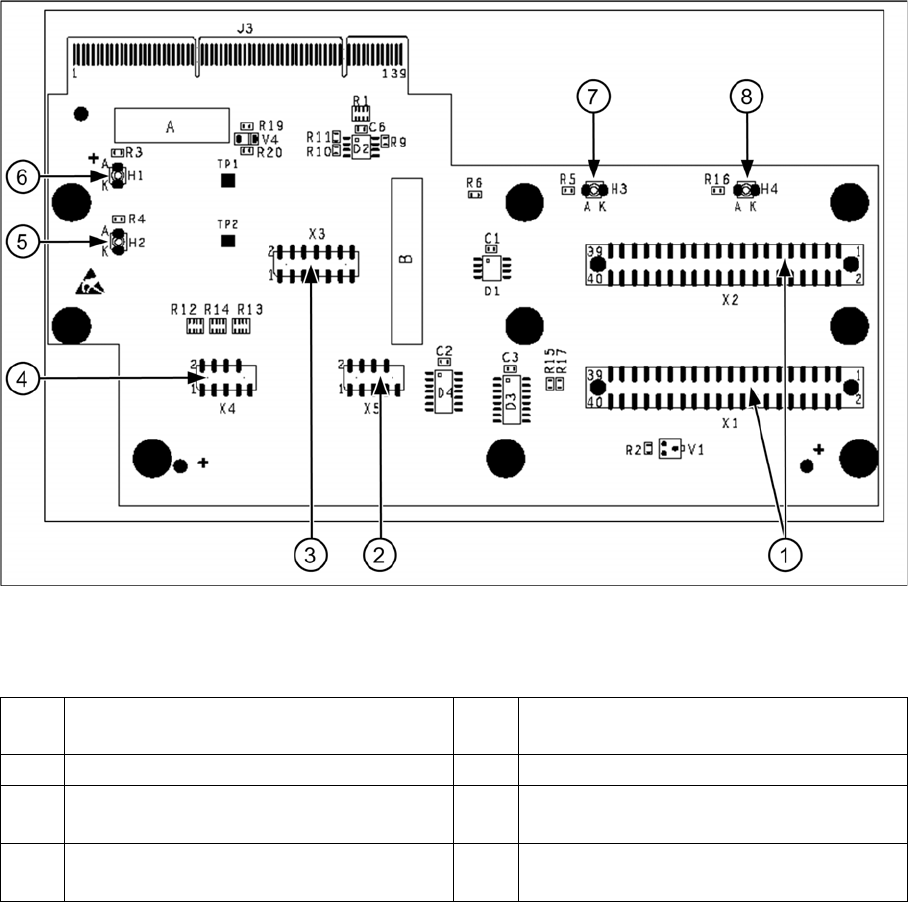
7.5.1.1 Head Adapter for C&P20A on X Machines with A364
Head adapter for C&P20A
Legend
1 X1, X2 connection to intermediate
distributor
5 H2 LED (green) for DP motor 24 V display
2 X5 Z axis track signals 6 H1 LED (red) for 24 V display at C&P20
3 X3 test connector: serial parallel interface
(SPI) bus
7 H3 LED (green) for component sensor
display
4 X4 star track signals 8 H4 LED (red) for hardware error display at
C&P20A
C&P20A
Settings Board Descriptions for C&P20A
249 Student Guide SIPLACE X-Serie and X4I SW70x (AL2)
Base Ada pter for CPx on SX 4 Machines with HCU
7.5.1.2 Base Adapter for CPx on SX4 Machines with HCU
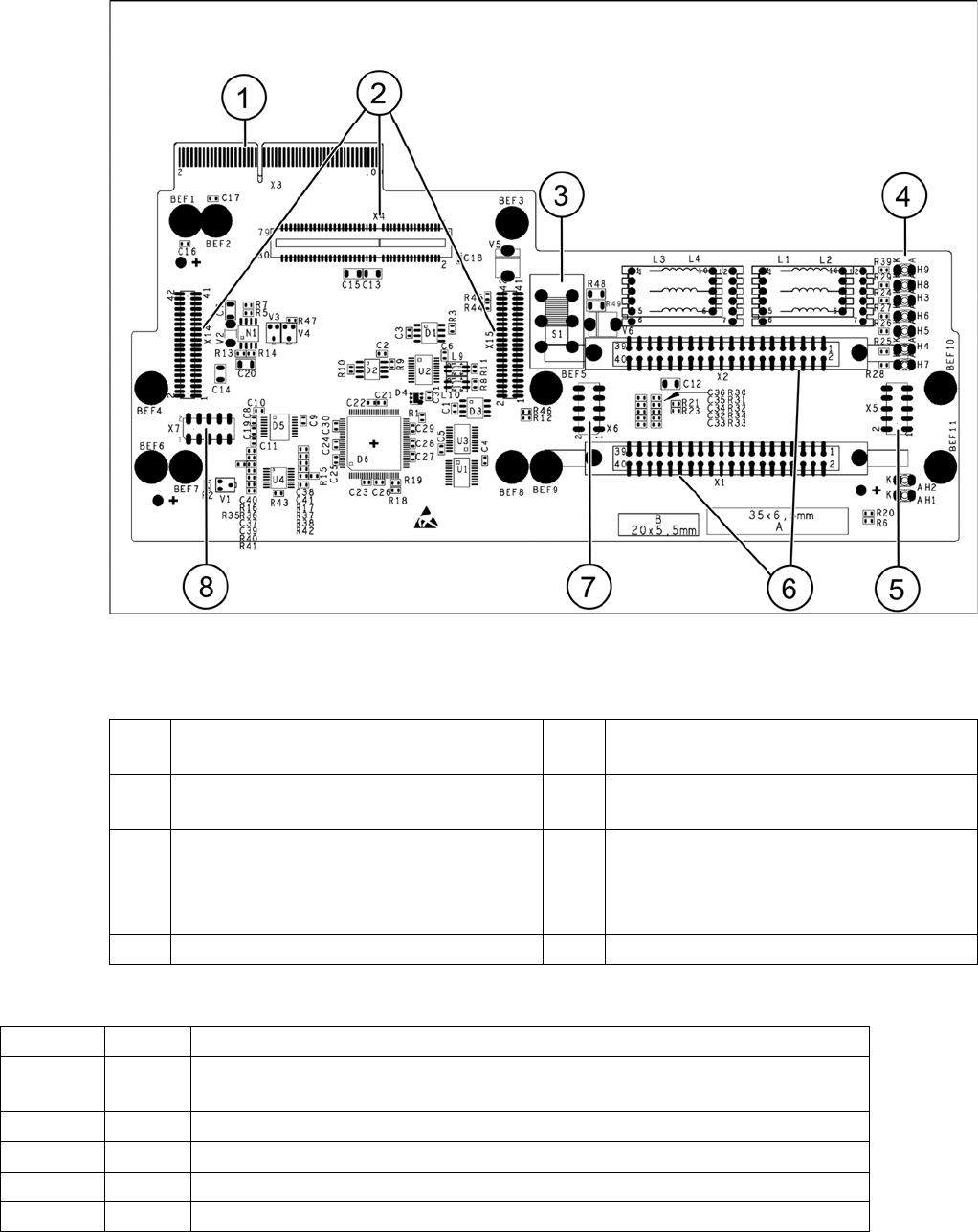
Base adapter for CPx [03045647-xx] on SX4 machines with HCU
Legend
Meaning of LEDs H1 - H9
1 X3 Connection to the head interface board
C700
5 Test connector for FPGA
2 X4, X14, X15 – connector for HCU 6 X1-X2 flat ribbon connection for CPP or
C&P20
3 Switch S1 intermediate circuit voltage
Z axis
40V C&P20 (switch top)
150V CPP(switch bottom)
7 X6 Programming connector for FPGA
4 LED H3- H9 8 X7 Test connector HCU
H1 OK Status display for the component sensor
H2 RS232 Shines when the programming connector for the HCU1 is connected (not
designed for Service)
H3 1V5 Voltage monitor 1.5 V, shines red in event of errors
H4 3V3 Voltage monitor 3.3 V, shines red in event of errors
H5 5V Voltage monitor 5 V, shines red in event of errors
H6 15V Voltage monitor 15 V, shines red in event of errors