00194614-08 Trainingsdoku. SG X-Serie_X4i SW70x (AL2)_EN.pdf - 第299页
Collect, Pick and Place Head (CPP) Pickup and Placement Cycle for CP P Pickup and Placement Cycle Fo r the Next Com ponents 299 Student Guide SIPLACE X-Serie and X4I SW70x (AL2) Pickup and P lacement Cycle For the N ext …
Collect, Pick and Place Head (CPP)
Procedure for Placing Components Pickup and Placement Cycle for CPP
Student Guide SIPLACE X-Serie and X4I SW70x (AL2) 298
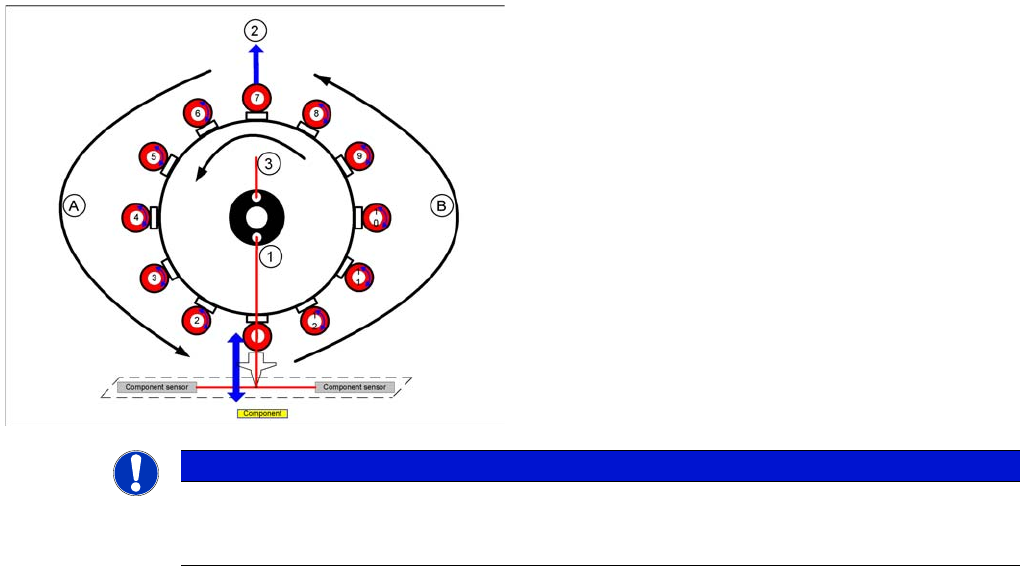
Procedur e for Placing Co mponents
8.4.7 Procedure for Placing Components
Prerequisite: The pickup process and optical centering must have been completed successfully.
1. The gantry moves over the placement position of the 1st component.
2. Vacuum measurement in pickup/place circuit „closed“
3. The Z axis travels down and interrupts the component sensor.
4. The Z position is read out. The nozzle length and component height are calculated using the value
from the Z axis up pickup procedure.
5. Switch on air blast (pressure control valve, depending on programmed placement profile)
6. The Z axis moves up.
7. The component sensor is released and the Z position is read out. The nozzle length is calculated
using the value from the Z axis down (reference value) pickup procedure. The component is placed.
8. The valve for the segment 1 valve terminal is switched off.
9. A vacuum check is performed when the Z axis is in the top position.
10. The star is rotated and more components are placed.
11. Segment 1 is rotated by the DP drive into the pickup position for the next component (area A or B).
12. Once all 12 components have been placed, the placement process has finished.
Legend
1. Vacuum measurement pickup/place circuit
2. Optical centering SIPLACE Vision
3. Vacuum measurement holding circuit
A : Rotate component into placement angle
B : Placement angle correction after optical centering
NOTICE
All vacuum measurements during the placement process are performed in the background and
do not produce any error messages. The error messages concerning missing components etc.
are produced only by the component sensor.
Collect, Pick and Place Head (CPP)
Pickup and Placement Cycle for CPP Pickup and Placement Cycle For the Next Components
299 Student Guide SIPLACE X-Serie and X4I SW70x (AL2)
Pickup and P lacement Cycle For the N ext Components
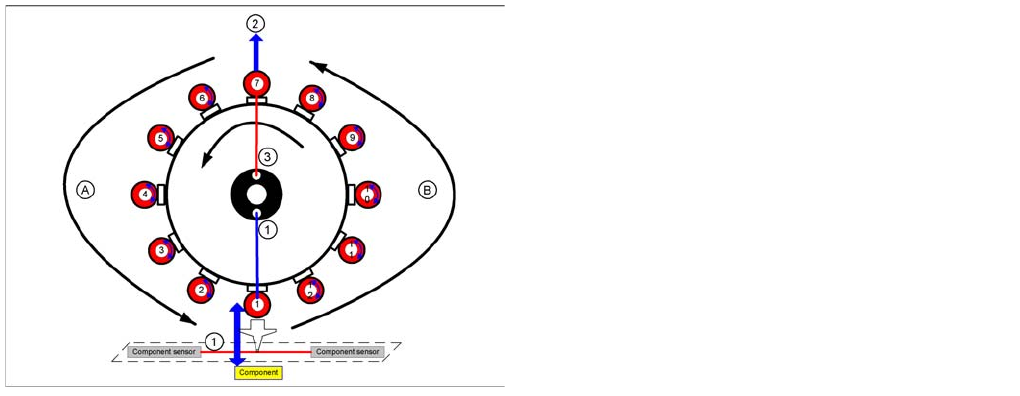
8.4.8 Pickup and Placement Cycle For the Next Components
▪ After all the components of the first head cycle have been placed on the board, the gantry axes move
the placement head to the pickup position of the next pickup cycle.
▪ The next pickup cycle is performed for the components.
▪ If necessary the machine performs repair cycles.
Segment with a "Defective Component“
8.4.9 Segment with a "Defective Component“
If the optical centering of a component fails (ident. error) or component recognition before placement
fails, the component will not be placed and will remain on the nozzle.
▪ The turning station will still turn this nozzle to the pickup angle of the new component if this segment
is in area A.
If this segment is in pickup position:
▪ The reject procedure will be activated and
▪ the X/Y axes will move to the reject position for this gantry,
▪ The component will be rejected to the reject box below, via air blast
▪ The new component is picked up.
The rejected component will then be placed in a repair run after all the other placement cycles for this
placement head have been performed.
Finishing Board Placement
8.4.10 Finishing Board Placement
▪ After placing the last component, the gantry axes move the placement heads to the waiting position.
▪ An optical nozzle scan is performed after the first board or after the relevant board (depending on
the scan parameters).
▪ The SIPLACE placement station activates the conveyor system and moves the board to the
intermediate/output conveyor.
▪ Finally, the SIPLACE placement station sends the number of consumed components (placed and
rejected ones) to the computer with the OIS (Operator Information System).
▪ The OIS (Operator Information System) calculates the placement statistics referring to the
programmed station setup, the programmed panel or the last reset time. This detailed data is used
to optimize the process.
▪ The machine is now ready for the next board.
Legend
1. Vacuum measurement pickup/place circuit
2. Optical centering SIPLACE Vision
3. Vacuum measurement holding circuit
A/B: Rotate the nozzle for the next component into the
correct pickup angle.
Collect, Pick and Place Head (CPP)
Detailed Standard Pickup Procedure: Z Axis Down Pickup and Placement Cycle for CPP
Student Guide SIPLACE X-Serie and X4I SW70x (AL2) 300
Detailed Standard Pickup Procedure: Z Axis Down
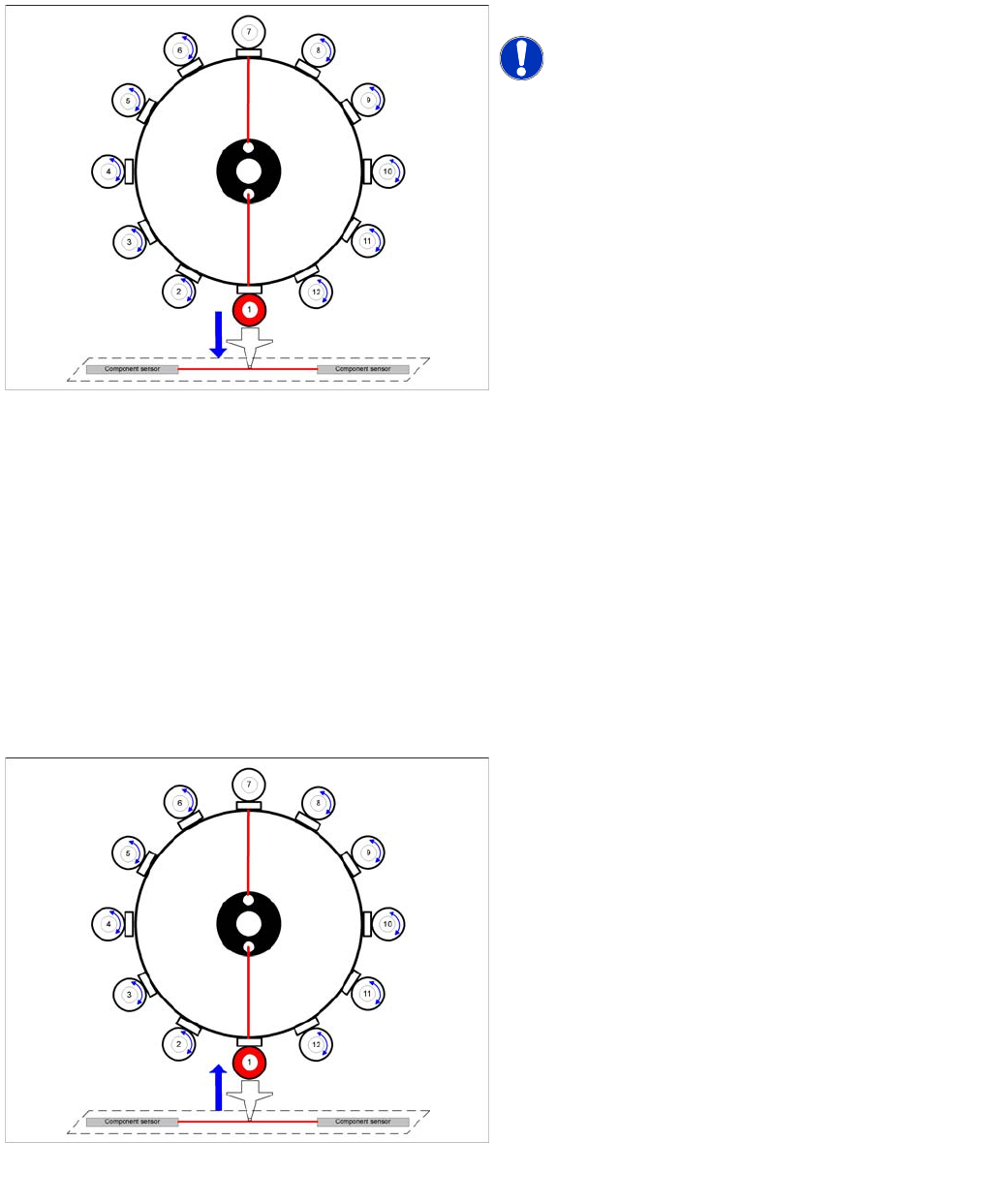
8.4.11 Detailed Standard Pickup Procedure: Z Axis Down
▪ Enables vacuum query: segment open threshold ? Yes
Component sensor switches due to Z axis movement:
▪ Measurement value for nozzle length "empty"
Axis controller:
▪ Enable "light barrier down" signal.
LB down switches:
▪ End signal Z axis positioning down
▪ Z axis measurement value for pickup height optimization
Detailed Standard Pickup Procedure: Z Axis Up
8.4.12 Detailed Standard Pickup Procedure: Z Axis Up
Star position 0°: detailed pickup sequence - Z axis down
Start gantry axes to the pick up position of next feeder.
NOTICE! The vacuum for the holding circuit of
each segment is switched on via the valve terminal, just
before pickup is performed. The vacuum is used for
picking up components and mainly comes from the
pressure control valve. The holding circuit vacuum is only
used to hold the component on the nozzle during the star
rotation.
▪ Start signal for X and Y axes to move to next feeder.
End signal X, Y axes:
▪ X/Y end position signals available.
Z axis starts:
▪ Z axis starts positioning downwards
End position signal for star axis
Detailed pickup procedure: Z axis up
LB down switches:
▪ Vacuum Threshold comp. picked reached? Yes
Z axis starts:
▪ Z axis starts positioning upwards
Component sensor switches due to Z axis movement:
▪ Z axis position value; nozzle length + comp.height
measurement threshold reached? Yes
Z axis position in safety area:
▪ reset light barrier state,
▪ X, Y gantry axes start
▪ start component feeder (communication to feeder
table)
Vacuum query:
▪ Vacuum threshold for holding circuit reached? Yes
▪ Star axis starts.