00194614-08 Trainingsdoku. SG X-Serie_X4i SW70x (AL2)_EN.pdf - 第381页
Modular Conveyor Function Description "Long Board" Option 381 Student Guide SIPLACE X-Serie and X4I SW70x (AL2) "Long B oard" Opti on 11.1.7 "Long Board" Option The long boards have to be cl…
Modular Conveyor
Checking the PCB Position on the Conveyor Sections Function Description
Student Guide SIPLACE X-Serie and X4I SW70x (AL2) 380
The PCB width is adjusted via three adjustment units, they are fitted near the input conveyor, at
intermediate conveyor and near output conveyor.
▪ The three adjustment units are moved synchronously by the stepping motor recirculating spindles
and toothed belt.
▪ The three adjustment units are positioned under the conveyor side so that they can be moved to
adjust the PCB width. The precise position is detected by a proximity switch on the adjustment unit.
▪ The conveyor side is mechanically connected to the adjustment unit by extending the pneumatically-
actuated fixing pins. This disables the conveyor side clamps (at the steel strip).
▪ Once the new PCB width is reached, the fixing pins of the adjustment units are retracted once more.
The conveyor side is clamped again.
On the dual conveyor, the widths of the conveyor tracks have to be set one after the other (just one drive
for both conveyor tracks). The maximum and minimum PCB widths are protected by limit switches. If the
two conveyor sides of a conveyor lane are not parallel, this is automatically corrected during width
adjustment. The three adjustment units are moved under the fixed conveyor side and the flexible
conveyor side is adjusted according to the average value of the three adjustment unit positions. The
adjustment unit that reaches its position under the flexible conveyor side first fixes the conveyor side.
The movement then continues until the second and third adjustment units have reached their positions
and have also fixed the flexible conveyor side. The conveyor side is now registered and fixed with the
adjustment unit and the correct PCB width can be set.
The flexible dual conveyor can also be used as a single conveyor by moving lanes 1 or 2 together (max.
PCB format 450 x 450 mm for the X series and 380 x 450 mm for the X4I).
Checking the PCB Position on the Conve yor Sections
11.1.4 Checking the PCB Position on the Conveyor Sections
The positions of the PCBs are identified via light barriers (sender modules and receiver modules). The
transmitter is positioned below the conveyor belt, while the receiver is fitted above the belt, on the right.
The signal from the light barriers stops PCBs in the input conveyors, intermediate conveyors and output
conveyors.
In the placement area, the light barrier initiates the braking procedure via the D.C. motors, so that a
constant time interval is set in the software, for slow movement towards the laser light barrier.
A PCB moving control check the start- and arrival time at the conveyors. This is necessary because of
the PCB-information (bad mark -, PCB recognition) we transfer from PA1 to PA2. The operator is not
allowed to remove PCB’s from the intermediate conveyor.
Stopping the PCB
11.1.5 Stopping the PCB
The PCB in the placement area is recognized by a laser light barrier. The laser beam looks for the front
edge of the board and stops it. This method prevents the impact against the stopper, which occurred in
previous cases. The positioning accuracy of the clamped PCB is +/-0.5 mm -precise enough for PCB
recognition.
Lifting Table
11.1.6 Lifting Table
Depending on the version (single/dual conveyor), one or two independent lifting tables are used in each
placement area. The lifting table drive works indirectly via a pneumatic cylinder controlled by a 5/3-way
valve. PCBs of different thicknesses will automatically be compensated for. The PCB is guided in the Z
direction at four points on the lifting table plate. The lifting path is determined via a distance measuring
system.
The top position of the lifting table is identified by the position measuring system and a fork light barrier
for lane A and B. The check for the upper lifting table position and with that the correct clamping of the
PCB board is performed via current consumption, by approaching the conveyor motors. The lowest lifting
table position is detected by the incremental measuring system and an end position BERO on the
pneumatic cylinder. The default clearance under the PCB is 40 mm.
If you use a dual conveyor as a single conveyor you must couple both lifting tables with one another.
Modular Conveyor
Function Description "Long Board" Option
381 Student Guide SIPLACE X-Serie and X4I SW70x (AL2)
"Long B oard" Opti on
11.1.7 "Long Board" Option
The long boards have to be clamped twice per placement area so that each head type (C&P and Twin
head) can place components over the whole board.
The hardware is mounted on the fixed conveyor side.
▪ Mechanical stopper
▪ Programmable ultrasound sensor
This is mounted at one position on the fixed conveyor side of the intermediate and output conveyors.
The ultra sonic sensor is programmed for PCB recognition by placing a PCB above the sensor and
pressing the programming switch for 3 sec.
With this option the standard conveyor light barriers and lasers remain active!
"Alignment Pin" Option
11.1.8 "Alignment Pin" Option
This option is for unfavorable length/width relationship, for cut outs at the leading edge at a PCB board
or for wide and short boards. Mechanical stopper pins are mounted on the flexible conveyor side and on
the lifting table. If the jumper set for this option on the transport interface, The clamping height is learnt
with the first board, so that the pins reach the height of the board. The laser recognize the PCB board
and the conveyor stops after a defined time and the clamping is completed. The clearance under the
PCB board is reduced to 25mm.
"Combined PCB" Option
11.1.9 "Combined PCB" Option
Combined PCB enables you to transport two different boards (top, bottom) into the placement area at
the same time and to place them at the same time. This reduces the transportation times. To make this
option possible, you require an upstream shuttle which collects the boards and a downstream shuttle
which then distributes the boards onto the conveyor lanes.
I-Placem ent Optio n
11.1.10 I-Placement Option
In this option for dual conveyors, the two outer conveyor sides are defined as fixed sides. The two inner
conveyor sides remain flexible and can be adjusted to suit the board widths. This creates shorter travel
ranges between pickup and placement in the SIPLACE X4I machine. In addition, both gantries can pick
up and place independently of one another in the same placement area. Each gantry processes one
board on one lane, independently of the other gantry in this placement area.
Firmware Control Tasks (Embedded Software)
11.1.11 Firmware Control Tasks (Embedded Software)
▪ Transporting, clamping, temporarily storing the PCBs, positioning the PCB using a laser light barrier,
mechanical stopper for long PCBs as an option
▪ Single functions for controlling the conveyor
▪ Adjusting the conveyor width
▪ Addressing the inputs/outputs
NOTICE
To avoid board vibration during placement, use the black PCB supports (94 mm).
NOTICE
X4I
This option is not available for the X4I.
NOTICE
X4I
This option is not available for the X4I.
Modular Conveyor
Conveyor Control TSP 301 Function Description
Student Guide SIPLACE X-Serie and X4I SW70x (AL2) 382
▪ Downloading the firmware via SITEST
▪ Setting the conveyor parameters (conveyor speed)
▪ Synchronous transport mode
Conveyor Control TSP 301
11.1.12 Conveyor Control TSP 301
The conveyor control TSP 301 supports the following options:
▪ Left conveyor side fixed (default: right conveyor side fixed)
▪ "Long PCB" option
▪ PCB Alignment pin
▪ Ceramic substrate centering
▪ Vacuum tooling
▪ PCB barcode
▪ SMEMA interface, SIEMENS (option)
▪ Combined PCB
▪I-Placement
Structure
11.1.13 Structure
Structure of the single conveyor
11.1.13.1 Structure of the single conveyor
PCB transport - single conveyor
Legend
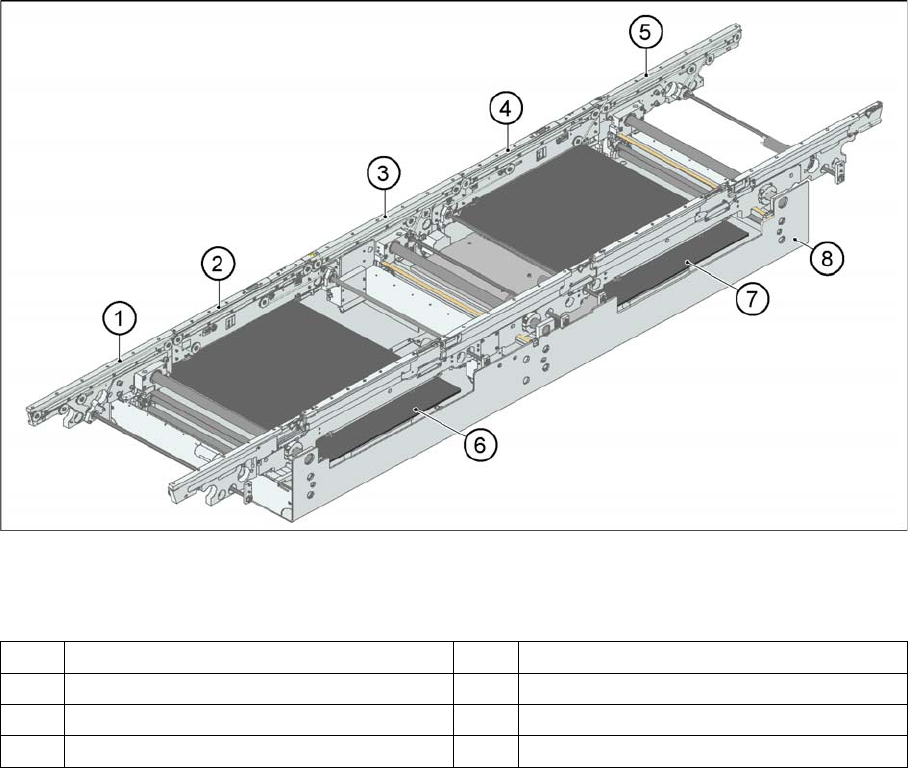
In SIPLACE X and D3/D4 machines, the single conveyor system consists of an input conveyor, two
placement areas, the intermediate conveyor and the output conveyor. The conveyor has an automatic
width adjustment unit and a lifting table for clamping the PCB.
1 Input belt 5 Output belt
2 Placement area 1 6 Lifting table placement area 1
3 Intermediate belt 7 Lifting table placement area 2
4 Placement area 2 8 Assembly tub