00194614-08 Trainingsdoku. SG X-Serie_X4i SW70x (AL2)_EN.pdf - 第469页
MTC2 MTC2 Calibration and Settings SITEST Calibration Flow Ch arts 469 Student Guide SIPLACE X-Serie and X4I SW70x (AL2) Maximu m positi on ► Now calculate the center of the WT gap, so that the driver will always engage …
MTC2
SITEST Calibration Flow Charts MTC2 Calibration and Settings
Student Guide SIPLACE X-Serie and X4I SW70x (AL2) 468
Feed axis
13.3.2.2 Feed axis
Notes for calibration the zeropoint correction and transfer position into the machine.
1a. Calib ration of ze ro point correction:
1a. Calibration of zero point correction:
► Select SITEST --> MTC --> Settings
► Select Teach zero point.
► Check the position of the driver with the ENGAGE.
In case the driver did not engaged successfully you must determine the middle of the notch of the waffel
pack tray.
The accurate adjustment is described below:
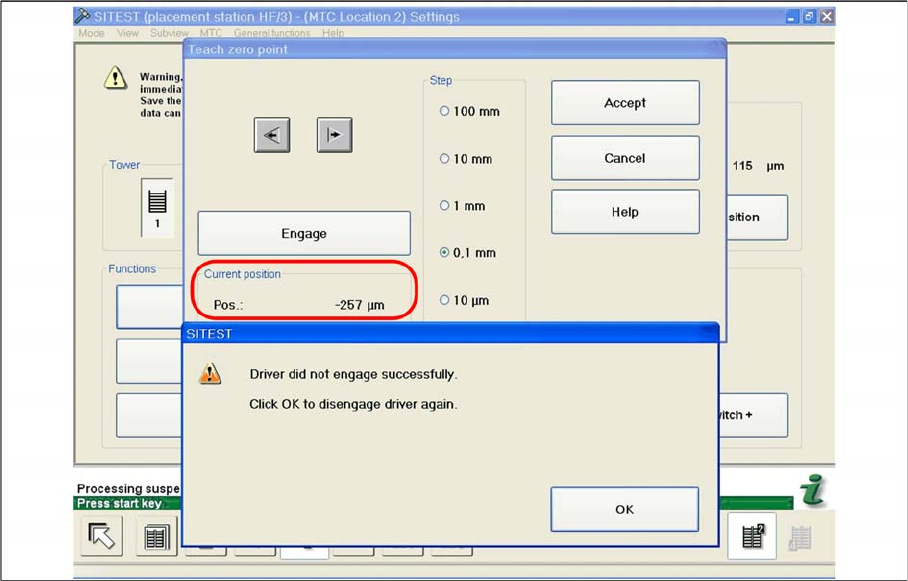
► If the feed axis is positioned so that the driver is unable to connect, move the feed axis into an
approximately correct position, in which the driver is able to engage. Now determine the minimum
and maximum position in which the driver can engage.
► Once the driver has engaged, gently tap the feed axis into the minimum position, until the driver is
just unable to engage (see diagram).
► Make a note of the position value shown.
Minimum position
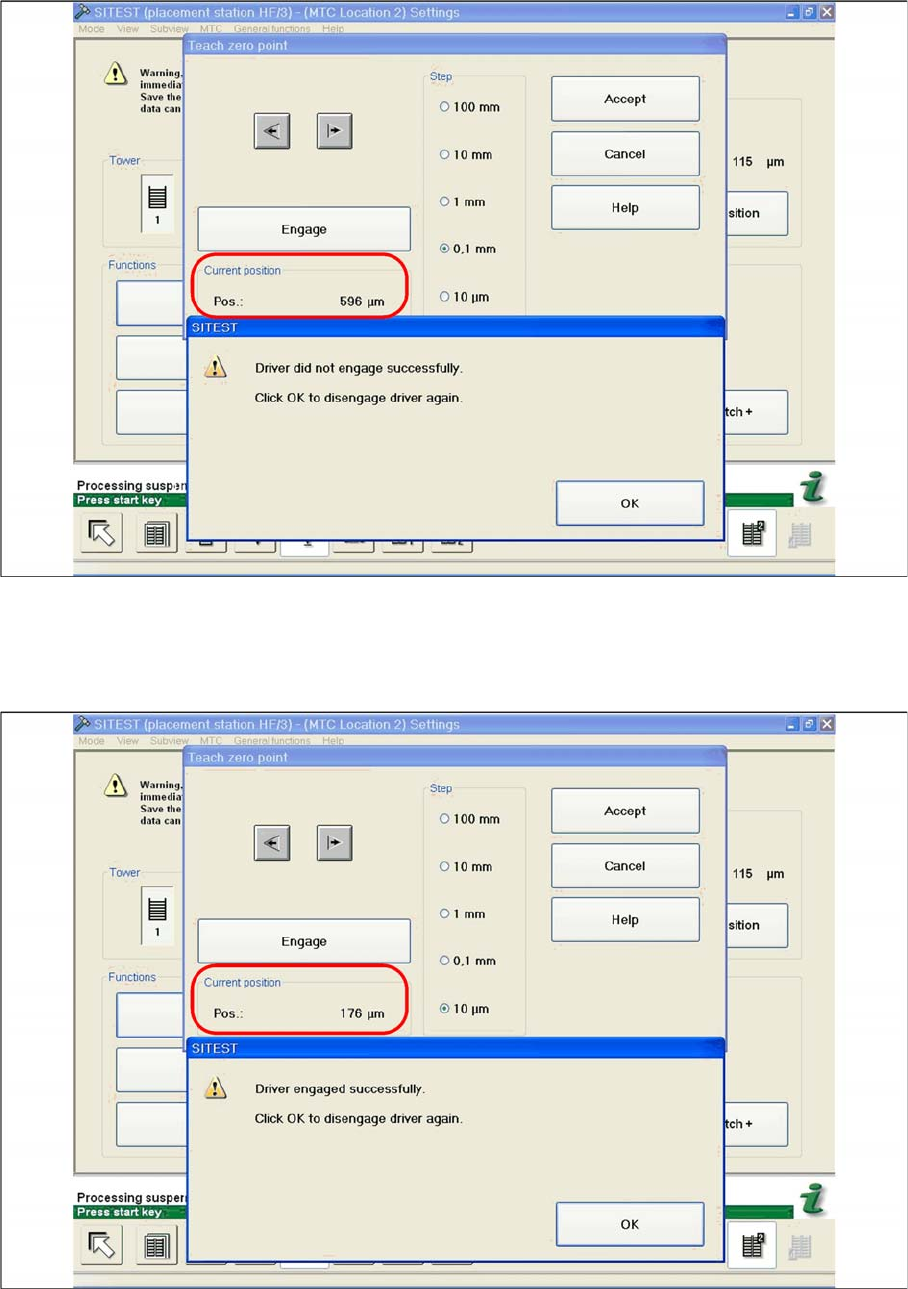
► Now gently tap the feed axis into the maximum position, until the driver is just unable to engage (see
diagram).
MTC2
MTC2 Calibration and Settings SITEST Calibration Flow Charts
469 Student Guide SIPLACE X-Serie and X4I SW70x (AL2)
Maximum position
► Now calculate the center of the WT gap, so that the driver will always engage reliably.
e.g. |-257| + 596 = 853 divided by 2 = 426 µm
426 + the maximum position or minimum position or maximum position - 426 = approx. 169 µm
Correct position for the feed axis
► Check the driver position. The driver now should be correctly in the middle position of the notch of
the WTC.
► Click on Accept.
► Check the position of the driver for the other cassettes.
MTC2
SITEST Calibration Flow Charts MTC2 Calibration and Settings
Student Guide SIPLACE X-Serie and X4I SW70x (AL2) 470
1b. Manuall Input of the Zero point c orrection
1b. Manuall Input of the Zero point correction
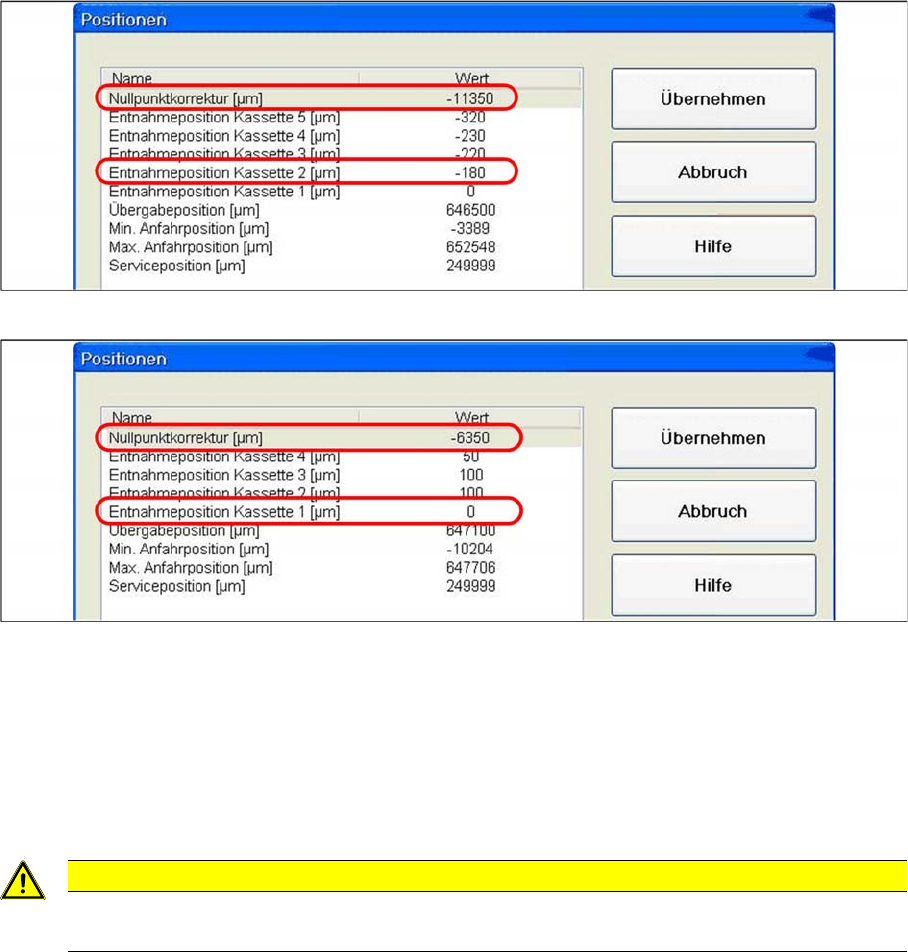
During calibration, the ZPC value is automatically entered in the Removal position cassette 1
line of the machine data.
Is this value to big, it is not possible to calibrate the max. and min. travel range of the feed axis.
Reason: The travel range will be calculated from the row Zero point correction . If this line shows
the value zero, the feed axis will move to the end position switch during measurement.
Solution: Enter the calibrated value for Removal position cassette 1 in the Zero point
correction line of the machine data. In the Position of removal Position cassette 1 line,
enter the value zero .
SITEST:
► MTC --> Axes
► Choose feed axis
► Select Positions
Example: Input machine data tower 1
Example: Input machine data tower 2
► After the manuall Inputs, check the Zero point correction again.
2a. Trans fer position of t he Tower 1 XL WTC
2a. Transfer position of the Tower 1 XL WTC
► Select Teach transfer position.
When you press the button to calibrate the Transfer position the tray moves approx. 5mm outside of the
feed axis.
CAUTION
If you have confirmed the calibration with OK in this situation, you will have calculated an
incorrect transfer position, which will lead to an incorrect pickup position for the Twin head.