00194614-08 Trainingsdoku. SG X-Serie_X4i SW70x (AL2)_EN.pdf - 第496页
MTC2 Factory settings Masterdrives Student Guide SIPLACE X-Serie and X4I SW70x (AL2) 496 ▪ r004 = Output current inverter, converter ▪ r006 = Actual DC inter mediate circuit vo ltage ▪ r009 = Temperature motor ▪ r069 = S…
MTC2
Masterdrives Operating the master drive with the parametrization unit (PMU)
495 Student Guide SIPLACE X-Serie and X4I SW70x (AL2)
Masterd rives
13.4 Masterdrives
Operating the master drive with the parametrization unit (PMU)
13.4.1 Operating the master drive with the parametrization unit (PMU)
Importan t Parame ter for t rouble sh ooting
13.4.2 Important Parameter for trouble shooting
U / r = visualization parameters
P = parameters which can be changed
00372624-01 Microschalter Turm 1 Micro switch tower 1, configured 1 ST 1 ST
00372628-01 Microschalter Turm 2 konf. Micro switch tower 2, configured 1 ST 1 ST
00372617-01 Mitnehmer Hebel Lever driver 1 ST 1 ST
00372608-01 Mitnehmer kpl. MTC2 DRIVER COMPLETE MTC2 1 ST 1 ST
00373139-01 MTC2 Controllerboard kp C167-CONTROLLERBOARD
COMPLETE
1 ST 1 ST
00372621-01 Netzteil 24 V DC MTC2 Power supply 24 V DC MTC2 1 ST 1 ST
00372638-01 Not-Aus-Taster Emergency stop button 1 ST 1 ST
00372649-01 NOT-HALT-Schaltgerät Emergency stop switchgear 1 ST 1 ST
00372651-01 Sensor Griffabfrage WTC handle sensor 1 ST 1 ST
00372645-01 Sensor Riemenabfrage
Hubachse
Toothed belt sensor lifting axis 1 ST 1 ST
00372647-01 Stecker mit Kabel (MTC2) Plug with cables MTC2 1 ST 1 ST
00372646-01 Stecker mit Kabel
(Zenrierrahmen)
Plug with cables docking station 1 ST 1 ST
00372609-01 Umlenkrolle vorne kpl. MTC2 Front deflection roll, complete
MTC2
1 ST 1 ST
00372652-01 Universal-Anpass.-Spartransf. Transformer power supply 1 ST 1 ST
00372613-01 Verriegelung FMT XL MTC2 Interlock WTC MTC2 1 ST 1 ST
00372627-01 Zahnriemen AC-Motor Toothed belt AC motor 1 ST 1 ST
Artikelnummer/
Part number
Description Description
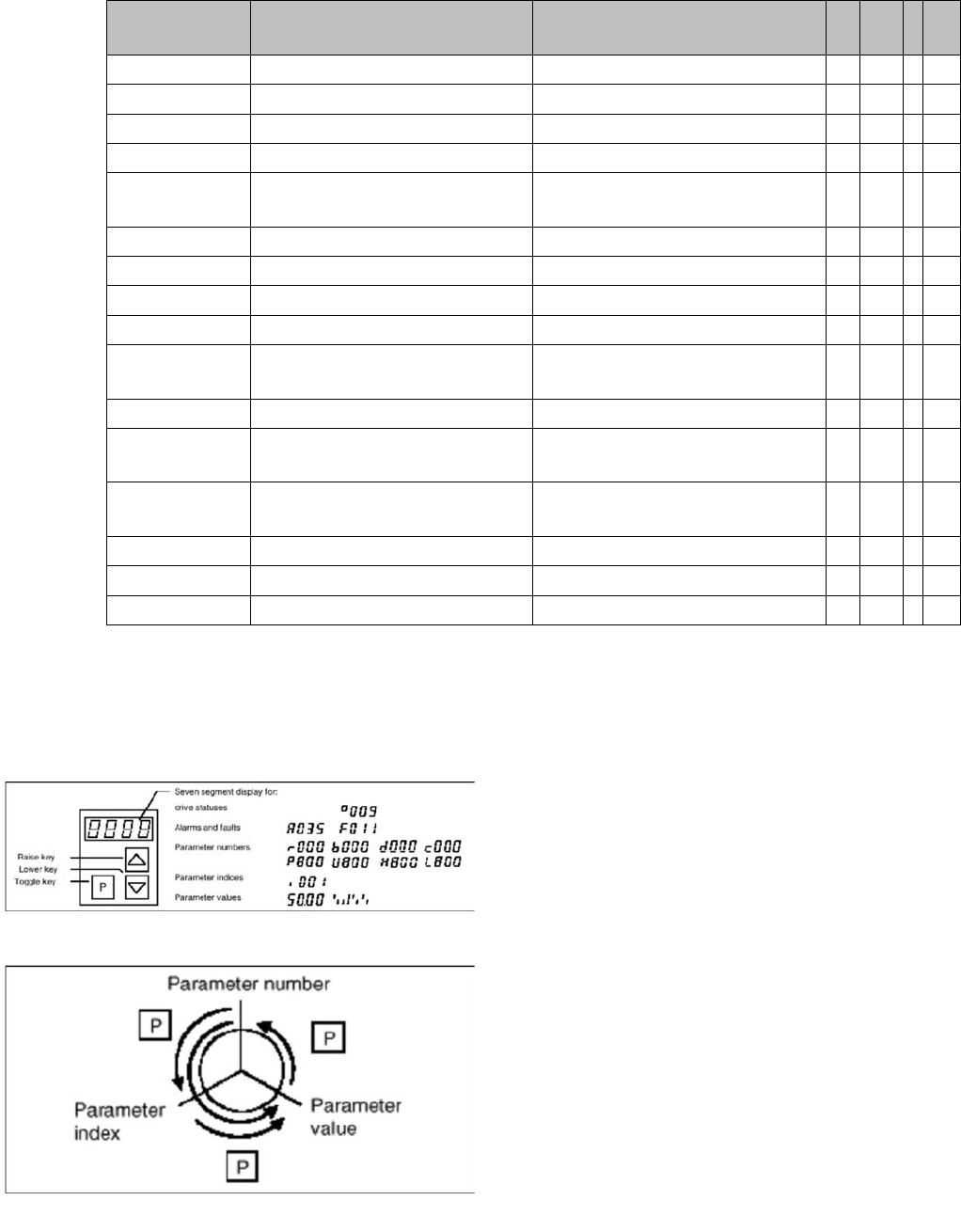
PMU parameterizing unit
The PMU parameterizing unit enables parameterization,
operator control and visualization of the converters and
inverters directly on the unit itself.
Toggle key of the PMU
With the toggle key, you can change over:
▪ from the parameter number to the parameter index
▪ from the parameter index to the parameter value
▪ from the parameter value to the parameter number
If the parameter is not indexed, you can jump directly
from the parameter number to the parameter value.
MTC2
Factory settings Masterdrives
Student Guide SIPLACE X-Serie and X4I SW70x (AL2) 496
▪ r004 = Output current inverter, converter
▪ r006 = Actual DC intermediate circuit voltage
▪ r009 = Temperature motor
▪ r069 = Software version
Index 1 Masterdrives
Index 2 Option BG Slot A
Index 3 Option BG Slot B
Index 4 Option BG Slot C
▪ U003 = Parameter set version:
For the feed axis of tower 1/2 software version
For the lifting axis of tower 1/2 software version
▪ U501 = Machine data
▪ P060 = Function parameters for selection of current menu
Index 4: Address
▪ P095 = Motor list with standard motors
▪ P096 =Function parameter motor
Define serial Interface:
▪ P700 interface address of COM 1
▪ P701 baud rate 8 is equal to 38400
Factor y setting s
13.4.3 Factory settings
Reset the Master drives to the define defaults
You must change 3 Parameters to define the defaults
after this you can download the parameter set for the axis.
▪ Change parameter P053 from 7 to 6 (this value is a binary code 0111 --> 0110).
▪ Set Parameter P060 from 7 to 2.
▪ Change Parameter P970 from 1 to 0. Parameter-Reset is started.
Check the serial interface and CAN Bus address after RESET:
▪ Adjust the V24 (RS232) Interface.
– Parameter P700 = 0
– Parameter P701 --> index 1 = 8 (= baud rate 38400).
▪ Check the address for Can -Bus Parameter P918.
▪ Download the Parameter set for the Axis with the Laptop.
Setting t he CAN bus addre ss at the maste r drive P MU
13.4.4 Setting the CAN bus address at the master drive PMU
It is necessary to enter the addresses of the feed and lifting axes on the PMU’s (Parameterization Units)
for the Master drives on initial commissioning of the MTC and after the replacement of the Master drives.
This can be performed external to the MTC. The Master drives must be supplied with 24 V DC. The
control for the related axis must be shut down.
NOTICE
The MTC2 parameter sets differ from one another, due to the mechanical construction.
CAUTION
When setting factory defaults, the axis concerned must not be subject to position control.
MTC2
Masterdrives Setting the CAN bus address at the master drive PMU
497 Student Guide SIPLACE X-Serie and X4I SW70x (AL2)
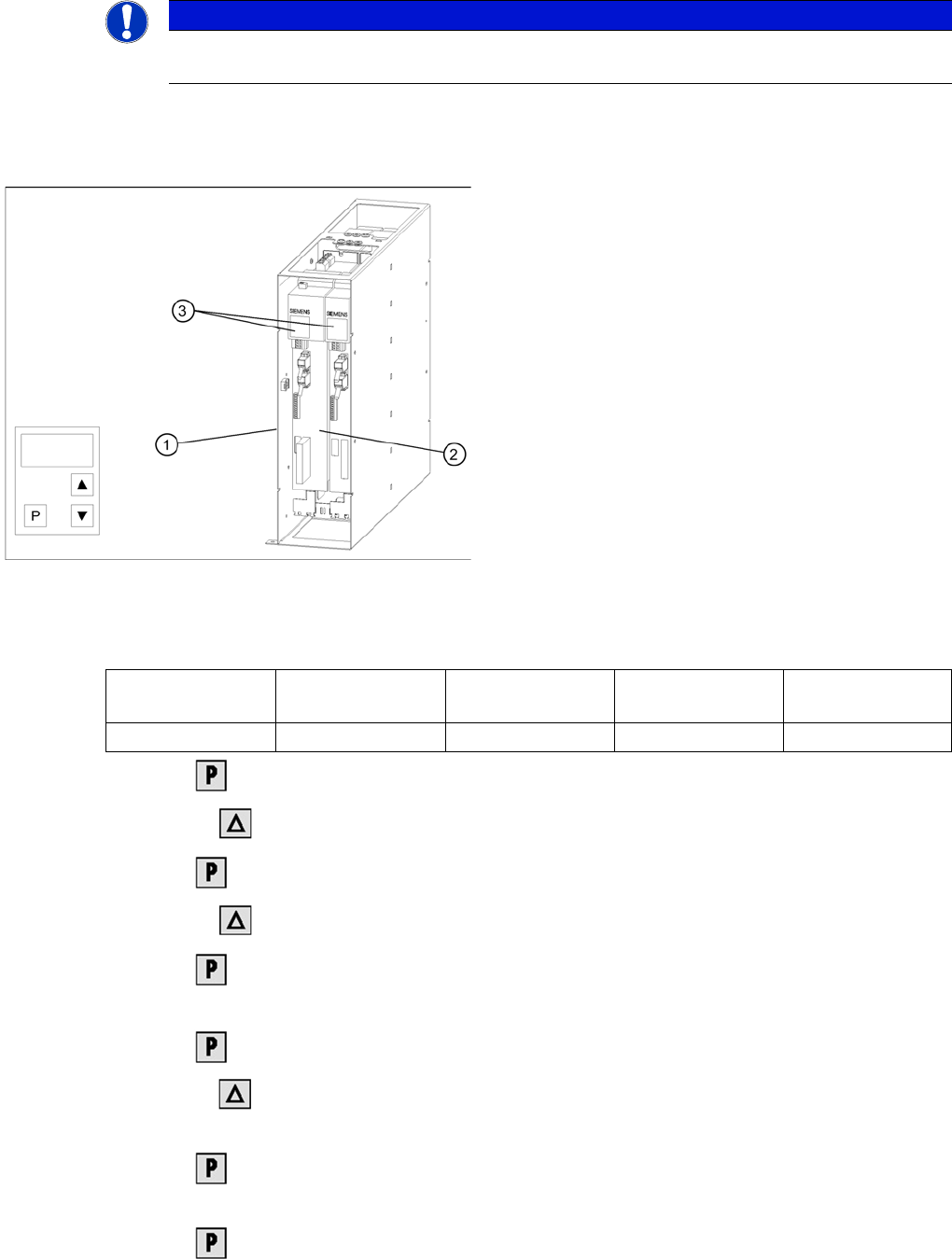
These brief instructions show how to enter the address for the Masterdrive of the lifting axis for tower 1.
For more detailed information, see the chapter "Parameterization" in the user manual for "SIMOVERT
MASTERDRIVES".
The following addresses are provided for the lifting and feed axes:
► Select , to go to the parameter numbers.
► Step with , until you reach the seven segment number P060 . This is the menu selection.
► Select . A number will appear on the display. This is the Parameter menu.
► Step with , until you reach the number 4 . ("4" means "module configuration").
► Select . You will see 004 on the display. This is the status indicator for Module
configuration.
► Select , to go to the parameter numbers. You will see P060.
► Step with , until you reach the seven segment number P918 . This is the parameter number for
the bus address.
► Select , to go to the parameter index. You will see 001 , which is index 1. (an index is always
indicated by a small line).
► Select , to go to the parameter value. You will see 1 . This is the address of the lifting axis for
tower 1.
NOTICE
For setting the CAN Bus address you could use the software "Drive Monitor". For manual
adjustment of the CAN bus address, see "13.3 MTC2 Calibration and Settings" [ ➙ 464].
Masterdrives of the lifting and feed axes (shown here for
tower 1)
Legend:
1. Masterdrive of the lifting axis for tower 1
2. Masterdrive of the feed axis for tower 1
3. Masterdrive of the lifting axis for tower 2
4. Masterdrive of the feed axis for tower 2
5. Control panels
Lifting axis 1
(PMU 1)
Feed axis 1
(PMU 2)
Lifting axis 2
(PMU 3)
Feed axis 2
(PMU 4)
Address 1 2 3 4