IPS adjustment on the modules.pdf - 第121页
Edition 1 .0 IPS Adjustment for V arious Head T ypes on the Module <H08MQ head > FK - 9F50 - 74 -0 E 6-7 FUJI CORPORA TION Configur a t i on setti ngs 1. Firs tly , check the "IPS TYPE” and “ HARD TYPE ” on th…
Edition 1.0
IPS Adjustment for Various Head Types on the Module
<H08MQ head>
FK-9F50-74-0E
6-6
FUJI CORPORATION
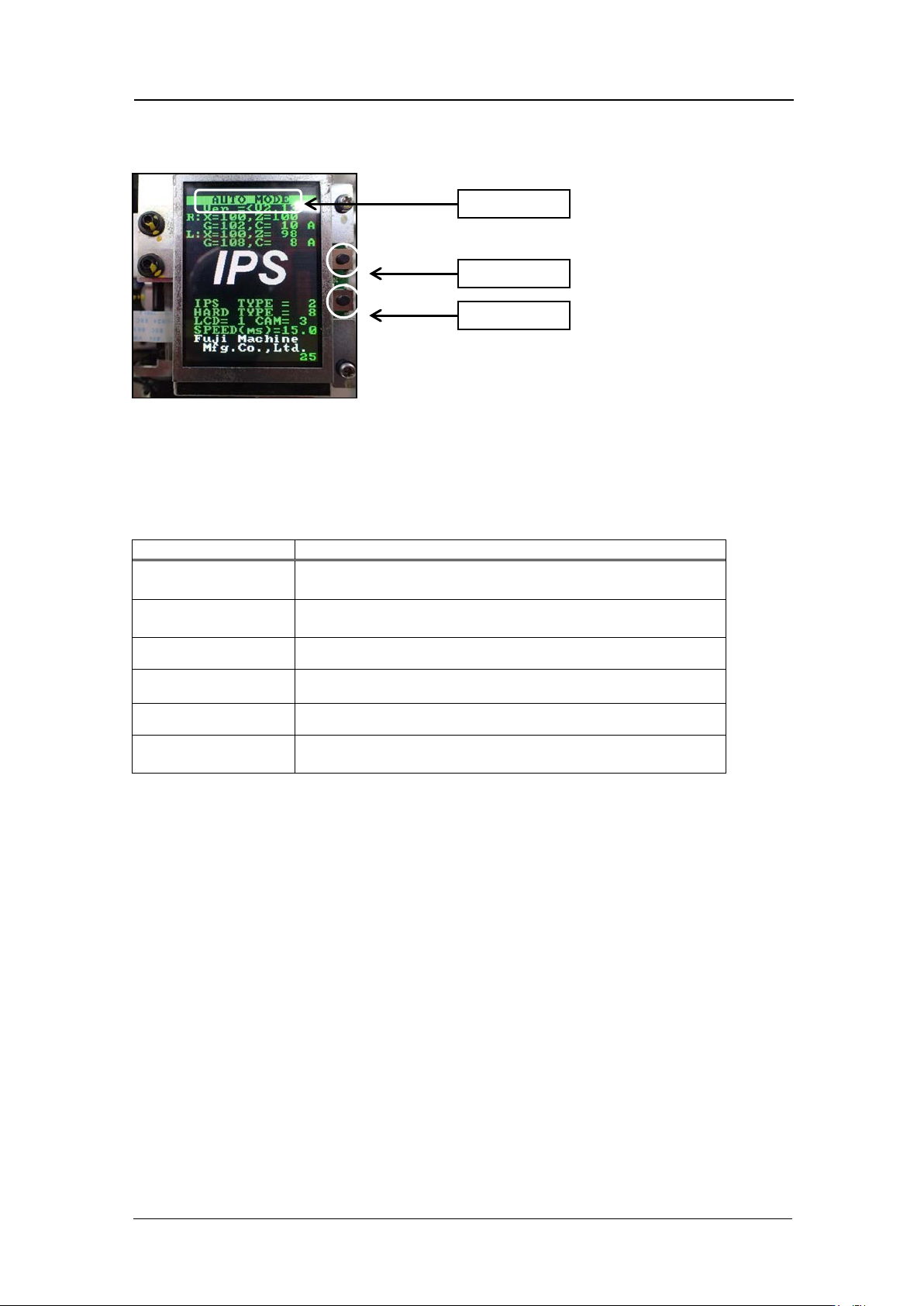
Component nam e s and e x planation of the a djustment modes
Mode name: displays t he cur r ent ly selected adjustment mode.
Back butt on: used t o switch t o a different mode from t he cur r ent ly selected mode.
Set button: us ed when saving or when selecting mo des.
There are six a djustment modes a s show n below. The adjustments differ for e ach mode.
Mode name
Details
AUTO MODE
The initial screen displayed when the power is supplied
to the head.
ADJ MODE
This mode is used to access the 3 adjustment modes
below.
ADJUSTMENT 1
Used for res ol ut ion and tilt adjustment.
ADJUSTMENT 2
Used for gray scale and cu r r ent value adjustment.
ADJUSTMENT 3
Used to chec k the field of vision.
CONFIGURATION
Used to set t he function settings.
Back butt on
Set button
Mode name
CONFIDENTIAL
Edition 1.0
IPS Adjustment for Various Head Types on the Module
<H08MQ head>
FK-9F50-74-0E
6-7
FUJI CORPORATION
Configur a t ion setti ngs
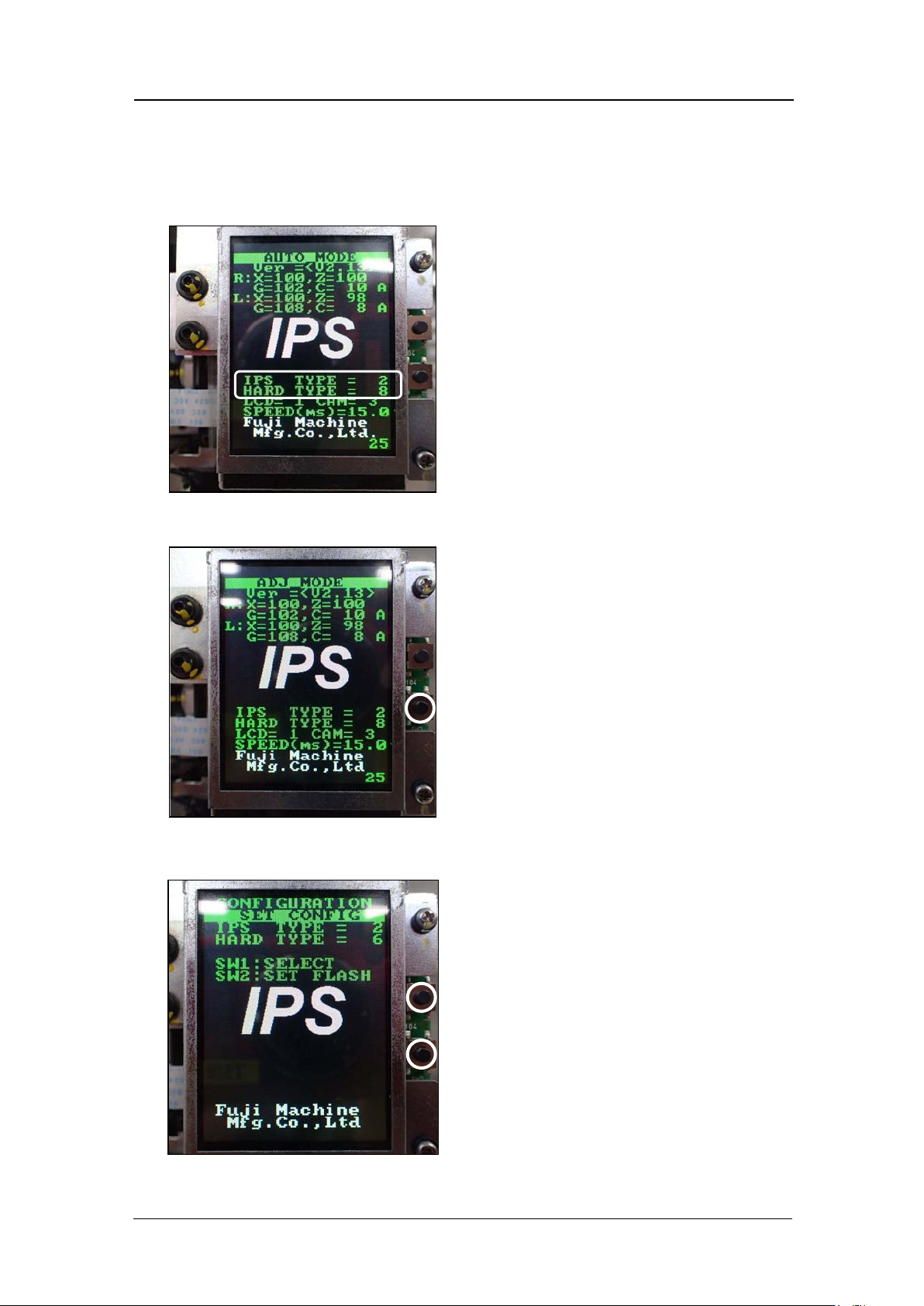
1. Firs tly, check the "IPS TYPE” and “HARD TYPE ” on the LCD screen. The “Hard Type”
setting var ies depend ing o n the IPS board.
2. Press and ho ld t he lower button to enter “ADJ MODE”.
3. Press the upper and lower buttons together to select the “Confi gur at i on” sc reen.
CONFIDENTIAL

Edition 1.0
IPS Adjustment for Various Head Types on the Module
<H08MQ head>
FK-9F50-74-0E
6-8
FUJI CORPORATION
4. Press the upper button to select “IPS TYPE” and “HARD TYPE”, and then press the
lower button to save the settings. The settings differ depending on the IPS board, so
be careful t o m ake the correct settings.
IPS Type
Hard type
IPS Board
IPS2
4
FH1374A0F (Old)
8
FH1374B0F (New)
Note: The difference between old and new boards is the difference between the LED
drivers on t he I PS m ain board.
5. The head mu st be r ebooted a f t er m aking the sett i ngs.
CONFIDENTIAL