IPS adjustment on the modules.pdf - 第170页
Edition 1 .0 IPS Adjustment for V arious Hea d T ypes on the Module < H12 L h ead > FK - 9F50 - 74 - 0E 8- 16 FUJI CORPORA TION Below is the pro cedure t o r et urn to [ADJ MO DE] scr een. (1) Press the upper b utt…
Edition
1.0 IPS Adjustment for Various Hea d Types on the Module
<H12L head>
FK-9F50-74-0E 8-15 FUJI CORPORATION
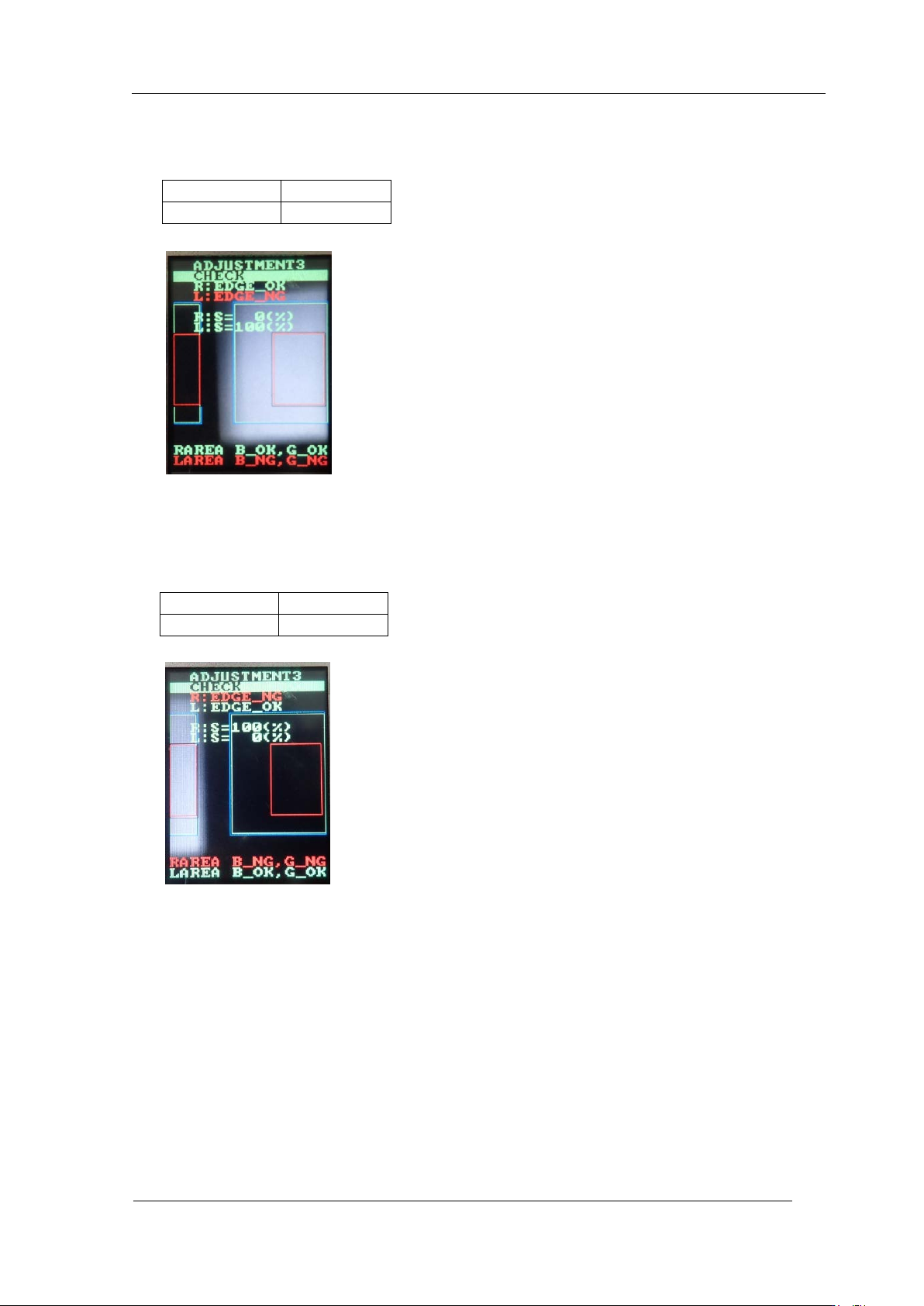
8. In the “ADJUSTMENT3 CHECK” screen, block the right glass with some paper etc., (in
this case, the right side glass as seen from the front of the device) and then press the
lower button t o check the value is within tolerance below.
9. In the “ADJUSTMENT3 CHECK” screen, block the left glass with some paper etc., (in
this case, the left side glass as seen from the front of the device) and then press the
lower button t o check the value is within tolerance below.
R:EDGE_OK
L:EDGE_NG
R
:
S
=
0%
L
:
S
=
100%
R:EDGE_NG
L:EDGE_OK
R
:
S
=
100%
L
:
S
=
0%
CONFIDENTIAL

Edition
1.0 IPS Adjustment for Various Hea d Types on the Module
<H12L head>
FK-9F50-74-0E 8-16 FUJI CORPORATION
Below is the procedure t o r eturn to [ADJ MODE] scr een.
(1) Press the upper button to display “ADJUSTMENT 3 BACK”.
(2) Press the lower but ton to display “ADJUSTMENT 2 CURRENT”.
(3) Press the upper button to display “ADJUSTMENT 2 SET”.
(4) Press the upper button to display “ADJUSTMENT 2, ADJUSTME NT 3”.
(5) Press the upper button to display “ADJUSTMENT 2, BACK”.
(6) Press the lower but ton to display “ADJUSTMENT 1 SET”.
(7) Press the upper button to display “ADJUSTMENT 1 ADJUSTMENT 2”.
(8) Press the upper button to display “A DJUSTMEN T 1 BACK”.
(9) Press the lower but ton to display “A DJ MO DE”.
(10) Turn the mac hine power OF F.
(11) Remove the IPS monitor ji g
(12) Attach the h ead cover.
(13) Perform the cali br at io n. (Requ ired)
Note: If the ADJUSTMENT 1 data was updated, it is necessary to perform the
calibration using [Accessory software] – [Calibration] – [Remeasure
Calibration] command
.
Otherwise, the saved values w i l l not be u pdated.
CONFIDENTIAL
Edition
1.0 IPS Adjustment for Various Hea d Types on the Module
<H12L head>
FK-9F50-74-0E 8-17 FUJI CORPORATION
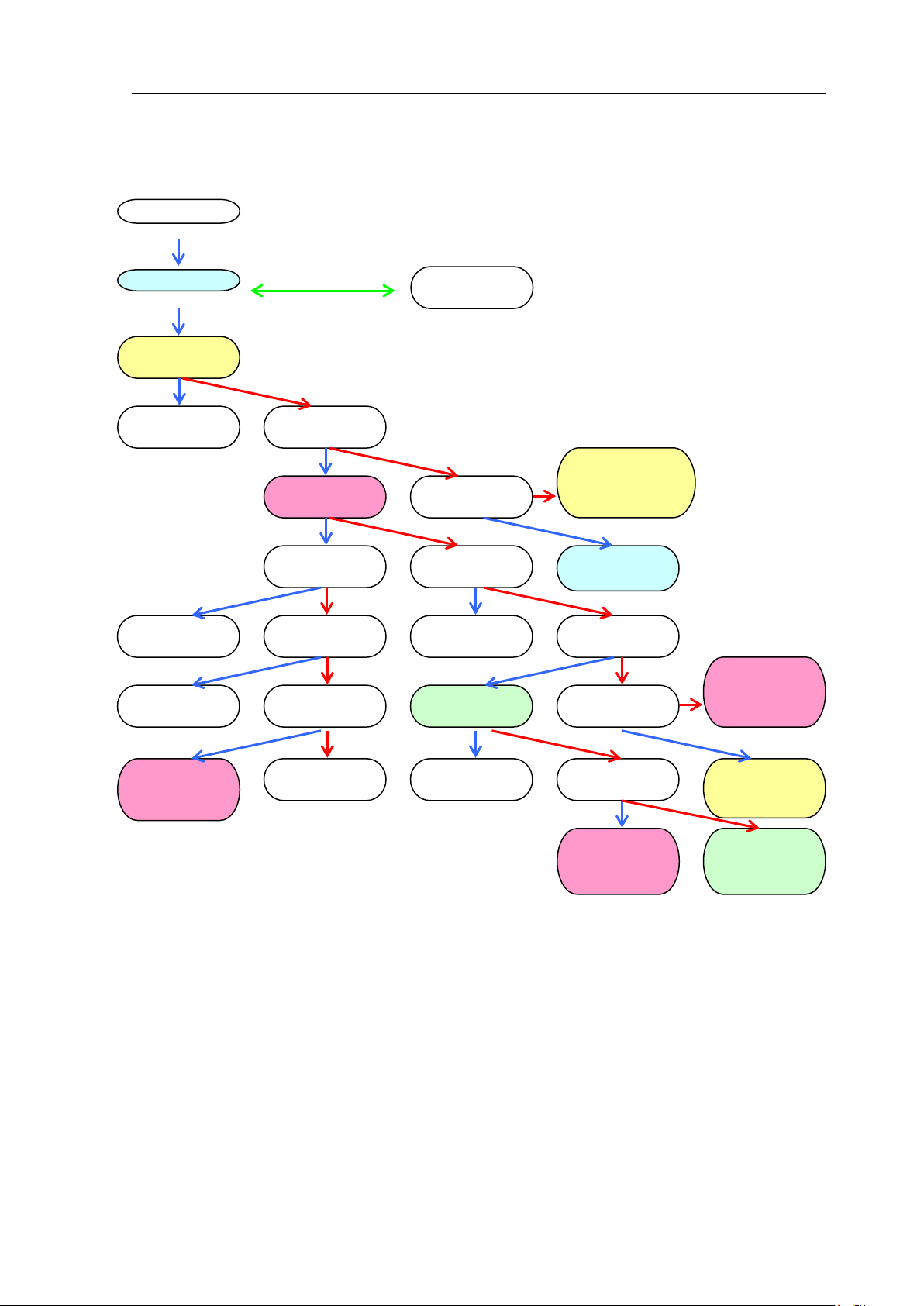
Mode s e t ti ng c hart
ADJUSTME NT 1
ADJUSTMENT 2
ADJUSTME NT 1
BACK
ADJUSTME NT 2
CURRENT
CURRENT
UP
ADJUSTME NT 2
SET
CURRENT
DOWN
Raise
Current
Save setting
ADJUSTME NT 2
ADJUSTME NT 3
Lower
Current
CURRENT
BACK
ADJUSTME NT 3
CHECK
ADJUSTME NT 2
BACK
Return to:
ADJUSTME NT 2
CURRENT
CURRENT
UP
ADJUSTME NT 3
BACK
Return to:
ADJUSTME NT 2
CURRENT
Return to:
ADJUSTME NT 3
CHECK
AUTO MODE
ADJ MODE
ADJUSTME NT 1
SET
Save setting
Check field of vision
Return to
ADJUSTME NT 1
SET
Return to:
ADJUSTME NT 2
CURRENT
Up
Down long press
Down
Down
Down
Up
Up and down together
Up
Up
Up
Up
Up
Up
Up
Up
Up
Down
Down
Down
Down
Down
Down
Down
Down
Down
CONFIGURATION
SET CONFI G
Return to
ADJ MODE
Return to
ADJUSTME NT 1
SET
Up
Down
CONFIDENTIAL