IPS adjustment on the modules.pdf - 第50页
E dition 1 .0 IPS Adjustment for V arious H ead T ypes on the Module <H24G/H24 S/H24A > FK - 9F50 - 74 -0E 2- 16 FUJI CORPORA TION How to retur n t o [ AD J M O DE] w indow . 1. Press the upper b utton t o disp lay…
Edition 1.0 IPS Adjustment for Various Head Types on the Module
<H24G/H24S/H24A>
FK-9F50-74-0E 2-15 FUJI CORPORATION
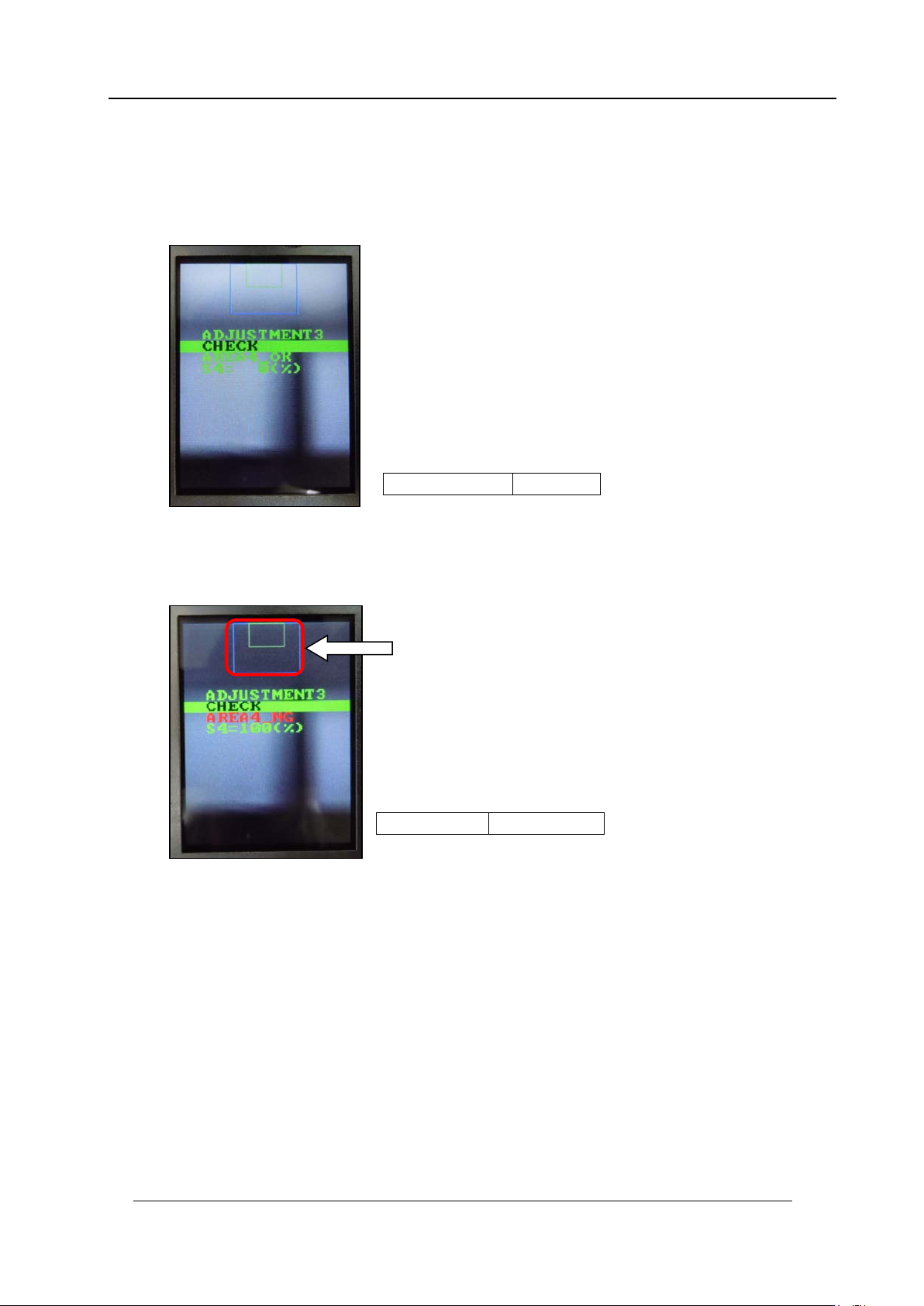
Checki ng t he Nozzle Existence Field of Vision
1. Press the upper button to change to “ADJUSTMENT 3” and then press the lower
button to enter the adjustment mode. Press the lower button to display
“ADJUS TM E NT 3 C HE CK” then check the val ue is in the toleran c e below.
2. Block the nozzle existence area glass with a piece of paper and then press the lower
button to display “ADJUSTMENT 3 CHECK”. (In the example below the right-hand
glass as view ed from the fr ont of t he machine is b lo cked).
AREA4
=
OK
S4
=
0%
AREA4
=
NG
S4
=
100%
Nozzle existence field
CONFIDENTIAL

Edition 1.0 IPS Adjustment for Various Head Types on the Module
<H24G/H24S/H24A>
FK-9F50-74-0E 2-16 FUJI CORPORATION
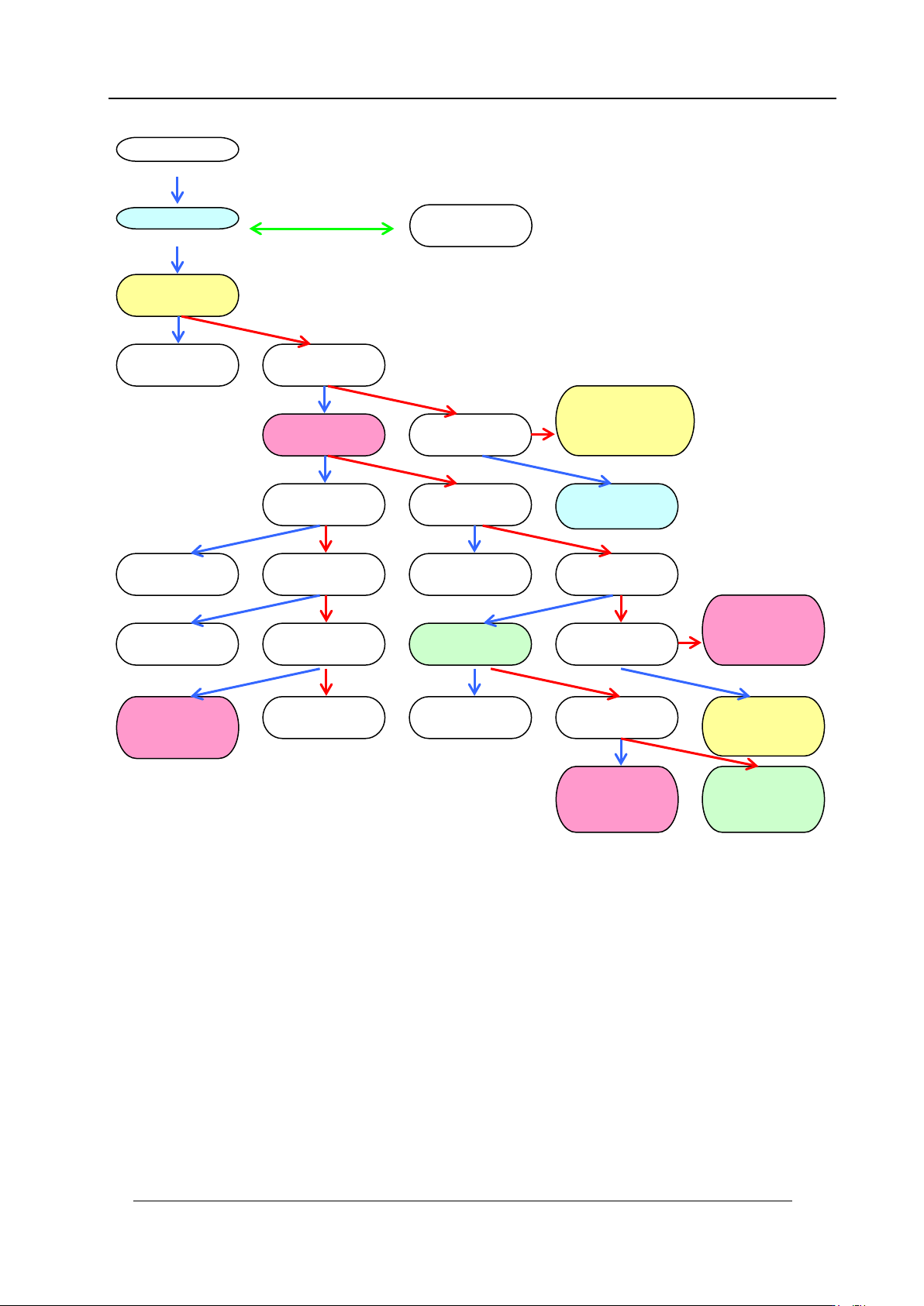
How to retur n t o [ AD J M O DE] window.
1. Press the upper button t o disp lay “ADJ US TMENT 3 BACK” .
2. Press the low er but t on t o display “ A DJUSTMEN T 2 CURRENT”.
3. Press the upper button t o disp lay “ADJ US TMENT 2 SET”.
4. Press the upper button t o dis play “A DJUST MEN T 2, ADJUSTMENT 3”.
5. Press the upper button t o disp lay “ADJ US TMENT 2, BACK”.
6. Press the low er but t on t o display “ A DJUSTMEN T 1 SET”.
7. Press the upper button t o disp lay “ADJ US TMENT 1 ADJUSTM ENT 2” .
8. Press the upper button t o disp lay “ADJ US TMENT 1 BACK”.
9. Press the low er but t on t o display “ A DJ M O D E” .
10. Turn the h ead bench O FF.
11. Remov e t he I PS mon it or j ig.
12. Attach the head cov er.
If the ADJUSTMENT 1 data was updated, it is necessary to perform the
calibration using [Accessory software] – [Calibration] – [Remeasure
Calibration] comm and. O t herw ise, the saved val ues w i l l not be u pdated.
CONFIDENTIAL
Edition 1.0 IPS Adjustment for Various Head Types on the Module
<H24G/H24S/H24A>
FK-9F50-74-0E 2-17 FUJI CORPORATION
ADJUSTME NT 1
ADJUSTME NT 2
ADJUSTME NT 1
BACK
ADJUSTME NT 2
CURRENT
CURRENT
UP
ADJUSTMENT 2
SET
CURRENT
DOWN
Raise
Current
Save setting
ADJUSTME NT 2
ADJUSTME NT 3
Lower
Current
CURRENT
BACK
ADJUSTME NT 3
CHECK
ADJUSTME NT 2
BACK
Return to:
ADJUSTME NT 2
CURRENT
CURRENT
UP
ADJUSTME NT 3
BACK
Return to:
ADJUSTME NT 2
CURRENT
Return to:
ADJUSTME NT 3
CHECK
AUTO MODE
ADJ MODE
ADJUSTME NT 1
SET
Save setting
Check field of vision
Return to
ADJUSTME NT 1
SET
Return to:
ADJUSTME NT 2
CURRENT
Up
Down long press
Down
Down
Down
Up
Up and down together
Up
Up
Up
Up
Up
Up
Up
Up
Up
Down
Down
Down
Down
Down
Down
Down
Down
Down
CONFIGURATION
SET CONFI G
Return to
ADJ MODE
Return to
ADJUSTME NT 1
SET
Up
Down
CONFIDENTIAL