YSM20_YSM20W_Mainte_E.pdf - 第173页
Appendix Appendix Contents 1. Specifications A-1 1.1 Air regulator unit A-1 1.2 Power connection terminals A-2 1.3 Connection between machines A-3 1.3.1 PREVIOUS INTERF ACE connector A-3 1.3.2 NEXT INTERF ACE connector A…
6-19
6
How to replace consumable parts
e
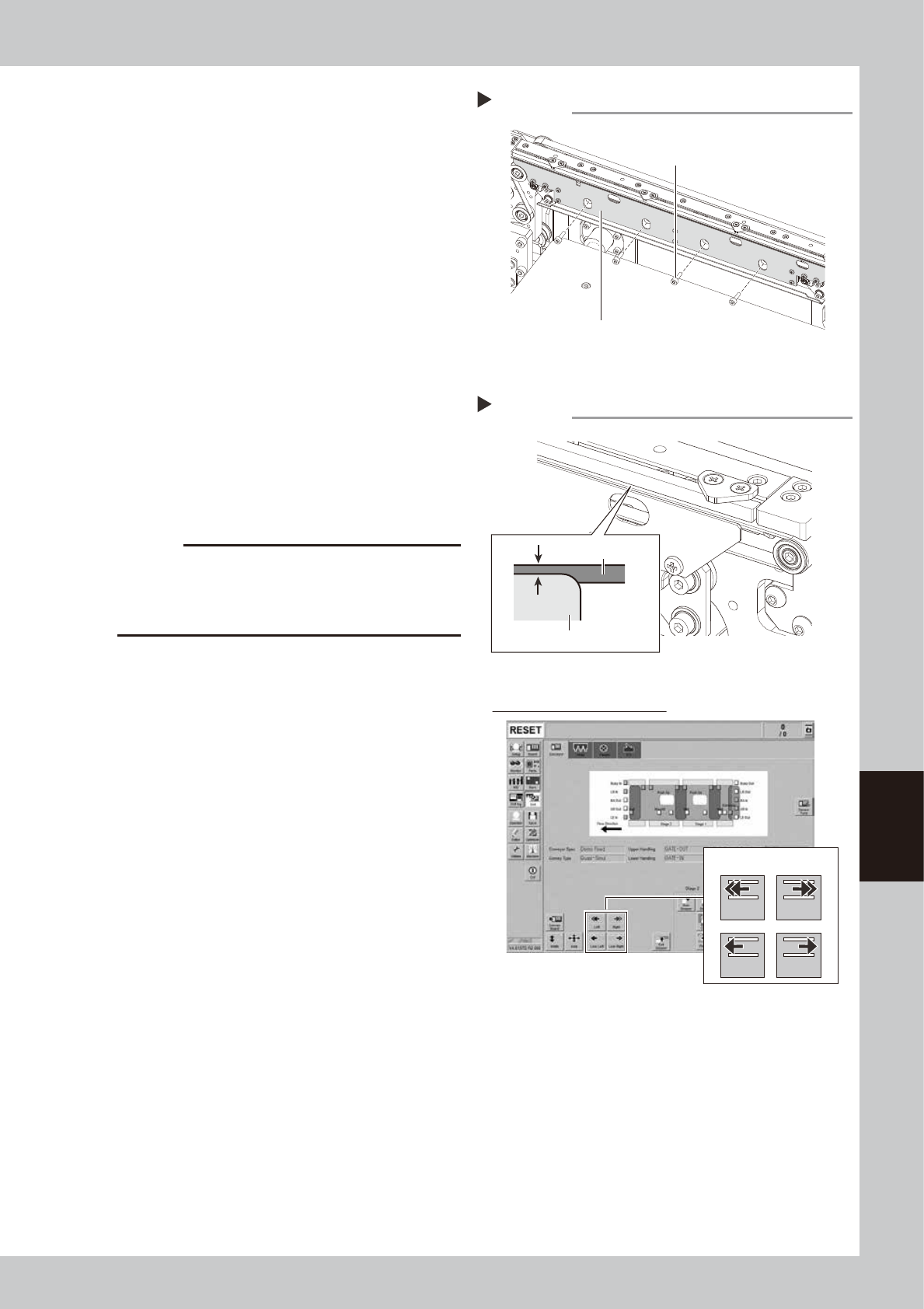
Mount the board clamp plate.
1. Fit the board clamp plate into its original
position and tighten the board clamp
plate mounting bolts with hex wrench (3).
2. Remove the square cloth.
r
Check the belt rotating condition.
1. Make sure that the board clamp top
surface is approx. 0.5 mm lower than the
belt upper surface.
2. Close the machine safety cover and
cancel the emergency stop. Attach the
carriage if the machine is the carriage
type.
3. On the [Unit]-[Conveyor] screen, press
the [Conveyor In] button or [Conveyor
Out] button to turn on the conveyor
motor and check the belt rotation.
4. If the rotation speed fluctuates or there is
slack in the belt, adjust the position of
the tensioner bolt and then check the
rotation again.
c
CAUTION
When the difference between the belt upper surface
and board clamp top surface is very little, the board
transfer error may occur easily. In this case, contact
your distributor.
Step 13
Mounting the board clamp plate
Board clamp plate
Board clamp plate mounting bolt
53622-N2-00
Checking the belt rotating condition
Step 14
Conveyor drive buttons
Checking conveyor belt rotation
Left Right
Low Left Low Right
0.5 mm
Board clamp plate
Belt
54602-N2-00

A-1
Appendix
1. Specifications
1.1 Air regulator unit
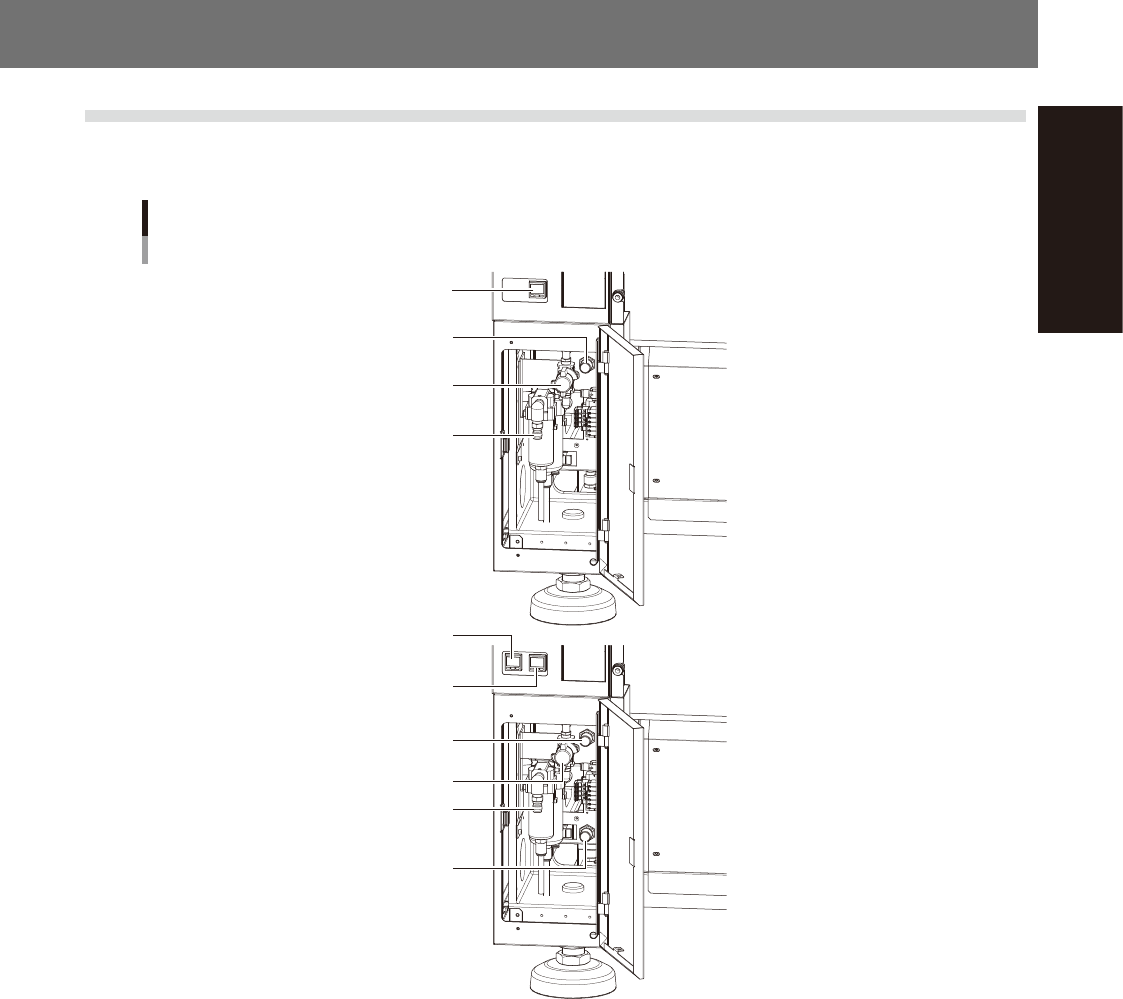
The regulator that regulates the air pressure supplied to the air drive section of this machine is located behind
the front lower left panel of the main unit. Specify the appropriate air pressure setting shown below.
Air pressure regulator and pressure gauge
For 1-beam
For 2-beam
Air supply/exhaust switch
Source air connector
Air pressure regulator
Digital pressure gauge
Digital pressure gauge
(A-table)
Digital pressure gauge
(B-table)
Air supply/exhaust switch
Source air connector
Air pressure regulator
(A-table)
Air pressure regulator
(B-table)
53A01-N2-00
n
Supply air pressure
This is the pressure of the source air supplied to the machine. Before setting the air pressure with the air regulator, make
sure that this supply air pressure is in the following optimal range.
Z:LEX (YSM20, YSM20W) : 0.45MPa to 0.70MPa
n
Digital pressure gauge
When within the normal range, the air pressure displays in green. When the air pressure is beyond the upper/lower limit
values (air down detection), an error occurs, and the air pressure displays in red.
n
Set pressure and air-down detection pressure
Air pressure setting for machine : 0.40MPa (±0.01)
(When the air pressure reaches 0.45MPa, the air pressure display turns red.)
Pressure-drop detection level : 0.33MPa
n
Air supply/exhaust switch (valve)
Turning this switch to the right shuts off air supply and exhausts air that remains inside the machine.
n
Source air connector
Prepare an air hose with an inner diameter of at least 8 mm having a 40SH socket (Nitto Koki, or equivalent), and
connect it to this connector. Use dry, clean air passed through an air filter.