TR7500_Series_Software_v29_En - 第259页
Test Research Inc. TR7500 Series User Guide – Software v.2.9.0 237 Referring to the prev ious examples, the s urface shape and lightin g angles on solder joints may have great impac t on the image qua lity. There f ore, …
Test Research Inc.
236 TR7500 Series User Guide –Software v.2.9.0
9.3 Color Check Method and RGB Weighting
9.3.1 Color Check Method
The Top-View camera consists of three CCD light-sensors. Unlike monochrome cameras,
they tend to have much better contrast in images by regulating the RGB Weighting.
Inspection boxes that are specially created using the top CCD camera will have better quality
sample images, and better to use for comparisons. Hence, the camera can easily detect
major contrasts on failing components. This is called CCM (Color Check Method).
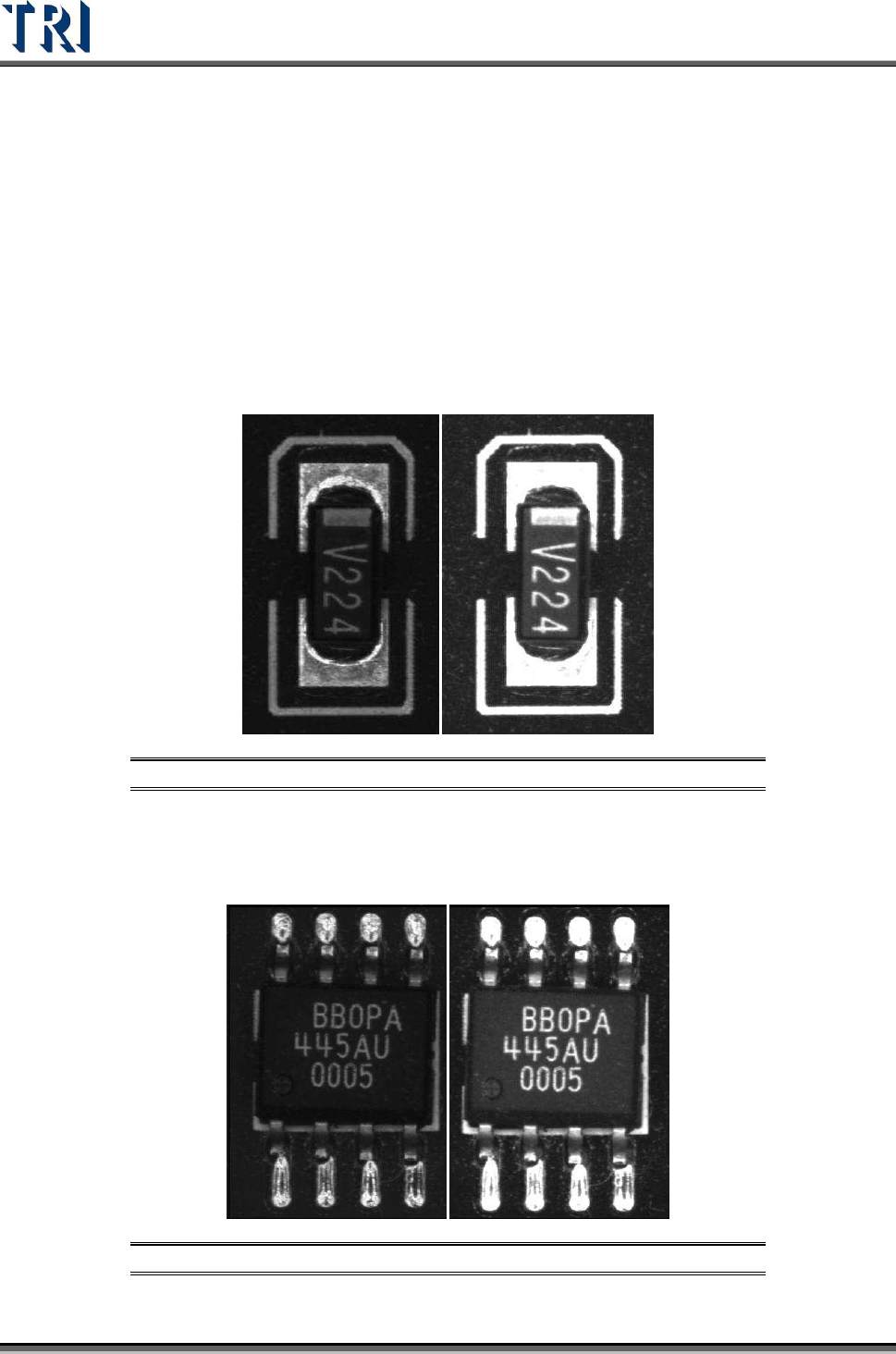
Using a resistor chip as an example, the image to the left was captured by a monochrome
camera, and the image to the right was captured by a three color sensor CCD camera and
regulated by RGB Weighting.
Figure 394: Resistor: Monochrome Image (left) & 3-Color CCD Image
Using an SOP designator as an example, the image to the left was captured by a
monochrome camera, and the image to the right was captured by a three color sensor CCD
camera and regulated by RGB Weighting.
Figure 395: SOP Designator: Monochrome Image (left) & 3-Color CCD Image
Test Research Inc.
TR7500 Series User Guide –Software v.2.9.0 237
Referring to the previous examples, the surface shape and lighting angles on solder joints
may have great impact on the image quality. Therefore, images that are captured by
monochrome cameras have irregular gray scale levels on solder joints. Images that are
captured by three color sensor CCD cameras regulated by RGB Weighting reflect much
better contrast which gives more stability to the inspection boxes.
9.3.2 RGB Weighting Dialog
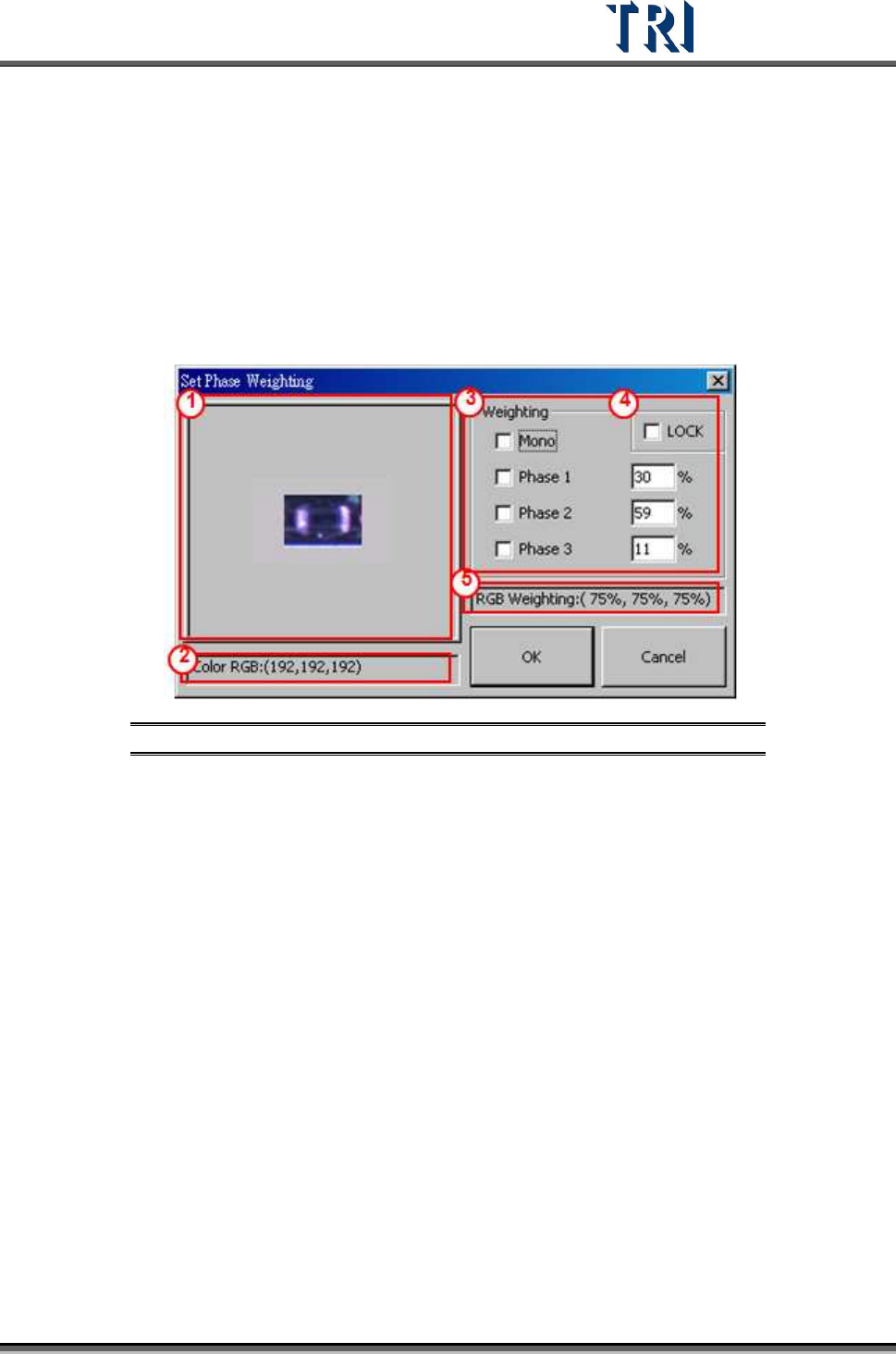
Percentage input is used for RGB Weighting parameter settings. Increasing/decreasing the R,
G, or B settings will obtain the desired contrast for inspection purposes. This can also
eliminate unwanted color reflected by the boards for a better detection accuracy.
Figure 396: RGB Weighting Dialog
(1) Click on displayed image to zoom in.
(2) Display RGB or Grayscale level values.
(3) Options and settings for RGB Weighting by percentage.
(4) Check [LOCK] box to save the RGB setting as the default settings. [OK] must be
clicked to change the current RGB settings.
(5) Display RGB Weighting as percentages.
9.3.3 Example for TR7500 RGB Weighting
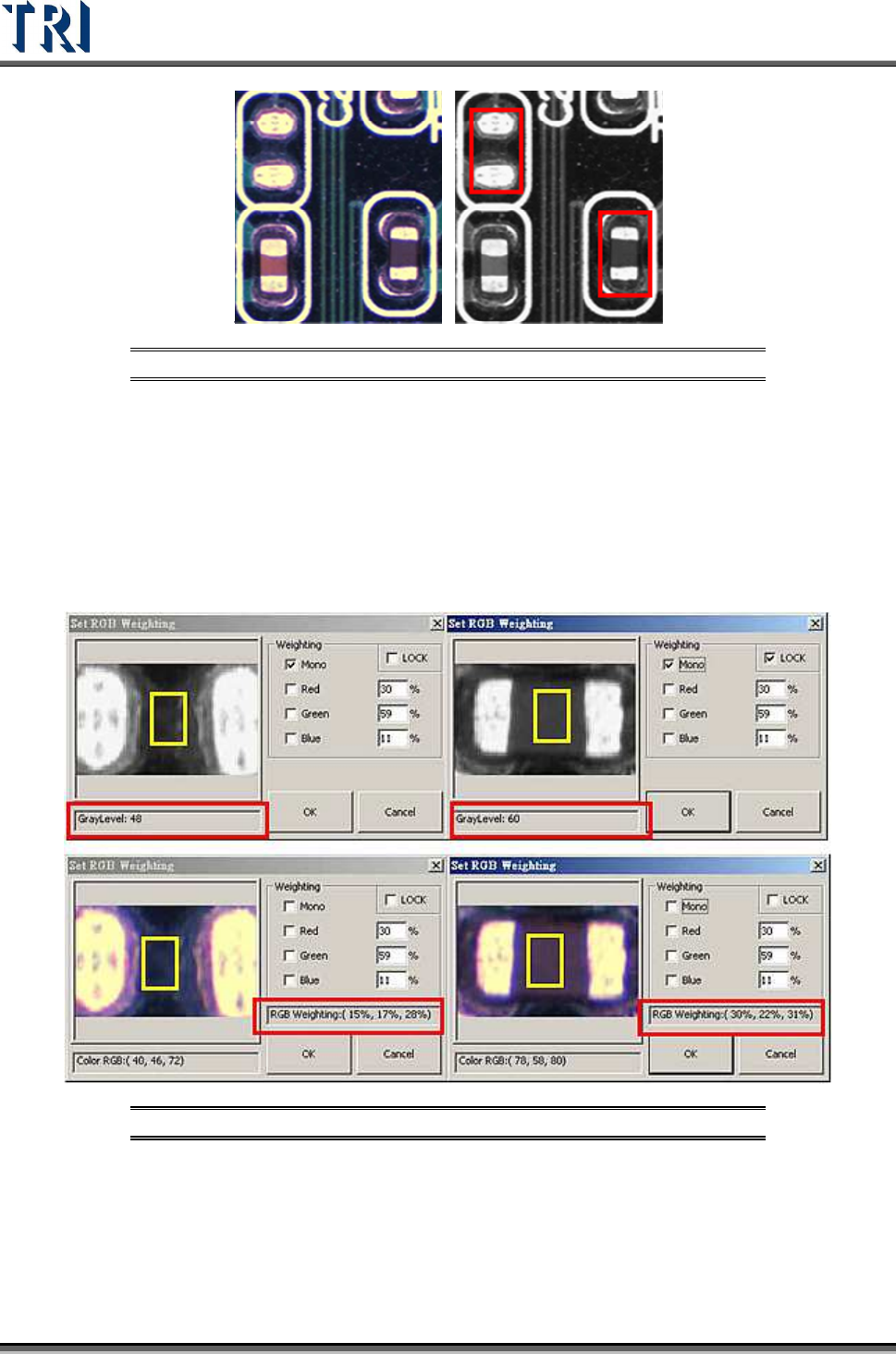
Using a missing designator as an example. The two figures below are in color and
monochrome. Within the monochrome figure, a placed designator and missing designator
locations are surrounded by red frames. The problem with the missing designator location is
that the software can easily mistake it for having a similar base color compared to an actual
placed designator’s body color. The picture to the left was taken by TR7500’s top color CCD
camera. The picture on the right was taken by a monochrome camera.
Test Research Inc.
238 TR7500 Series User Guide –Software v.2.9.0
Figure 397: Missing Designator: Color (left) & Monochrome Images
In the top-left figure below a missing designator has a gray level of 48. The top-right shows a
placed designator with a gray level of 60, which is very close to the missing designator. This
will cause unavoidable false calls or missed calls. These pictures were captured by a
monochrome camera, where the gray level is analyzed within the yellow box.
The two pictures on the bottom are captured by the 3 CCD True Color Camera. The RGB
weighting ratios within the yellow boxes are: RGB (15%, 17%, 28%) for a missing designator,
and RGB (30%, ,22%, 31%) for a placed designator.
Figure 398: Monochrome (above) vs. RGB Values
According to the compared figures above, the Red value makes the most value difference.
Therefore, use the RGB Color Weighting to make a better contrast between the two by
raising Red percentage ratio up to 200. A much bigger gray level contrast will be visible
between the two pictures after raising the Red ratio value and lowering the Blue and the
Green values.