00193325-01.pdf - 第102页
SIPLACE Softw are Guide SR.503.xx 7.7 "Long Printed Circ uit Board" Option Issue 12/01 EN 102 7.7 " Long Printe d Circui t Board" Option 7.7.1 Purpose The "Long printed ci rcuit bo ard" opti…
SIPLACE Software Guide SR.503.xx
Issue 12/01 EN 7.6 "Traceability" Option
101
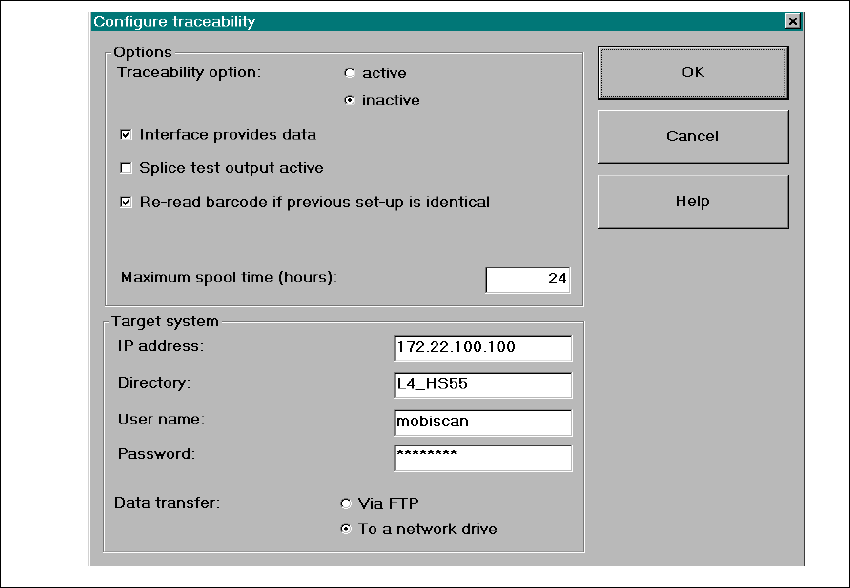
7.6.3.2 Settings in "Configuring Traceability" Menu
In the menu Options => Configure Traceability of the SIPLACE user interface, the operator can
change the Traceability settings. Refer to the Online Help for a description of the parameters. 7
Fig. 7.6 - 2 Dialog: Configuring Traceability

SIPLACE Software Guide SR.503.xx
7.7 "Long Printed Circuit Board" Option Issue 12/01 EN
102
7.7 "Long Printed Circuit Board" Option
7.7.1 Purpose
The "Long printed circuit board" option allows you to process overlength printed circuit boards (up
to a length of 610mm). 7
7.7.2 Description
NOTE:
Please refer to the UNIX Line Computer Operating Guide and the Operating Guide for the
respective machine for a detailed description. 7
7

SIPLACE Software Guide SR.503.xx 8 New Functionality
Issue 12/01 EN 8.1 Software Version 503.01
103
8 New Functionality
8.1 Software Version 503.01
8.1.1 Placing 0201 Components
8.1.1.1 Purpose
For Typ 0201 components, solid-state pick-up has been implemented in order to minimize
pick-up errors. 8
8.1.1.2 Description
NOTE
Please refer to the Placing 0201 Components User Manual for a detailed description. 8
8.1.2 Component Sensor
8.1.2.1 Purpose
In addition to the vacuum check as Component presence control respectively, a Component sen-
sor has been introduced to function as an added optical control. This ensures that a on edge pi-
cked-up
component with varying component height and width is recognized. 8
8.1.2.2 Description
NOTE:
Please refer to the Online Help and the Component Sensor Operating Guide for a detailed de-
scription. 8