00193325-01.pdf - 第67页
SIPLACE Software G uide SR.503.xx 5 Error information and TSS Issue 12/01 E N 5.1 General 67 5 Error information and TSS 5.1 Gen eral If errors occur during o peration s at the pl acement s tation, yo u can ca ll up info…

4 Switching the SIPLACE line on and off SIPLACE Software Guide SR.503.xx
4.2 Switching off the SIPLACE line Issue 12/01 EN
66
4.2.2 Switching off Siplace Pro (Windows NT)
Select Item --> Exit from the SIPLACE Pro menu bar.
Close all other programs on the computer.
Select Shutdown from the Windows Start menu.
4.2.3 Switching off the stations
Proceed as follows to switch off the station: 4
Terminate all placement operations.
Check to make sure that the z-axes of all placement heads are in the top end position.
Check to see if there are components in the placement heads and, if necessary, remove.
If necessary, move all gantries to the waiting position with the help of the corresponding gantry
functions (see the user manual for your machine).
NOTE
Gantries are usually moved automatically to the waiting position. 4
Shut down properly the operating system of the station PC.
Now switch off the station at the main switch.
4.2.4 Starting stations which have already been powered up after shutting down
the line computer
If the stations remain switched on after shut down of the line computer, and the line computer has
been restarted, the computer then reconnects to the stations (synchronous restart). 4

SIPLACE Software Guide SR.503.xx 5 Error information and TSS
Issue 12/01 EN 5.1 General
67
5 Error information and TSS
5.1 General
If errors occur during operations at the placement station, you can call up information about the
possible causes and ways of eliminating the error in question. 5
To do this click the button to start the Help system for the station computer (Online help
system on page 75). 5
– The information displayed will always be related to the error that is currently displayed on
screen, and from which the Help system was called.
– You can find information about other errors using the help system index. Simply enter the num-
ber of the error you wish to find, and the system will call up the description that belongs to this
error.
Clicking on the button starts the Technical Solution System (TSS). The TSS is op-
tional. 5
5.2 Calling error information
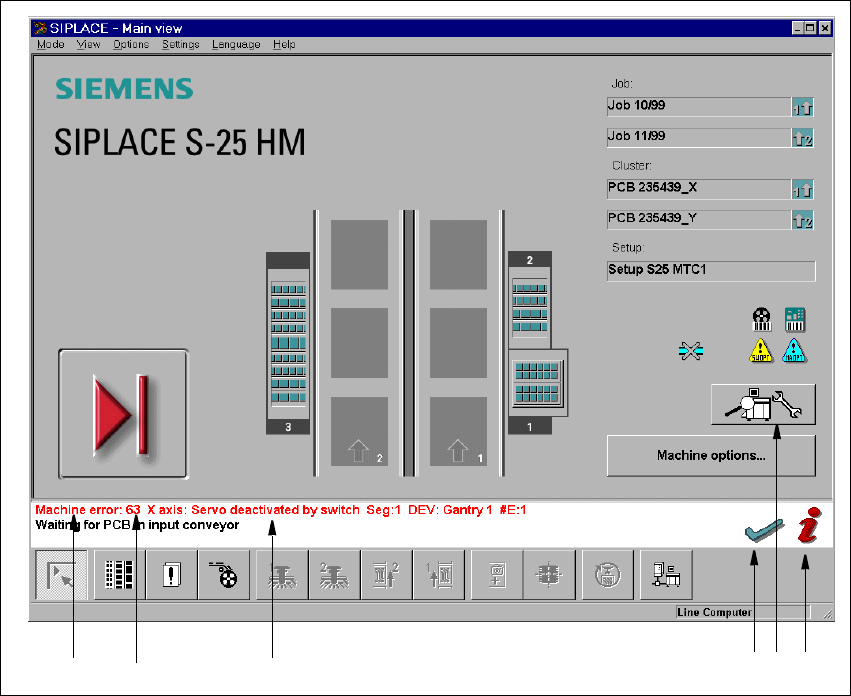
If an error occurs during operation, the appropriate error message is displayed in red in the status
bar of the user interface. In the Error view, the icons for Error information and Technical Solu-
tion System are both active (see Fig. 5.2 - 1). 5
You use the button to clear an error after the cause of the error has been eliminated. 5
5 Error information and TSS SIPLACE Software Guide SR.503.xx
5.2 Calling error information Issue 12/01 EN
68
5
Fig. 5.2 - 1 Main view with error message (Example: S-25 HM)
Key to Fig. 5.2 - 1
(1) Type of error (Track, machine, transport or general error)
(2) Error number (The error number assigned to the error)
(3) Error message (Short information about the error)
(4) „Clear error“ button (Used to acknowledge the error after the cause of the error
has been eliminated)
(5) „TSS“ button (Used to call the Technical Solution System)
(6) „Error information“ button (Used to call up help on the current error)
12 3 456