00193325-01.pdf - 第9页
SIPLACE S oftware Guide SR.503.xx 1 Preface Issue 12/01 E N 1.1 General 9 1 Preface 1.1 Gen eral 1.1. 1 Over view This so ftware gu ide de scribe s the o perating software for the SI PLAC E machi nes (s oftware ver - sio…
List of figures SIPLACE Software Guide SR.503.xx
Issue 12/01 EN
8
Fig. 7.1 - 1 Connecting the ISDN router to the local SIPLACE-LAN. . . . . . . . . . . . . . . . . . . . . . . . . . . 90
Fig. 7.1 - 2 Connection to the customer’s site LAN. . . . . . . . . . . . . . . . . . . . . . . . . . . . . . . . . . . . . . . . 91
Fig. 7.6 - 1 Dialog: Machine Options – Setup Control with Barcode. . . . . . . . . . . . . . . . . . . . . . . . . . 100
Fig. 7.6 - 2 Dialog: Configuring Traceability . . . . . . . . . . . . . . . . . . . . . . . . . . . . . . . . . . . . . . . . . . . . 101
Fig. 9.2 - 1 "Language selection" dialog box. . . . . . . . . . . . . . . . . . . . . . . . . . . . . . . . . . . . . . . . . . . . 106
Fig. 9.2 - 2 Welcome screen. . . . . . . . . . . . . . . . . . . . . . . . . . . . . . . . . . . . . . . . . . . . . . . . . . . . . . . . 107
Fig. 9.2 - 3 "Registration" dialog box. . . . . . . . . . . . . . . . . . . . . . . . . . . . . . . . . . . . . . . . . . . . . . . . . . 108
Fig. 9.2 - 4 Confirmation of registration details . . . . . . . . . . . . . . . . . . . . . . . . . . . . . . . . . . . . . . . . . . 109
Fig. 9.2 - 5 Selecting a touch screen . . . . . . . . . . . . . . . . . . . . . . . . . . . . . . . . . . . . . . . . . . . . . . . . . 110
Fig. 9.2 - 6 „Application selection“ dialog . . . . . . . . . . . . . . . . . . . . . . . . . . . . . . . . . . . . . . . . . . . . . . 111
Fig. 9.2 - 7 Component selection . . . . . . . . . . . . . . . . . . . . . . . . . . . . . . . . . . . . . . . . . . . . . . . . . . . . 112
Fig. 9.2 - 8 TCP/IP addresses. . . . . . . . . . . . . . . . . . . . . . . . . . . . . . . . . . . . . . . . . . . . . . . . . . . . . . . 113
Fig. 9.2 - 9 TCP/IP addresses for „Whispering down the line“ . . . . . . . . . . . . . . . . . . . . . . . . . . . . . . 114
Fig. 9.2 - 10 Service port ID’s . . . . . . . . . . . . . . . . . . . . . . . . . . . . . . . . . . . . . . . . . . . . . . . . . . . . . . . . 115
Fig. 9.2 - 11 Checking inputs . . . . . . . . . . . . . . . . . . . . . . . . . . . . . . . . . . . . . . . . . . . . . . . . . . . . . . . . 116
Fig. 9.2 - 12 Log file entries . . . . . . . . . . . . . . . . . . . . . . . . . . . . . . . . . . . . . . . . . . . . . . . . . . . . . . . . . 117
Fig. 9.2 - 13 Final screen of the CD installation routine . . . . . . . . . . . . . . . . . . . . . . . . . . . . . . . . . . . . 118

SIPLACE Software Guide SR.503.xx 1 Preface
Issue 12/01 EN 1.1 General
9
1 Preface
1.1 General
1.1.1 Overview
This software guide describes the operating software for the SIPLACE machines (software ver-
sion SR.503.xx). It is intended for use by the following groups of people: 1
– operators
– line engineers
– service personnel.
The headers of each of the chapters provides information about the 1
– issue and the
– software version.
1.1.2 Where to find additional information?
If you have questions regarding this software guide or would like more detailed information about
a particular topic, please contact the appropriate Siemens representative or us directly at: 1
Siemens Dematic AG
SD EA 1 S GC
Rupert-Mayer-Str. 44
D-81359 Munich, Germany 1
1.1.3 SIPLACE on the Internet (WWW)
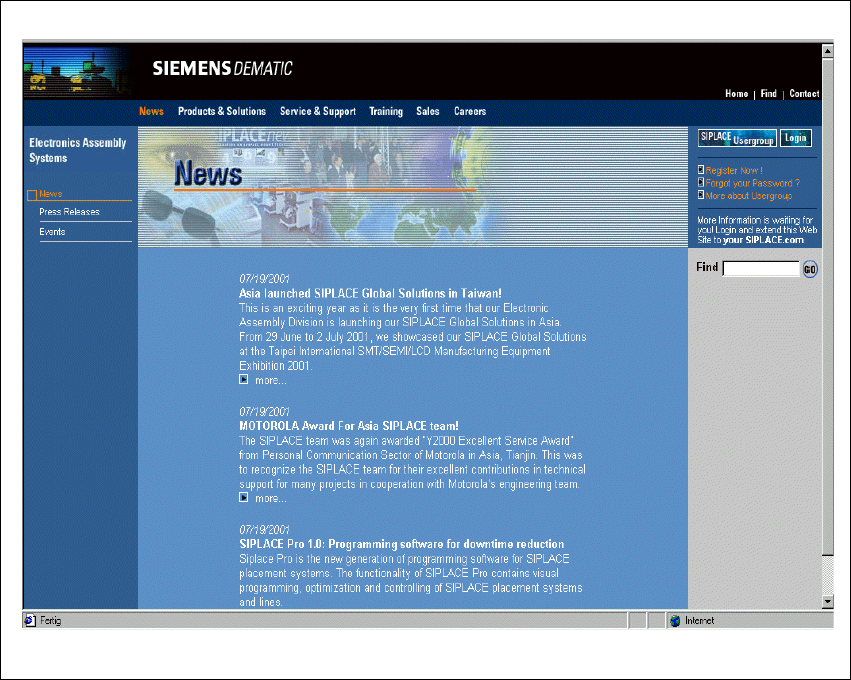
Information can also be found on the Internet. You can log on to the SIPLACE home page under
http://www.siplace.com. 1
On the welcome page, select the country in which you reside, and the home page opens.
1
1
1 Preface SIPLACE Software Guide SR.503.xx
1.1 General Issue 12/01 EN
10
1
Fig. 1.1 - 1 SIPLACE home page
The various topics include information on the following 1
– our products
– our services
– the people to contact etc.
In addition to this, registered customers also have access to the SIPLACE User Group. Here you
can call up specialized information about our placement machines, for example 1
– technical documentation
– technical information
– lists of spare parts etc.
Registration for access to the User Group is very simple: 1
Click the icon Register Now!.
Fill in the registration form and send it off.
You will receive a USER ID and a password which entitles you to access. 1