00194313-03 - 第61页
SIPLACE S-25 HM / S-27 HM 2 Assembly Inst ructions for PCB Camera, Multicolor 02/2007 Edition 2.5 Preparatory Steps 61 2.5.2 Assembly in the T e rminal Panel, LH Side 2.5.2.1 Changing the "Illumination" Cables …

2 Assembly Instructions for PCB Camera, Multicolor SIPLACE S-25 HM / S-27 HM
2.5 Preparatory Steps 02/2007 Edition
60
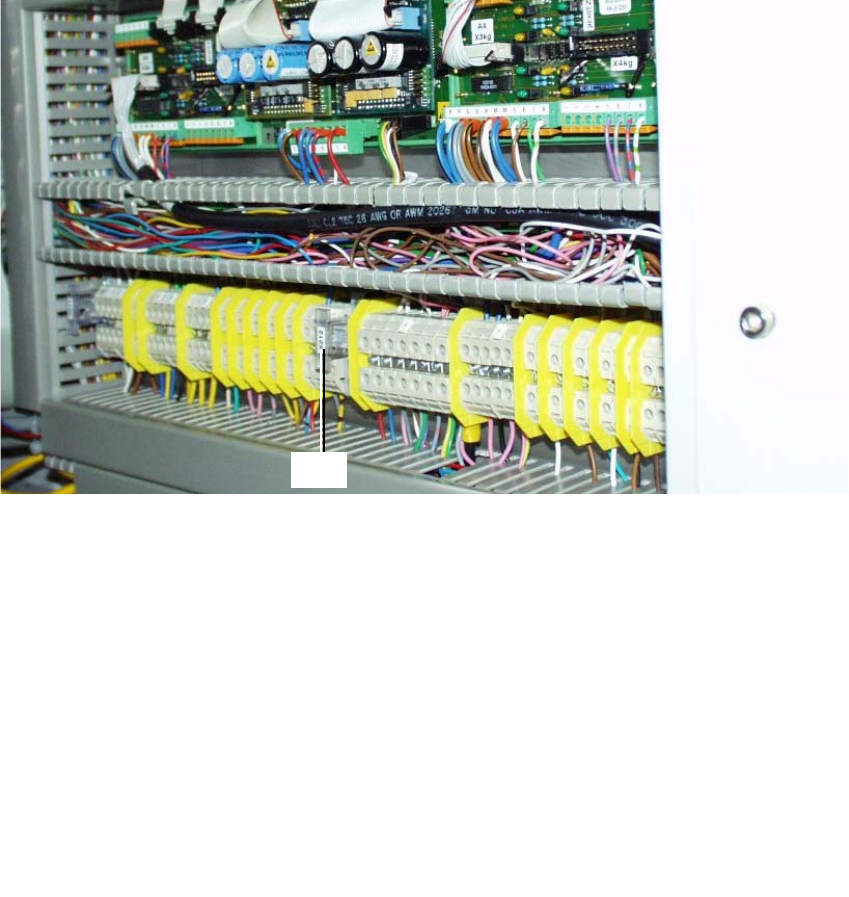
2.5.1.1 Conducting the Wiring in the Terminal Panel, Right Side
: Remove the cover from the horizontal and vertical cable pit.
: Remove the green strand running from rectifier module A2: X7 to terminal X207-1
(layout A2: see Fig. 2.6.2). The terminal X207-1 is then not in use.
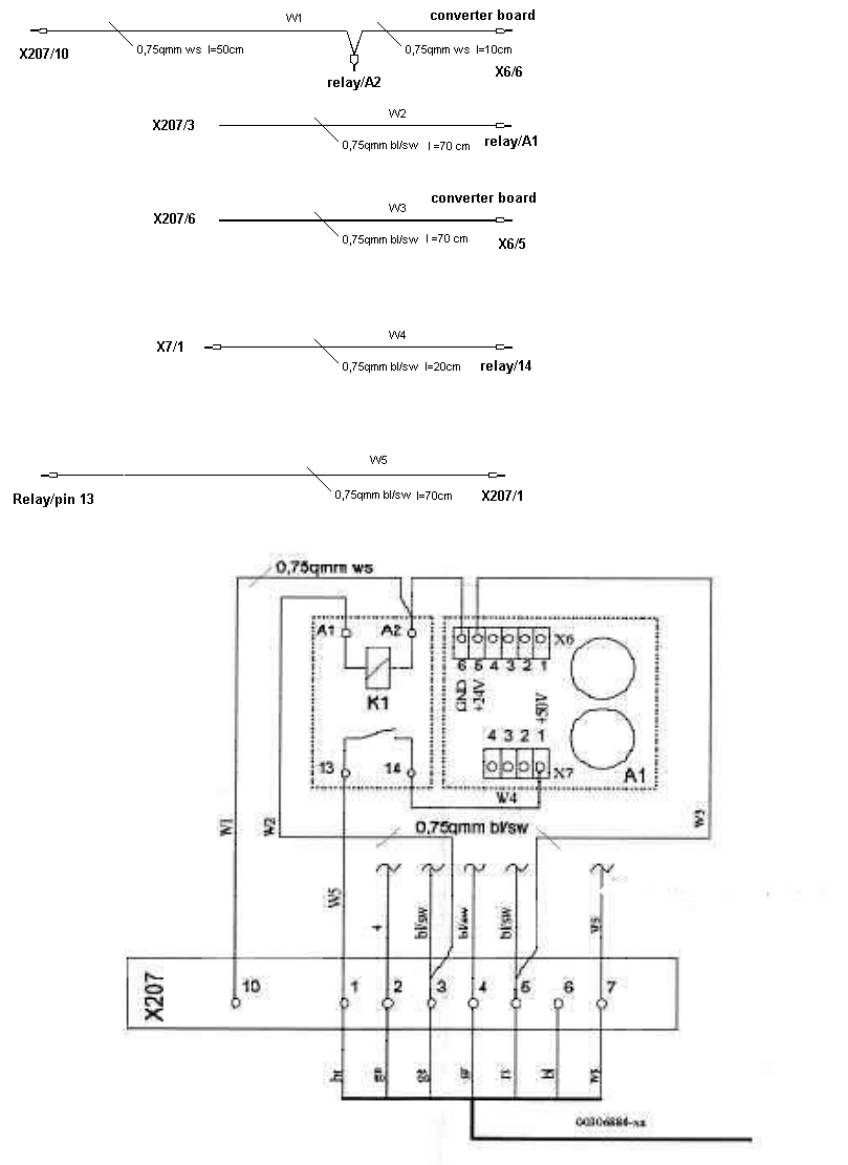
: Run the cables W1 to W5 from the assembly kit as shown in the overview, Fig. 2.13.7.
Prefabricate the cables as much as possible.
NOTE:
You will need a size 1 screwdriver to disconnect and make the Catch terminal connections and
terminal connections X 207. 2
: Lay and wire the new cables W1 to W5 as shown in circuit diagram Fig. 2.13.8 AND, while
doing so, assemble cables W2 and W3 as follows:
: Install a twin connector sleeve at cable end W2 that will be connected to X207-3 and at cable
end W3 that will be connected to X207-5.
: Use the crimp pliers to fasten each of the two strands bl/bk in the twin connector sleeve.
: Clamp the cables W2 thus assembled to X 207-3 and W3 to X 207-5.
: Make certain that all connections are firmly seated and are correctly allocated.
2
SIPLACE S-25 HM / S-27 HM 2 Assembly Instructions for PCB Camera, Multicolor
02/2007 Edition 2.5 Preparatory Steps
61
2.5.2 Assembly in the Terminal Panel, LH Side
2.5.2.1 Changing the "Illumination" Cables
The S-25 HM / S-27 HM have 2 "illumination" cables: 2
– Cable "illumination, gantry 1": Item no. 00244260-xx
– Cable "illumination, gantry 2": Item no. 00244261-xx
These cables must be changed first, as described below.
Fig. 2.5.3 Terminal Panel, LH Side, Layout of the Illumination Cables, Gantries 1 and 2
: Open the machine frame doors for terminal panel, LH side.
: Use the circuit diagram Fig. 2.13.6 and Change the two cables "illumination, gantry 1" and "2"
as follows:
: Separate the strands wh, gn, gr, bl which are clamped to terminal X212 - 4 with a connector
sleeve.
: Use the crimping pliers. Now clamp these strands separately as follows, each in a twin con-
nector sleeve from the assembly kit (Section 2.4.1): wh with gn. gr with bl.
: Clamp the 2 changed "Illumination" cables on the terminal panel:
2
2
the strands wh, gn
-> to terminal X212 - 4 (+ 24V),
the strands gn, bl -> to terminal X212 - 9 (+ 50V)
3
4
X212
2 Assembly Instructions for PCB Camera, Multicolor SIPLACE S-25 HM / S-27 HM
2.5 Preparatory Steps 02/2007 Edition
62
2.5.3 S-25 HM wiring with terminal panel on right-hand side, new version
(new rectifier module A2, lamp-wire connector in cable duct)
2
W1: Ground connection for
relay and converter board
W2: Connection switched
24VDC from X207/3 (only
available if cover is closed)
W3: 24VDC input for converter
board from X207/5
W4: 50VDC output of converter
board to pin 14 of relay
W5: Switched relay output
50VDC to X207/1 (brown wire of
cable 00306880) 2