00194313-03 - 第71页
SIPLACE S-25 HM / S-27 HM 2 Assembly Inst ructions for PCB Camera, Multicolor 02/2007 Edition 2.2 Installing PCB Camera Board and PCB Camera Multicolor 71 2.2.2 Inst alling the PCB Camera Multicolor Abb. 2.2.4 PCB Camera…
2 Assembly Instructions for PCB Camera, Multicolor SIPLACE S-25 HM / S-27 HM
2.2 Installing PCB Camera Board and PCB Camera Multicolor 02/2007 Edition
70
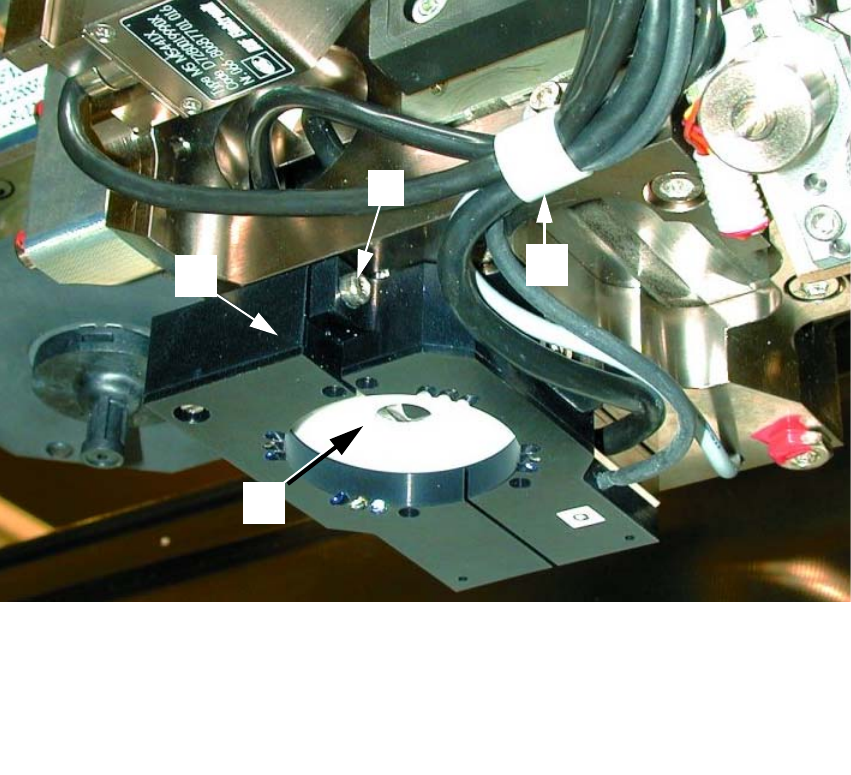
: If the optional oblique illumination (see Abb. 2.2.3) is present on the subgantry PCB camera,
deinstall the oblique illumination as follows:
Abb. 2.2.3 Removing the Optional Oblique Illumination (Using S-25HM as an Example)
2
: Undo the cable clip fastener (see Abb. 2.2.3 -> 2).
: Hold onto the oblique illumination:
Undo the attachment screw (socket hex head cap screw M3: see Abb. 2.2.3 -> 2) and pull the
oblique illumination straight down and off the camera.
: Cautiously put the oblique illumination to one side so that it won’t be damaged.
: Use a small mirror as an aid and HOLD onto the PCB camera:
Starting from the bottom, undo the screws fastening the PCB camera (3 socket hex head cap
screws M2, see Abb. 2.2.2 -> 4) and lower the PCB camera out.
: Set the PCB camera down carefully so that it won’t be damaged.
1 Subgantry PCB camera
2 Cable clip: Fastener = 1 socket hex head cap screw M3
3 Optional oblique illumination
4 Fastener for oblique illumination: an attachment screw (socket hex head cap screw M 3))
3
1
2
4
SIPLACE S-25 HM / S-27 HM 2 Assembly Instructions for PCB Camera, Multicolor
02/2007 Edition 2.2 Installing PCB Camera Board and PCB Camera Multicolor
71
2.2.2 Installing the PCB Camera Multicolor
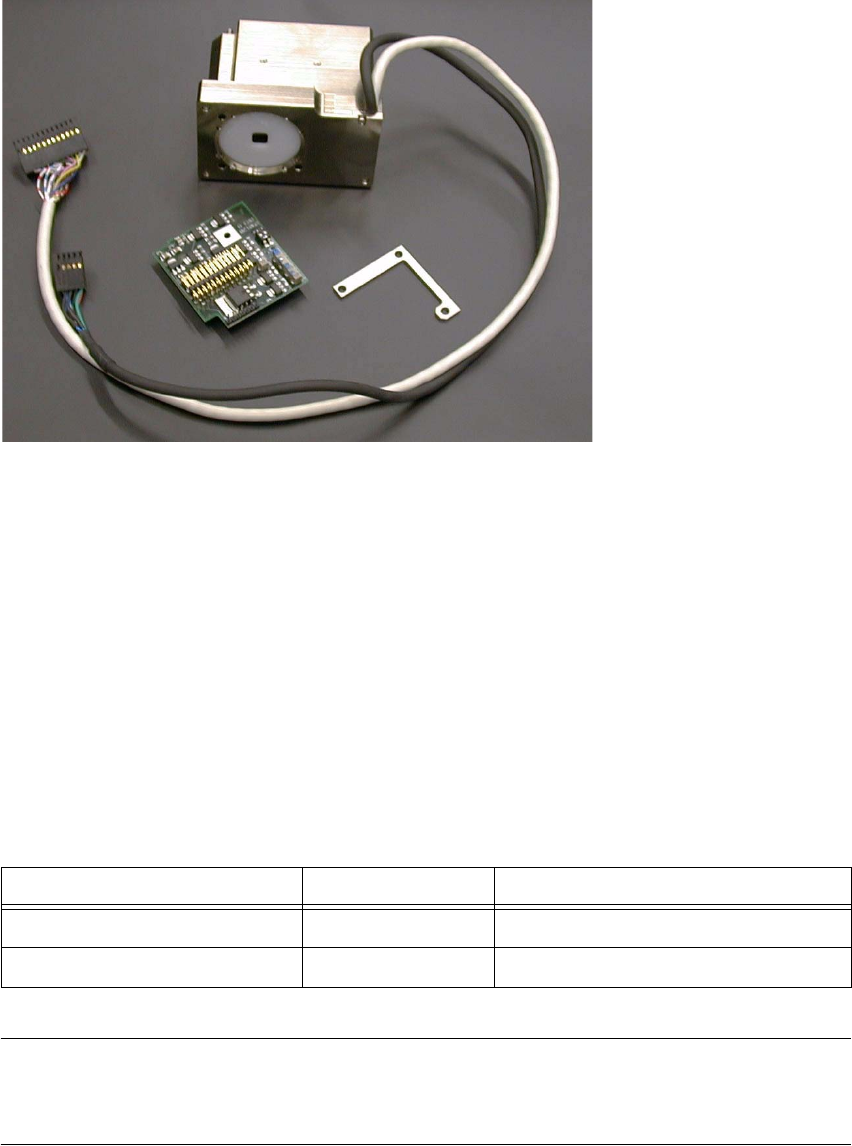
Abb. 2.2.4 PCB Camera Multicolor Assembly with Distance Plate (Spacer)
: Find out before installing the PCB camera Multicolor which PCB or substrate thickness will be
placed next. Depending on the thickness, it will or will not be necessary to place the distance
plate (spacer) from the assembly kit under each camera.
The table below is helpful during assembly process. In deciding, calculations are carried out to
ascertain which thickness range the current PCB or substrate thickness is closest to the focus.
NOTE:
At S-27 HM the distance plate is always mounted with the PCB camera Multicolor.
(Distance between surface conyeyor rail and lower surface of camera = 16 mm). 2
1 Distance plate (Spacer) *) *
2 PCB camera Multicolor incl. cable and connector *)
3 Fasteners for PCB camera Multicolor: 3 hex head cap screws M3 x 14, captive *)
4 "PCB camera board, modular" *)
5 Cable "illumination", camera *) -> Connection to X3 at "PCB (camera) board modular"
6 Cable "camera" *) -> Connection to X4 at "Vision board, modular"
PCB or substrate thickness Focus Install distance plate (spacer)
0.3 - 3.4 mm 1.7 mm Yes
1.5 - 4.5 mm 3.2 mm No
2
1
3
4
5
6
2 Assembly Instructions for PCB Camera, Multicolor SIPLACE S-25 HM / S-27 HM
2.2 Installing PCB Camera Board and PCB Camera Multicolor 02/2007 Edition
72
Following the configuration of the Multicolor PCB camera at the line computer, including descri-
bing the PCB or substrate (entry of the thickness), a message can be accessed at the line com-
puter as a check (see Abschn. 2.3.1). 2
In most cases, adequate imaging quality will still be achieved even it work is done outside the ran-
ges indicated above.
With the spacer plate removed, system fiducials can still be adequately recognized. 2
: Ascertain the PCB/substrate thickness to be processed now.
: Use the table to determine whether the distance plate is required.
If YES, place the distance plate (see Abb. 2.7.4 -> 1) from the camera assembly kit on the ca-
mera’s assembly surface in the correct rotational position (this is determined on the basis of
the holes).
2
: Place the PCB camera Multicolor, including the distance plate, if applicable, in the correct po-
sition on the distance bolts (HS-50) or directly on the camera holder from below (S-25 HM).
: Use the 3 captive hex head cap screws M 3 x 14 to screw the camera to the camera holder.
: Fasten the cables with the two cable ties.
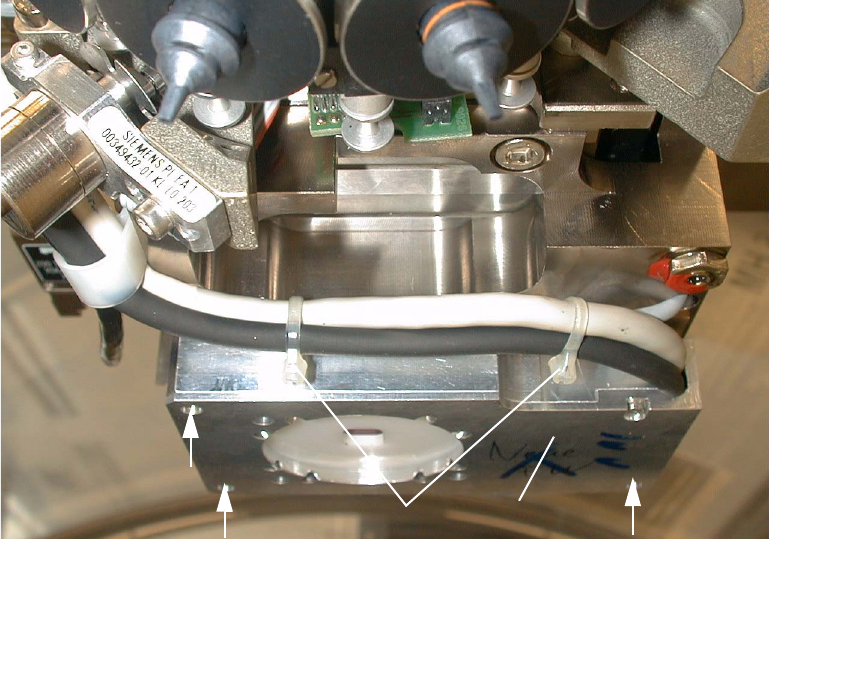
Abb. 2.2.5 Fastening the PCB Camera Multicolor (View from below, diagonally)
1 PCB camera Multicolor
2 Fasteners: 3 hex head cap screws M3 x 14 (captive)
3 2 Cable ties
2
2
21
3