Infinity DI.pdf - 第56页
Chapter Issu e 3 Jan 01 Infinity Dual Imag e Manual 2.9 INFINITY OPERATOR RUN PRODUCT Pr oduct Sensor Option When Run i s selected, the f irst board from the batc h is fed to the inroad con v eyor sensor and is stopped. …
2.8 Infinity Dual Image Manual Chapter Issue 3 Jan 01
INFINITY
OPERATOR
RUN PRODUCT
RUN PRODUCT
Bar Code Reader Option
WARNING
LASER LIGHT SOURCE. THE BAR CODE READER UTILIZES A
LASER TO SCAN THE BAR CODE, DO NOT LOOK DIRECTLY IN
TO THE READER OR AT THE LIGHT DIRECTLY REFLECTED
FROM A SURFACE, AS SERIOUS DAMAGE CAN OCCUR TO THE
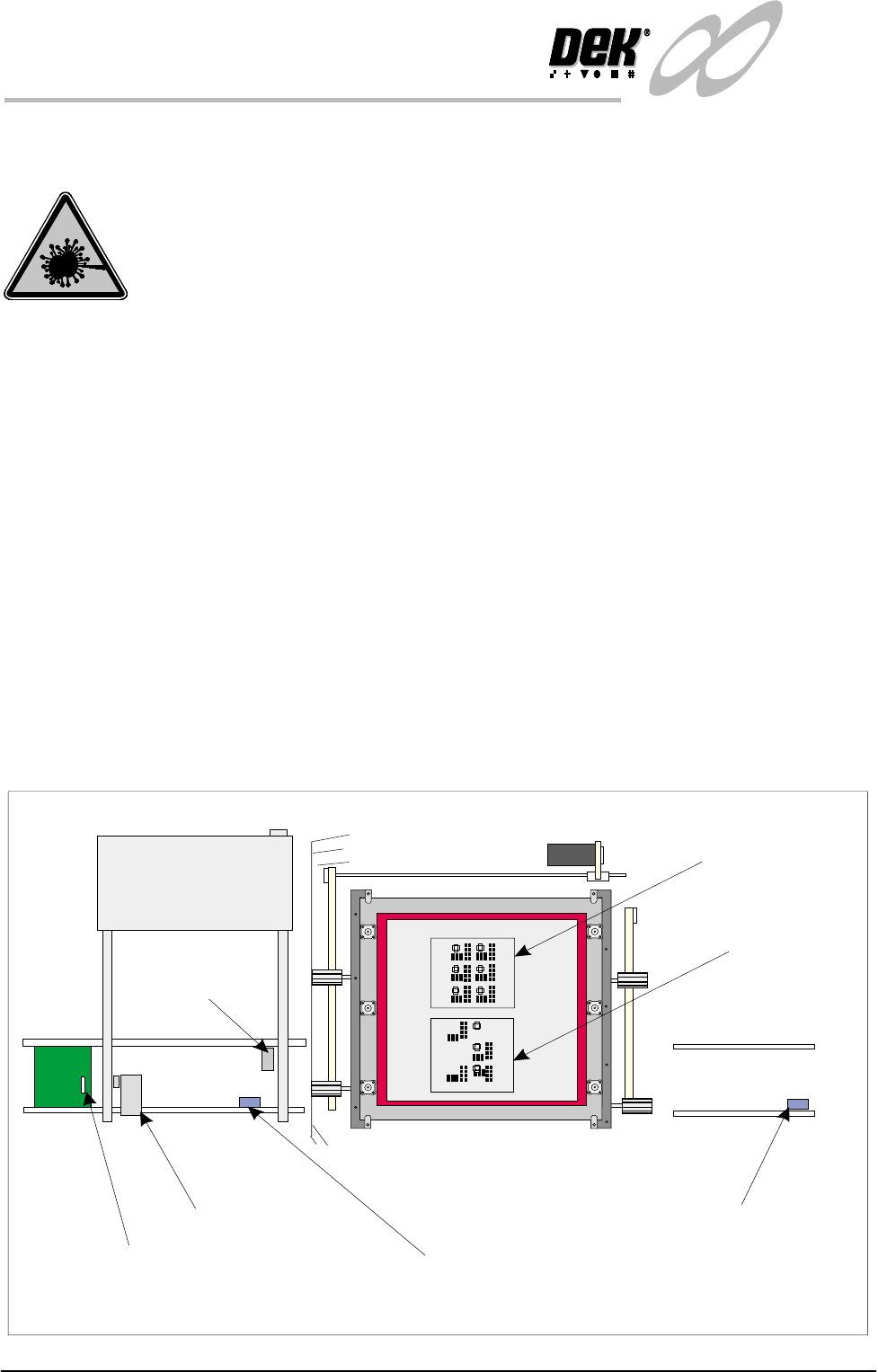
When Run is selected,the first board from the product batch is fed to the bar
code reader. The label on all boards are read. The machine sets up automatically
by comparing the label information with the machine product file.
Load Product ’Rear’ The first board in the batch( the’Rear’ Product ) is passed to the input conveyor
sensor where it is halted. During conveyance, the rear bar code reader is
triggered on causing the reader to read the label. The board present sensor
detects the presence of the board.
As soon as the board reaches the board present sensor this instigates the start up
of the machine print conveyors. The board is fed into the machine and printing
commences. On completion, the board is fed to the output conveyor where it is
passed on to the next process.
Load Product
’Front’
If the product is now changed over and the front product is printed, when the
printer reads the bar code label on the first board in the batch, the new product
file is loaded automatically. The board is fed to the input conveyor sensor and
halts. The board present sensor detects the board and the screen changer moves
the screen to the product ’Front’ position. The board is fed into the machine and
printing starts.
Figure 2-3 Board Load - Bar Code
Elements of the Dual Image Option
Front
Bar Code Reader
Bar Code Label
Input Conveyor Sensor
Output Conveyor Sensor
Product
‘Rear’ image
Product
‘Front’ image
Board
Present
Sensor
Chapter Issue 3 Jan 01 Infinity Dual Image Manual 2.9
INFINITY
OPERATOR
RUN PRODUCT
Product Sensor
Option
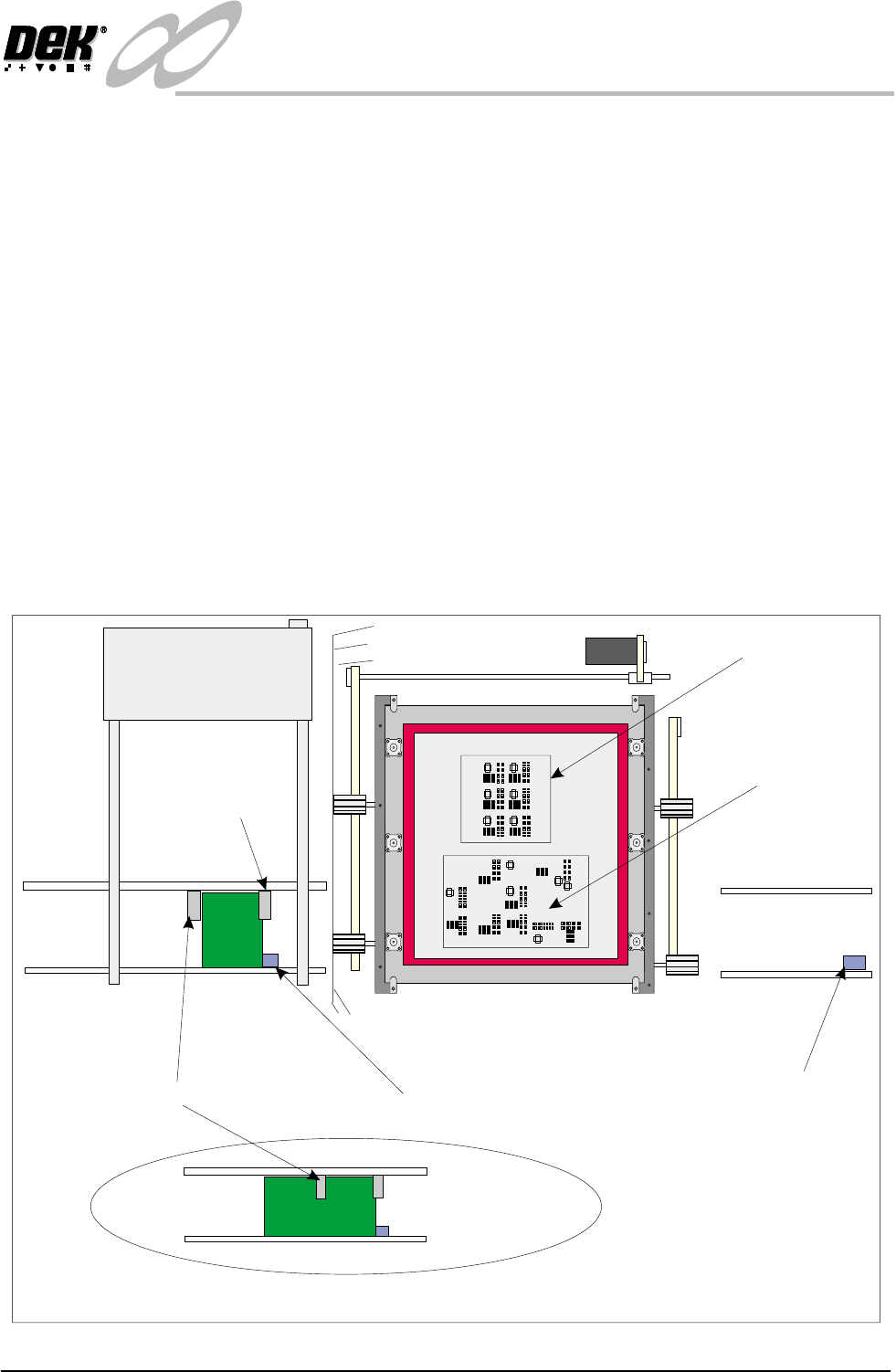
When Run is selected, the first board from the batch is fed to the inroad conveyor
sensor and is stopped. There are two further sensors on the input conveyor frame.
The Board Present sensor is activated when the board arrives at the input
conveyor sensor this action tells the printer that a board is ready to be received.
The Product sensor has been set up to determine what type of board is being
loaded. The machine compares product files to determine which product is being
loaded.
Load Product ’Rear’ The first board in the batch ( the’Rear’ Product ) is passed to the input conveyor
sensor where it is halted. The Board Present sensor detects the presence of the
board. as soon as the board reaches the board present sensor, this instigates the
start up of the machine print conveyors. If the board is of the type ’Rear’, its
product file is loaded. The board is fed into the machine and printing com-
mences. On completion, the board is fed to the output conveyor where it is
passed on to the next process.
Load Product
’Front’
If the product is now changed over and the ’Front’ product is printed, when the
product sensor sees the board, the new product file is loaded automatically to the
printer. The screen changer moves the screen to the product ’Front’ position. The
board is fed into the machine and printing starts.
Figure 2-4 Board Load - Product Sensor
Product ‘Rear’ on the Input Conveyor
Front
Product Sensor
Input Conveyor Sensor
Output
Conveyor
Sensor
Product
Front
Product Rear
Product ‘Rear’ image
Product ‘Front’ image
Board
Present
Sensor
2.10 Infinity Dual Image Manual Chapter Issue 3 Jan 01
INFINITY
OPERATOR
EDIT DATA
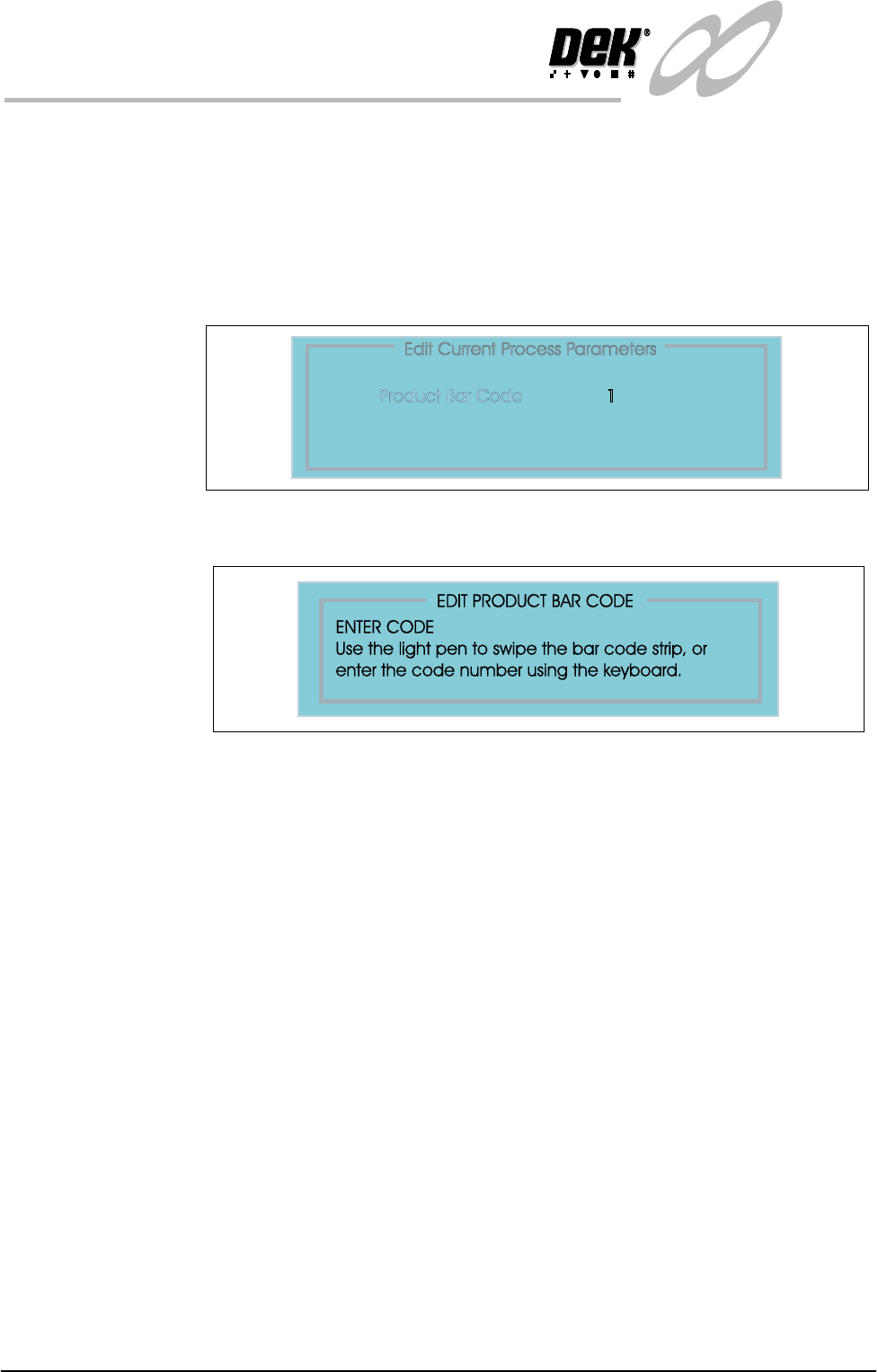
EDIT DATA The product bar code can be altered by swiping a label with a reader or by keying
in the code if it is known.
To edit the bar code follow the steps below:
1. Select Set Up (F6).
2. Select Edit Data (F3).
3. Select Bar Code from the ’Edit Process Page’.
4. Select incr. (F4). Enter the code using the options as shown.