Infinity DI.pdf - 第7页
1.2 Infinity Dual Imag e Manual Chapter Issue 4 Aug 01 INFINITY TECHNIC AL RE FERENCE MODULE OVER VIEW MODULE O VER VIEW Purpose The front/rear shuttle mechanism is provided to enable product of the same width b ut havin…

INFINITY
TECHNICAL REFERENCE
INTRODUCTION
Chapter Issue 4 Aug 01 Infinity Dual Image Manual 1.1
CHAPTER 1 TECHNICAL REFERENCE
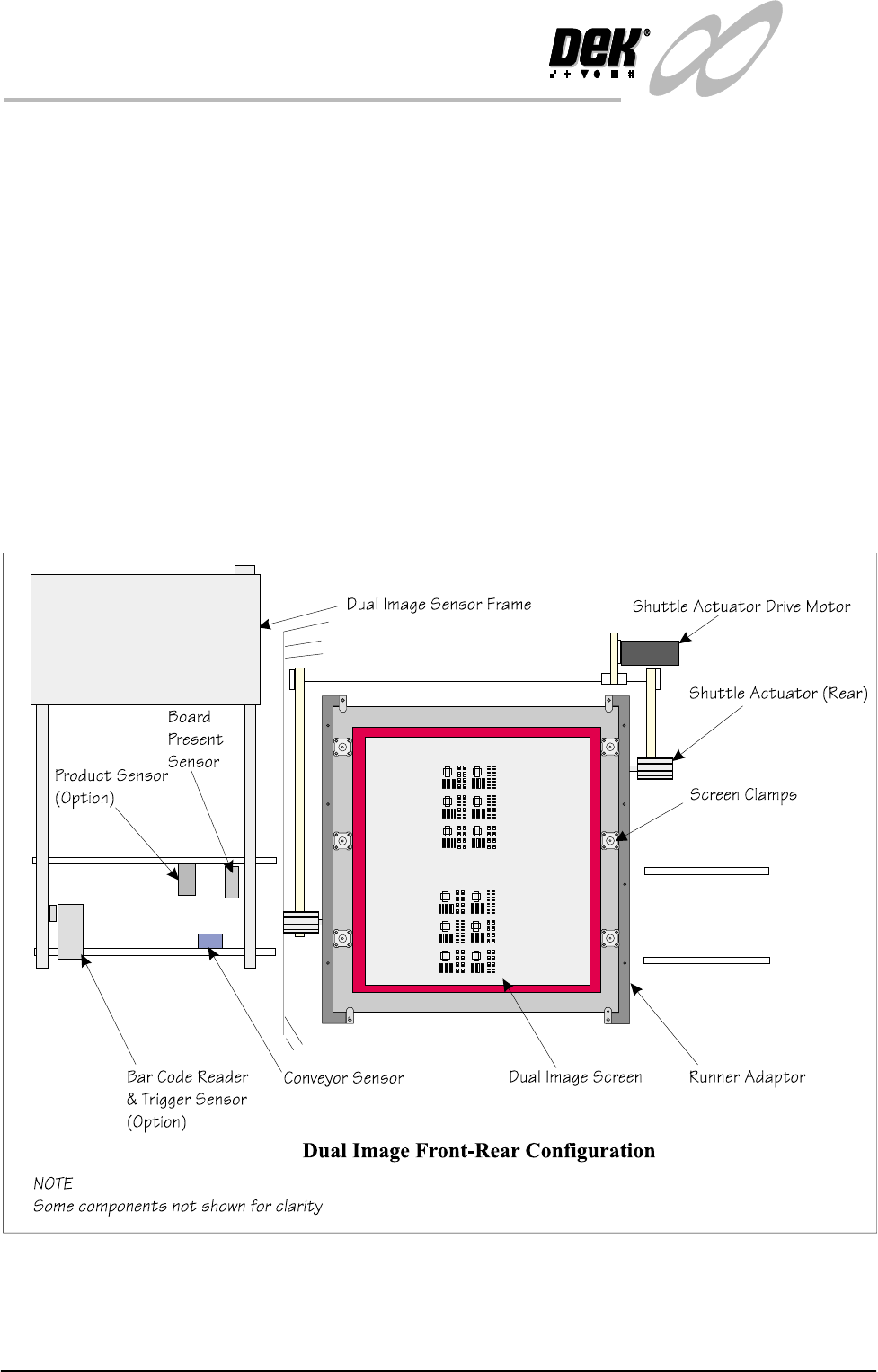
INTRODUCTION The dual image option enables the Infinity machine to run products top side/
bottom side or two different products. The screen is shuttled forward and
backward within the machine to register an image corresponding to the product
to be printed.
A sensor frame is fitted above the input conveyor and the sensors are set up to
enable the detection of products as they are fed into the printing machine.
Two product detection sensor options are available:
A bar code reader mounted on the sensor frame at either the left or right input
conveyor (dependent upon input configuration), detects the board type by read-
ing the board bar code label. A sensor is utilized to trigger the Bar Code Reader
(BCR) ON at the appropriate time.
Alternatively, the machine may be set up with a ‘Product Sensor’ system to
determine the type of board that is to be printed. Where boards have recesses or
protrusions or are of a different length, the sensor determines the correct product
to be printed.
When the product type has been determined, a board present sensor detects the
board as it is fed to the machine. The machine uses the standard SMEMA
interface (or DEK supported interface) to give limited control of product move-
ments. The board is stopped on the input conveyor at the conveyor sensor, the
board present sensor is positioned on the sensor frame at this point.
Either the ProFlow unit or Squeegees can be used to apply paste to the screen.
NOTE
This manual contains supplementary information, instructions given in this
manual include installation, operation and technical reference information. The
information presented should be used in conjunction with the standard Infinity
manual set.
WARNING
LASER LIGHT SOURCE. THE BAR CODE READER UTILIZES A
LASER TO SCAN THE BAR CODE, DO NOT LOOK DIRECTLY IN
TO THE READER OR AT THE LIGHT DIRECTLY REFLECTED
FROM A SURFACE, AS SERIOUS DAMAGE CAN OCCUR TO THE
1.2 Infinity Dual Image Manual Chapter Issue 4 Aug 01
INFINITY
TECHNICAL REFERENCE
MODULE OVERVIEW
MODULE OVERVIEW
Purpose The front/rear shuttle mechanism is provided to enable product of the same
width but having a different print requirements to be printed. A screen with two
images is loaded into the machine, boards are presented to the machine from the
upline board feeder or fed manually by the operator. The print input conveyer
acts as a buffer station, when a board is fed into the machine, it is detected and
passed to the print station for printing.
Elements The main elements of the system are:
• External Conveyors
• Board Present Sensor
• Product Sensor or Bar code Reader with Trigger Sensor
• Dual (or Single) Image Screen and Adaptors as required
• Screen Load/Shuttle Mechanism
Figure 1-1 Elements
INFINITY
TECHNICAL REFERENCE
ELECTRICAL SCHEMATIC
Chapter Issue 4 Aug 01 Infinity Dual Image Manual 1.3
ELECTRICAL SCHEMATIC
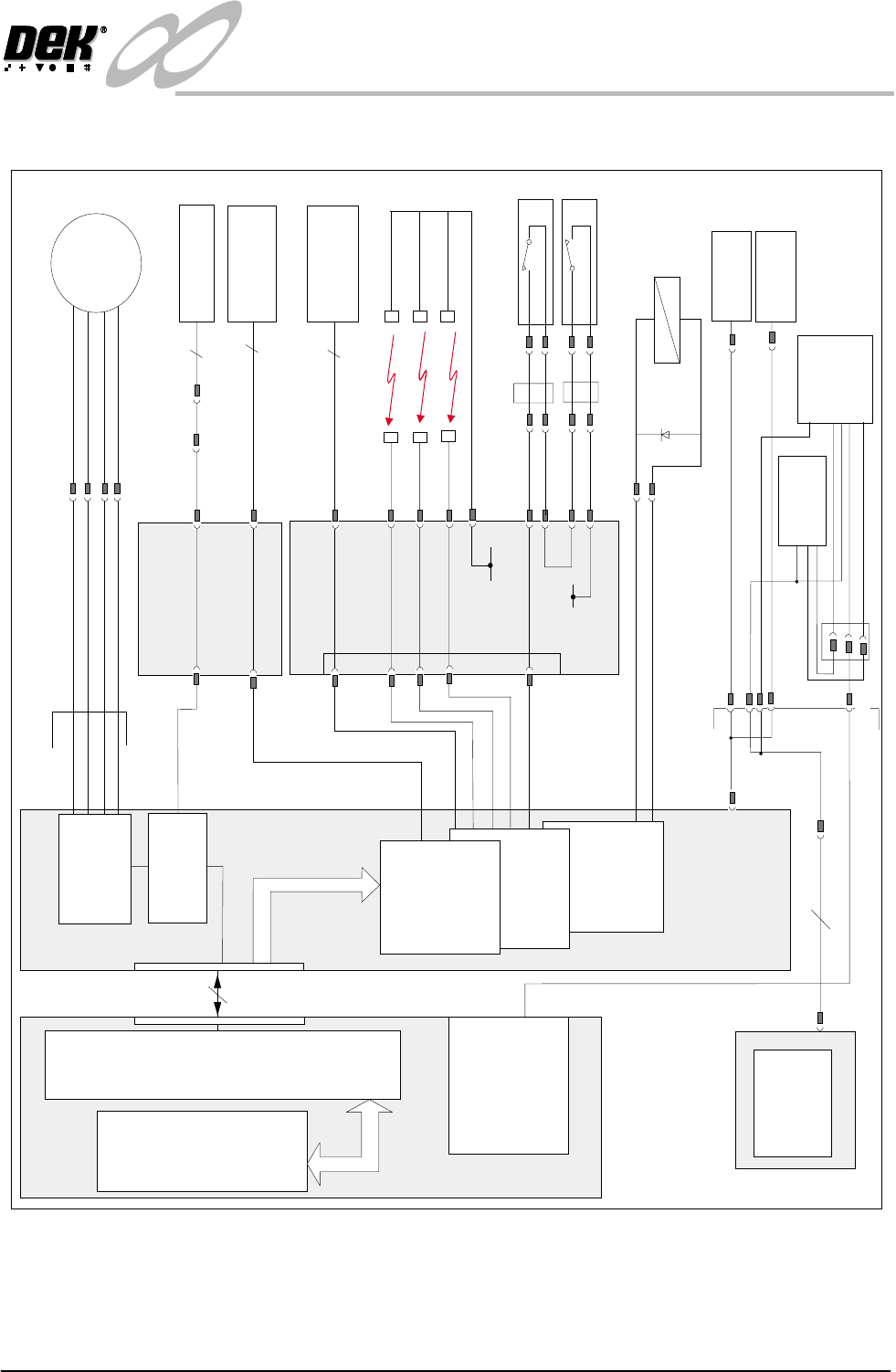
Figure 1-2 Electrical Schematic
X13
Machine Controller
CAN Bus
Machine PC
100
Way
Screen Home
Processor
NextMove
ISA Bus
Breakout Board D
Screen
Load
Stepper
Motor 13M1
Motor B-2
Motor B+2
Motor A-2
Motor A+2
M19PL37
3
3
4
DPL1
Screen Home
13SE05
Screen in Transit
'Rear'
9SE19
DPL6
DPL8
DPL2
IN1
Breakout Board F
Screen in Transit
'Front'
9SE18
FPL3
FPL1
IN7
IN 6
Screen at Front
12V
Screen at Centre
IN 5
12V
Screen at Rear
IN 4
12V
12V
FPL4
FPL5
R/H Rear Coupling Extended
13SE08
L/H Rear Coupling Extended
13SE09
IN3
IN8,9
2
0v
X11
MultiMove
X12
X7
4 Channel RS232
Comms Expansion
Screen Clamps
(6 positions)
Product
Sensor
Board Present
Sensor
Rear Service Panel
6SK20
6PL18
6PL19
6SK21
6PL22
Product
Bar Code
Reader
16SK07
+
16SK18,19,20
Source 0
0v
+
-
Stepper Drive
X6
Channel 2
Multiplexer
MUX4
Pa r t D C
PSU
6PL17(part of)
6PL17(part of)
Trigger
Bar Code
Scan