00198486-01_Programming_Training_E_by_DEK_EN - 第22页
4 Board Dimensions Room for Your Sketches and Notes 22 Programming Training E by DEK 12/2017
4 Board Dimensions
Room for Your Sketches and Notes
Programming Training E by DEK 12/2017 21
Room for Your Sketches and Notes

4 Board Dimensions
Room for Your Sketches and Notes
22 Programming Training E by DEK 12/2017
5 Speed and Pressure parameters
5.1 Relationship between Speed and Pressure
Programming Training E by DEK 12/2017 23
5 Speed and Pressure parameters
5.1 Relationship between Speed and Pressure
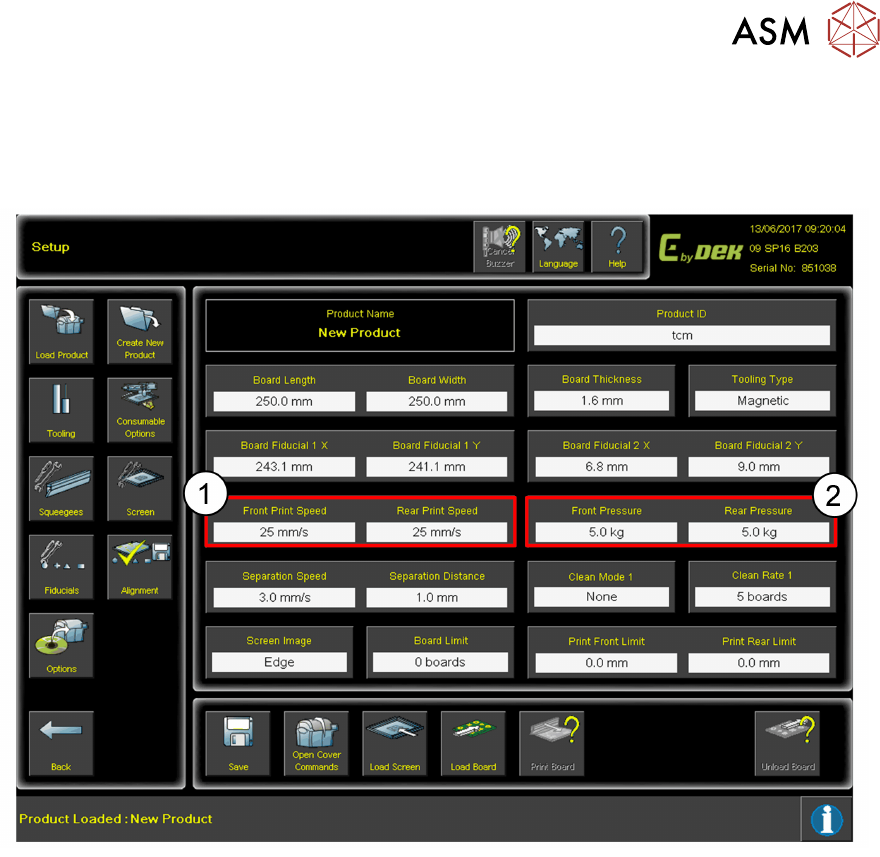
1. Front Print Speed and Rear Print Speed: The Print speeds will vary depending on the paste
manufacturer – refer to the data sheet supplied with the paste. Always start on the lowest
suggested speed, and then increase if needed.
2. Front Pressure and Rear Pressure: As a general starting point, use the guidelines of 1KG of
pressure per 50mm of Squeegee length. Ensure there is no smear of paste when printing
Front to Back, and when printing Back to Front ensure to check the paste is rolling correctly.
When increasing the Print Speed, the Pressure will need to also be increased. If this is not
done, it may result in the Squeegee lifting on top of the paste and causing smearing. Over
pressuring will cause excessive flex on the Squeegee blade, altering the angle and therefor
the effective process.