CP6的IO代码.pdf - 第313页
2.2 Film T ake-up Reel Reverse T orque Check (WC and MC T ypes) If the top film take-up reel reverse torque is weak, the top film may not be taken up normally. Use a push-pull gauge to confirm the reverse torque is set n…
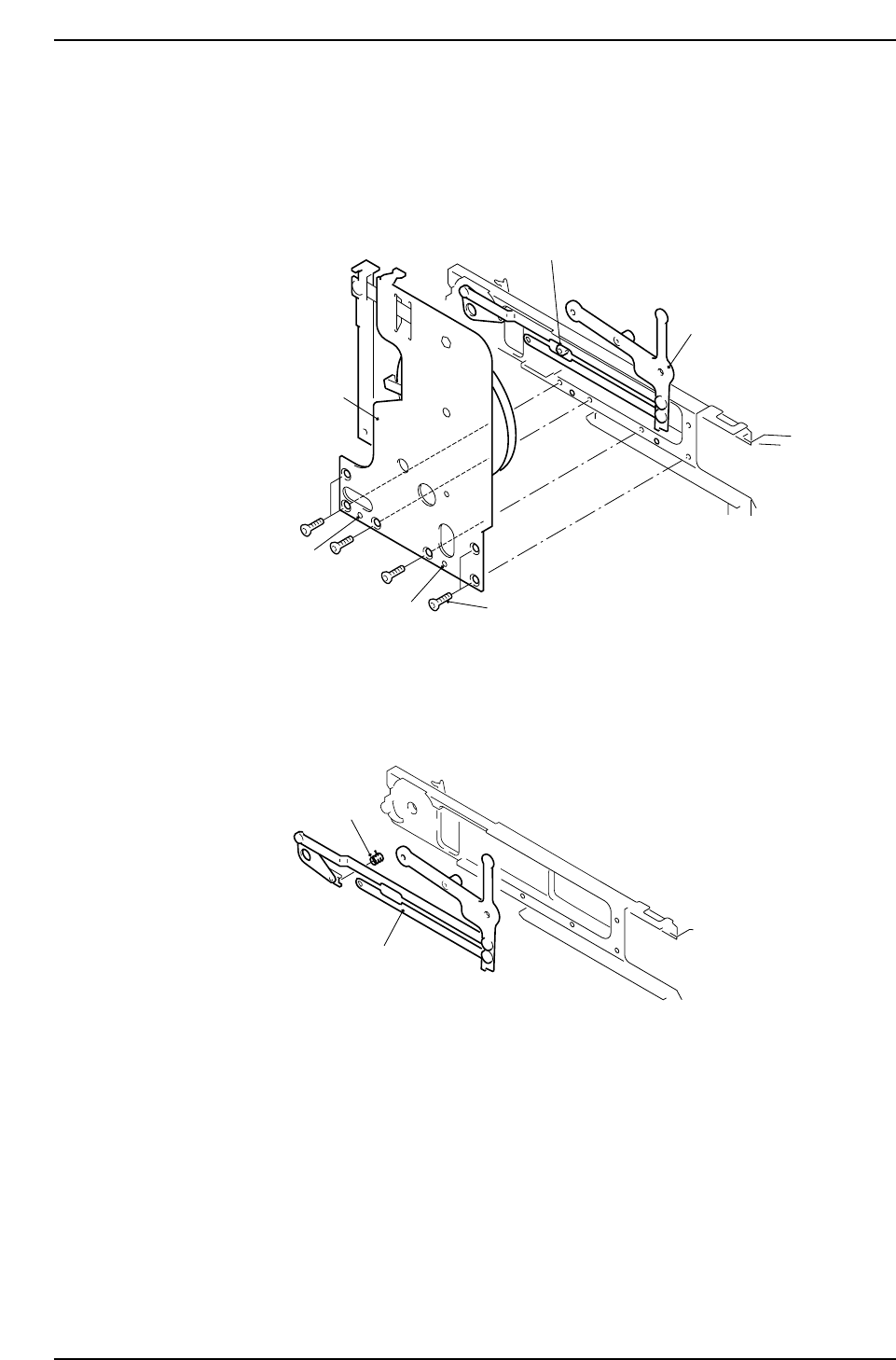
8. Remove the flush screws that fix the bracket and then remove the bracket. On the
bracket, there are 2 extruded studs pressed in to the main feeder body that are
used for positioning. Be careful not to damage these studs. Use a flat driver or
other type of tool in removing the bracket. Take care not to damage the bracket or
scar the feeder. Also take care not to lose the collar that is between the bracket and
the feeder body.
Removing the Bracket
9. Replace the link assembly.
Replacing the Feed Jaw Spring
10. Replace the feed jaw spring.
Follow these procedures in reverse to assemble.
Feeding jaw spring
Link assembly
CP6M8078
Extruded studs
Collar
Link assembly
Bracket
Flush screw
Extruded studs
CP6M8077
Part 8 Chapter 2 Feeder Maintenance
Edition 1.0 8-2-4 CP-6 Series Mechanical Reference
2.2 Film Take-up Reel Reverse Torque Check
(WC and MC Types)
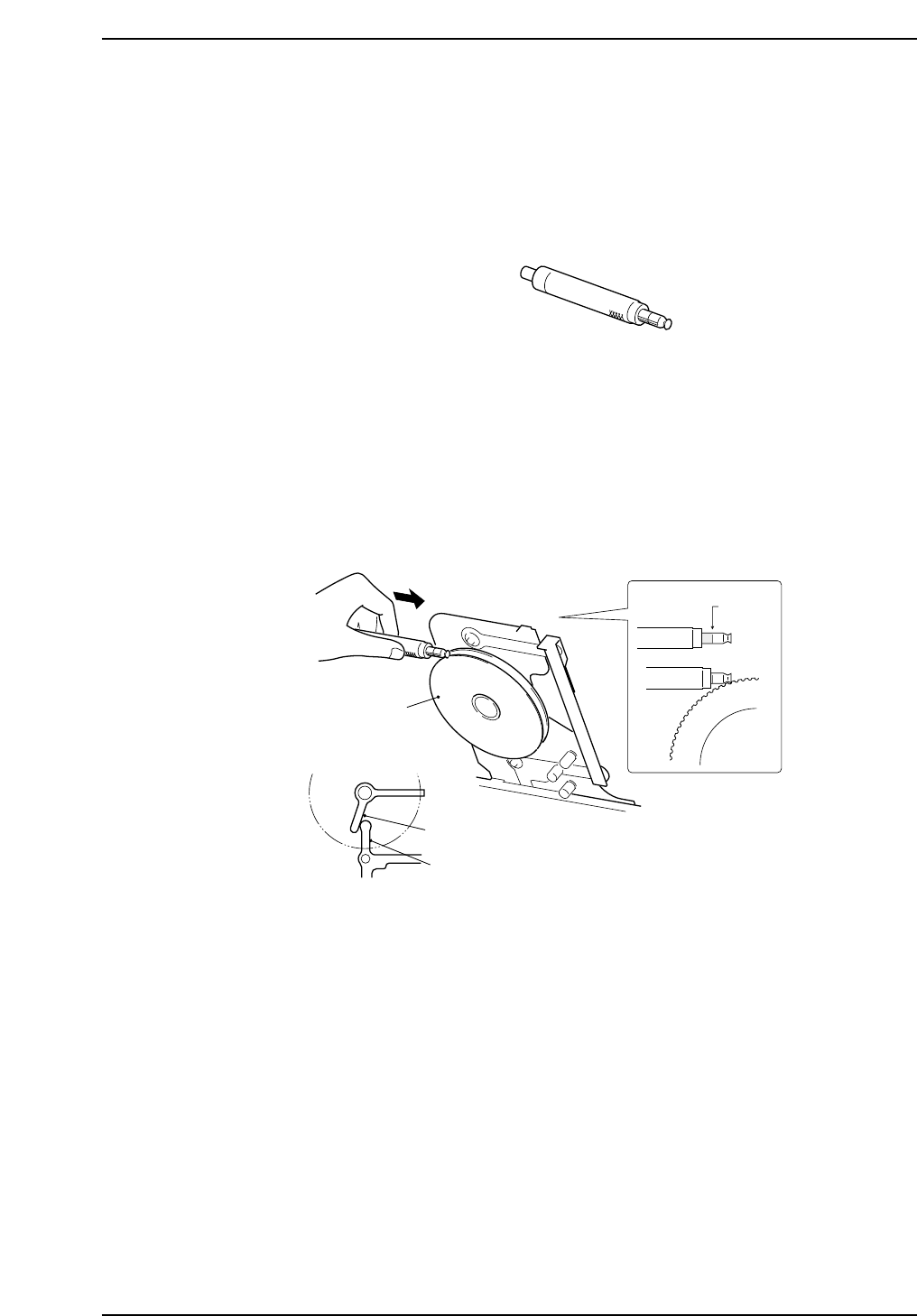
If the top film take-up reel reverse torque is weak, the top film may not be taken up
normally.
Use a push-pull gauge to confirm the reverse torque is set normally (1 kgf), and if it is
under this amount replace the reel.
Push-pull gauge
1. Set the push-pull gauge onto the periphery of the top film take-up reel.
2. Press the gauge to the blue mark (1 kgf), and verify that the top film take-up reel
does not rotate.
If it does rotate, replace the top film take-up reel.
Film Take-up Reel Reverse Torque Check
Top film take-up reel
Take-up lever
Feed lever
1 kgf
mark
Caution : The take-up lever and the feed
lever should make contact with
each other during measurement.
CP6M8080
Z9064ALPJ5560
Push-pull gauge
CP6M8079
Part 8 Chapter 2 Feeder Maintenance
Edition 1.0 8-2-5 CP-6 Series Mechanical Reference
2.3 Checking Errors Through Production Information
(WC Type)
It is possible to check for the presence of feeder errors through daily maintenance, but
this section explains how to check for such errors by inspecting the feeder through the
production information managed by the MCS.
Data required for feeder inspection
Compile the production data, and select MAINTENANCE.
Production Data (maintenance) – – – MAINTENANCE/DEVICE
Press the F1 key (select) and move the cursor to the desired device.
Production Data Display 1/2
MAINTENANCE - DEVICE
LINE : FUJI MC : CX0900 PROGRAM : Evaluation. W08xP02.D1
DATE : 96/03/21 09:11:02 - 96/03/23 00:00:00
D_NO. D_COMMENT
PARTS
ERROR
JUNK RATE 0 50 100%
001
resistor
2125T04. 1 20090 90 0 0.45
002
resistor
2125T04. 2 20000 0 0 0.00
003
resistor
2125T04. 3
20150 150 0 0.74
TOTAL 60240 240 0 0.39
(F1) (F2) (F3) (F4) (F5) (F6) (F7) (F8)
*----------------------------------------------------------------------------------------------------*
*----------------------------------------------------------------------------------------------------*
*----------------------------------------------------------------------------------------------------*
*----------------------------------------------------------------------------------------------------*
select
copla print
head nozzle error end
CP6M8081
Part 8 Chapter 2 Feeder Maintenance
Edition 1.0 8-2-6 CP-6 Series Mechanical Reference