00197195-02-UG SetupCenter 5.1_en.pdf - 第133页
Working with the Setup Center Application Download Partial Setups Setup Verification for Partial Setups User Guide SIPLACE Setup Center 5.1 13 3 The following diagram shows a pr oduction schedu le with a select ed recipe…
Working with the Setup Center Application
Setup Verification for Partial Setups Download Partial Setups
132 User Guide SIPLACE Setup Center 5.1
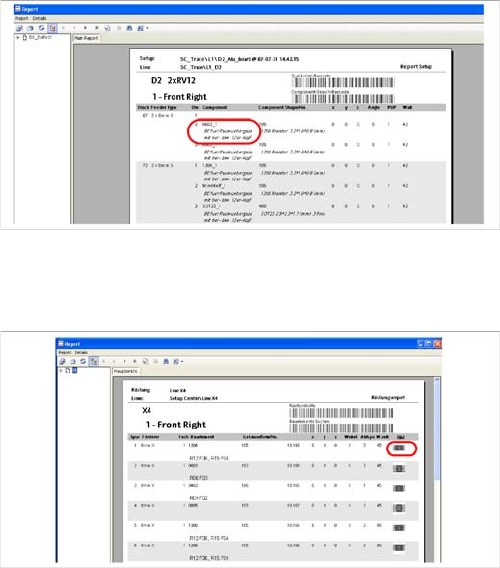
Display comment
Display the component image
7.9 Setup Verification for Partial Setups
The starting point is the compilation of a production schedule with the help of the SIPLACE Line Control
GUI. This production schedule enables you to combine multiple recipes with the same setup (cluster set-
up).
With SIPLACE Pro, selected recipes in a production schedule can be defined at the stations in a line,
which only require part of the joint setup for successful production.
Setup Center detects the selected recipes during downloading and automatically requests setup verifi-
cation of the required partial setup. If no recipe has been selected for downloading, setup verification will
be performed for the entire setup.
The following chapter shows how to use partial setups and explains their handling limits.
7.9.1 Download Partial Setups
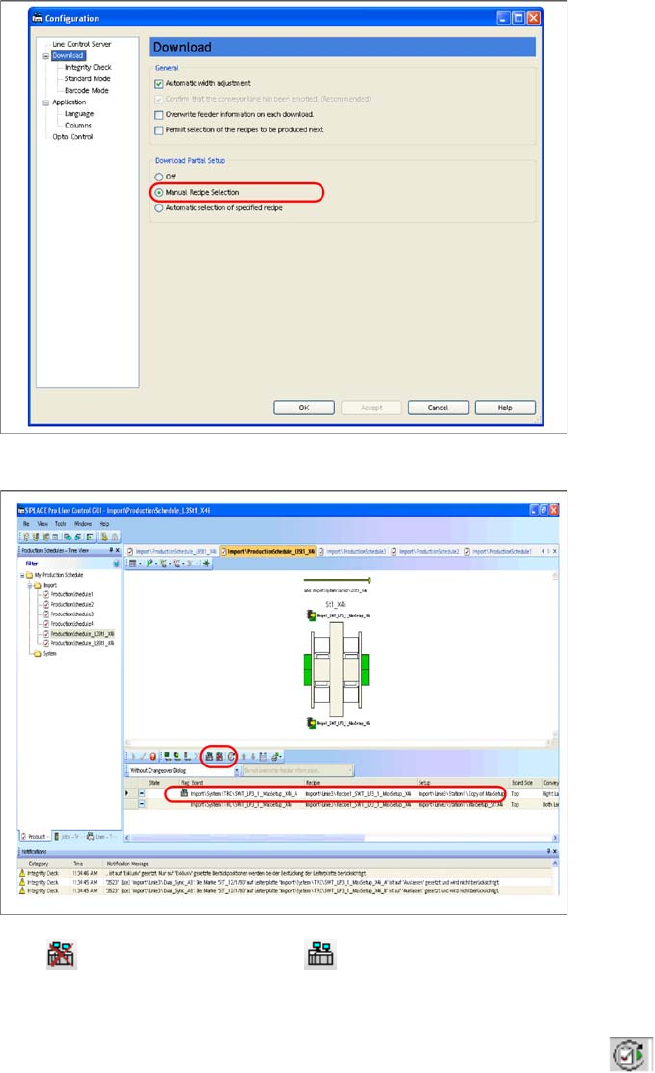
SIPLACE Pro enables you to download partial setups. The download of partial setups can be enabled
at Configuration -> Download -> Partial Setup. The setups which are sent to the stations only contain
those components needed for the selected recipe. This recipe selection can be performed manually or
it automatically relates to the predefined recipe.
The following diagram shows the configuration dialog in the SIPLACE Line Control GUI :
Prerequisite: Comments about the component con-
cerned must already be present in SIPLACE Pro.
► The option "Display comment" can be enabled/disa-
bled here. Enable this option to add additional com-
ments about the components to the setup report.
Confirm this with OK.
⇨ In the setup report, you will see that an additional line
has been included, with an additional comment for
the component concerned.
► The option "Display the component image" can be
enabled/disabled here. Enable this option to add the
component diagrams to the setup report. Confirm this
with OK.
⇨ In the setup report, you will see that an additional line
has been included, with a component image for the
component concerned.
Working with the Setup Center Application
Download Partial Setups Setup Verification for Partial Setups
User Guide SIPLACE Setup Center 5.1 133
The following diagram shows a production schedule with a selected recipe for a partial setup:
With you can enable and with you can disable the download for the marked line/recipe. The
SIPLACE Line Control Server and Setup Center calculate the required partial setup for all selected rec-
ipes, during downloading.
These pictograms are only possible for manual recipe selection. With you can switch between the
various recipes to be produced (job or production schedule).
Working with the Setup Center Application
Setup Verification for Partial Setups Stationwise Download
134 User Guide SIPLACE Setup Center 5.1
7.9.2 Stationwise Download
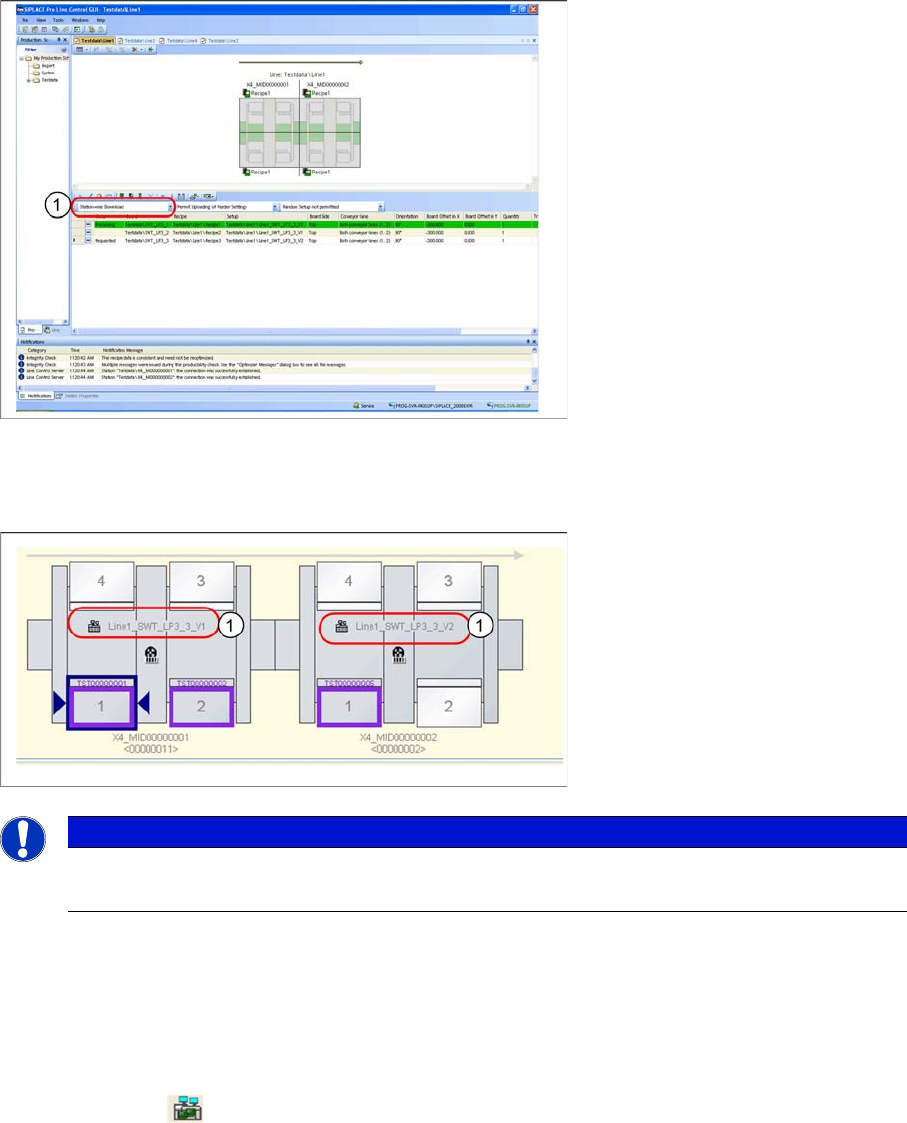
SIPLACE Pro permits stationwise downloads.
► Select the function Stationwise Download from the list field (1) on the SIPLACE Line Control GUI.
Result:
Setup Center shows the different setup names (1).
7.9.3 Online Setup Verification
With Setup Center, it is possible verify only parts of a setup. Together with the SIPLACE Line Control
GUI, the line operator can select which recipes are to be produced and, using Setup Center, can subse-
quently verify the components needed in the recipes.
If Setup Center detects the download of a partial setup, this will be marked on the user interface with a
special symbol (1) .
NOTICE
Stationwise Download
For details about "stationwise downloads" refer to the current SIPLACE Pro user guide.