00197195-02-UG SetupCenter 5.1_en.pdf - 第14页
Starting Setup Center The User Interface Menu Area 14 User Guide SIPLACE Setup Center 5.1 2.2.1.1 Tree Views SIPLACE Pro Desk displ ays its objects in various tree views. Th is is where you can ope n and print set - ups …
Starting Setup Center
Menu Area The User Interface
User Guide SIPLACE Setup Center 5.1 13
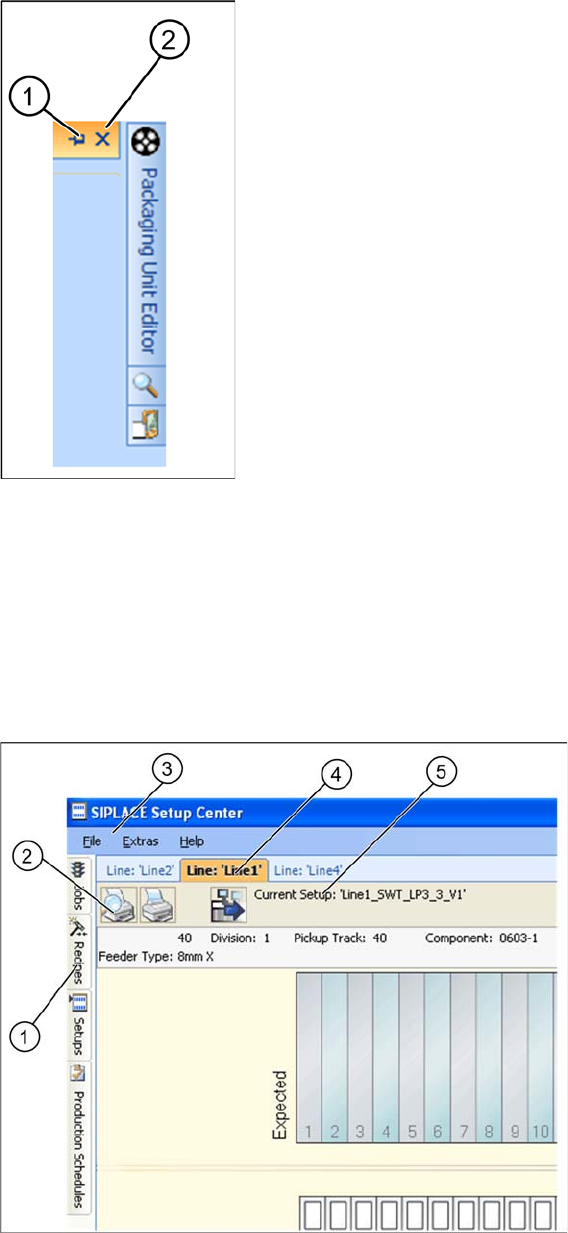
1. Releases the window from its default position
2. Hides the window
The function Extras => Restore Default Layout resets all settings to their original state. The current win-
dow positions are saved when you exit Setup Center and will be applied again at the next program start.
2.2.1 Menu Area
Detailed view - menu area
1. Tree views for jobs, recipes, setups and production schedules (offline)
2. Toolbar
3. Menu bar
4. Tabs for selection of active setups
5. Name of the current setup
Starting Setup Center
The User Interface Menu Area
14 User Guide SIPLACE Setup Center 5.1
2.2.1.1 Tree Views
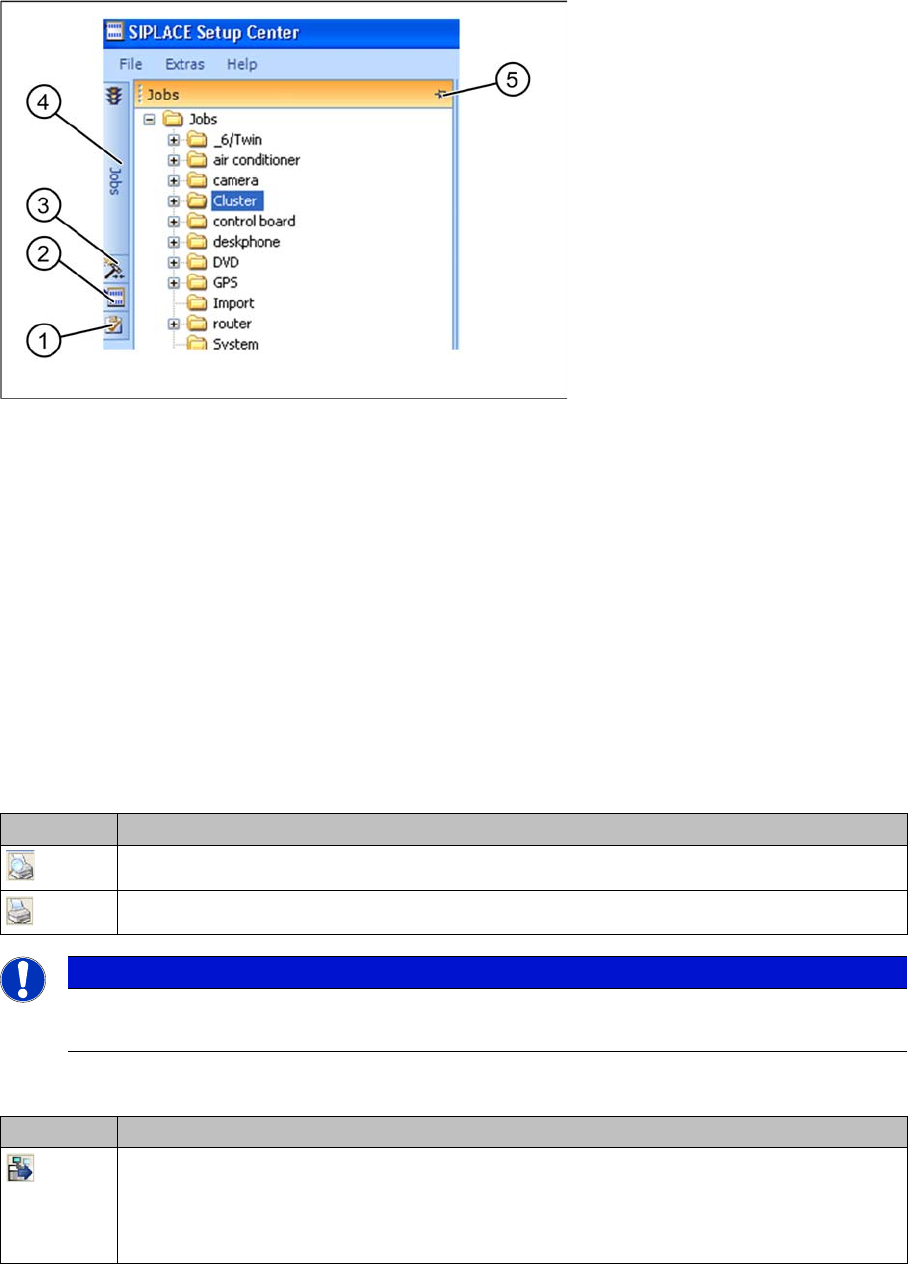
SIPLACE Pro Desk displays its objects in various tree views. This is where you can open and print set-
ups in the pre-setup area (offline).
1. Production schedules
2. Setups
3. Recipes
4. Jobs
5. The auto-hide function allows you to release the window from its default position and move it to wher-
ever you want.
2.2.1.2 Tool bar
Printing test reports
The print buttons for the test reports are located in the upper left area of the user interface. The test report
contains a setup list with the verification status of each component in the setup. If defined, the user name
will also be printed on the test reports.
Open next setup
Icon Description
Print preview of test report.
Print test report. Prints the report directly at the configured default printer for your PC.
NOTICE
Layout of checklists
The checklist layout is saved in the PrintoutStyles.xml file.
Icon Description
Opens the view for the next setup. Is only displayed, if these functions have been activat-
ed in the settings. This option requires a license.
Activate the Prepare next step option in the Tools => Settings => General function of the
Setup Center main menu. See "7.6 Next Setup in Setup Center" [ ➙ 123].
Starting Setup Center
Menu Area The User Interface
User Guide SIPLACE Setup Center 5.1 15
2.2.1.3 Menu Bar
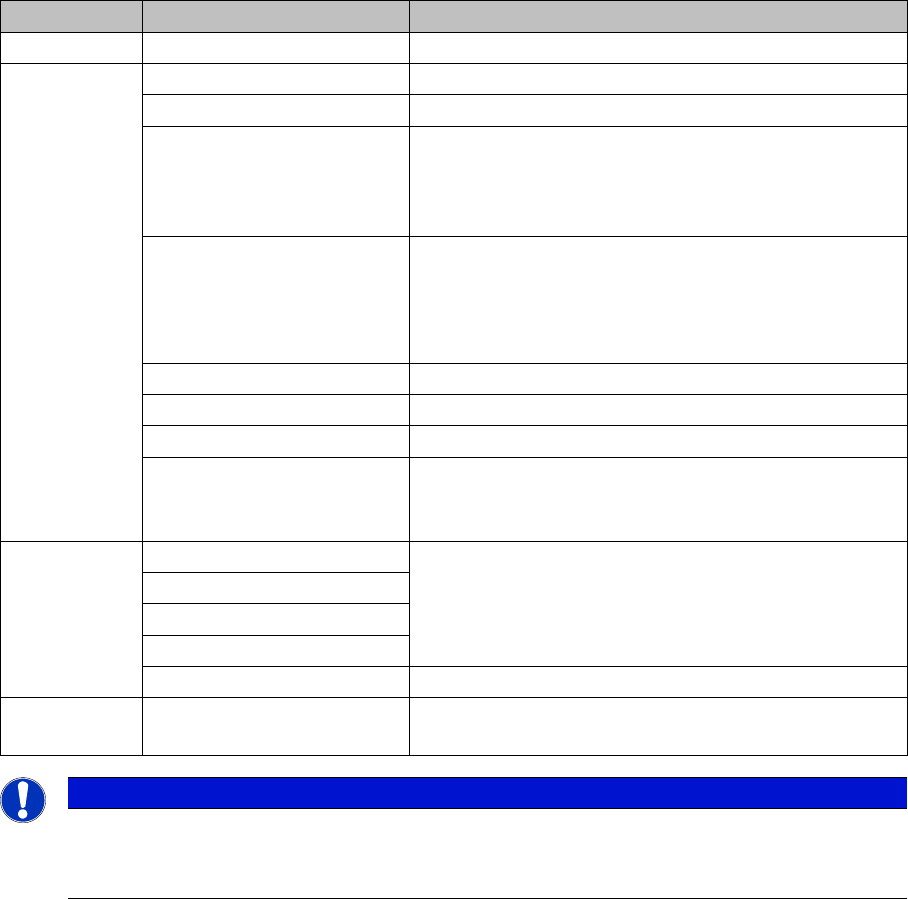
The menu bar contains all the links to the SIPLACE Setup Center dialogs.
Menu Submenus Brief description
File Exit SIPLACE Setup Center will be terminated.
Extras Barcode labels... Opens the barcode label wizard.
Settings... Opens the Settings dialog with the configuration views.
Change Language... Opens the Change Language dialog box. This is where
you can select the language for the Setup Center user
interface . The language is changed directly and does
not require you to restart the application.
Firmware Firmware Pool
Opens the Firmware Pool dialog
Download
Opens the Firmware Download dialog
Edit packaging units... Opens the Packaging Unit Editor dialog box.
Search Material... Opens the Search Material dialog box.
Verification History Viewer... Opens the Verification History dialog box.
Restore default layout If you have changed the arrangement of tree views and
toolbar, this function can be used to re-establish the
original state.
Help Help… Opens the online help for SIPLACE Setup Center.
Contents...
Index…
Search...
Error Reports Starts the Error Reporter Service
About SIPLACE Setup Cent-
er
NOTICE
Online Help
Click on Help Help in the menu bar or press your F1 button in the configuration dialog to view
the Online Help text for the current dialog.