00197195-02-UG SetupCenter 5.1_en.pdf - 第154页
Working with the Setup Center Application Setting the Machine ID Using the Reader 154 User Guide SIPLACE Setup Center 5.1
Working with the Setup Center Application
Using the Reader Setting the Machine ID
User Guide SIPLACE Setup Center 5.1 153
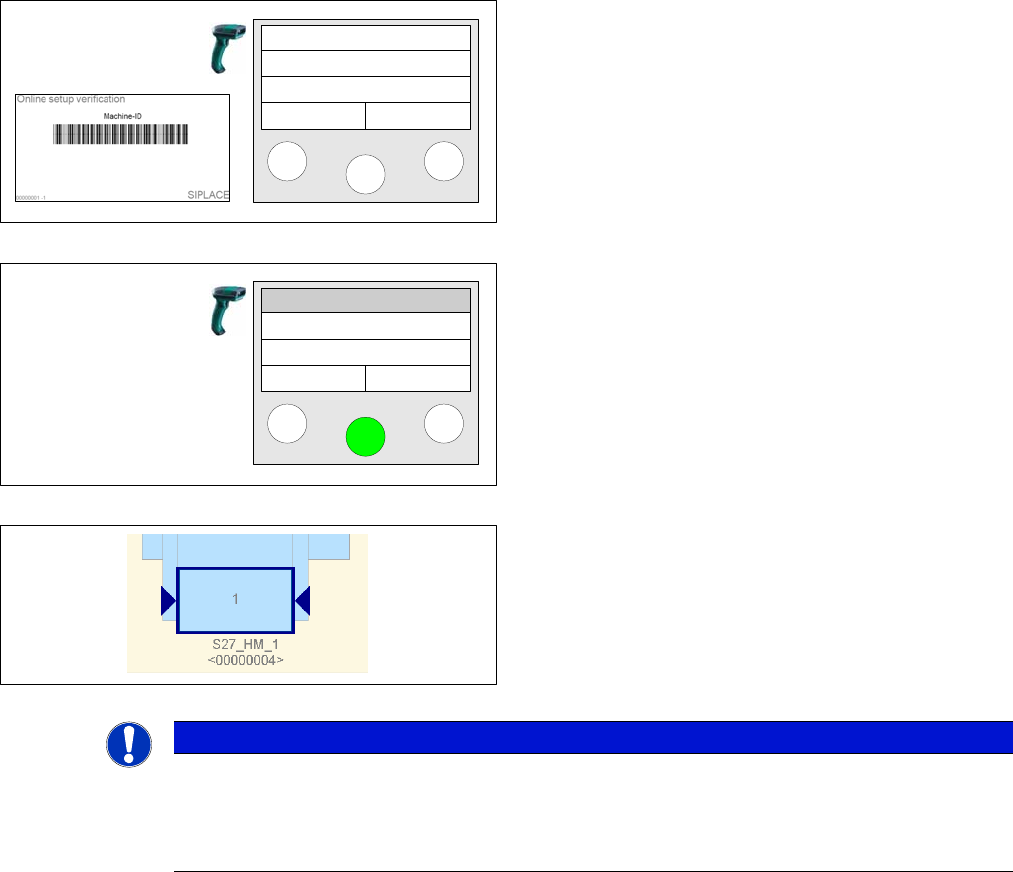
Step 3
Scan the appropriate Machine ID.
Step 4
Select the Station that you want to connect with the ma-
chine ID. After that, he main menu is automatically dis-
played.
Step 5
Verify in Setup Center whether machine ID is assigned
correctly.
Scan MID
Station 1
Station 2
Station 3
NOTICE
Machine ID for X Series
► For machines of the X series the physical machine ID is read out. If a machine ID has been
manually assigned to an X-machine, the X-machine will be corrected during the first online
setup verification through the physical machine ID.
Working with the Setup Center Application
Setting the Machine ID Using the Reader
154 User Guide SIPLACE Setup Center 5.1
Setup Verification in Practical Cases
Online And Offline Setup Verification Overview
User Guide SIPLACE Setup Center 5.1 155
8 Setup Verification in Practical Cases
This chapter explains the key steps with the help of examples from SIPLACE Setup Center operation.
We recommend that you go through these exercises in order to familiarize yourself with the user inter-
face and the reader.
The exercises relate to one another and should be worked through one after the other.
8.1 Overview
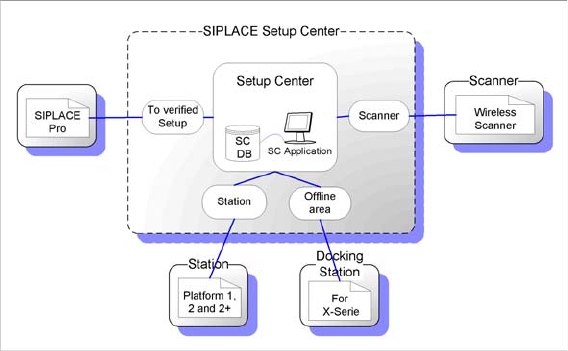
Setup verification is the stepwise verification of component allocation from the target setup to a track in
the actual setup. SIPLACE Setup Center loads the target setup from SIPLACE Pro. The component is
identified by scanning in a barcode label. The track is then assigned to the component via the track bar-
code on the machine or via the component verification button on the X feeder. The data acquired during
a setup verification is stored by SIPLACE Setup Center in a separate database.
8.1.1 Online And Offline Setup Verification
SIPLACE Setup Center now supports online setup verification for all SIPLACE placement machines (ex-
cept F3 and S15).
SIPLACE Setup Center also allows you to perform offline setup verification in the pre-setup area. The
offline setup verification is performed for the changeover table of a selected setup. After completing the
setup via the offline setup verification, the changeover table can be moved out of the pre-setup area and
over to the production line, where it can be logged on to the station via the "Changeover table manage-
ment". This once again supports all SIPLACE machines.
8.1.2 Unforced and Forced Setup Verification
SIPLACE Setup Center also differentiates between unforced and forced setup verification.
▪ Unforced Setup Verification
Unforced setup verification enables you to verify a setup, without the need for a connection to the
station. Setup verification is performed via a protocol file or the setup report and the results are stored
for reference.
The advantage of unforced setup verification is that production can be continued, even if the verifi-
cation process fails. This is particularly useful during the introductory phase of Setup Center.
SIPLACE CS/CF only supports unforced setup verification. Unforced setup verification is only pos-
sible with "line based Traceability".
▪ Forced setup verification
After downloading a job, the station locks all tracks, for which Setup center has not sent any setup
data. Before production can start, the line operator must have therefore successfully verified all com-
ponents necessary for the product.