00197195-02-UG SetupCenter 5.1_en.pdf - 第19页
Starting Setup Center Display Area for Open Setups The User Interface User Guide SIPLACE Setup Center 5.1 19 2.2.2.4 Track Icons The SIPLACE Setup Center user interface shows information about the feeders on the tracks. …
Starting Setup Center
The User Interface Display Area for Open Setups
18 User Guide SIPLACE Setup Center 5.1
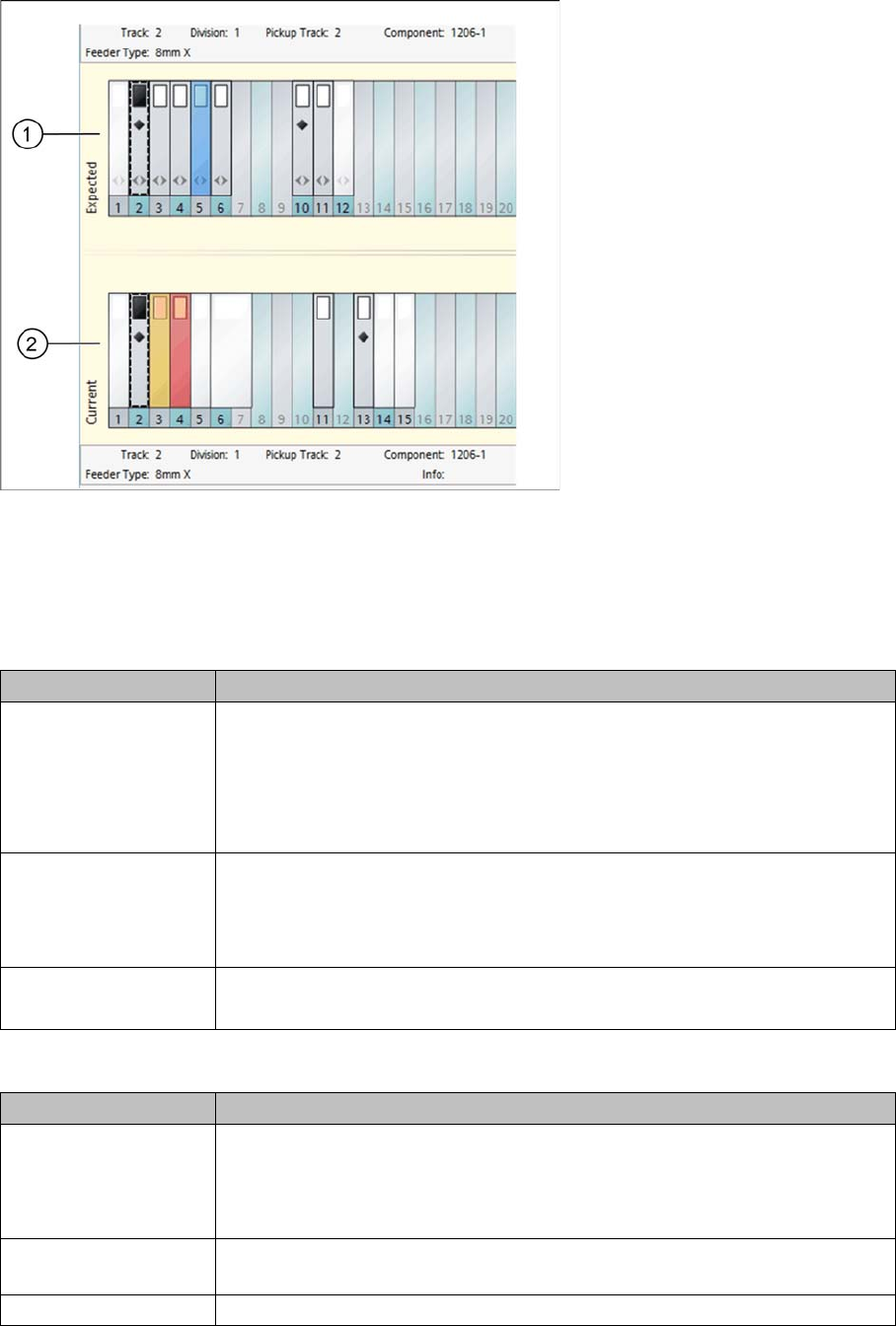
Legend
1. Table view "expected" (view of target setup)
2. Table view "current" (view of actual setup)
Table view "expected" (view of target setup)
Table view "current" (view of actual setup)
Color Meaning
Feeder - white These tracks are not checked by Setup Center, because:
▪ The feeder is defined without a component in the target setup.
▪ The feeder is defined with a component in the target setup, which is not
included in the setup verification.
Example: tracks 1 and 12
Feeder - gray These tracks are checked by Setup Center because the feeder is defined with
a component in the target setup, which is included in the setup verification.
This component has already been verified.
Example: tracks 2, 3, 4, 6, 10 and 11
Feeder - blue The feeder is defined in the target setup. The component is not yet verified.
Example: track 5
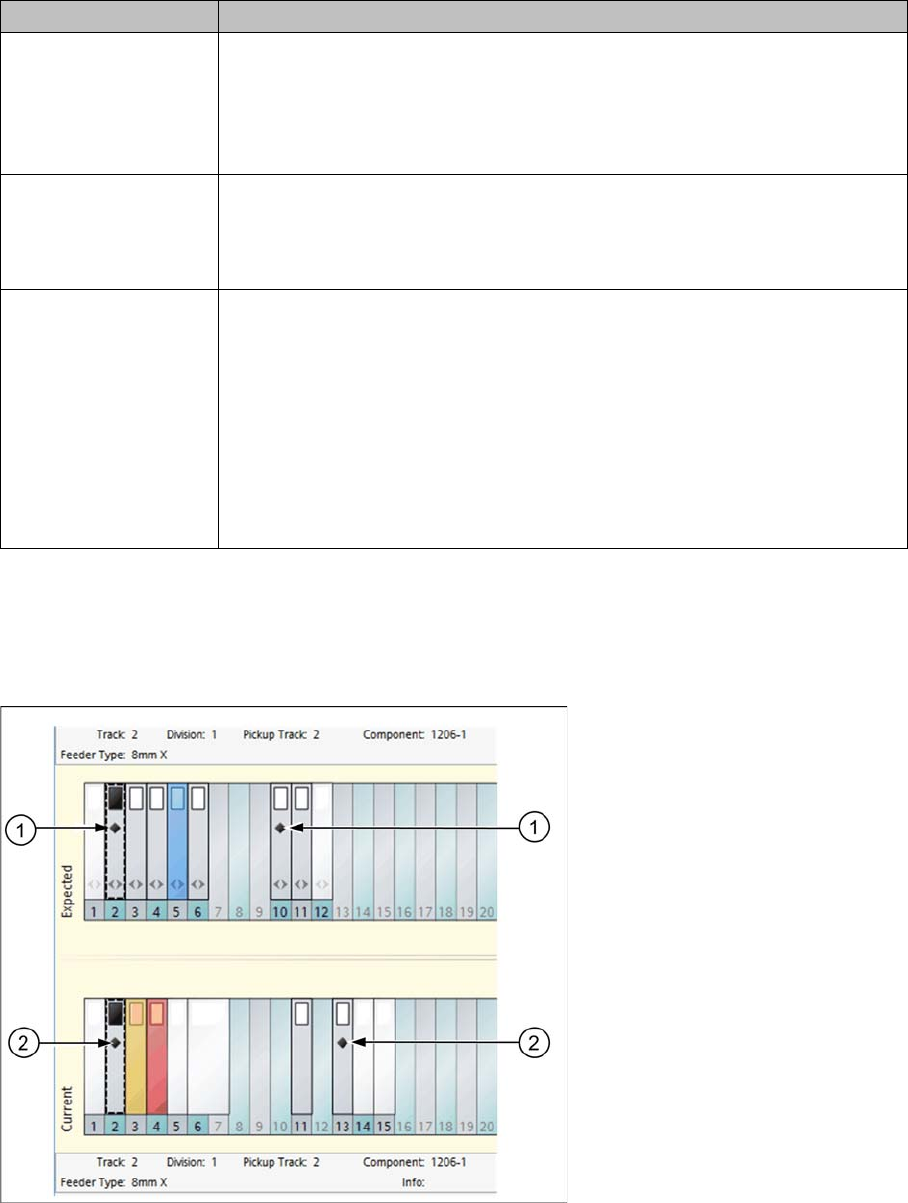
Color Meaning
Feeder - white The feeder is on a track which is not included in the setup verification of the
target setup. It does not matter whether a component is configured or not in
the feeder.
Example: tracks 1, 5, 6, 7, 14 and 15
Feeder - blue The feeder is on a track which is included in the target setup of the setup ver-
ification. This track has not yet been verified successfully.
Track blue The feeder is defined in the target setup but is missing in the current setup.
Starting Setup Center
Display Area for Open Setups The User Interface
User Guide SIPLACE Setup Center 5.1 19
2.2.2.4 Track Icons
The SIPLACE Setup Center user interface shows information about the feeders on the tracks.
Diamond icon
The diamond icon marks those feeders with components in the expected setup (1) which also have
equivalent components (2) in the current setup. This gives you a clear view of the tracks in the current
setup on which this component is already configured. You can therefore see where this component can
still be configured or picked up, something which is particularly helpful for Random Setup. Select a track
in the expected setup and all tracks with equivalent components in the current setup will be marked with
the diamond icon.
Feeder - gray The feeder is on a track which is included in the target setup of the setup ver-
ification. This track has been verified successfully. When you have an active
component level indicator with thresholds, the component level will also be
above the warning threshold.
Example: track 2
Feeder - orange The feeder is on a track which is included in the target setup of the setup ver-
ification. This track has been verified successfully. The component level has
undershot the warning level of the component level indicator.
Example: track 3
Feeder - red ▪ The feeder is on a track which is included in the target setup of the setup
verification. This track has been verified successfully. The component lev-
el has undershot the stop level of the component level indicator.
▪ An incorrect feeder type is on a track which is included in the target setup
of the setup verification.
▪ The feeder is on a track which is included in the target setup of the setup
verification. The track has been locked by Setup Center or an external
system (padlock symbol).
Color Meaning
Starting Setup Center
The User Interface Display Area for Open Setups
20 User Guide SIPLACE Setup Center 5.1
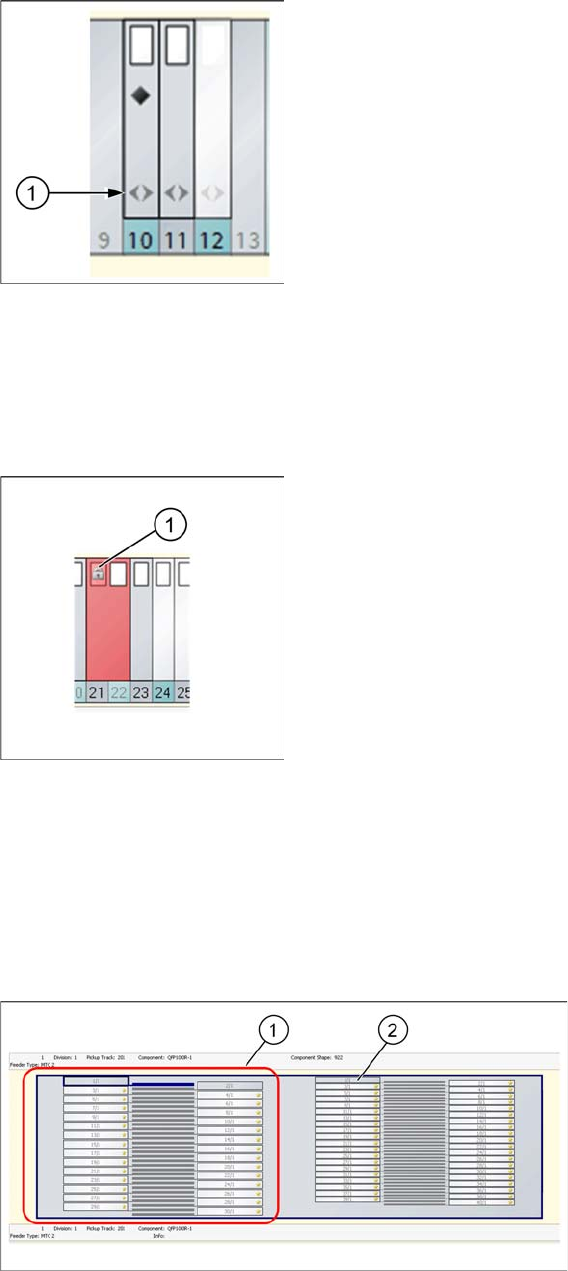
Double arrow icon
The double arrow (1) icon marks those feeders which are compatible with Random Setup. This means
those feeders in the setup which were sent to the line in Random Setup mode. This shows a clear over-
view of which feeders do not need to be configured on the exact track. Feeders which are not compatible
with Random Setup include S feeders, manual trays etc.
Padlock (gray) icon
A gray padlock (1) shows the following states:
▪ This feeder has been locked by Setup Center
▪ This feeder is locked by an external system.
▪ The splice monitor has reported an error for this feeder.
2.2.2.5 Location Display - Tray
The top half of your screen shows the display area for the selected location.
Legend
1. Tower
2. Level