00197195-02-UG SetupCenter 5.1_en.pdf - 第27页
Configuring Setup Center Settings of Online Setup Verification General User Guide SIPLACE Setup Center 5.1 27 3.2.1 Settings of Online Setup Verification Here you can activate/ deactivate the online setup verific ation. …
Configuring Setup Center
General
26 User Guide SIPLACE Setup Center 5.1
For some settings, e. g. Language, a restart of SIPLACE Setup Center is necessary. If a restart is nec-
essary, you will be notified.
3.2 General
► In the main menu open Extras > Settings and the Settings window is opened.
► Select the category General and the Settings will be opened.
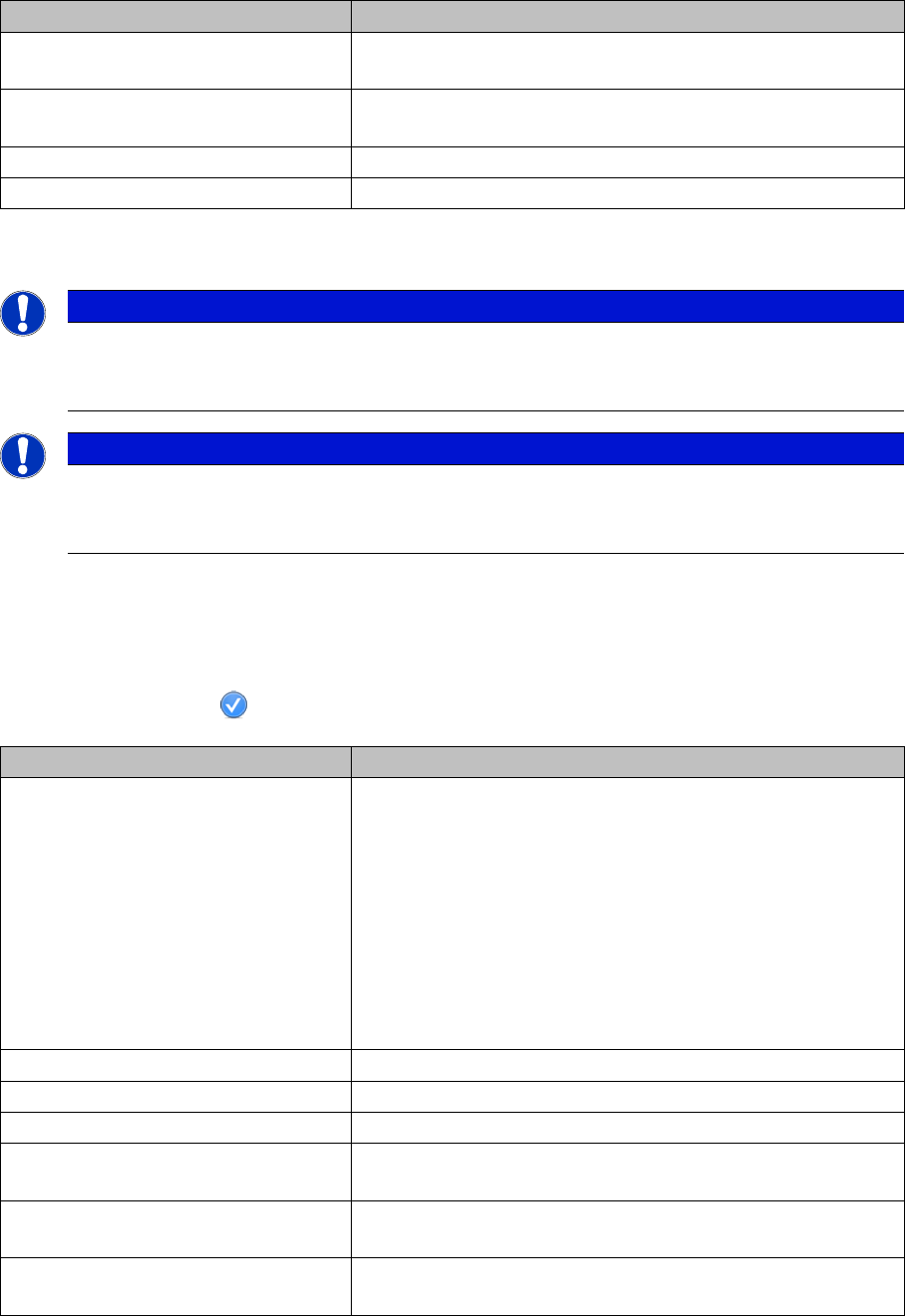
Button Description
OK All modifications in the configuration dialog box are saved by
clicking the OK button. In addition, OK closes the dialog box.
Accept All modifications in the configuration dialog box are saved. The
dialog box remains open for further settings.
Cancel Cancel discards all modifications and closes the dialog box.
Help Opens the online help for the current view.
NOTICE
Settings are saved
Certain settings are saved in the ApplicationSettings.xml file. This file is located in the installa-
tion directory of Setup Center.
NOTICE
Reading the "barcode label" section
Please read the "barcode labels" section of this manual very carefully and observe any instruc-
tions which may effect your daily work, such as verifying setups, refilling packaging units etc.
Edit field Description
Changeover table management Here you can activate/deactivate the changeover table man-
agement of the setup verifications.
The changeover table management has a great influence on
the procedures and the handling of the Setup Center in offline
and in online operation. Each changeover table (COT) is iden-
tified by a unique barcode for changeover table management.
This barcode has to be scanned in during the work steps, e.g.,
to allow for the assignment of a table to a location. Before
changing this setting, you need to tear down the complete line,
otherwise unintentional errors could occur.
Settings for online setup verification See "3.2.1 Settings of Online Setup Verification" [ ➙ 27].
Settings for offline verification See "3.2.2 Settings of Offline Verification" [ ➙ 29].
General settings for setup verification See"3.2.3 General Settings for Setup Verification" [ ➙ 29]
Packaging data for station-based
traceability
See"3.2.4 Packaging Data for Station-Based Traceability"
[ ➙ 30]
Automatic individualization of packag-
ing unit charges
See "3.2.5 Automatic Individualization of Batch Packaging
Units" [ ➙ 30].
Print current quantity barcode label on
tear down
See "3.2.6 Print Current Quantity Barcode Label on Tear
down" [ ➙ 30].
Configuring Setup Center
Settings of Online Setup Verification General
User Guide SIPLACE Setup Center 5.1 27
3.2.1 Settings of Online Setup Verification
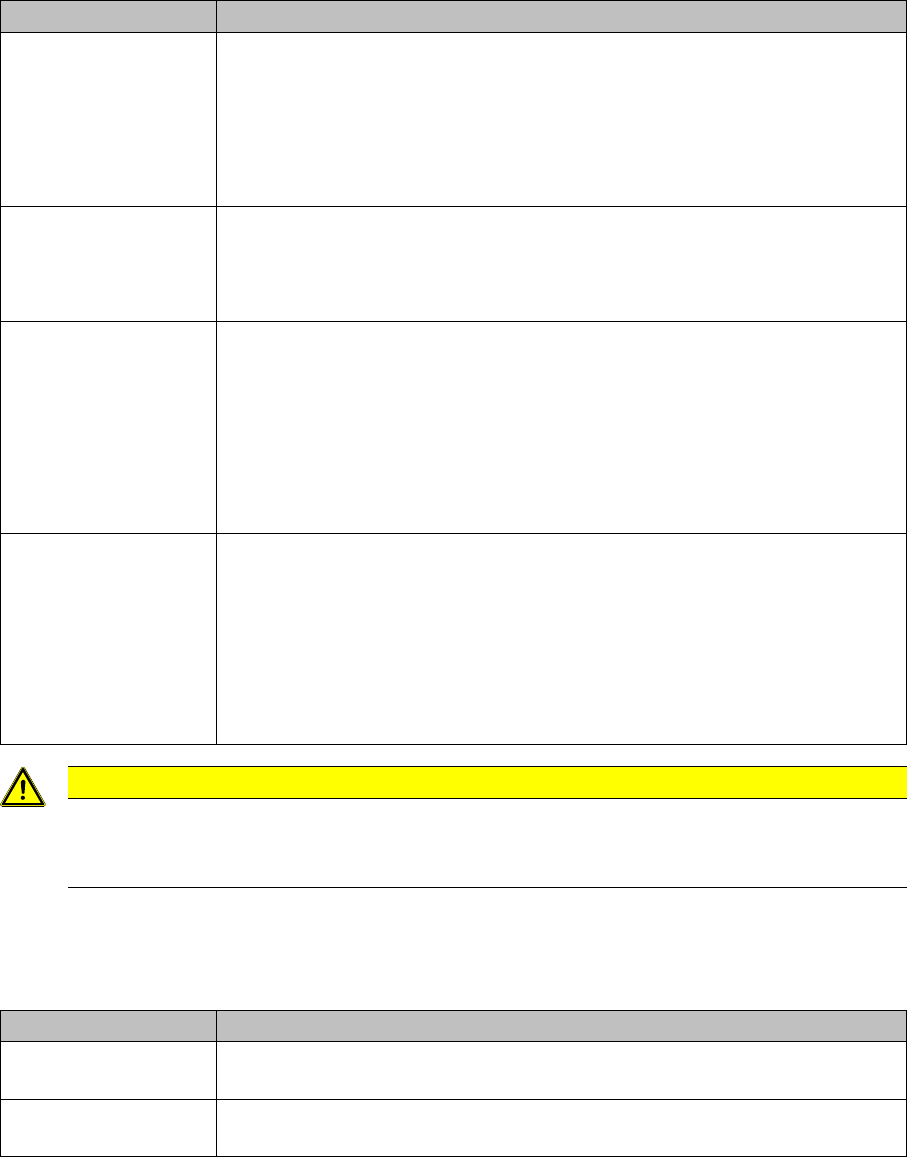
Here you can activate/deactivate the online setup verification. The following settings can be defined.
Actions on setup changeover
This means that one of the following actions is carried out after a setup with an deviating name becomes
active:
Activate pickup position with verification
If this setting has been activated, the barcode with the barcode fragment "Component" or "UID" has to
be scanned when activating a track after a track error.
Settings Meanings
General Delta setup verification (do not tear down identical components)
Identical components in the old and the new setup will not be torn down. The
pickup track, feeder type and component type are compared for this.
This setting is useful if your setups contain identical parts, e.g., if one side of
the line is always configured identically or if only some components have to be
changed on a station for a product variant.
Complete setup verification
The old setup is torn down in the database. A new, complete setup verification
is forced for the new given setup. Take this option into consideration if you
want to make sure that each setup is to be newly recorded.
Special case for tray
changers
All tray changers verified in the current setup are torn down accordingly on a
setup change.
No special handling
The relevant setting under General is used (Delta setup verification or Com-
plete setup verification).
Always complete setup verification
The Complete setup verification setting is used.
Special handling for
feeder next to WPC /
WPC3
The fixed location next to a tray changer (e.g. next to an MTC or a WPC on an
SX2) is torn down accordingly on a setup change.
No special handling
The relevant setting under General is used (Delta setup verification or Com-
plete setup verification).
Always complete setup verification
The Complete setup verification setting is used.
CAUTION
Setup change required
After a download to the machine, each verification-relevant modification to the setup triggers a
setup change in Setup Center.
Settings Meanings
For components
on S-Tables
Activating the pickup position with verification is activated for components on
S-tables.
For components
on X-Tables
Activating the pickup position with verification is activated for components on
X-tables.

Configuring Setup Center
General Settings of Online Setup Verification
28 User Guide SIPLACE Setup Center 5.1
Splice monitor
Settings Meanings
Action after missing re-
fill detection
None
Error handling with a splice monitor has been disabled. No action is needed.
Error handling with splice monitor
Error handling with splice sensor is activated.
Teardown packaging unit
The packaging unit needs to be torn down. Recommended setting to achieve
an enhanced and consistent process.
Action after missing
splice detection
None
Error handling with a splice monitor has been disabled. No action is needed.
Error handling with splice monitor
Error handling with splice sensor is activated.
% of original quantity to
detect missing splices
The option monitors splice sensors of S-feeders and X- feeders if the "Splice
detection" setting is activated for the component in the programming system.
If the quantity for a refilled packaging unit is undershot by the percentage val-
ue entered here, the track will be deactivated by Setup Center. The splice sen-
sor error has to be rectified in Setup Center and on the track.
The splice monitoring is activated if a value between 1% and 50% is entered.
The splice monitoring is deactivated if the value 0% is entered.
Please note that on the F-, S-, HF-, HS-, and C-series this setting only works
properly if the threshold value control is activated in the filling level control of
the station.
Settings Meanings
Teardown after foil torn
(X-Feeder)
If this setting is activated Setup Center cancels the relation between packag-
ing unit and feeder, in the event of an X feeder foil tear. Since the system is
unable to detect the replacement of a packaging unit in this error situation, this
setting ensures that the packaging unit is always rechecked after a foil tear.
This setting is always active if the option Tear down the packaging unit if the
verification status of the X-feeder is unreliable has been enabled at Settings
=> Line => Domain-Wide Verification Settings.
Enable quantity correc-
tion during refill
The quantity of the previous packaging unit can be corrected during refill. An
additional step on the scanner is necessary.