00197195-02-UG SetupCenter 5.1_en.pdf - 第48页
Configuring Setup Center Logging Dockin g Station Dialog Box 48 User Guide SIPLACE Setup Center 5.1
Configuring Setup Center
Docking Station Dialog Box Logging
User Guide SIPLACE Setup Center 5.1 47
Log settings
Description A detailed description of the selected parameters will be shown via the pur-
pose.
Column Name The name of the parameters can be changed. The new name will then be
shown in the verification log.
Accept The changed column name will be applied.
Default Value If the parameter name was changed, the original name will be restored.
Settings Meanings
Logger This log is written in one or more text files. The amount of results generated
can be specified via the size and number of individual text files. Once the max-
imum limit (file size x number of files) has been reached, the oldest data is au-
tomatically removed, to make room for new information.
The list of logs is dynamic and can therefore vary.
Level This defines the level of detail (info., warning, error, debug) for the log data.
The more detailed the data is, the more capacity it will require. This means that
the time recorded will be shorter.
File size Defines the maximum size which an individual logger file may have.
Number of files Defines the number of log files which may be generated.
File name Defines the name of the log file.
Settings Meanings
Configuring Setup Center
Logging Docking Station Dialog Box
48 User Guide SIPLACE Setup Center 5.1
Setting System Components
Setup Verification at the Station Station Software Settings (from Version 60x)
User Guide SIPLACE Setup Center 5.1 49
4 Setting System Components
4.1 Station Software Settings (from Version 60x)
4.1.1 Setup Verification at the Station
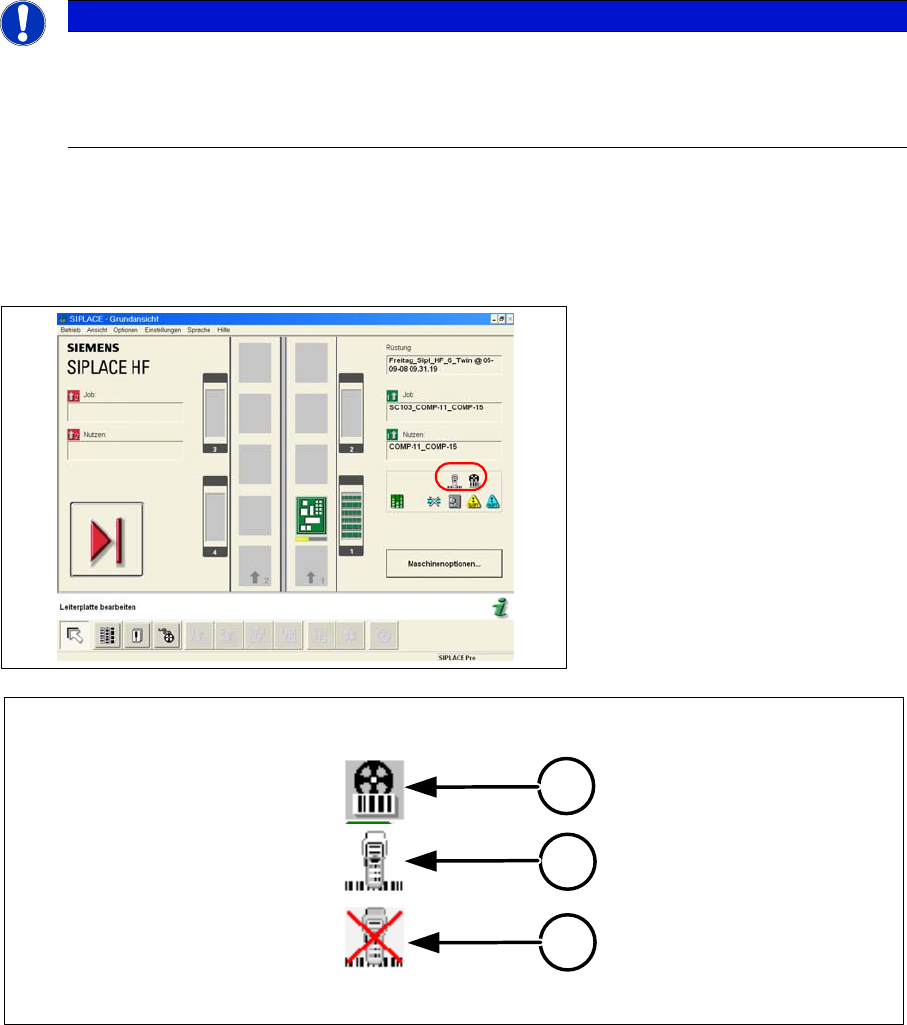
The main view of the station shows whether you are working in forced setup verification mode. In this
case the machine blocks tracks used in the product until setup verification data from SIPLACE Setup
Center have been received.
Meaning of the Icons
1. Setup verification is switched on and at least one track is being monitored.
2. There is a connection to the Setup Center.
3. There is no connection to the Setup Center.
4.1.1.1 Activation
To operate the machine in forced setup verification mode, you must activate the Component verification
with barcode setting in the machine options. In order to do this, the operator level "Line Engineer" must
be set.
NOTICE
For more detailed information, refer to the station software Online Help.
This section describes the key settings and functions in the station software in conjunction with
Setup Center e.g. filling levels and refilling. For a complete and detailed description, refer to the
station software Online Help.
1
2
3