00197195-02-UG SetupCenter 5.1_en.pdf - 第52页
Setting System Components Station Software Settings (from Version 60x) Component Level Indicator 52 User Guide SIPLACE Setup Center 5.1 1. Component level indicator view of all verified packaging uni t s. 2. Configuratio…
Setting System Components
Component Level Indicator Station Software Settings (from Version 60x)
User Guide SIPLACE Setup Center 5.1 51
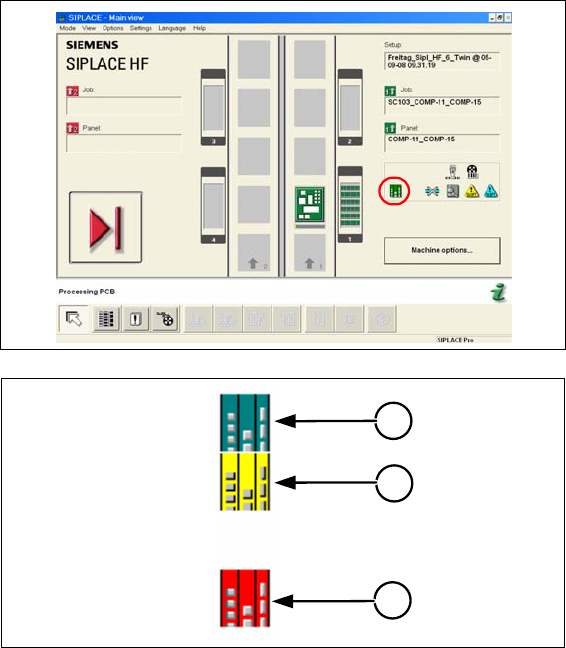
Key to icons
1. At least one track is being monitored by the component level indicator and the level of all tracks is
below the warning threshold.
2. For at least one track being monitored by the component level indicator, a warning has been issued
and the track in question is highlighted in yellow in the component level indicator view. The preset
threshold value was undercut.
3. For at least one track that is being monitored by the component level indicator, an error message
has been issued; the track in question is disabled and highlighted in red in the component level in-
dicator view. The preset threshold value was undercut. After refilling, the track needs to be reactivat-
ed.
4.1.2.1 Component Level Indicator Menu
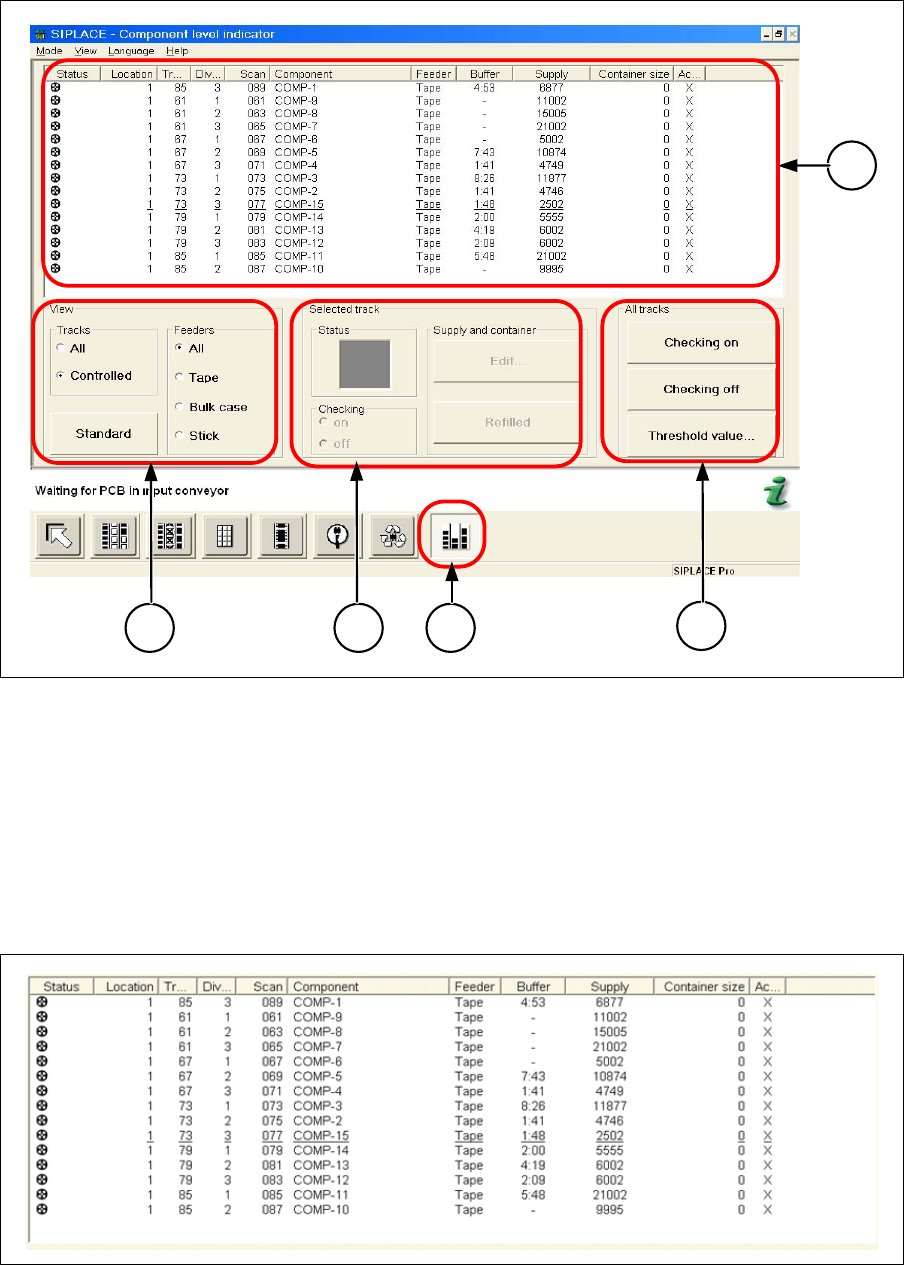
From the main menu at the station, you can select the Feeders button to access the component level
indicator menu. The figure below shows the component level indicator menu of the station software 50x.
1
2
3
Setting System Components
Station Software Settings (from Version 60x) Component Level Indicator
52 User Guide SIPLACE Setup Center 5.1
1. Component level indicator view of all verified packaging units.
2. Configuration of the view.
3. Information and editing of the component level of a selected packaging unit.
4. Component level indicator switch
5. Activates/ deactivates the component level and configures the threshold values.
Component Level Indicator View
The view provides information about component levels and the status of all verified packaging units.
1
2 3 4
5
Setting System Components
Component Level Indicator Station Software Settings (from Version 60x)
User Guide SIPLACE Setup Center 5.1 53
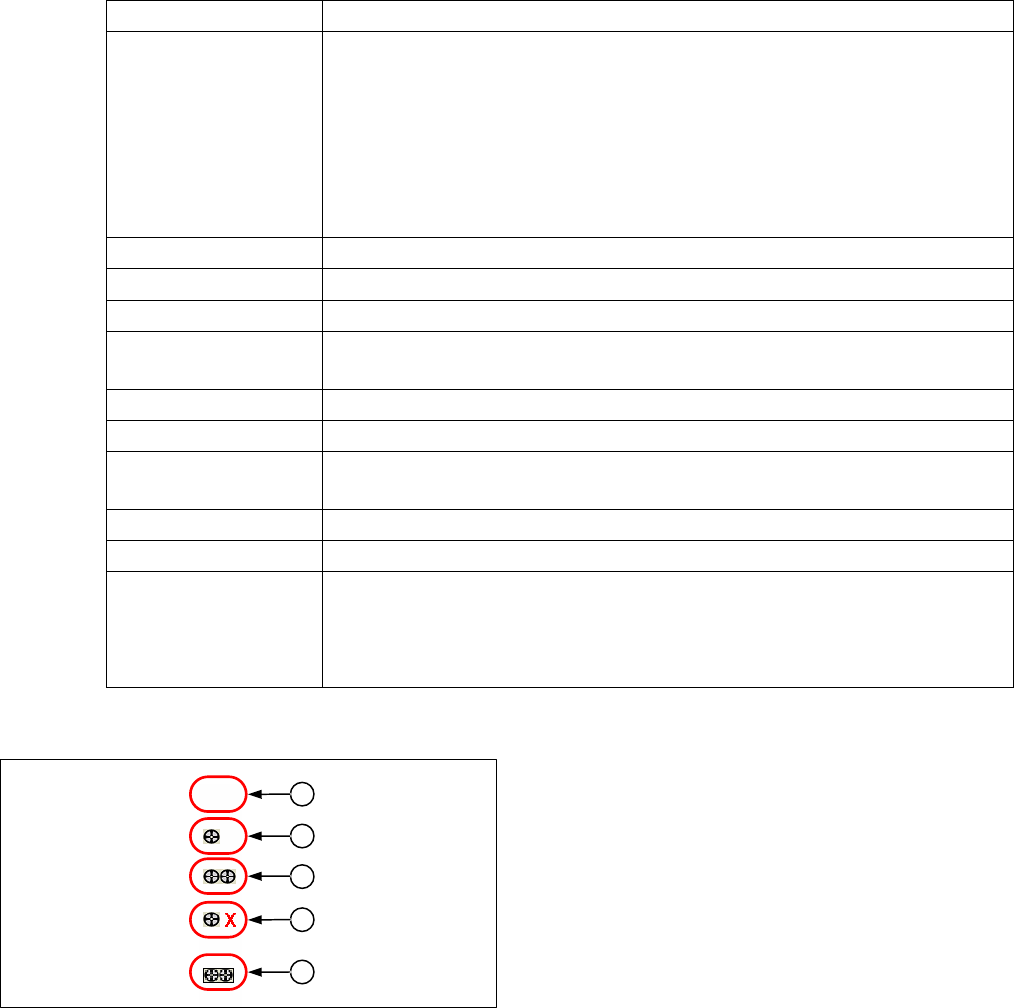
Meaning of the View
Status
Display Meaning
Status Displays whether batch information is available for a track. Prerequisite for this
status display:
▪ Component level indicator is activated.
▪ Setup verification has been activated in the programming system for the
component of this track.
▪ Setup Center has sent the packaging unit information for the track to the
station.
Location Location on which the feeder is placed.
Track Track number to which the feeder is attach to.
Division The component is picked up from this location.
Scan Associated track barcode (3 digits). This track barcode must be used by setup
verification.
Component Name of the component
Feeders Feeder type
Buffer The estimated time until a track runs empty unless new components are re-
filled beforehand (hours: minutes).
Supply Current number of components in feeder.
Container Size Current number of components in the refilled packaging unit.
Active ▪ X The track is monitored by the component level indicator. In station soft-
ware 60X, this display also means that these components are needed for
the current job.
▪ - Track which is not monitored.
Meaning of the Status Display
1. No valid packaging unit information present.
2. One packaging unit recorded.
3. Two packaging units recorded.
4. One packaging unit recorded. The track was deacti-
vated following the detection of a splice. The follow-
ing packaging unit still has to be recorded.
5. Two packaging units recorded. Information on the
two packaging units is logged in the Traceability data
for the currently equipped components.
1
2
3
4
5