00197195-02-UG SetupCenter 5.1_en.pdf - 第79页
Barcode Structure of Barcode Label Barcode Labels User Guide SIPLACE Setup Center 5.1 79 Barcode label A barcode label is an adhesive label w hich is stuck on the pack aging unit carrier. The label contains one or more b…
Barcode
Barcode Labels Structure of Barcode Label
78 User Guide SIPLACE Setup Center 5.1
Structure of the regular expression for the barcode:
Syntax of the fragment OriginalQuantity:
5.1.2 Structure of Barcode Label
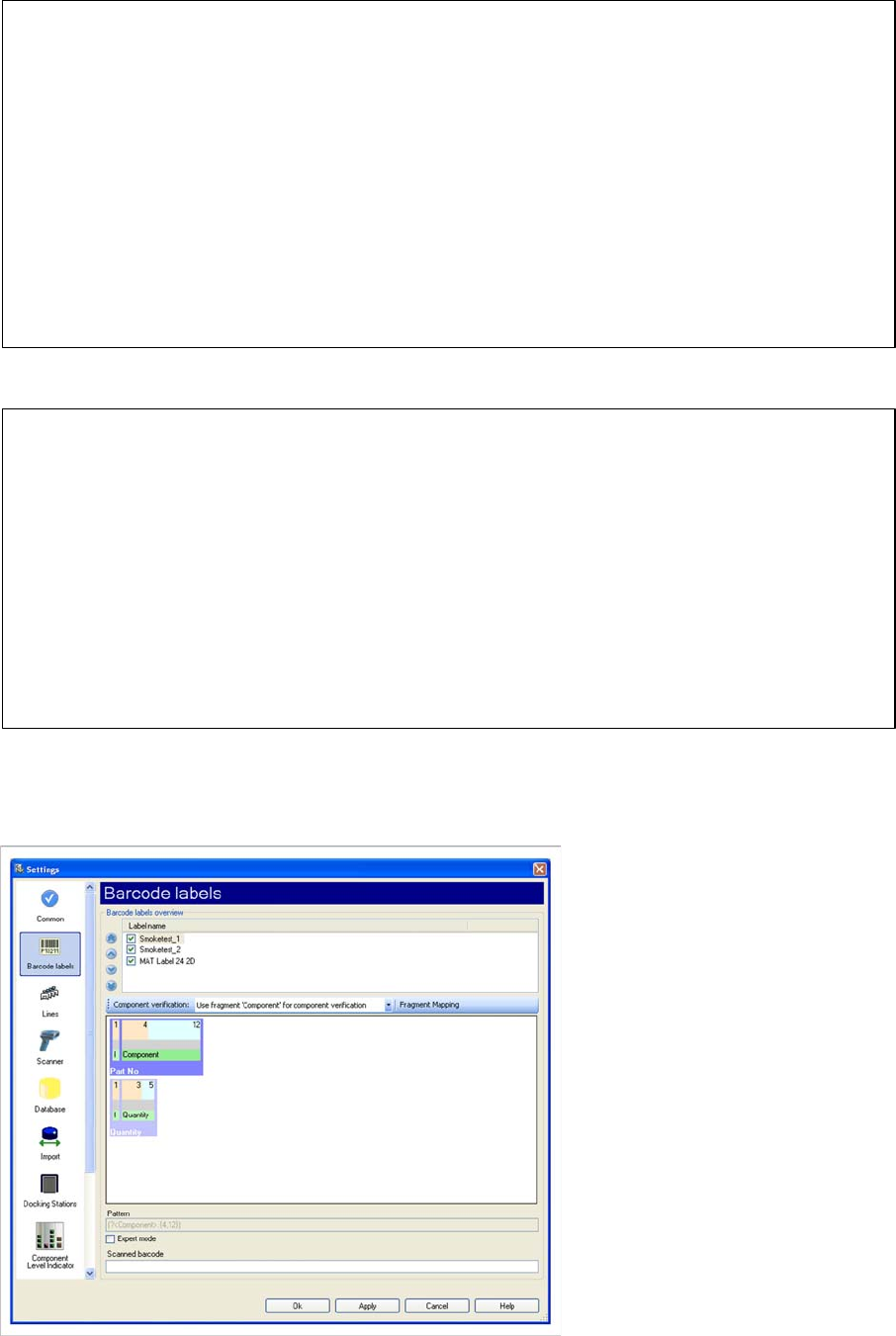
You can create barcode labels via the Extras => Settings menu.
^(?<Component>.{10,10})(?<Ignore>Q.{0,0})(?<OriginalQuantity>.{4,5})(?<Ignore>.{3,3})(?<Extra1>.{10,10})$
^ first character of regular expression
(?<Component>.{10,10}) barcode fragment „Component“
(?<Ignore>Q.{0,0}) barcode fragment „Ignore“
(?<OriginalQuantity>.{4,5}) barcode fragment „OriginalQuantiy“
(?<Ignore>.{3,3}) barcode fragment „Ignore“
(?<Extra1>.{10,10}) barcode fragment „Extra1“
$ last character of regular expression
(?<OriginalQuantity> .{4,5})
( first character of fagmentes
? quantifier
<OriginalQuantity> fragement typ
. Individual character or character classes
{4,5} quantifier
) last character of fragment
Barcode
Structure of Barcode Label Barcode Labels
User Guide SIPLACE Setup Center 5.1 79
Barcode label
A barcode label is an adhesive label which is stuck on the packaging unit carrier. The label contains one
or more barcodes, which provide information about the packaging unit in the carrier. A barcode label can,
in practice, also be spread across several adhesive labels, although they are logically counted as one
barcode label. This means that each definition of a barcode label can consist of one or more barcodes.
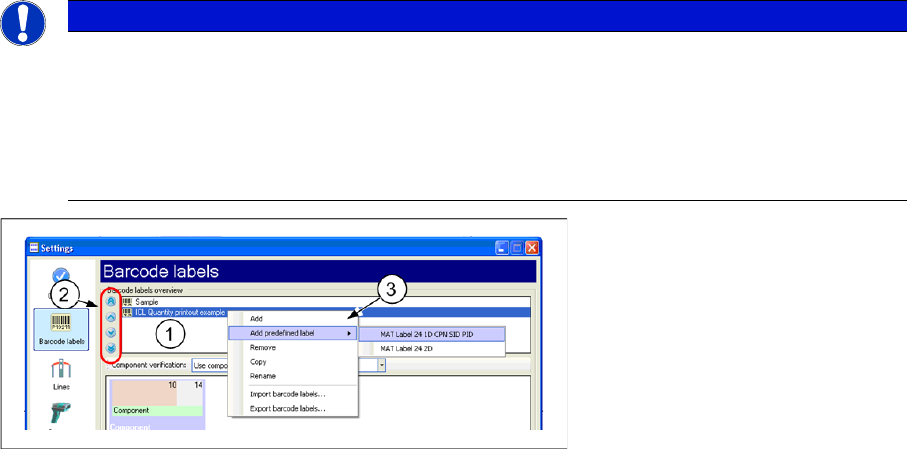
1. List of all barcode labels created.
2. Switch for changing the order of barcode labels.
3. Right-click with the mouse to open the context menu for Add, Delete and Copy functions for the bar-
code labels. In addition it is possible to export or import barcode labels and select predefined bar-
code labels (MAT labels).
A barcode label can be defined in the Settings dialog. The context menu is used to add, delete or copy
barcode labels. A selected barcode label is shown in the "barcode label detailed view". Double-click on
a barcode label name to edit it.
Barcode
A barcode is the part of a barcode label which can be read out or, in other words, scanned in with a bar-
code reader. The encoded barcode text is then extracted and processed further. Processing is deter-
mined by the barcode pattern.
NOTICE
Order of barcode labels
The order in which the barcode labels appear in the list is important. SIPLACE Setup Center
evaluates a scanned-in barcode during setup verification by applying the barcode labels in se-
quence, from the first to the last line. In other words, if two barcode labels both have the same
barcode as their first barcode, SIPLACE Setup Center will use the barcode label which appears
first in the list to recognize the scanned-in barcode.
Barcode
Barcode Labels Structure of Barcode Label
80 User Guide SIPLACE Setup Center 5.1
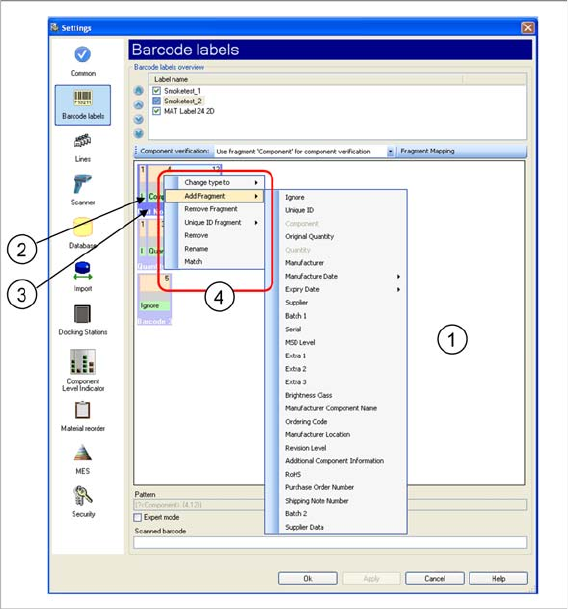
1. List of all barcodes for a barcode label
2. Barcode fragment
3. Barcode
4. Right-click with the mouse to open the context menu for Add, Change and Remove functions for
barcodes and fragments.
Barcodes can be added or deleted via the context menu of the "Barcode label detailed" view. The order
of barcodes can be changed as required in the detailed view, with Drag & Drop. The barcode pattern is
shown once a barcode has been selected. It can be directly edited, provided expert mode has been en-
abled.
Barcode Fragment
A barcode label consists of one or more barcodes. The barcode itself consists of one or more fragments.
Each barcode fragment is allocated a fragment type with a specific content-related meaning. This
means, that the defined part of a scanned-in barcode can be allocated to the specified fragment type
and then stored in the database for further processing, according to this barcode fragment type.
In the "Barcode label detailed" view, users are guided step-by-step through the compilation of a barcode
from individual barcode fragments. The new barcode is created and then the barcode fragments are add-
ed to the barcode via the context menu. The fixed or variable length of a barcode fragment can be set
with Drag&Drop.
Fragment types:
The following barcode fragment types can be configured: