00197195-02-UG SetupCenter 5.1_en.pdf - 第95页
Operating the Barcode Reader Operating the Barcode Reader Datalogic Reader User Guide SIPLACE Setup Center 5.1 95 6 Operating the Barcode Reader 6.1 Datalogic Reader 6.1.1 Operating the Barcode Reader The barcode scanner…
Barcode
Barcode Labels Importing and Exporting Barcode Labels
94 User Guide SIPLACE Setup Center 5.1
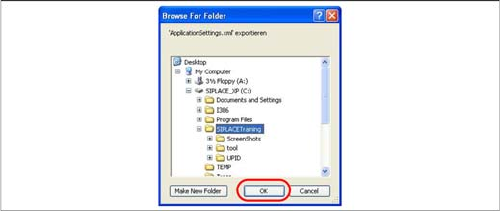
Step 2
Select the directory to which the ApplicationSettings.xml
file, with the barcode labels, is to be exported.
Operating the Barcode Reader
Operating the Barcode Reader Datalogic Reader
User Guide SIPLACE Setup Center 5.1 95
6 Operating the Barcode Reader
6.1 Datalogic Reader
6.1.1 Operating the Barcode Reader
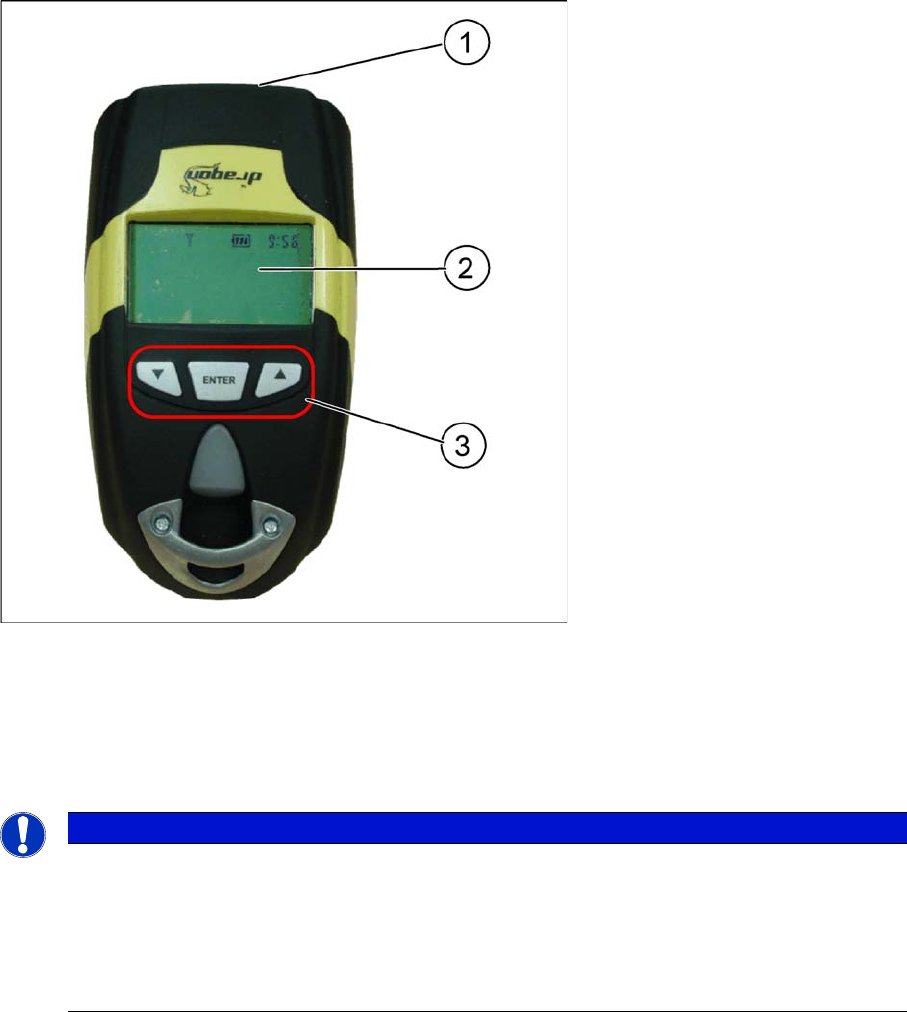
The barcode scanner from Datalogic
TM
, has a 1D barcode reader (model M101, M131, PM8300) or a
2D barcode reader (model PM8500), which can be enabled using the "trigger".
Legend:
1. Laser window
2. Display (4 lines)
3. Keyboard (3 buttons)
The display shows operation and progress information.
NOTICE
Updating the barcode scanner display
For technical reasons, the barcode reader display can only be updated by using the reader i.e.
by pressing a button or scanning in a barcode. In certain circumstances, the reader display may
not show the current status but this will not occur during normal operation. One example would
be the automatic deactivation of the barcode reader display. This can be switched back on by
pressing a button or by using the trigger.
Operating the Barcode Reader
Datalogic Reader Barcode Reader Safety Instructions
96 User Guide SIPLACE Setup Center 5.1
6.1.2 Barcode Reader Safety Instructions
The Datalogic barcode scanner
TM
is assigned to laser class 2.
The warning label W216 is shown on the barcode reader.
6.1.3 Configuration
To configure the barcode reader please follow the instructions in the Setup Center Installation Manual.
Accurate (error-free) configuration of the barcode reader is essential for proper operation.
6.1.4 Working with the Barcode reader
The reader is very simple to use and handle. The various procedures require only a few steps.
The SIPLACE Setup Center always shows the next step on the barcode reader display. Other functions
can be called up with the buttons. To return to the "main menu" of the reader, simply press the button in
the middle. The functions for the left and right buttons are shown grey in the lower display line.
The barcode is scanned by aiming, pressing and holding the trigger until the barcode is recognized. This
only takes a fraction of a second but can vary according to the distance from the barcode, the angle at
which you are aiming and the quality of the barcode itself.
DANGER
LASER RADIATION!
Do not look into beam!
Laser Class 2
CAUTION
Laser Instructions
Before operating the barcode scanner, make sure that all operating personnel have been prop-
erly instructed about observance of the relevant laser regulations.
► While operating the barcode reader, observe the respective regulations in line with VDE
0837 "Protection from radiation emitted by laser devices“ and the "Laser radiation“ accident
prevention regulations (VBG93), applicable in Germany.
► Also observe the accident prevention regulations applicable in your country.
NOTICE
Setting the target beam
We recommend that you set a higher target beam value than normally required, until you have
familiarized yourself with the barcode reader. When you feel more confident, the red spot time
can be reduced. To adjust the target beam, please follow the instructions in the Setup Center
Installation Manual.
NOTICE
Data exchange with the barcode scanner
Setup Center is unable to directly address the barcode reader and can only react to queries
from the reader. This means that, should the reader not react, press one of the buttons to ex-
change data.